Repository navigation
GrokGauge 0.9.1

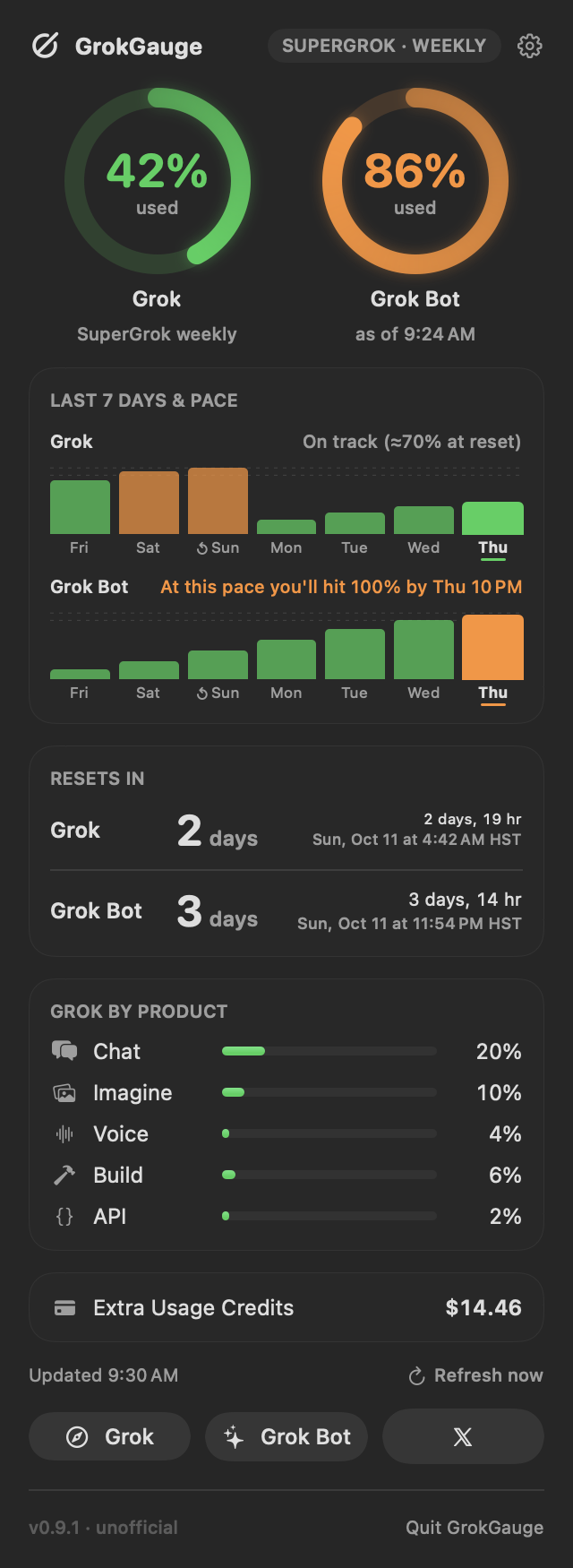
GrokGauge 0.9.1 is the first release since 0.3.0. It includes everything from 0.9.0, which was never published on its own, plus the 0.9.1 fixes and additions.
Install or upgrade
brew install --cask stevencombs/tap/grokgauge     # new install
brew update && brew upgrade --cask grokgauge      # from 0.3.0
Or download GrokGauge-0.9.1.zip below (universal: Apple silicon and Intel; macOS 14 Sonoma or later) and check it against GrokGauge-0.9.1.zip.sha256.
Gatekeeper: GrokGauge is open source and ad-hoc signed, not notarized by Apple. The Homebrew cask removes the download quarantine flag from GrokGauge.app only, so it opens normally. If you install from the zip by hand, right-click the app and choose Open the first time, or run xattr -dr com.apple.quarantine /Applications/GrokGauge.app.
Highlights
New in 0.9.1
- Fixed: "Grok returned an error (400)" that wouldn't clear. A reused HTTP/3 connection could stay pinned to a failing server instance. Every refresh now uses its own connection, a 400/408/421/5xx or dropped connection is retried once right away on a new one, and a 400 keeps the last good reading while GrokGauge retries with backoff.
- Daily history graphs: "Last 7 days" now shows one bar per day with the highest % reached that day, in your level colors, with weekday labels, today highlighted and a ↺ mark on the reset day.
- Graph style: Bars (default), Line or Area, picked from thumbnail tiles in Settings › Layout. Separate Grok history and Grok Bot history toggles (turn both off to hide the section).
- Grok Bot readings from an earlier day show the date ("as of Oct 7, 5:38 PM").
- Diagnostics shows the server's own error message for HTTP errors (sanitized: no tokens, emails or ids).
- Settings › About shows who makes GrokGauge, with links to YouTube and email.
From 0.9.0 (first released here)
- Settings window (gear button or ⌘,): Layout, Menu Bar, Colors & Alerts, Sync, Diagnostics and About tabs; changes apply immediately.
- Layout: show, hide and reorder dropdown sections and action buttons; rings side by side, stacked, or one combined ring.
- Menu bar: higher percent, both (
G · B), Grok only, Grok Bot only, or the logo alone tinted by status; optional days-to-reset suffix; hide the logo. - Colors & levels: a two-handle slider for the warning/critical levels (default 80/90), custom colors with a warning when two are hard to tell apart, and a colorblind-friendly preset (Okabe–Ito). Notifications follow the levels unless you unlink them. Refresh every 5, 15, 30 or 60 minutes.
- Sync between Macs through a folder you already sync (Google Drive, iCloud Drive, Dropbox…): newest change wins, preferences only, never logins, usage numbers or history. Export / Import settings as JSON.
- Diagnostics: per-source status, last success/error, login expiry, and a Copy Report button that never includes tokens, emails, account ids or paths.
- Pace: "On track (≈40% at reset)" or "At this pace you'll hit 100% by Fri 3 PM".
- Update check (optional, daily) against this repo's public releases, with an "Update available" banner. Nothing installs automatically.
- Global shortcut (default ⌃⌥G) to open the dropdown, and an Open X shortcut button (opens the X app or x.com; no X data is read).
- Accessibility: VoiceOver labels and values for rings, bars, graphs and buttons; Reduce Motion and Increase Contrast support.
- Smarter retries: exponential backoff, and a quiet grace period after wake or a network change.
- If xAI changes the usage reply, GrokGauge says "xAI changed something" instead of showing a misleading 0%.
Full details: CHANGELOG.md
Disclaimer
GrokGauge is an unofficial community project. It is not made, endorsed, or supported by xAI, or by Anysphere, the maker of the Grok Bot app. "Grok" and "SuperGrok" are trademarks of xAI. GrokGauge reads an undocumented Grok CLI endpoint and Grok Bot's local cache, either of which can change without notice. Your Grok login stays on your Mac and is sent only to xAI.
Made by Steven Combs (retroCombs) · YouTube: @retroCombs-Tech · Contact: retroCombs@icloud.com