Repository navigation
GrokGauge 0.9.2

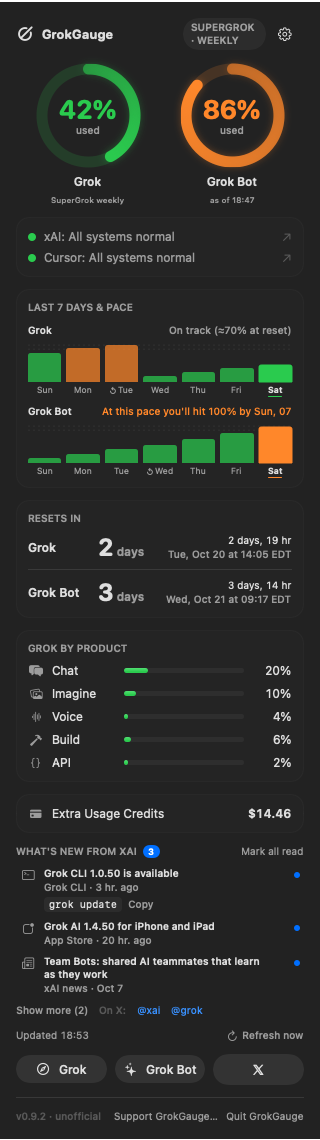
GrokGauge 0.9.2: usage history synced across your Macs, service status dots for xAI and Cursor, pick-and-sort for "Grok by product", guided Grok CLI setup and a "What's new from xAI" section.
Install or upgrade
brew install --cask stevencombs/tap/grokgauge     # new install
brew update && brew upgrade --cask grokgauge      # from an earlier version
Or download GrokGauge-0.9.2.zip below (universal: Apple silicon and Intel; macOS 14 Sonoma or later) and check it against GrokGauge-0.9.2.zip.sha256.
Gatekeeper: GrokGauge is open source and ad-hoc signed, not notarized by Apple. The Homebrew cask removes the download quarantine flag from GrokGauge.app only, so it opens normally. If you install from the zip by hand, right-click the app and choose Open the first time, or run xattr -dr com.apple.quarantine /Applications/GrokGauge.app.
What's new in 0.9.2
Added
- Usage history synced across your Macs. The 7-day graphs now show readings from every Mac, not just this one. Each Mac writes only its own small file,
<sync folder>/GrokGauge/history/<machine-id>.json(written atomically), and reads and merges everyone's. Usage is account-wide, so readings for the same product in the same 10-minute window are combined by taking the highest, never added; Grok and Grok Bot stay separate, entries older than the 8-day window are dropped, and a lone dip from one Mac's slightly older reading isn't drawn as a reset. The files hold only percentages, timestamps, an anonymous per-Mac id (a hash of the hardware UUID) and the Mac's name — never tokens or anything from~/.grok. - The sync folder is the one Settings › Sync already uses; if none is set, GrokGauge looks for a
MacSyncingfolder in your cloud-drive folders (Google Drive, Insync, Dropbox…). Settings › Sync › Usage history has a Sync history across Macs switch (on by default; it does nothing until there's a folder), Change…, Use iCloud Drive, the number of Macs and the last sync, plus Sync Now. With no folder, history stays on this Mac exactly as before. - GrokGauge watches the history folder (and re-reads it every minute and whenever the dropdown opens), so other Macs' readings appear on their own. Insync/Drive conflict copies are merged; partial, corrupt or foreign files are skipped (never deleted) and listed in Settings › Diagnostics › History sync, with the folder, the number of Macs and the last sync time.
- Pick and sort the "Grok by product" rows. Settings › Layout › Grok by product has a checkbox per product, a drag-to-reorder list (arrows and VoiceOver actions too), a Sort menu (My order, the default; Highest usage first, with ties in My order; Alphabetical) and Reset. Products xAI adds later appear at the end, shown. Unchecking every product hides the section. The choices are part of your settings, so they go into Export/Import and settings sync; settings from older versions get every product, the standard order and My order. Reset Layout to Default resets them too.
- Service status row. Two dots in the dropdown, right under the rings: xAI (
data.x.ai/status/summary.json, falling back to thestatus.x.ai/feed.xmlRSS if the summary fails or changes shape) and Cursor (status.cursor.com/api/v2/summary.json, the home of Grok Bot and Cloud Agents, which are named first when affected). Green "All systems normal"; orange for degraded, partial outage or maintenance; red for an outage; gray when a check failed. The text names what's affected (xAI: Degraded: Imagine,Cursor: Outage: Cloud Agents); the tooltip and VoiceOver label add the details and last check time; clicking opens status.x.ai or status.cursor.com. Checked about every 5 minutes and when the dropdown opens (at most every 30 s), backing off after failures (5, 10, 20, then 30 min). Public pages only, no login. - Settings › Layout: a Service status section (on by default, reorderable) with xAI and Cursor switches and an optional, off-by-default notification when a service goes from normal to an outage. The choices sync with your other settings; settings from older versions get both dots on and the row placed after the rings. Settings › Diagnostics › Service status shows each source's last result, error and URL. New
--print-statusdebug flag. - Guided Grok CLI setup. When the Grok CLI isn't installed, the dropdown says so (instead of only "run
grok login", which fails with "command not found") and offers Copy install command (curl -fsSL https://x.ai/cli/install.sh | bash, xAI's official installer), Install in Terminal… (asks first, then runs it in Terminal) and Open Terminal. Once installed it shows Sign in to Grok with Copy “grok login” and the~/.grok/bin/grok loginfallback. GrokGauge re-checks when the dropdown opens and every few seconds while setup is pending, and switches to usage as soon asauth.jsonappears. Diagnostics and--print-usageshow the same status. - What's new from xAI section in the dropdown: the 4 newest items from xAI news (x.ai sitemap), the API release notes (docs.x.ai), Grok CLI updates (x.ai/cli/stable vs. the installed CLI, with the
grok updatecommand and a Copy button; GrokGauge never runs it), the Grok and Grok Bot iPhone apps (Apple's public lookup) and Grok Bot for Mac (its installed version, with Open). Unread dots, Mark all read, links to @xai and @grok on X. The first check marks everything already out as read. No login or API key. - Settings › What's New tab: show the section, per-source switches, check interval (6/12/24 h; Grok CLI every 2 h), optional notifications (off by default, one summary per check), Check Now, Mark All Read. Choices sync with your other settings; read marks stay on this Mac.
- Settings › Diagnostics lists each What's new source with its status, last check and last error.
- Support GrokGauge: a Tip via PayPal button in Settings › About, a Support GrokGauge… link in the dropdown footer and the app menu, a PayPal badge in the README, and
.github/FUNDING.yml(GitHub's Sponsor button).
Changed
- The dropdown's gear opens a Settings… / Quit GrokGauge menu, like ClipGauge.
Fixed
- The dropdown could be taller than the screen (graphs cut off, no scrolling). It's now capped to the screen; the middle sections scroll.
Full details: CHANGELOG.md
Disclaimer
GrokGauge is an unofficial community project. It is not made, endorsed, or supported by xAI, or by Anysphere, the maker of the Grok Bot app. "Grok" and "SuperGrok" are trademarks of xAI. GrokGauge reads an undocumented Grok CLI endpoint and Grok Bot's local cache, either of which can change without notice. Your Grok login stays on your Mac and is sent only to xAI. The service status dots read only the public status.x.ai and status.cursor.com pages, with no login.
Made by Steven Combs (retroCombs) · YouTube: @retroCombs-Tech · Contact: retroCombs@icloud.com

