Repository navigation
Releases: tcballard/omarchy-task-manager
Release list
v0.1.1 — Less overhead when your computer is slow

v0.1.1 — Less overhead when your computer is slow
Task Manager should help when the desktop is slow, not add to the load. This maintenance release reduces the cost of sampling and sending data while preserving the familiar Summary and safe close/force-quit flow.
- Sample GPU clients more cheaply. Only DRM and accelerator descriptors are read for GPU attribution. On NVIDIA desktops, one bounded, supervised
nvidia-smistream replaces a new process every sample. On the contributor's RTX 3080 desktop, measured worker plus child CPU fell from about 12% to 3% of one core with the window open at the default one-second interval. This is a measurement on that machine, not an all-hardware guarantee. - Send smaller snapshots. The full process list goes to Applications and Processes; other pages retain the process count but avoid parsing hundreds of unused rows each second. Switching pages fetches fresh rows immediately.
- Make local tests reliable. The Qt test suites use a private runtime directory, so a developer's running background monitor cannot change their assertions.
Install or upgrade
On Omarchy x86_64, install or upgrade from the Stable, RC or Edge package channel:
sudo pacman -Syu omarchy-task-managerVersion 0.1.1-1 is live in all three channels. Alternatively, download the x86_64 GitHub release package and SHA256SUMS into the same directory for manual installation:
sha256sum --ignore-missing --check SHA256SUMS &&
sudo pacman -U ./omarchy-task-manager-0.1.1-1-x86_64.pkg.tar.zst
Open Task Manager from the launcher. Super + Alt + Delete is an optional one-time shortcut setup.
The Omarchy package PR merged and its publication run succeeded on 25 September 2026. Normal system updates now deliver this version from the selected channel.
Verification and limits
The v0.1.0 release was accepted on Tom's XPS for Summary, background monitoring, logout/reboot startup and GPU readings. The v0.1.1 changes have contributor testing on an NVIDIA desktop and portable tests; the new GPU sampling path and page transitions still need a v0.1.1 XPS check. AMD/Intel hardware and ARM are not covered by the contributor's measurements. NVIDIA streaming trades roughly 25 MiB of resident memory for lower CPU use while the window is open. Readings can be up to one second old at the fastest refresh setting.
The release workflow builds on Ubuntu and Arch, checks the package lifecycle, and publishes only after those jobs pass on the release commit. BUILD-INFO.txt identifies the commit and workflow run; SHA256SUMS covers the assets. The per-user background service and local state format are unchanged.
Before removal or downgrade, turn Background monitoring off or run:
systemctl --user disable --now omarchy-task-manager-monitor.servicePreferences and application history survive removal. A verified v0.1.0 package remains available for rollback.
v0.1.0 — Find the frozen app. Get back to work.
v0.1.0 — Find the frozen app. Get back to work.
Task Manager for Omarchy's first non-preview release gives you a familiar, mouse-friendly way to see what's running, find a misbehaving application and close it.
v0.1.0 carries forward the behaviour tested in v0.0.5. This release updates version labels and documentation; it adds no new application features.
- Start with Summary. See running applications and compact CPU and memory graphs, then find an app by name.
- Close an app with care. Request a normal close first. If it won't cooperate, Force quit names the target and asks for confirmation.
- See what happened before you opened it. Background monitoring retains the last minute of CPU, memory, disk and network readings, including while the window is closed with Super + W.
- Go deeper when needed. Performance, processes, services and startup applications remain available. GPU readings depend on the driver and hardware.
- Fits your desktop. Omarchy colours and fonts, a movable and resizable window, remembered preferences and keyboard controls.
Install or upgrade
Download the x86_64 package and SHA256SUMS into the same directory, then run:
sha256sum --ignore-missing --check SHA256SUMS &&
sudo pacman -U ./omarchy-task-manager-0.1.0-1-x86_64.pkg.tar.zst
Open Task Manager from the launcher. Super + Alt + Delete is an optional, one-time shortcut setup.
The existing Omarchy packaging PR handles the channel update separately. sudo pacman -Syu omarchy-task-manager installs whichever version your channel currently publishes; this GitHub release does not itself promote the package to Edge, RC or Stable.
Tested on the XPS
Tom accepted v0.0.5 on his XPS, including Summary and background history, and confirmed the remaining logout/reboot startup and GPU checks on 24 September 2026. v0.1.0 preserves that behaviour. Fresh release CI builds and tests on Ubuntu and Arch, including real user-service controls and package installation, upgrade, reinstall and removal. BUILD-INFO.txt identifies the release commit; SHA256SUMS covers its assets.
That acceptance covers this XPS, not every GPU or driver. ARM is not supported by the published package. Per-app network traffic is unavailable; detailed process, service and GPU polling runs while the window is open. The existing screenshot predates Summary and background monitoring.
Background monitoring and removal
The first normal installed launch enables a user service. Background monitoring can be disabled in the menu; Pause live view only freezes the displayed readings. History stays local, and the collector has no network listener.
Before removal or downgrade, turn Background monitoring off or run:
systemctl --user disable --now omarchy-task-manager-monitor.servicePreferences and application history survive removal. The last-minute graph cache is temporary. A verified v0.0.5 package remains available for rollback; v0.1.0 introduces no state-format changes.
v0.0.5 — Recent history
v0.0.5 — Recent history
Preview for Omarchy / Arch x86_64. This build adds a familiar Summary and a small per-user collector so the graphs can show the last minute when Task Manager is opened again.
- Summary: compact CPU and memory graphs, running applications and a direct route to Find an app. Existing users can keep their saved page.
- History after Super + W: the installed user service collects basic CPU, memory, disk and network readings once a second while the window is closed. Reopening imports its latest minute. It starts on the first normal launch and then with the user session.
- Separate controls: Pause live view freezes the displayed readings; Background monitoring in the menu disables and stops the independent collector. The choice persists. Detailed process, service, GPU and per-app polling runs only while the window is open.
- Bounded local data: history lives in a private runtime directory, is replaced atomically and expires. The collector requires fresh data before the app reports startup success. It has no network listener and does not enumerate processes.
Install for testing
After this release is published, download the x86_64 package and SHA256SUMS to the same directory, then run:
sha256sum --ignore-missing --check SHA256SUMS &&
sudo pacman -U ./omarchy-task-manager-0.0.5-1-x86_64.pkg.tar.zst
Open Task Manager from the launcher. To check the new behaviour, leave it open for ten seconds, close it with Super + W, wait ten more seconds and reopen. The graphs should include the time when the window was closed. The menu shows setup errors and lets you switch Background monitoring off. Keyboard shortcut setup remains optional.
On an Omarchy channel, sudo pacman -Syu omarchy-task-manager installs whichever version that channel publishes. This release does not update the upstream channel package. The existing v0.0.4 package remains available for rollback. Before a downgrade, use the menu to turn Background monitoring off or run systemctl --user disable --now omarchy-task-manager-monitor.service; v0.0.4 does not install this unit. Downgrade only with a verified v0.0.4 package. User preferences and application history remain; background graph cache is temporary.
Verification boundary
CI builds and tests on Ubuntu and Arch, including collector and GUI history lifecycle, real user-service controls, package installation, upgrade and removal. The exact source and checksums are in BUILD-INFO.txt and SHA256SUMS. Live Super + W/reopen, login, toggle and desktop usability on the XPS still require acceptance. The earlier XPS screenshot predates these features. No ARM or new GPU hardware test is claimed. The End task simplification remains planned.
v0.0.4 — Beyond Edge
v0.0.4 — Beyond Edge
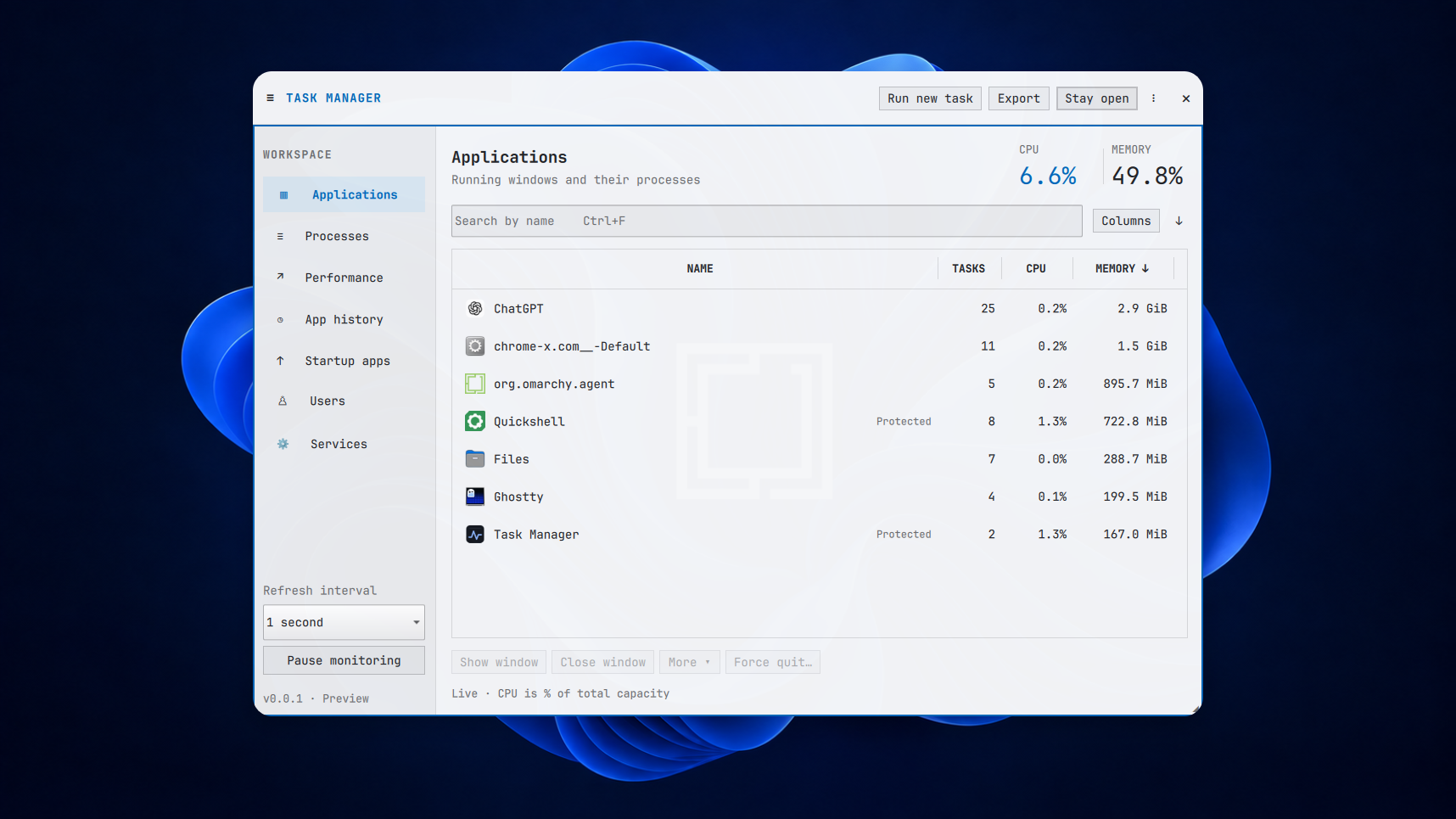
Captured on my XPS on 21 September. The interface is unchanged apart from its version label.
Task Manager is ready for the next step beyond Edge.
v0.0.4 brings the fixes already carried by the Edge package into the release itself and prepares the package for Omarchy's RC and Stable channels. Upstream promotion still needs to merge and publish before those channels can install it through pacman.
- Safer shutdown. Timers and worker callbacks stop before the window's bridge is destroyed, fixing the shutdown crash found during packaging.
- Reliable pause/resume checks. Tests capture the resumed sample when it arrives, removing the timing failure that blocked the first official build.
- A simpler package. Both fixes are included in the source, so the two downstream patches can go. The package keeps the same name, preferences and history.
Install or upgrade
On Omarchy's Edge channel:
sudo pacman -Syu omarchy-task-managerThis installs the version currently published on your channel. The same command will work on RC and Stable once the promotion is published.
For v0.0.4 now on Omarchy / Arch x86_64, download the package and SHA256SUMS into the same directory:
sha256sum --ignore-missing --check SHA256SUMS &&
sudo pacman -U ./omarchy-task-manager-0.0.4-1-x86_64.pkg.tar.zst
Check that the package reports OK, then open Task Manager from the launcher. Super + Alt + Delete setup remains optional.
Still improving
This remains a v0.0.x preview. Wider package availability does not make it v0.1.0. GPU readings depend on your driver, and the simpler End task flow remains planned.
Publication is gated on Ubuntu and Arch CI, including Rust/Qt tests, repeated shutdown and pause/resume checks, sanitizers, package lint and installation/upgrade/removal checks. The attached BUILD-INFO.txt identifies the exact source and run; SHA256SUMS covers the assets. Earlier XPS testing is historical; this release does not claim a new live desktop or ARM test.
Remove with sudo pacman -R omarchy-task-manager; preferences and history remain. For rollback, use a verified cached 0.0.3-3 Edge package with sudo pacman -U. The original GitHub v0.0.3 package predates the shutdown fix. There is no settings or history-format migration.
v0.0.3 — Ready for repository packaging
v0.0.3 — Ready for repository packaging
On-device capture with the Familiar theme from before the v0.0.2 version bump. This release changes packaging; the interface is unchanged apart from its version label.
Installing Task Manager should be the easy bit. v0.0.3 prepares it for Omarchy’s package repository.
The goal is simple: install it once, then get updates with the rest of your system. This release supplies the recipe and update metadata for that upstream contribution. It is not yet available from the official Omarchy repository.
What changed
- One package recipe. Local builds and the Omarchy contribution use the same versioned source archive and SHA-256 checksum.
- Preview update tracking. The proposed repository entry follows published GitHub previews and targets the edge channel while we iterate through v0.0.n.
- Better installation checks. CI now checks package contents and dependencies, fresh installation, upgrading from v0.0.2, reinstalling and removing. It checks that existing preferences and history survive.
- An icon dependency fixed. The new package checks caught a missing declaration for
hicolor-icon-theme. It is now included.
Install or upgrade now
For Omarchy / Arch x86_64, download the package and SHA256SUMS into the same directory, then run:
sha256sum --ignore-missing --check SHA256SUMS &&
sudo pacman -U ./omarchy-task-manager-0.0.3-1-x86_64.pkg.tar.zst
omarchy-task-manager
Check that the package checksum reports OK. These commands work for a fresh install or an upgrade. Pacman installs the required dependencies. You can also open Task Manager from the app launcher.
Super + Alt + Delete still needs the one-time setup. Installation does not edit your personal bindings.
Repository submission
The attached omarchy-task-manager-0.0.3-omarchy-pkgs.tar.gz contains the two-file contribution for omacom/omarchy-pkgs. Upstream review, acceptance and publication come next. Normal repository installation and updates become available only when the package is published on your configured channel.
Building locally? Download the source archive and PKGBUILD into the same directory, verify their checksums and run makepkg -si as your normal user. The debug package is optional.
Still a preview
Publication is gated on Ubuntu and Arch CI for the release commit, including the package lifecycle checks above, Rust/Qt tests, worker protocol tests and real systemd service controls. BUILD-INFO.txt identifies the exact source and run; the attached namcap report and package file list record packaging evidence. Static lint warnings for runtime plugins and subprocess dependencies are retained for review.
The earlier XPS testing is useful context, not a new live acceptance result for v0.0.3. The official Omarchy builder and fresh Wayland/launcher checks remain part of upstream submission validation. ARM and full GPU accuracy are not claimed. The simpler End task flow and in-app shortcut setup remain planned.
We’re continuing through v0.0.n until the everyday experience is ready for v0.1.0. If installation or upgrading gets in your way, tell us what happened.
Rollback and removal
To roll back, verify and install the package from v0.0.2 with sudo pacman -U. This release makes no settings or history-format changes.
Remove with sudo pacman -R omarchy-task-manager. Preferences and history remain; remove any manually added shortcut separately.
v0.0.2 — Desktop polish
v0.0.2 — Desktop polish
On-device capture on a Dell XPS with the Familiar theme. Taken before the version bump, so the panel still reads v0.0.1.
v0.0.2 makes Task Manager fit better on your screen and makes your apps easier to spot.
We’re building this for the person with a frozen spreadsheet who just wants to close it and get back to work. A native, open-source Task Manager that feels at home in Omarchy. This release brings the desktop fixes from our latest on-device testing.
What changed
- Recognisable app icons. Applications now use your desktop icon theme, with SVG support and an Omarchy icon for Omarchy windows.
- A panel that fits. Better sizing on smaller logical screens, a collapsible sidebar and columns you can resize. Your layout preferences are saved.
- Themes follow your desktop. Live theme updates now work with Omarchy’s newer state-directory layout, while keeping support for the older config layout.
- Super + Alt + Delete. The supplied binding opens or focuses Task Manager. There’s still a one-time setup; in-app shortcut setup is planned.
Try it
For Omarchy / Arch x86_64, download the package and SHA256SUMS into the same directory, then run:
sha256sum --ignore-missing --check SHA256SUMS &&
sudo pacman -U ./omarchy-task-manager-0.0.2-1-x86_64.pkg.tar.zst
omarchy-task-manager
Check that the package checksum reports OK. These commands also upgrade an existing installation. Pacman installs the new qt6-svg dependency for icons.
Building it yourself? The source archive and PKGBUILD are attached below; use makepkg -si as your normal user. The debug package is optional.
Still a preview
On-device testing informed this release, and Ubuntu and Arch CI passed, including service controls and package install, reinstall and removal checks. That doesn’t establish GPU accuracy or every live desktop behaviour.
We’re staying on v0.0.n while we refine the everyday experience. The simpler End task flow is still planned; this version uses Close window and Force quit. Current capabilities and limitations.
Can you find the app you want to close without thinking about Linux? If something gets in the way, tell us where you got stuck.
Rollback, removal and build details
To roll back, download the package and checksums from v0.0.1, verify them and install that package with sudo pacman -U. There’s no history-format migration; older builds ignore the added UI preferences.
Remove with sudo pacman -R omarchy-task-manager. Preferences and history remain; remove any manually added shortcut separately.
BUILD-INFO.txt records the packaged source commit and workflow run. SHA256SUMS covers the attached assets. The maintainer reported on-device readiness on 21 September 2026; a per-scenario acceptance record and exact tested environment were not supplied.
v0.0.1 — First preview
v0.0.1 — First preview
Moving from Windows should not mean relearning how to find a runaway process or close a frozen app. Task Manager for Omarchy brings familiar controls into a native floating panel, with mouse and keyboard support and fonts and colors drawn from Omarchy.
This first preview includes process and application management, CPU/memory/disk/network graphs, driver-dependent GPU readings, startup controls, user and system service controls, session information, and local usage history.
The hardening pass adds safer process identity checks, protected desktop services, atomic state writes, clearer errors, and regression coverage. CI builds the Rust worker and Qt interface, tests disposable process and real systemd service actions, and builds, installs, reinstalls and removes the Arch package.
Install on Omarchy / Arch x86_64
Download the attached package and SHA256SUMS into the same directory, then run:
sha256sum --ignore-missing --check SHA256SUMS
sudo pacman -U ./omarchy-task-manager-0.0.1-1-x86_64.pkg.tar.zst
omarchy-task-manager
Proceed with installation only if the package checksum is reported as OK. The source archive and a checksummed local PKGBUILD are also attached for building with makepkg -si as your normal user. Optional nvidia-utils supplies NVIDIA counters; optional gdb enables live process core dumps.
Preview boundaries
Live Omarchy placement, scaling, session/polkit behavior, and real GPU accuracy still need hardware acceptance. GPU availability depends on the driver; missing readings appear as dashes. Per-application network traffic and Windows-specific power or boot-impact scores are not implemented. See FEATURES.md and the README for the full boundaries.
We will iterate through v0.0.n while testing and refining the app. v0.1.0 is reserved for when we are happy with it.