Location Spoofer v1.1.0 — Windows controller

Put your Android phone anywhere on the map — now from your PC too
Location Spoofer sets your phone's GPS position to any point on Earth, or moves it along a route at a realistic speed. It uses Android's official mock location API — no root, no hacks — and is built for testing location-based apps, geofences and navigation flows without leaving your desk.
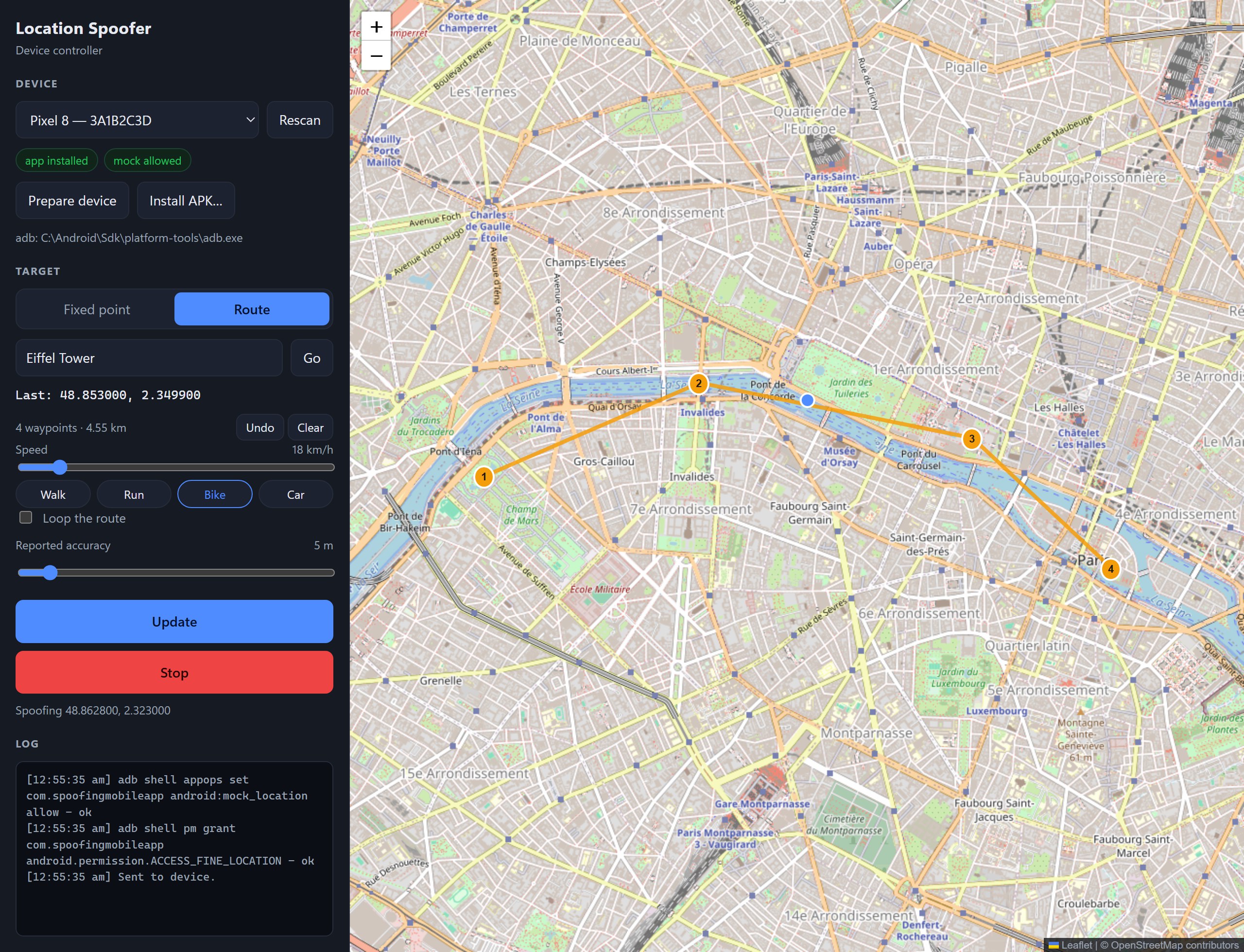
Version 1.1.0 adds a Windows controller: plan points and routes on a big map, set up a phone in one click, and drive Android emulators directly.
Downloads
| File | For | How to use it |
|---|---|---|
| LocationSpoofer-v1.1.0-debug.apk | Android 8.0+ | Open it on the phone and allow installs from unknown sources |
| LocationSpoofer-windows-v1.1.0.zip | Windows 10/11 x64 | Unzip and run SpoofingApp.exe. Self-contained, no .NET install needed |
What's new
Windows controller (.NET 10, WPF + WebView2)
- Prepare device does the whole Developer-options setup over adb: it makes Location Spoofer the mock location app and grants its location and notification permissions.
- Install APK… sideloads the app onto the selected phone.
- Draw a fixed point or a multi-stop route on the map, choose a speed (walk, run, bike, car or custom) and loop it if you like. The phone runs the simulation itself.
- Android emulators need no app at all: the PC walks them along the route once per second with
adb emu geo fix. - Place search, coordinate paste, and a log of every adb command it runs.
Android app
- Accepts start and stop commands over adb, which is how the controller drives it. You can script it yourself too:
adb shell am start -n com.spoofingmobileapp/.MainActivity -a com.spoofingmobileapp.action.REMOTE --es command start --es points '48.8584,2.2945;48.8606,2.3376' --es speed 18
Getting started
- Install the APK on your phone.
- Either click Prepare device in the Windows controller (with USB debugging on), or on the phone: Settings › About phone › tap Build number 7 times, then Developer options › Select mock location app › Location Spoofer.
- Pick a point or route and press Start spoofing. Press Stop, in either app or in the phone's notification, to get your real location back.
Full instructions are in the README.
Good to know
- Windows won't start the exe? Right-click the downloaded zip › Properties › tick Unblock, then extract it again.
- The Windows controller needs adb (Android platform-tools) and the WebView2 Runtime, which is built into Windows 11.
- The APK is debug-signed for sideloading. From 30 September 2026, phones in Brazil, Indonesia, Singapore and Thailand only install apps from unregistered developers through Android's advanced install flow or
adb install. - Apps can detect mocked locations, and some reject them. Please use Location Spoofer for testing, not to deceive other people or services.
- Windows and iPhone themselves can't be spoofed: neither has a mock location API.
Support the project
Location Spoofer is free and built in my spare time. If it saved you a walk around the block, you can buy me a coffee — thank you!
Full changelog: v1.0.0...v1.1.0