Repository navigation
Releases: transversal-tools/after-effects-scripts
Release list
0.4.0-beta.1 — Depth Map overhaul

Download after-effects-scripts-v0.4.0-beta.1.zip below and unzip it. In After Effects choose File → Scripts → Run Script File… to run a script from the Scripts folder. Save your project first: every action undoes with a single Cmd/Ctrl+Z.
Depth Map overhaul (macOS)
- One-click setup: install Python 3.12, then double-click
depth-map/install.command(first time: right-click → Open). It downloads the pinned models, checks them and ends with READY. - One Generate button that follows the selection: still images get one depth map each, placed on top of the image and parented to it; with nothing selected, the comp work area becomes a depth sequence.
- After Effects stays usable while it generates, with a progress bar and a Cancel button. The window closes and tells you what was imported when it is done.
- Effects: Depth Reveal (the image appears near-first), Depth Sweep (a band of light travels through the scene) and Parallax for stills (a small 3D camera move), all made from standard AE effects you can keep editing.
- Reuse: running it again on the same image reuses the existing depth map instantly (Option-click Generate to make a new one).
- Tidy files: everything goes into a "Depth Maps" folder on disk and in the Project panel.
- Simpler panel: just Still quality (Normal/High), Effect and Import as guide layer. Contrast, blur and invert are now done with AE effects.
Tested on After Effects 26.5 on macOS (Apple Silicon). Windows and older versions have not been tested yet. Problems or ideas: open an issue. Full details in the changelog.
🤖 Generated with Claude Code
0.3.0-beta.1 — Keyframe Tools
Download after-effects-scripts-v0.3.0-beta.1.zip below and unzip it. In After Effects choose File → Scripts → Run Script File… to run a script from the Scripts folder. Save your project first: every action undoes with a single Cmd/Ctrl+Z.
New: Keyframe Tools
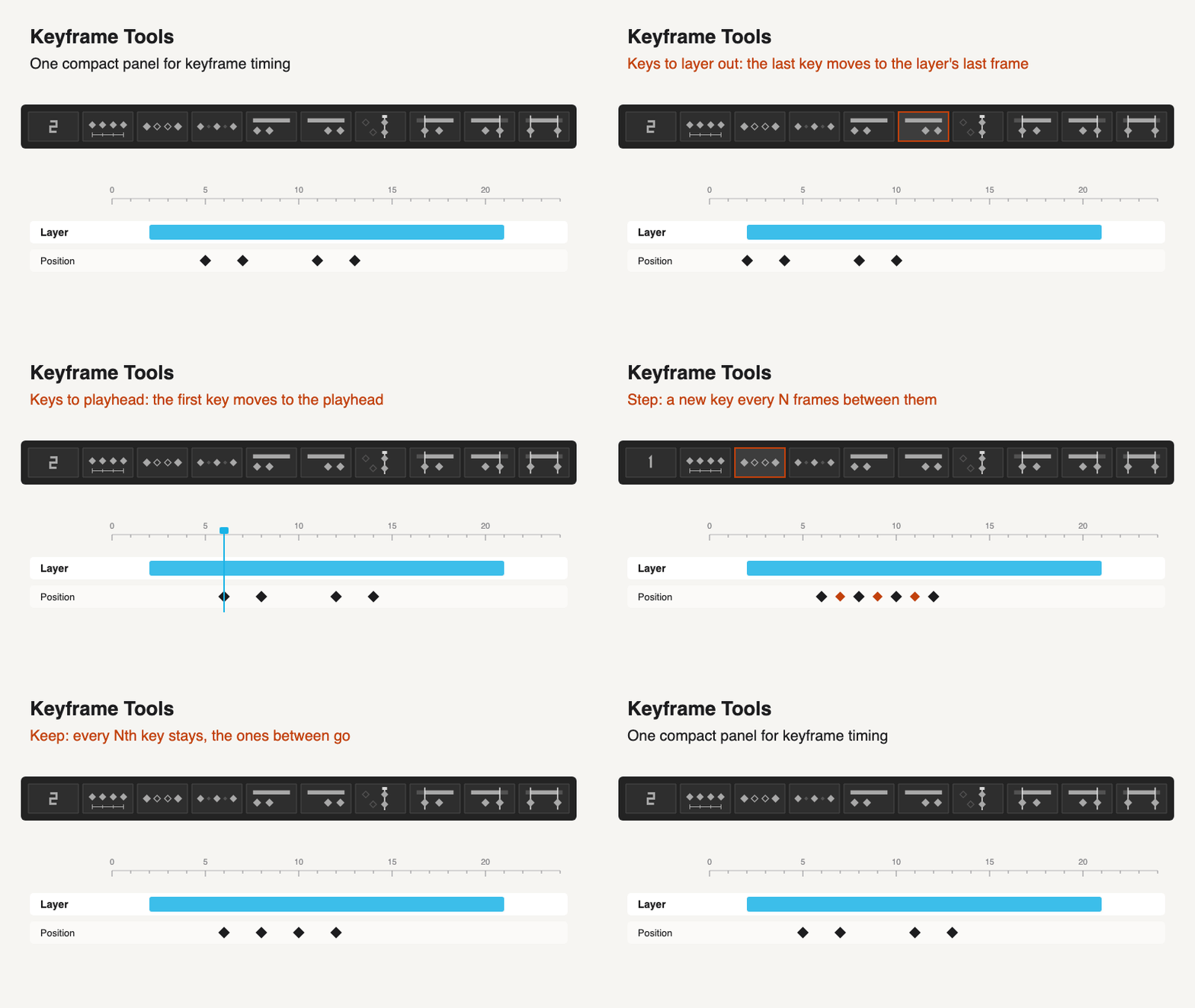
One compact, dockable panel with a number field and eight icon buttons:
- Space and Step: space the selected keys N frames apart, or add keys every N frames between them.
- Keep: keeps every Nth selected key and removes the ones between.
- Keys to layer in / out: moves the selected keys so the first lands on the layer's in point, or the last on its last frame.
- Trim in / out / both: the layer starts and ends on its keyframes.
To dock it, copy Keyframe-Tools.jsx into After Effects' ScriptUI Panels folder, restart AE and open it from the Window menu. The buttons fit the panel's shape as a column, a 3 × 3 square or a single row. KBar buttons can run one action directly. Guide
Changed
- Spacing Keyframes and Stepped Keyframes are now part of Keyframe Tools; the separate scripts were removed.
Tested on After Effects 26.5 on macOS. Windows and older versions have not been tested yet. Problems or ideas: open an issue. Full details in the changelog.
0.2.0-beta.1 — Shape to Stroke and fixes
Download after-effects-scripts-v0.2.0-beta.1.zip below, unzip it, and in After Effects choose File → Scripts → Run Script File… to run any script from the Scripts folder. Each one works on its own. Save your project first: every script's changes undo with a single Cmd/Ctrl+Z.
New: Shape to Stroke (experimental)
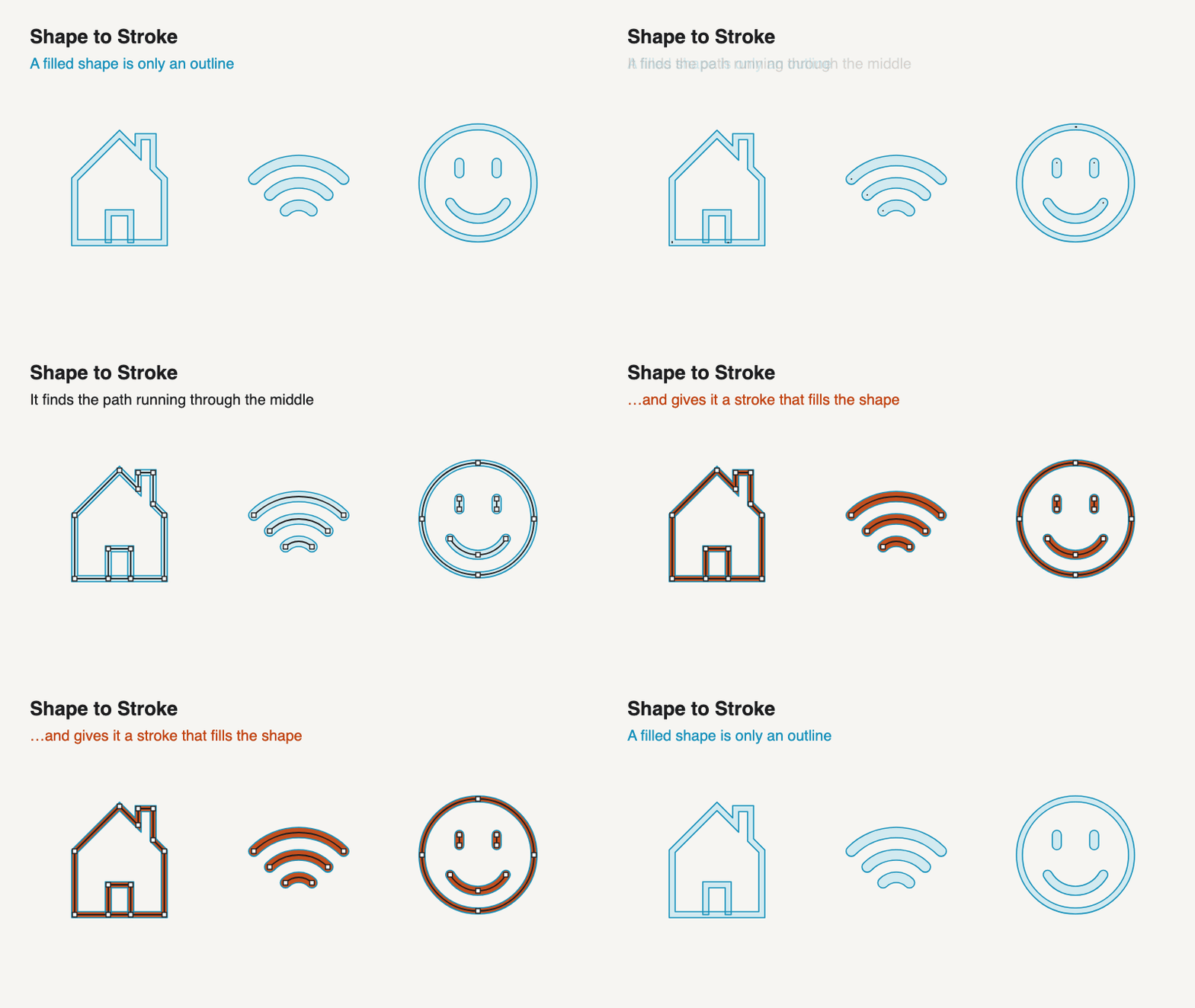
Turns filled outline shapes (bars, rings, arcs, hollow frames, zigzags…) into editable strokes on the path running through their middle, ready for Trim Paths. It refuses anything it can't read with confidence and explains why. Try it on the READY, SKIP and ICONS test comps created by Shape to Stroke test comps/Create-Test-Fixtures.jsx. Guide
Fixes
- Stepped Keyframes: on curved Position paths with hand-pulled handles, the motion path now keeps its shape instead of looping near the original keys.
- Font Inspector: much faster on projects that reuse the same precomp many times; the report is unchanged.
- Depth Map: the window now warns that After Effects stops responding while a depth map is generating.
Also
- Shorter guides, with animations for Shape to Stroke and Transform to Null.
- One version number for the whole collection.
Tested on After Effects 26.5 on macOS. Windows and older versions have not been tested yet. Problems or ideas: open an issue. Full details in the changelog.
0.1.0-beta.1 — First public collection
Changelog
0.1.0-beta.1 — 2026-10-08
First curated public collection, derived from Pedro's personal scripts. Originals remain unchanged.
- Transform to Null: zero controller pivot, explicit class handling, verified channel copy, unique names, guarded hierarchy transfer and rollback.
- Spacing: explicit selected/all-key scope, composition-frame timing, collision preflight and key-data preservation.
- Stepped: stable original intervals, pre-sampled values, retained existing keys, optional Hold mode and insertion limit.
- Keyframe serialization: property-value-type spatial detection and safe handling of Hold-only Source Text.
- Font Inspector: portable text report/save UI, canonical font names, safer reveal references, scope warnings and timestamp carry fix.
- Depth Map: source-only distribution, environment check, tested dependency pins, safer checkpoint loading, durable output folder selection, finite-value validation, natural sequence order, overwrite protection and complete-sequence markers.
- English usage guides, explicit beta limitations, automated tests and native AE integration fixtures.