Goto and add a custom emulated device in the Chrome developement tools.
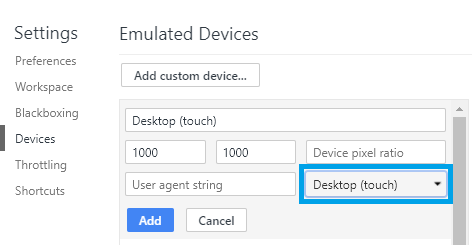
All gestures will be ignored.
Background:
This behaviour was actually observed with a Windows Computer (Windows 10) with a touchscreen and a mouse. Interestingly the gestures where working in the also installed Edge Browser for both inputs but not on the most current Chrome.
When fixing this issue you might want to doublecheck that dragging with the mouse and dragging with the touchscreen is both working.
Goto and add a custom emulated device in the Chrome developement tools.
All gestures will be ignored.
Background:
This behaviour was actually observed with a Windows Computer (Windows 10) with a touchscreen and a mouse. Interestingly the gestures where working in the also installed Edge Browser for both inputs but not on the most current Chrome.
When fixing this issue you might want to doublecheck that dragging with the mouse and dragging with the touchscreen is both working.