Releases: victorblanco-tech/lumi
Release list
Lumi 0.6.3 — Public Beta

Lumi 0.6.3 — Public Beta
A simpler, reliable installation route for the Mac. This patch replaces the
drag-to-folder shortcut with the standard macOS Installer.
Install or update
- Download Lumi-0.6.3-arm64.dmg and verify its SHA-256 checksum.
- Finish your show and quit Lumi. Open the DMG and double-click Install Lumi.pkg.
- Follow macOS Installer; it creates
/Applications/Lumiautomatically.
Administrator approval may be required. - Eject the DMG and open Lumi from
/Applications/Lumi.
This beta is not Apple-notarized. If macOS blocks the installer or app, use
System Settings → Privacy & Security → Open Anyway for the verified official download.
Existing tracks, phrases, MIDI mappings and settings are preserved. Dev and RC
stay in their own folders with separate data. A fresh Production installation
starts empty. Licenses and complete corresponding-source archives are included
in Licenses & Sources in the DMG.
What stays the same
Live performance, waveform rendering, USB sync and lighting integrations are
unchanged. Lumi Remote 0.1.1 remains the compatible iPhone app; no iPhone
reinstallation is needed for this packaging update. The simulator is independent.
Requires Apple Silicon and macOS 15 or newer.
Lumi 0.6.2 — Public Beta
Lumi 0.6.2 — Public Beta
This update improves USB synchronization and live editing, together with
Lumi Remote 0.1.1 for iPhone.
What's new
- Change the next phrase from the booth. Choose a configured Lumi Phrase
Type, Theme and AutoLoop from Mac Live or iPhone. Changes are committed
together so a rejected edit cannot leave half an updated plan behind. - One saved lighting offset. Adjust −250 to +250 ms from either client.
Negative means earlier, positive means later. During playback the new value
takes effect at the next phrase without restarting the running AutoLoop. - Predictable iPhone control. Controller ownership survives reconnects and
mode changes. View-only devices are identified clearly; control transfers
remain an explicit choice on the Mac. - More reliable USB sync. Separate USB identities, full audio verification,
revision checks before committing and clearer source-specific progress help
keep the Library aligned with the selected rekordbox export. - Updated guides and HQ imagery, including the enlarged Track Editor and
instructions for the separate Pro DJ Link Simulator.
Remote communication and command handling also gain bounded reads, clearer
failure outcomes and regression coverage. These changes do not introduce
SoundSwitch timeline correction or a new waveform renderer.
Install or update
- Download Lumi-0.6.2-arm64.dmg below. Apple Silicon and macOS 15+ are required.
- Quit Lumi, open the DMG and use its installation shortcut for
/Applications/Lumi. - Open Lumi. This public beta is ad-hoc signed, not Apple-notarized; macOS may
require Privacy & Security → Open Anyway for an official download. - Update the iPhone companion separately to
Lumi Remote 0.1.1.
Back up Lumi before updating. Existing Production Library data, Lumi phrases,
lighting mappings and settings are retained. Dev and RC data remain separate.
A first Production installation starts empty; the installer contains no
personal tracks, USB registrations, show configuration or pairing credentials.
The checksum and SPDX component inventory are attached. Lumi Remote uses
Xcode and your own Apple Account on a physical iPhone; there is no TestFlight
invitation or App Store release yet. The Pro DJ Link Simulator remains an
independent product; its current production release is 0.4.0.
Beta notes
- Recheck changed beatgrids/audio and prepared phrases before a show. Initial
scan counts can change after full synchronization verification. - Registering writable USB media may add a tiny
.lumi-media.jsonidentity
file. Rekordbox databases, analysis and music are not modified. - The preferred Editor waveform height can still reset after loading a track.
- The broader isolation/security audit is ongoing. Heavy Library operations
should be completed before a show; new simulated checks are not a substitute
for testing your own hardware and keeping manual lighting control available.
Lumi Remote 0.1.1 — Public Beta
Lumi Remote 0.1.1 — Public Beta
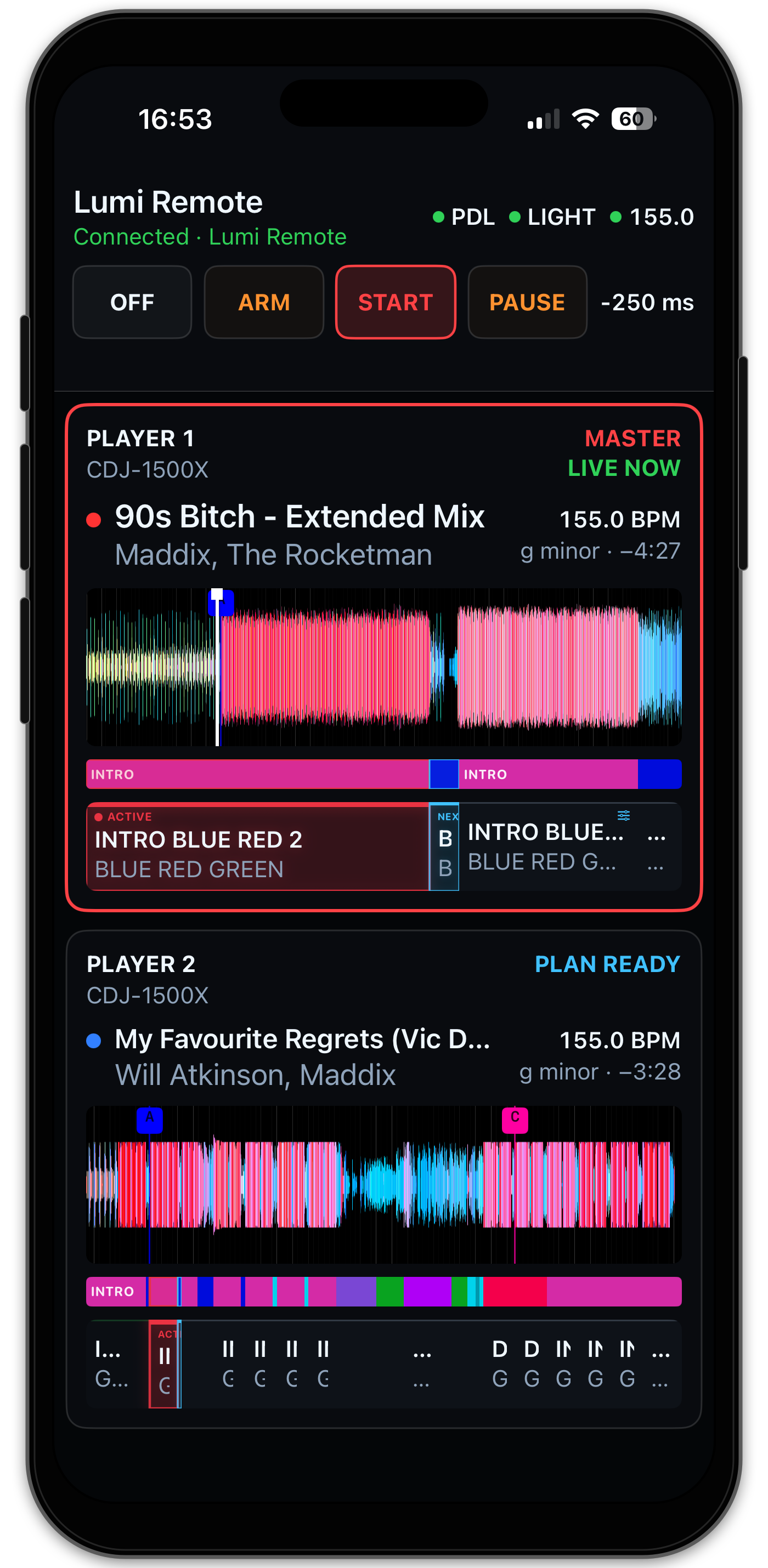
The iPhone companion to Lumi 0.6.2 for Mac. Follow both Players and adjust
future lighting choices from the booth while the Mac runs the show.
What's changed
- Choose the actual Lumi Phrase Type for a future phrase, alongside Theme
and AutoLoop, using the configured model from the Mac. - Adjust and save the shared lighting offset from −250 to +250 ms. The
picker remains stable during live updates. A running show's change applies
at the next phrase and remains saved after restarting Lumi. - See whether this phone is Controller or View only. Reconnecting or
changing show mode no longer transfers control to another device. - Clearer stale/reconnecting states and command failures: controls wait for
fresh authoritative state instead of accepting unreliable queued changes.
The accepted RGB waveform and live rendering are retained.
Install on an iPhone
Use iOS 18+, Xcode, your Apple Account and Lumi 0.6.2+ on the Mac.
Check out the lumi-remote-v0.1.1 source tag, select the Release Run
configuration, choose your signing team and run on the connected iPhone.
Follow the complete installation and pairing guide.
There is no TestFlight or App Store build yet. The attached ZIP is only an
iOS Simulator validation app for a Mac, not an IPA or physical-iPhone installer.
Free Personal Team installations require renewal through Xcode after seven days.
Use the Production Mac app with this Release configuration; Dev/RC channels
remain separate. Update both products to receive the new shared controls.
Lumi 0.6.1 — Public Beta
Lumi 0.6.1 — Public Beta
Lumi 0.6.1 is a focused stability update for long-running Live Decks sessions.
It keeps the macOS interface, persistent engine and optional iPhone gateway
connected without changing the isolated Pro DJ Link, SoundSwitch MIDI or
Ableton Link show lanes.
Highlights
- Long-session reconnect stability — an open Lumi window now makes bounded
recovery attempts after a local engine socket replacement instead of losing
both Live Decks. - Bounded gateway health — Remote Gateway health checks reuse one
authenticated localhost connection rather than repeatedly opening and
cancelling sockets. - Safe failure handling — unexpected authenticated client I/O failure parks
operation, Link and lighting output before the persistent engine accepts a
replacement UI connection. - Production-path soak evidence — two playlist-driven simulated Players
completed repeated Master handoffs while Lumi remained inStart, generated
live and next-track phrase plans, drove SoundSwitch AutoLoops and maintained
one Ableton Link peer without Pro DJ Link traffic errors.
Compatible product set
- Lumi for macOS: 0.6.1
- Lumi Remote for iPhone: 0.1.0
- Optional development test tool: Pro DJ Link Simulator 0.4.0-dev-56
Lumi Remote retains its independent version because this patch does not change
the iPhone application or its public protocol. The simulator is distributed in
a separate prerelease and is not installed with Lumi.
Data safety and upgrading
Installing 0.6.1 over 0.6.0 preserves the Production library, authored phrases,
trusted USB sources, SoundSwitch mappings and Light Plan configuration in
~/Library/Application Support/Lumi. The release DMG contains no personal
tracks, USB identities, mappings or pairing credentials.
Back up important Lumi and rekordbox data before upgrading. Keep manual
lighting control available while using any Public Beta during a show.
Installation
- Download
Lumi-0.6.1-arm64.dmg, its checksum and SBOM from this release. - Verify the SHA-256 checksum.
- Open the DMG and drag Lumi to Applications - Lumi.
- Follow the installation README in the DMG if macOS blocks the unsigned app.
- Lumi Remote 0.1.0 users do not need to reinstall the iPhone app for this
patch.
Known beta limitation
After an unavailable phrase analysis, its warning can occasionally remain
visible briefly after a newly active Master already has a valid phrase plan.
The live plan and lighting execution continue correctly; the message clears on
a subsequent state refresh. This is a presentation-state issue recorded for a
later update.
See the user guide,
Lumi Remote guide
and Public Beta guide
before testing a live setup.
Lumi Pro DJ Link Simulator 0.4.0
Lumi Pro DJ Link Simulator 0.4.0
Pro DJ Link Simulator 0.4.0 is the first stable, independently versioned
release of Lumi's self-contained macOS test tool. It generates the limited
Pro DJ Link traffic Lumi consumes, allowing representative two-Player testing
without physical CDJs.
Highlights
- Two simulated Players — independently load, play, pause, seek, pitch,
elect Master and set On Air state for Player 1 and Player 2. - Rekordbox USB playlists — browse a connected OneLibrary USB read-only and
select a playlist as the source for ordered or shuffled Auto Mix runs. - Unattended soak testing — Auto Mix loads both Players, preloads a new
track on the idle Player and performs exclusive Master and On Air handoffs. - Loop testing — configure or clear an independent playback loop on either
Player to exercise long-running phrase and transport behavior. - Representative timing — the default CDJ-1500X profile emits precise
position traffic at 50 Hz, beat events and changing effective BPM. - Remote controls — an authenticated local-network UI and CLI API make
repeatable headed and automated integration tests possible.
Installation
- Download
Lumi-Pro-DJ-Link-Simulator-0.4.0-macOS-arm64.dmgand its
SHA-256 checksum from this release. - Open the DMG and drag Lumi Pro DJ Link Simulator to Applications.
- If macOS blocks the ad-hoc signed app, follow the installation instructions
included in the DMG. - Connect a Rekordbox OneLibrary USB and launch the Simulator.
- Run Lumi on another Mac on the same trusted LAN. Do not run physical CDJs or
another Pro DJ Link simulator on that network at the same time.
The app includes its own Java runtime and does not require Terminal, Java or
administrator rights to run. A non-admin user can install it in
~/Applications.
Scope and safety
The Simulator does not play audio, serve rekordbox media, emulate a CDJ screen
or control physical Players. It reads the selected USB and broadcasts simulated
Player state; it does not modify the USB.
The remote-control token grants control of the simulated Players. Use it only
on a trusted local network and never expose its control port to the internet.
This macOS app is Apple Silicon-only, ad-hoc signed and not notarized.
See the Simulator guide for setup,
Auto Mix and remote-control details.
Lumi Pro DJ Link Simulator 0.4.0-dev-56
Pro DJ Link Simulator 0.4.0-dev-56 — playlist soak testing
This simulator-only development release extends two-player Auto Mix with real
Rekordbox USB playlists. It remains isolated from the Lumi production runtime.
Included
- read-only playlist and folder discovery from the connected Rekordbox USB;
- playlist selection in the remote browser UI;
- ordered or shuffled playback with duplicate track references collapsed;
- automatic initial loading of both players;
- preloading of the next different playlist track on the idle player after
every exclusive Master/On Air handoff; - manual two-track Auto Mix remains available;
- authenticated playlist API and matching CLI controls.
Verification
- all simulator configuration, packet, loop, playlist rotation and Auto Mix
tests pass; - the real connected Rekordbox USB is parsed read-only and returns its complete
nested playlist paths and track counts; - headed packaged-app verification covers playlist selection, two initial
loads and repeated five-second transitions with changing track identities; - the USB is never modified and the feature adds no code to Lumi's realtime
production lanes.
Auto Mix simulates player state and Pro DJ Link traffic; it does not mix or
play audio.
Pro DJ Link Simulator 0.4.0-dev-55
Pro DJ Link Simulator 0.4.0-dev-55 — two-player soak control
This simulator-only development release turns the narrow USB-backed player
into a two-player lab source without adding any code to the Lumi production
runtime.
Included
- two independently discoverable player identities from one Mac and USB;
- separate load, play, pause, seek, pitch, Master and On Air controls;
- bounded loops with visible loop range and wrap count per player;
- Auto Mix with a configurable 5–3600 second interval;
- deterministic handoffs: the incoming player restarts, becomes On Air and
Master, then the outgoing player pauses; - authenticated API and CLI control for every new function;
- a compact two-player browser UI suitable for remote Mac mini operation.
Verification
- all 20 simulator configuration, API, packet, loop and Auto Mix tests pass;
- the shaded Java 21 build passes;
- version consistency and repository structure pass locally;
- the packaged app read a real Rekordbox USB, loaded separate tracks on both
players, preserved overshoot through a 10–15 second loop and completed three
five-second Auto Mix handoffs; - stopping the simulator released ports 50000 and 17840, after which the Lumi
Dev engine and Pro DJ Link bridge restarted normally.
The Auto Mix mode is a repeatable soak driver, not a DJ transition model. It
does not mix audio. A two-host LAN run remains the final evidence that Lumi sees
both player identities and follows repeated Master changes for an extended
period.
Lumi 0.6.0 Public Beta
Lumi 0.6.0 — Public Beta
Lumi 0.6.0 brings the complete Live Decks experience into the DJ booth with
Lumi Remote for iPhone. The Mac remains the show authority and continues to
run Pro DJ Link, SoundSwitch MIDI and Ableton Link independently, even when the
phone sleeps, reconnects or leaves the network.
Highlights
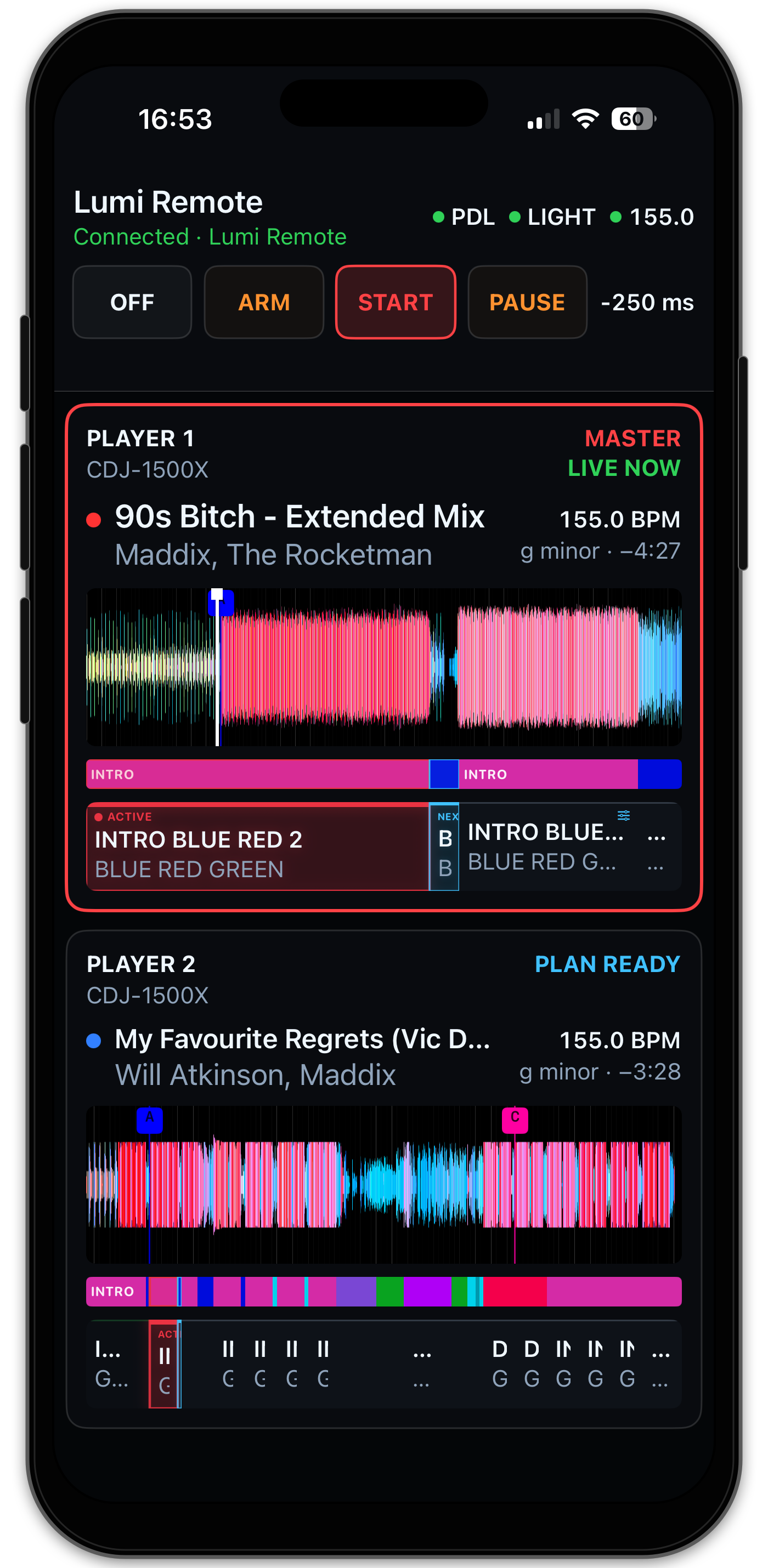
- Lumi Remote 0.1.0 — follow the current Master and prepared next Player
from a native portrait or landscape iPhone interface. - Live show control — change
Off,Arm,StartandPause, monitor Pro
DJ Link, Light Output and Ableton Link, and adjust timing offset from the
booth. - Phrase-aware planning — inspect vivid RGB waveforms, Hot Cues, phrases
and proportional Light Plans and safely change a future Theme or AutoLoop. - Real Player identity — Player number, announced hardware model, track,
BPM and remaining time match the authoritative Mac state. - Local and resilient — Bonjour discovery, one-use pairing, pinned TLS and
Keychain credentials operate without a cloud account or internet relay. - Show-lane isolation — Remote presentation and commands are bounded and
remain outside the realtime Pro DJ Link, SoundSwitch and Link execution
lanes.
Compatible product pair
- Lumi for macOS: 0.6.0
- Lumi Remote for iPhone: 0.1.0
The products share this release source revision but retain independent tags and
future version histories. The Remote is currently installed from the immutable
lumi-remote-v0.1.0 source tag with Xcode and the tester's own Apple Account.
There is no TestFlight invitation yet.
Data safety and upgrading
The Production bundle identifier remains co.victorblan.tech.lumi and its data
remains in ~/Library/Application Support/Lumi. Installing 0.6.0 over 0.5.2
preserves the Production library, phrase work, trusted USB sources, output
mappings and Light Plan configuration. The release DMG contains none of that
personal data.
Back up important Lumi and rekordbox data before upgrading. Keep manual
lighting control available while using any Public Beta during a show.
Installation
- Download
Lumi-0.6.0-arm64.dmgand its.sha256file from this release. - Verify the checksum.
- Open the DMG and drag Lumi to Applications - Lumi.
- Follow the installation README in the DMG if macOS blocks the unsigned app.
- To add the iPhone companion, follow the
Lumi Remote Xcode guide.
Requirements and beta limitations
- Apple Silicon Mac running macOS 15 or newer.
- iPhone running iOS 18 or newer for Lumi Remote.
- Both devices must use the same non-isolated local network.
- The Mac build is ad-hoc signed and not notarized.
- The iPhone beta requires Xcode installation; free provisioning expires after
seven days. - Local Playback, Library, USB Sync and Track Editor remain Mac-only.
See the user guide,
Lumi Remote guide
and Public Beta guide
before testing a live setup.
Lumi Remote 0.1.0 Public Beta
Lumi Remote 0.1.0 Public Beta
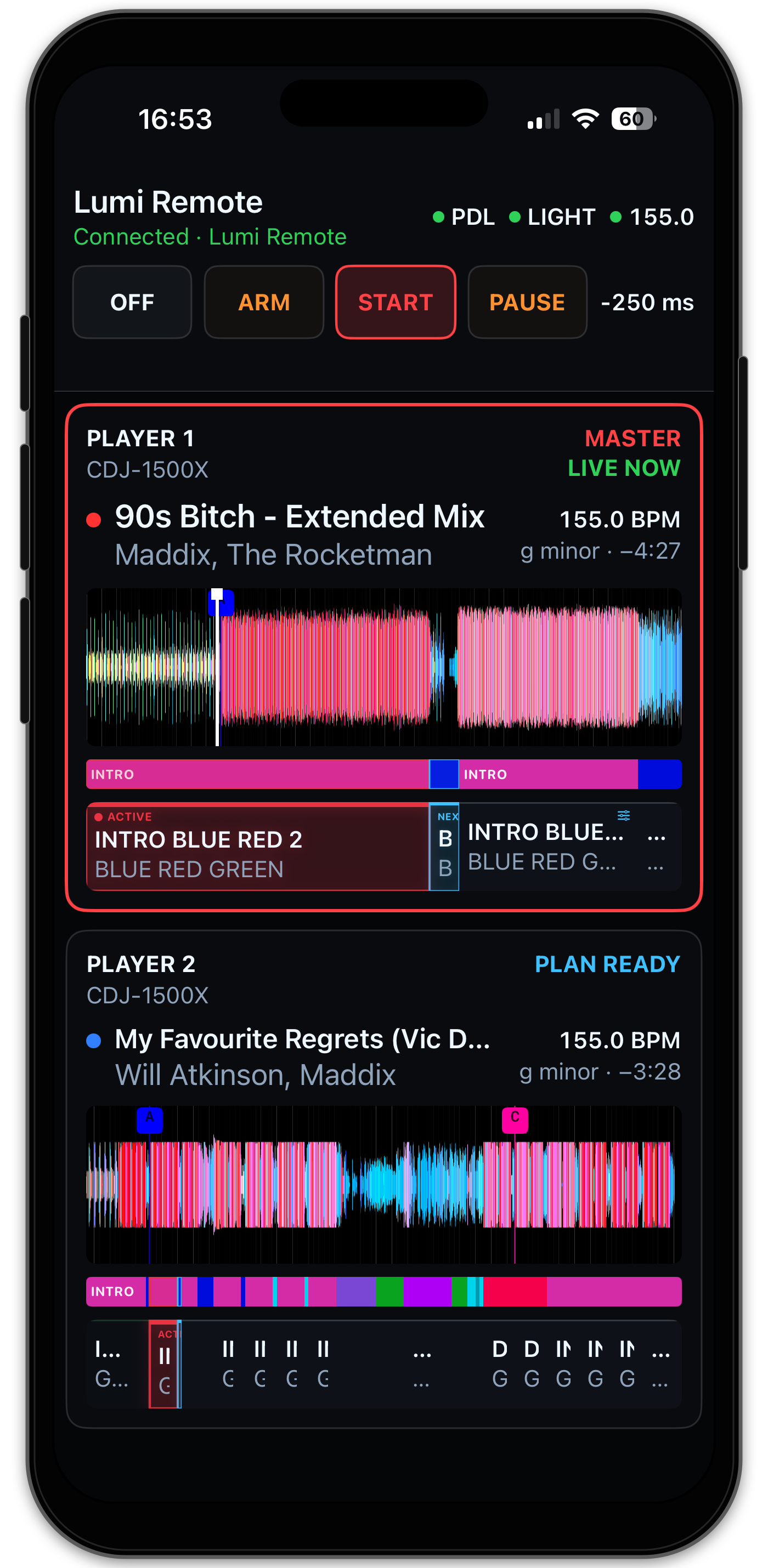
Lumi Remote is the native iPhone booth companion for Lumi. It opens directly
into Live Decks and keeps the current Master and prepared next Player visible
without putting the phone in any show-critical execution path.
Included
- portrait Master-first and landscape side-by-side Player layouts;
- smooth, pinch-zoomable RGB waveform with beatgrid and Hot Cues;
- proportional Lumi phrase and Light Plan timelines with Active and Next
emphasis; - real Player number, hardware model, track metadata, BPM and remaining time;
- persistent Pro DJ Link, Light Output and Ableton Link health;
Off,Arm,StartandPause, Link and timing-offset controls;- future-phrase Theme, AutoLoop and lock changes for the current Controller;
- local Bonjour discovery, pinned-TLS pairing, Keychain credentials and
reconnect after foregrounding; - one Controller plus additional view-only paired devices.
Safety boundary
Lumi on the Mac remains authoritative. The Remote Gateway is independently
supervised and cannot sit in the Pro DJ Link, SoundSwitch MIDI or Ableton Link
paths. Losing the iPhone connection queues no command and does not interrupt the
show.
Public beta limitations
- iOS 18 or newer and Lumi 0.6.0 or newer are required;
- Mac and iPhone must be on the same non-isolated local network;
- Local Playback, Library, USB Sync and Track Editor remain Mac-only;
- internet and cloud relay are not supported;
- this first beta still needs broader device, Wi-Fi and multi-phone field
coverage.
Install the physical-iPhone beta from source with Xcode and your own Apple
Account by following the
iPhone installation guide.
Free Personal Team provisioning expires after seven days. There is no
TestFlight invitation yet; the optional GitHub Simulator artifact is for
validation and is not installable on an iPhone.
Read the Lumi Remote guide,
privacy information and
public beta guidance
before testing a live setup.
Lumi 0.5.2 — Public Beta

Lumi 0.5.2 — Public Beta
Lumi 0.5.2 is a compatibility-preserving hardening release for the complete
USB-to-show workflow introduced in 0.5.0 and prepared for public field testing
in 0.5.1. It tightens runtime ownership, removes retired provider paths and
improves Live and USB reliability without automatically changing Production
data or user configuration.
Highlights
- Safer local runtime — bounded engine-client operations, verified process
ownership and predictable recovery replace indefinite or ambiguous control
actions. - Supported providers only — Live Decks uses direct Pro DJ Link and Import
& Sources uses trusted Rekordbox OneLibrary USB media. Retired BLT, XML and
direct local-Rekordbox product paths are removed. - Isolated USB work — scanning and synchronization run through a supervised
worker outside Pro DJ Link, Ableton Link and SoundSwitch MIDI lanes. - Exact USB presence — two equal-model USB disks retain independent
identities, and only physically mounted matching media appears connected. - Recognizable Players — Live shows
Player 1,Player 2and the announced
hardware model such asCDJ-1500X. - Stable RGB Live surfaces — bounded and detailed Library waveforms share
the same saturated 8-bit RGB data, while cancelled renders cannot flash an
older track or zoom level back into view. - Stronger quality gates — engine-client, persistence, documentation,
security, licence and packaging boundaries have broader automated coverage.
Data safety and upgrading
The Production bundle identifier remains co.victorblan.tech.lumi and its data
remains in ~/Library/Application Support/Lumi. Installing 0.5.2 over 0.5.1
opens the existing Production database without importing Dev data. The DMG does
not contain tracks, trusted USB identities, personalized mappings, phrases or
configuration.
Back up important Lumi and Rekordbox data before upgrading. Keep manual
lighting control available while using any Public Beta during a show.
Installation
- Download
Lumi-0.5.2-arm64.dmgand its.sha256file from GitHub Releases. - Verify the checksum.
- Open the DMG and drag Lumi to Applications - Lumi.
- If macOS blocks the unsigned build, follow the installation README included
in the DMG.
Requirements and known follow-up
- Apple Silicon Mac running macOS 15 or newer.
- Rekordbox OneLibrary USB media for the supported import workflow.
- SoundSwitch is required for the current lighting-output profile.
- Pro DJ Link hardware is optional when using Local Playback.
- The build is ad-hoc signed and not notarized.
- Physical acceptance found a possibly slower visible BPM-slider response than
an earlier build. Integrations remained functional and this is not a 0.5.2
blocker;0.6.0starts with separate measurements of Pro DJ Link ingestion,
Link publication and SoundSwitch/UI refresh before optimization. - iPhone Companion and automatic color override output are not included.
See the user guide
and Public Beta guide
for the complete workflow and field-test expectations.