Lumi 0.6.0 Public Beta

Lumi 0.6.0 — Public Beta
Lumi 0.6.0 brings the complete Live Decks experience into the DJ booth with
Lumi Remote for iPhone. The Mac remains the show authority and continues to
run Pro DJ Link, SoundSwitch MIDI and Ableton Link independently, even when the
phone sleeps, reconnects or leaves the network.
Highlights
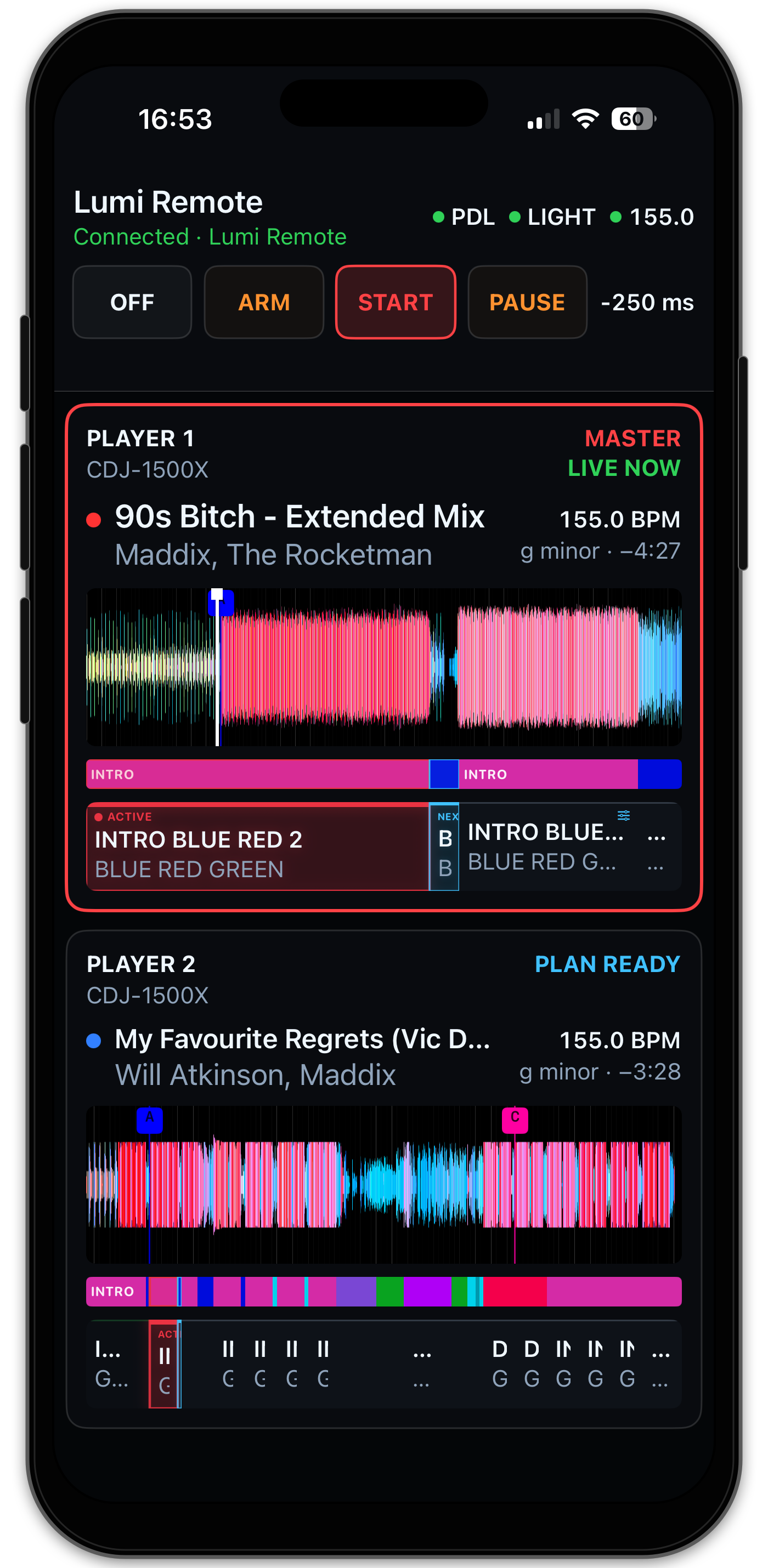
- Lumi Remote 0.1.0 — follow the current Master and prepared next Player
from a native portrait or landscape iPhone interface. - Live show control — change
Off,Arm,StartandPause, monitor Pro
DJ Link, Light Output and Ableton Link, and adjust timing offset from the
booth. - Phrase-aware planning — inspect vivid RGB waveforms, Hot Cues, phrases
and proportional Light Plans and safely change a future Theme or AutoLoop. - Real Player identity — Player number, announced hardware model, track,
BPM and remaining time match the authoritative Mac state. - Local and resilient — Bonjour discovery, one-use pairing, pinned TLS and
Keychain credentials operate without a cloud account or internet relay. - Show-lane isolation — Remote presentation and commands are bounded and
remain outside the realtime Pro DJ Link, SoundSwitch and Link execution
lanes.
Compatible product pair
- Lumi for macOS: 0.6.0
- Lumi Remote for iPhone: 0.1.0
The products share this release source revision but retain independent tags and
future version histories. The Remote is currently installed from the immutable
lumi-remote-v0.1.0 source tag with Xcode and the tester's own Apple Account.
There is no TestFlight invitation yet.
Data safety and upgrading
The Production bundle identifier remains co.victorblan.tech.lumi and its data
remains in ~/Library/Application Support/Lumi. Installing 0.6.0 over 0.5.2
preserves the Production library, phrase work, trusted USB sources, output
mappings and Light Plan configuration. The release DMG contains none of that
personal data.
Back up important Lumi and rekordbox data before upgrading. Keep manual
lighting control available while using any Public Beta during a show.
Installation
- Download
Lumi-0.6.0-arm64.dmgand its.sha256file from this release. - Verify the checksum.
- Open the DMG and drag Lumi to Applications - Lumi.
- Follow the installation README in the DMG if macOS blocks the unsigned app.
- To add the iPhone companion, follow the
Lumi Remote Xcode guide.
Requirements and beta limitations
- Apple Silicon Mac running macOS 15 or newer.
- iPhone running iOS 18 or newer for Lumi Remote.
- Both devices must use the same non-isolated local network.
- The Mac build is ad-hoc signed and not notarized.
- The iPhone beta requires Xcode installation; free provisioning expires after
seven days. - Local Playback, Library, USB Sync and Track Editor remain Mac-only.
See the user guide,
Lumi Remote guide
and Public Beta guide
before testing a live setup.