Repository navigation
Performance Tools
This section will give an overview of the gpu performance analysis tools
available on Piz Daint. Feel free to contact us on #profiler_questions or
#cluster_support_pizdaint in Slack for more information.
Nvidia nsight
- Nsight™ Systems is NVIDIA® system-wide performance analysis tool. It is installed on Piz Daint.
- Nsight™ Compute is not supported on Piz Daint P100 gpus but it is supported on Raplab with V100 gpus.
To use the latest version of Nsight Systems on Piz Daint with PrgEnv-gnu, load the following modulefiles:
module swap PrgEnv-cray PrgEnv-gnu
module load cdt-cuda/21.05

module load craype-accel-nvidia60
module swap cudatoolkit cudatoolkit/11.2.0_3.39-2.1__gf93aa1c

module use /apps/daint/UES/eurohack/modules/all
module load nsys/2021-3

which nsys
# /apps/daint/UES/eurohack/software/nvidia-nsight-systems/2021-3/bin/nsys
nsys --version
# NVIDIA Nsight Systems version 2021.3.1.54-ee9c30a
Run your job on Piz Daint with:
nsys_opt1='profile --force-overwrite=true'
nsys_opt2='-o %h.%q{SLURM_NODEID}.%q{SLURM_PROCID}.qdstrm'
nsys_opt3='--trace=cuda,mpi,nvtx --mpi-impl=mpich --stats=true --delay=2'
srun nsys $nsys_opt1 $nsys_opt2 $nsys_opt3 ./myexe -- myexe_args
You may also want to track the GPU memory usage with the
'--cuda-memory-usage=true' flag. This feature may cause significant runtime
overhead. You can also deactivate cpu reporting with '--sample=none'.
Get more informations about the tool with: nsys profile --help
To improve your user experience, we recommend to download and install the
Nsight Systems client on your
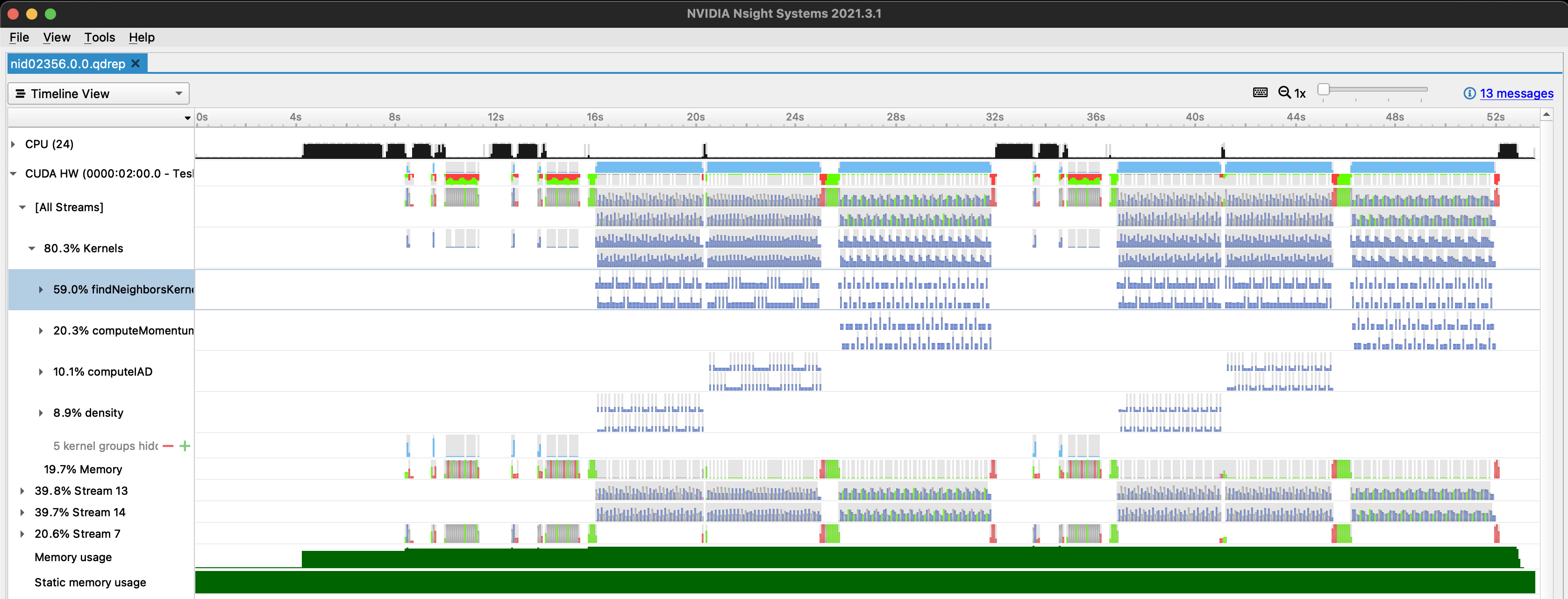
laptop. A succesfully completed job on Piz Daint will create 1 or more
*.qdrep report file(s). These files can be transferred to your laptop with
scp, where you should open them with the installed client:
Nsight™ Systems version 2021.4 is also available:
module use /apps/daint/UES/eurohack/modules/all
module load nsys/2021-4

which nsys
# /apps/daint/UES/eurohack/software/nvidia-nsight-systems/2021-4/bin/nsys
nsys --version
# NVIDIA Nsight Systems version 2021.4.1.73-08591f7
Nvidia nvprof/nvvp
- nvprof and NVVP are NVIDIA® previous generation profiler and gui. nvprof collects performance data from GPUs and NVVP is the graphical visual interface to nvprof.
- Please notice that NVVP and nvprof will be
deprecatedin a future CUDA release. It is recommended to use next-generation tools like NVIDIANsight Systems.
To use nvprof on Piz Daint with PrgEnv-gnu, load the following modulefiles:
module swap PrgEnv-cray PrgEnv-gnu
module load cdt-cuda/21.05

module load craype-accel-nvidia60
module swap cudatoolkit cudatoolkit/11.2.0_3.39-2.1__gf93aa1c

nvprof --version
# Release version 11.2.67 (21)
which nvprof
# /usr/local/cuda-11.2/bin/nvprof
GPU details
This section shows hardware differences between Piz Daint and Raplab, to be considered when doing performance analysis.
| Piz Daint | Raplab | A100 | |
|---|---|---|---|
| Device | P100-PCIE-16GB (daint-gpu) |
V100-SXM2-16GB | A100 |
| NVRM version | 460.32 | 450.51 | - |
| CUDA Driver Version | 11.x | 11.x | - |
| CUDA Capability | 6.0 sm_60 |
7.0 sm_70 |
8.0 sm_80 |
| Multiprocessors /gpu |
56 | 80 | 108 |
| CUDA Cores /multiprocessor |
64 | 64 | 64 |
| GPU Max Clock rate | 1.33 GHz | 1.53 GHz | 1.41 GHz |
| FP64 peak performance /gpu |
4761 Gflop/s | 7833 Gflop/s | 9746 Gflop/s |
| gpu/compute node | 1 | 8 | - |
| compute nodes | reservation=60 (total>5000) |
10 | - |