You need python2.7 with tkinter support and working pip. Then you can use pip install to install bCNC and all it's dependencies (except for tkinter, which has to be installed/compiled as integral part of python).
If you want to use pip to install latest development version from github, you will also need git binary installed and available in your PATH, so pip can use it to fetch the source code from github.
That's all you need to know. Rest of this document are just examples of how to do that on specific OS:
- Update your system (Optional) and install git, python (with tkinter support) and pip:
	#This is specific for Debian/Ubuntu, other distros have other package managers than apt-get
	sudo apt-get update
	sudo apt-get upgrade
	sudo apt-get install git python python-tk python-pip
- Install bCNC using pip and launch it:
	sudo pip2 install --upgrade bCNC
	#sudo pip2 install --upgrade git+https://github.com/vlachoudis/bCNC #if you want git version
	python2 -m bCNC
Happy milling!
1.) Install python 2.7: https://www.python.org/downloads/
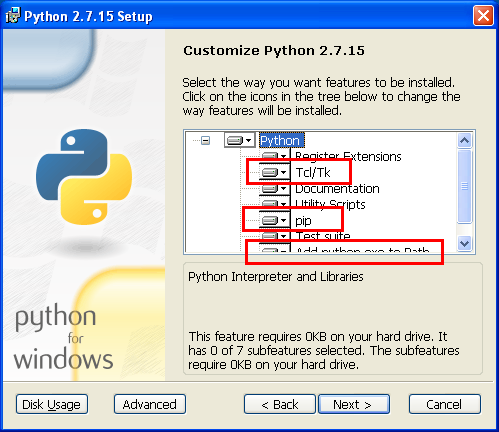
Do not forget to install Tcl/Tk and PIP modules while doing so. Also check that python will be added to path:
Open commandline and install bCNC using pip:
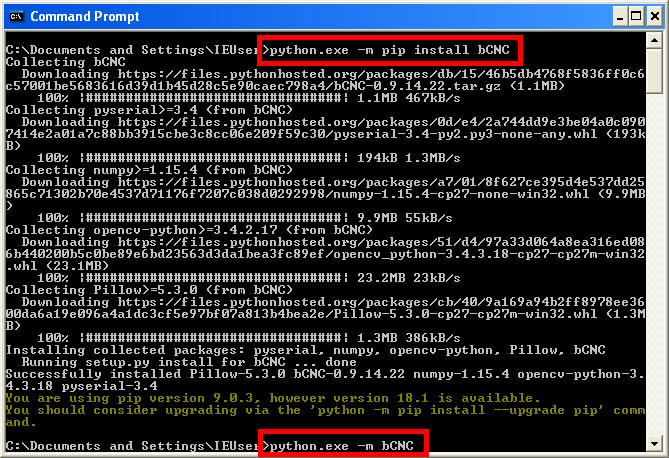
This installs bCNC to C:\Pyhton27\Lib\site-packages\bCNC\ and launches it
There might be experimental .exe build available at https://github.com/vlachoudis/bCNC/releases Such build does not need anything, since it comes bundled with python and all needed libraries. Only download, unpack zip and launch bCNC.exe
| OS | Python | Notes |
|---|---|---|
| Windows XP SP3 | 2.7.5 | |
| Windows Vista SP2 | 2.7.9 | |
| Windows 7 | 2.7.* | Any 2.7 version should work |
| Windows 8.1 | 2.7.10 is known to work | |
| Windows 10 | 2.7.* | Any 2.7 version should work |
FIXME: There is probably easier way to do this. Any mac user here to update this?
It is recommended to use Homebrew for installing dependencies.
- Install git and Python
    brew install git
    brew install python --with-tcl-tk
- Activate the brew python version. At the time of writing, the standard "brew link python" method no longer works. Put the brew path before the OS provided PATH in your profile files. See notes on homebrew github. For example, in your .bash_profile and/or .profile, add the following line (or adapt the PATH line that is in there already), and restart the terminal session.
export PATH=$(brew --prefix)/opt/python/libexec/bin:${PATH}
- Install a recent version of tcl-tk. At the time of writing, you may need the dev version, in order to avoid a SIGABRT. See notes on homebrew github.
brew install --devel tcl-tk
- Install zlib which is required by python-imaging. See notes on Stackoverflow.
    brew install homebrew/dupes/zlib
    brew link zlib --force
- Install and launch bCNC
    pip install --upgrade bCNC
    #pip install --upgrade git+https://github.com/vlachoudis/bCNC #if you want git version
    python -m bCNC


