Repository navigation
Releases: wisecort/LogDeck
Release list
LogDeck 1.6.2

- Kubernetes events in the timeline: warnings about the pod (failed probes, back-off, OOM, failed mounts…) and the Killing event appear between the log lines at the time they happened, with how many times and from when to when, and as purple diamonds on the histogram. Read with
kubectl get events -n <namespace> -o jsonevery 5 s while the pod is open and filtered by pod in the app;eventsjoins the read-only allowlist (no--watch, no field selectors). Without permission to read events nothing is shown. - Marks between log lines, so an empty stretch is never ambiguous: "Connection lost at … back at …" when the kubectl stream dropped (the lines from that stretch are fetched again, without duplicates), "No logs for 2m 10s" when the stream was connected and the container wrote nothing (more than a minute, and 20× the usual gap between lines, so slow jobs are not flagged), "Container … restarted" with the reason, exit code and how long it ran, plus See previous logs, and "N old lines dropped" above the oldest line when the 50,000-line buffer is full. The histogram shows restarts as red ticks and stream drops as hatched stretches. Marks hide while searching or filtering by an error group (asked on r/kubernetes).
- Faster pod opening: the log's
kubectl logsstarts alone; the extra reads (events, services, routes, ingresses) wait for its first lines (at most 3 s), and events refresh every 15 s instead of 5. Each kubectl process costs a login round trip on OKD. - Empty view says why: when every loaded line is filtered out, the list says how many lines were loaded and how many the presets hide (health checks can fill the whole
--tail), with Turn presets off in this namespace and Clear filters. - How the pod is reached (Pod tab → Access): the Services whose selector matches the pod's labels (type and ports) and the URLs of the OKD Routes and Ingresses pointing at them, with a copy button (the app never opens them). Read with
kubectl get services,get routes.route.openshift.ioandget ingresseswhen a pod is opened; these join the read-only allowlist. Clusters without the Route API or without permission just show less. - Pod tab in the right panel: the container's state and uptime, restarts, the previous run (reason such as OOMKilled, exit code, how long it ran and when it ended), image, memory and CPU requests and limits, readiness/liveness/startup probes (exec probes show only "command", never the command), node, creation time and QoS. Previous runs seen while the app is open are listed too (Kubernetes keeps only the last one). The status bar shows the container's uptime and restarts. Read from the same
kubectl get pods -o jsonthe sidebar already refreshes. - Community files for contributors:
CONTRIBUTING.md(how to run, rules, AI assistance),SECURITY.md(private vulnerability reports),CODE_OF_CONDUCT.md, issue templates (bug, feature) and a pull request template. - Website on GitHub Pages (https://wisecort.github.io/LogDeck/), in English and Portuguese: demo video, screenshots, the read-only promises and downloads per OS (the visitor's OS comes first), with kubectl install commands, a before/after, zoomed details, "and more" features and a FAQ; Retina screenshots from
make site-shots. Built fromsite/byscripts/build-site.mjsand published by.github/workflows/pages.ymlafter each release. - LogDeck is on the Microsoft Store (published with 1.6.0): signed by Microsoft, no SmartScreen warning, updated by the Store. Both READMEs show the Store badge and recommend it for Windows.
LogDeck 1.6.1
- Fix: on Linux the
.deb/.rpmshowed a generic gear instead of the LogDeck icon (GNOME and other desktops). The package now ships the icon in the standard sizes (16 to 512 px,build/icons/, made bymake icon), and the launcher description is in English and no longer says "macOS" only. - Copy with details follows "Mask sensitive data": it also hides the context name (cluster host and user) and internal IPs. Fix: its "Copied" label now goes back after 2 s instead of staying.
LogDeck 1.6.0
- Microsoft Store package (appx/MSIX):
npm run release:storebuilds it (build.appxwith the Partner Center identity, Store logos inbuild/appx/made byscripts/build-appx-assets.sh, also run bymake icon). CI builds it on every PR and on each release as a workflow artifact (never a release asset: the Store signs it on submission). Testing and submission steps indocs/microsoft-store.md. - The Microsoft Store copy never checks GitHub for new versions: the Store updates it (
src/platform/distribution.ts). - No kubectl? The welcome screen says how to install it: a highlighted card with the install command for the OS (winget, brew, snap), a Copy button and Check again, which finds kubectl without restarting the app; meanwhile log files can already be opened. README lists how to install
octoo. - Home is the house button: the app opens on the home screen with the button lit and no tab; tabs are only for pods, files and builds. The house shows the home screen and leaves the open tabs running (it used to empty the current tab and stop its log). The "+" button is gone: ⌘/Ctrl-click or middle-click a pod opens it in a new tab.
- Copy with masking: Details has a "Mask sensitive data" option for Copy: it hides passwords, tokens, keys, emails and internal IPs (10.x, 172.16–31.x, 192.168.x) in the copied line and stack trace. Off by default, remembered on this machine; the log on screen does not change.
- "Copy for ticket" is now Copy with details (pod, UTC times, level and the line, secrets masked).
- Wider Preferences: two columns when there is room (themes on the left; language, updates and About on the right), so everything shows without scrolling in the default window; one column in narrow windows.
- Fix: a missing login plugin (
oc,aws,gke-gcloud-auth-plugin,kubelogin…) showed "Resource not found (the pod may have been removed)". It now names the plugin and says to install it or check the PATH. - CHANGELOG in English (
CHANGELOG.md), with the Portuguese version inCHANGELOG.pt-BR.md. - Release notes with the changes: each GitHub Release shows its version's section from
CHANGELOG.md(scripts/release-notes.mjs) instead of "see the CHANGELOG", plus the code signing policy link; the release fails if the version has no section. - README: code signing status updated. The SignPath Foundation declined the first application (the project is too new); releases stay unsigned, and we will reapply once the project has wider adoption.
- Stable shell integration test on Windows: it also resends
exitwhen ConPTY drops the first keystrokes. - README screenshots redone by
make screenshots(tests/screenshots, fake kubectl and fictional logs, English and Portuguese).
LogDeck 1.5.0
- English README (
README.md, with English UI screenshots indocs/images/en/) and a Portuguese version inREADME.pt-BR.md, linked to each other. - winget: manifests for the
wisecort.LogDeck1.4.0 package inpackaging/winget/(per-user installer, depends onKubernetes.kubectl), ready for themicrosoft/winget-pkgsPR. - Code signing policy (section in the READMEs) and privacy policy (
PRIVACY.md/PRIVACY.pt-BR.md), required to apply for free signing from the SignPath Foundation; every release's notes link to the "Code signing policy". - New-version notice (opt-in only): the welcome screen asks once whether it may notify you; if yes, the main process makes at most one anonymous GET a day to
api.github.com/repos/wisecort/LogDeck/releases/latest(fixed URL, no credentials, no redirects, response treated as data). When a new version exists, the status bar shows "X.Y.Z available", and the modal shows the Homebrew and winget commands and the release link, with "Skip this version". LogDeck never downloads or installs anything. Toggle it in Preferences → Updates. G6, the privacy policy and the READMEs were updated. - Automated winget: the release workflow opens the "Update: wisecort.LogDeck to X.Y.Z" PR in
microsoft/winget-pkgs(scripts/update-winget.sh, manifests generated byscripts/winget-manifests.mjsfrom the previous version), with no third-party actions; needs theWINGET_TOKENsecret. Locally:make winget VERSION=X.Y.Z. - Stable shell integration test on Windows: retypes the command when ConPTY drops the first keystrokes.
LogDeck 1.4.0
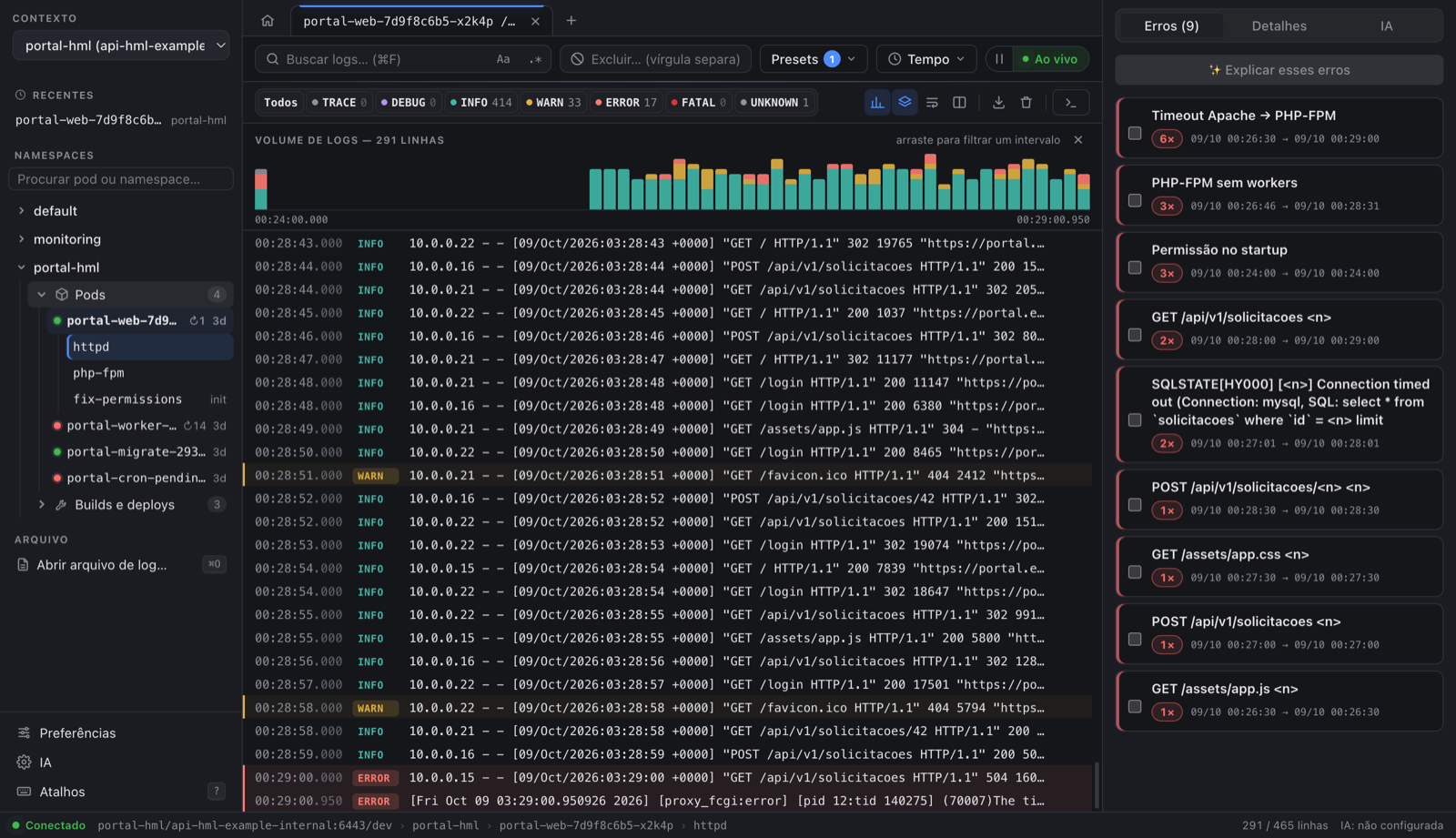
Novidades
- Visual novo: tela de boas-vindas, botão Início, linhas de log mais fáceis de ler (INFO discreto, WARN/ERROR em destaque), barras de ação numa linha só, árvore com guias, painel de erros em cartões, Preferências com miniaturas de tema e Atalhos redesenhados.
- Builds do OKD/OpenShift no namespace: pastas Pods e Builds e deploys, com o histórico de builds (status, commit, duração). Clique num build para ver o log; se o cluster já removeu o pod, aparecem os detalhes do build.
- Log de build legível: passos
STEP n/m, push e erros reconhecidos (antes tudo aparecia como UNKNOWN) e a regra Falha no build no painel de erros. - Mais rápido em pods terminados: builds concluídos e Jobs são lidos uma vez, sem ficar reconectando.
- Recentes com × para tirar um pod da lista.
- Produção marcada com PROD no seletor de contexto e na barra de status (sem a faixa vermelha no topo).
- Mensagem clara quando o cluster não responde (qual comando demorou e o que verificar).
- README novo com tour visual.
Instalar ou atualizar
- macOS:
brew upgrade --cask logdeck(oubrew install --cask wisecort/tap/logdeck), ou o.dmgabaixo (arm64para M1+,x64para Intel). - Linux:
.deb,.rpmou.AppImage. Windows:.exe.
Checksums nos arquivos SHA256SUMS-*.txt.
English
New visual design (welcome screen, Home button, cleaner log rows and toolbars), OKD/OpenShift build history inside each namespace with readable build logs, finished pods read once (no reconnect loop), removable recent pods, PROD badge instead of the banner, and a README visual tour.
LogDeck 1.3.0
Novidade
- Pods de build e de deploy do OKD/OpenShift ocultos. Pods criados por BuildConfig e por DeploymentConfig não aparecem mais misturados com os pods da aplicação. No fim de cada namespace, + N builds/deploys do OKD mostra todos, com a marca
buildoudeploy, e a escolha fica salva. A identificação é pelos rótulos do OpenShift (openshift.io/build.name,openshift.io/deployer-pod-for.name), não pelo nome do pod.
Instalar ou atualizar
- macOS:
brew upgrade --cask logdeck(oubrew install --cask wisecort/tap/logdeck), ou o.dmgabaixo. - Linux:
.deb,.rpmou.AppImage. Windows:.exe.
Checksums nos arquivos SHA256SUMS-*.txt.
English
OKD/OpenShift build and deployer pods are hidden by default in the pod tree ("+ N builds/deploys" shows them, remembered), identified by their OpenShift labels.
LogDeck 1.2.1
Correção
- macOS: "LogDeck está danificado e não pode ser aberto". O app não estava danificado: a assinatura do pacote estava incompleta, e o macOS trata isso como dano em apps baixados. Agora o pacote inteiro é assinado (ad-hoc). Na primeira abertura aparece o aviso normal de desenvolvedor não verificado; libere em Ajustes do Sistema → Privacidade e Segurança → Abrir mesmo assim, ou rode
xattr -dr com.apple.quarantine /Applications/LogDeck.app.
Também
- README com o passo a passo do Homebrew:
brew install --cask wisecort/tap/logdeck(atualizar:brew upgrade --cask logdeck). - O CI confere a assinatura do app do macOS em todo build.
Sem mudanças para Linux e Windows além do número da versão. Checksums nos arquivos SHA256SUMS-*.txt.
English
Fixes macOS reporting the downloaded app as "damaged": the bundle is now ad-hoc signed, so Gatekeeper shows the regular unidentified-developer prompt (System Settings → Privacy & Security → Open Anyway).
LogDeck 1.2.0
Novidades
- Abas: vários pods ou arquivos abertos ao mesmo tempo, cada um recebendo o log em segundo plano. Clique em + para uma aba nova, ou ⌘-clique (Ctrl-clique no Windows/Linux) num pod para abri-lo direto numa aba. Até 8 abas.
- Comparar com o anterior: em pods com restart, o botão de colunas mostra o log do container anterior (
--previous) ao lado do atual, com os mesmos filtros de nível e texto. Ideal para CrashLoopBackOff. - Pods recentes: os últimos 5 pods abertos aparecem em "Recentes" na barra lateral e reabrem no mesmo container.
- Tradução completa: as mensagens de erro do kubectl, os títulos dos grupos de erro e as respostas da IA seguem o idioma escolhido (pt-BR, pt-PT, inglês ou espanhol).
Correções
- Windows: quando o Claude CLI estourava o tempo, aparecia um erro de permissão no lugar de "tempo esgotado".
- Os popovers Presets e Tempo fecham ao clicar fora ou com Esc.
Por dentro
- Testes de integração e E2E também no Windows (CI em macOS, Linux e Windows).
Qual arquivo baixar
| Sistema | Arquivo |
|---|---|
| macOS Apple Silicon (M1+) | LogDeck-1.2.0-arm64.dmg (ou brew install --cask wisecort/tap/logdeck) |
| macOS Intel | LogDeck-1.2.0-x64.dmg |
| Ubuntu/Debian | LogDeck-1.2.0-amd64.deb |
| Fedora/RHEL | LogDeck-1.2.0-x86_64.rpm |
| Qualquer Linux | LogDeck-1.2.0-x86_64.AppImage |
| Windows | LogDeck-1.2.0-x64.exe |
Requer kubectl. Os pacotes ainda não são assinados (veja o README para liberar o aviso no macOS e no Windows). Checksums nos arquivos SHA256SUMS-*.txt.
English
Tabs (several pods or files at once), side-by-side comparison with the previous container (--previous), recent pods, and full translation (kubectl messages, error group titles and AI answers follow the chosen language). Windows fix for the Claude CLI timeout message. CI now runs integration and E2E tests on macOS, Linux and Windows.
LogDeck 1.1.0
O LogDeck agora roda em macOS, Linux e Windows.
Novidades
- Linux (x64): AppImage,
.debe.rpm - Windows (x64): instalador
.exe(por usuário, sem pedir administrador) - macOS Intel (
x64), além do Apple Silicon (arm64) - Chaves de IA no cofre de cada sistema: Keychain (macOS), DPAPI (Windows), GNOME Keyring/KWallet (Linux)
- Atalhos com Ctrl no Windows e no Linux; sem barra de menu fora do macOS
- Popovers de Presets e Tempo fecham ao clicar fora ou com Esc
Qual arquivo baixar
| Sistema | Arquivo |
|---|---|
| macOS Apple Silicon (M1+) | LogDeck-1.1.0-arm64.dmg |
| macOS Intel | LogDeck-1.1.0-x64.dmg |
| Ubuntu/Debian | LogDeck-1.1.0-amd64.deb (sudo apt install ./LogDeck-1.1.0-amd64.deb) |
| Fedora/RHEL | LogDeck-1.1.0-x86_64.rpm (sudo dnf install ./LogDeck-1.1.0-x86_64.rpm) |
| Qualquer Linux | LogDeck-1.1.0-x86_64.AppImage (chmod +x e abra) |
| Windows | LogDeck-1.1.0-x64.exe |
Requer kubectl instalado (brew install kubectl, sudo snap install kubectl --classic ou winget install -e --id Kubernetes.kubectl).
Os pacotes ainda não são assinados: o macOS mostra o aviso de desenvolvedor não verificado (Ajustes do Sistema → Privacidade e Segurança → Abrir mesmo assim) e o Windows mostra o SmartScreen (Mais informações → Executar assim mesmo). Veja o README.
English
LogDeck now runs on macOS (Apple Silicon and Intel), Linux (AppImage, deb, rpm) and Windows (installer). Requires kubectl. Builds are not code-signed yet. Checksums are in the SHA256SUMS-*.txt files.
LogDeck 1.0.0

Primeira versão pública do LogDeck: explorador de logs de Kubernetes/OKD para macOS, somente leitura.
Destaques
- Log ao vivo com reconexão, níveis com cores, busca por texto/regex, exclusões e presets por namespace
- Histograma de volume com filtro por intervalo e painel de erros e timeouts agrupados
- Detalhes da linha, Copiar para chamado (segredos mascarados), container anterior (
--previous) e terminal no container - Abrir arquivo de log (⌘O ou arrastar), seletor de contexto com renomear/ocultar só no LogDeck
- IA opcional (Claude Code CLI, API da Anthropic ou API compatível com OpenAI) com preview mascarado antes de qualquer envio
- 9 temas e 4 idiomas (pt-BR, pt-PT, English, Español)
Instalação
Requer macOS em Apple Silicon e kubectl (brew install kubectl).
- Baixe
LogDeck-1.0.0-arm64.dmg, abra e arraste o LogDeck para Aplicativos. - O app ainda não é assinado pela Apple. Na primeira vez, abra uma vez e depois vá em Ajustes do Sistema → Privacidade e Segurança → Abrir mesmo assim, ou rode:
xattr -dr com.apple.quarantine /Applications/LogDeck.app
Veja o README para o guia de uso.
English
First public release of LogDeck, a read-only Kubernetes/OKD log explorer for macOS (Apple Silicon). Requires kubectl. The app is not notarized yet: after the first launch, allow it in System Settings → Privacy & Security, or run the xattr command above.
Checksums (SHA-256)
ed62e7bf035624036ea0154ba99341e8ce9665a7b90c32069aab2d2d704cf4ad  LogDeck-1.0.0-arm64.dmg
6816138cd4383d20539431c4cc78ed48eb26503db87faddcd22ffb1adcfd81d4  LogDeck-1.0.0-arm64.zip