Jump_Start
In this section, we will go start to finish on how to create, build, and run an xtUML project from scratch. This guide assumes some basic knowledge of how to use BridgePoint. For help with BridgePoint and xtUML, please visit xtUML.org.
If you have not already, go to the examples page of the repository. That is a great place to start if you find yourself wanting to learn by viewing existing projects.
-
BridgePoint latest nightly
-
Maven
-
pyxtuml
On Ubuntu linux:
sudo apt-get update && sudo apt-get install -y maven python-pip wget unzip
pip install pyxtuml
wget https://s3.amazonaws.com/xtuml-releases/nightly-build/org.xtuml.bp.product-linux.gtk.x86_64.zip
unzip org.xtuml.bp.product-linux.gtk.x86_64.zip
On macOS:
brew install maven wget unzip
pip install pyxtuml
wget https://s3.amazonaws.com/xtuml-releases/nightly-build/org.xtuml.bp.product-macosx.cocoa.x86_64.zip
unzip org.xtuml.bp.product-macosx.cocoa.x86_64.zip
|
Note
|
This step is not necessary if you have built a Ciera project before (including the examples). It simply downloads the runtime library (including modeled artifacts). |
In a terminal window:
mvn -DgroupId=io.ciera -DartifactId=runtime -Dversion=2.1.0 dependency:get
-
Open BridgePoint and create a new xtUML project. Call the project "MyCieraProject"
-
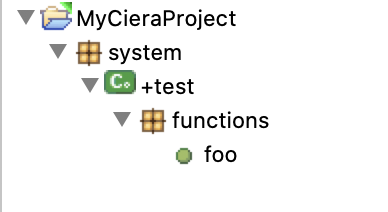
Create a new package, component, package, and function in the project. Name them "system", "test", "functions", and "foo" respectively. Your tree should now look something like this:
-
Enable inter-project references. Right click on project > Properties > xtUML Project > Inter-project References.
-
Import the Ciera runtime library. Import > General > Existing Projects into Workspace. Tick the "Select archive file" and navigate to
~/.m2/repository/io/ciera/runtime/2.1.0/runtime-2.1.0.jar. Select theruntimeproject and click "Finish". -
Open the "foo" function and enter the following code:
LOG::LogInfo(message:"Hello, World!");
control stop;
-
Navigate to the Eclipse project location
-
Create a directory called
gen/ -
Create a file called
gen/features.markwith the following contents:*,ApplicationName *,ApplicationPackage *,AsyncApplication *,NonPersistentInstanceIds *,RootPackage *,SortComparator *,TemplateDir Association,Exclude Attribute,NonPersistent Component,EnableSimulatedTime Component,InitFunction Component,InstanceLoading Component,Version Model Class,Exclude Model Class,NonPersistent Model Class,UseKeyLettersForName Package,DoNotSerialize Port,BaseClass Port,HttpEndpoint
-
Create a file called
gen/application.markwith the following contents:*,RootPackage,*,MyCieraProject::system system::test,InitFunction,Component,foo
-
Create a file called
pom.xmlwith the following contents:<project xmlns="http://maven.apache.org/POM/4.0.0" xmlns:xsi="http://www.w3.org/2001/XMLSchema-instance" xsi:schemaLocation="http://maven.apache.org/POM/4.0.0 http://maven.apache.org/maven-v4_0_0.xsd"> <modelVersion>4.0.0</modelVersion> <groupId>io.ciera</groupId> <artifactId>MyCieraProject</artifactId> <packaging>jar</packaging> <version>1.0.0-SNAPSHOT</version> <properties> <project.build.sourceEncoding>UTF-8</project.build.sourceEncoding> <maven.compiler.source>1.8</maven.compiler.source> <maven.compiler.target>1.8</maven.compiler.target> </properties> <dependencies> <dependency> <groupId>io.ciera</groupId> <artifactId>runtime</artifactId> <version>2.1.0</version> </dependency> </dependencies> <build> <plugins> <plugin> <groupId>io.ciera</groupId> <artifactId>ciera-maven-plugin</artifactId> <version>2.1.0</version> <executions> <execution> <id>pre-build</id> <goals> <goal>pyxtuml-pre-build</goal> </goals> </execution> <execution> <id>ciera-core</id> <goals> <goal>core</goal> </goals> </execution> </executions> </plugin> </plugins> <resources> <resource> <directory>${project.basedir}</directory> <filtering>true</filtering> <includes> <include>models/**/*.xtuml</include> <include>.project</include> </includes> </resource> <resource> <directory>${project.build.directory}/generated-sources/java</directory> <filtering>true</filtering> <includes> <include>**/*.properties</include> </includes> </resource> </resources> </build> </project>
-
In a terminal:
java -cp $HOME/.m2/repository/io/ciera/runtime/2.1.0/runtime-2.1.0.jar:$HOME/.m2/repository/io/ciera/MyCieraProject/1.0.0-SNAPSHOT/MyCieraProject-1.0.0-SNAPSHOT.jar mycieraproject.MyCieraProjectApplication