ThreadDeck for Codex v0.2.0 Beta
Pre-release
Pre-release

베타 릴리스입니다. Codex의 공개되지 않은 로컬 형식이 바뀌면 일부 감지가 일시적으로 어긋날 수 있습니다.
한국어
ThreadDeck for Codex 0.2.0은 실제 Stream Deck Neo에서 다듬은 최신 기능을 공개 저장소와 설치 파일에 모두 반영한 릴리스입니다.
주요 변화
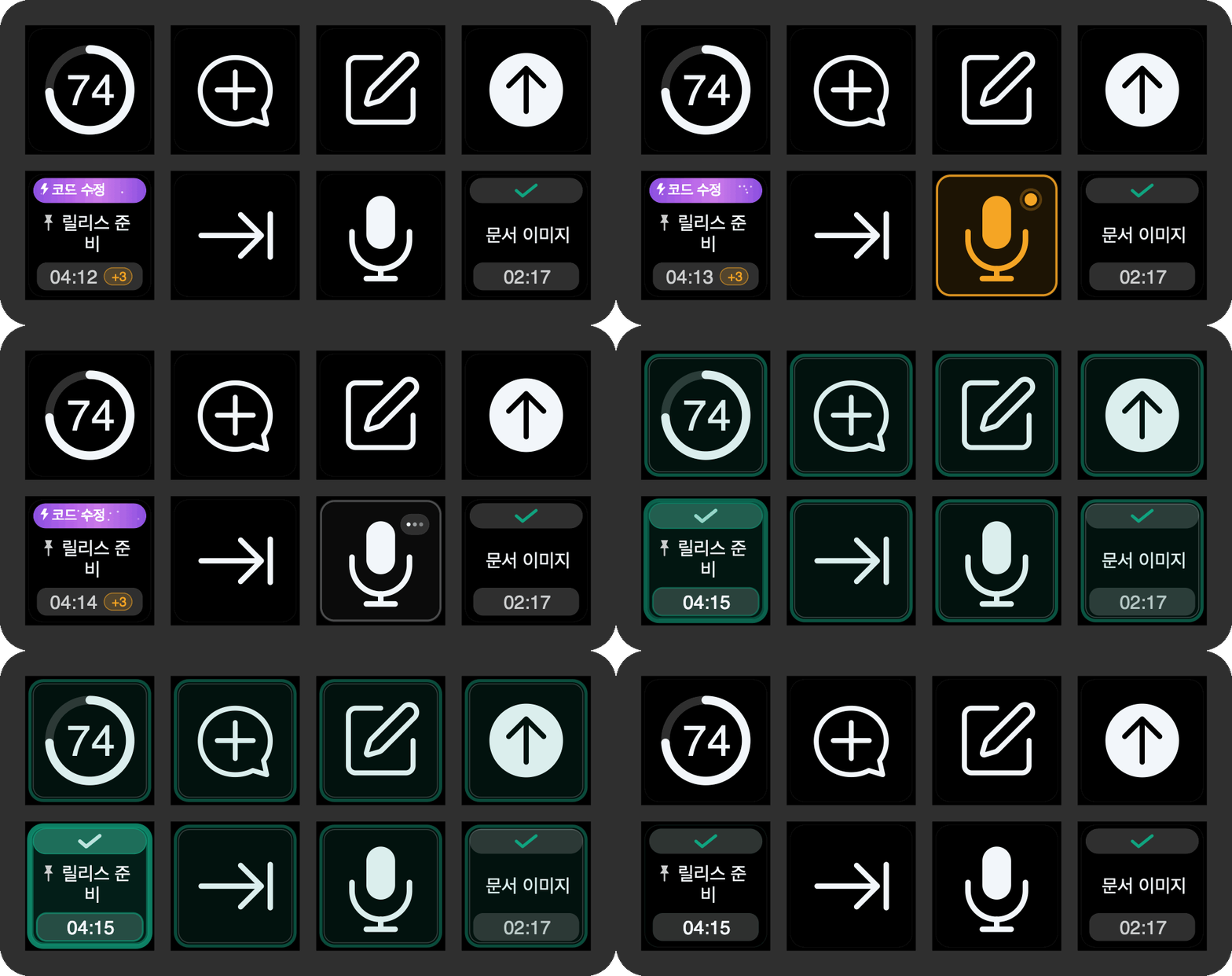
- 작업 버튼 음성 입력: 작업 버튼을 짧게 누르면 이동하고, 길게 누르면 해당 작업에서 음성 입력을 시작합니다. 버튼을 놓으면 받아쓰기를 기다린 뒤 일반 후속 요청으로 자동 제출합니다.
- 더 안정적인 완료 알림: 누락된 종료 시점, 대기 명령이 다음 순서로 넘어간 순간, 페이지 탐색을 포함한 모든 ThreadDeck 버튼에서 완료 펄스를 더 안정적으로 표시합니다.
- 사이드챗 수명 주기: 현재 Codex 세션의 사이드챗만 보여주고 닫은 사이드챗이 작업 목록에 다시 나타나는 현상을 줄였습니다.
- UI 개선: 다크·라이트 모드 대비, 글자·시간·한도 정렬, 대기열 배지, 탐색 아이콘, 음성 입력·완료 애니메이션을 다듬었습니다.
- 완전한 공개 소스: 최신 Node.js 플러그인, 범용 macOS 네이티브 헬퍼, Neo 프로필, 실제 렌더러, 이미지·GIF 생성 도구를 모두 MIT 라이선스로 공개합니다.
- 한국어 문서 전체 제공: 설치, 기능, 구조, 보안, 개인정보 보호, 기여, 지원, 문제 해결, 브랜드, 오픈소스 구성, 관련 프로젝트, 변경 기록을 한국어와 영어로 제공합니다.
설치
- 아래
com.yechan.threaddeck.streamDeckPlugin을 다운로드합니다. - 파일을 더블클릭해 Stream Deck에서 설치합니다.
- 포함된 ThreadDeck for Codex 프로필을 가져옵니다.
- 시스템 설정 → 개인정보 보호 및 보안 → 손쉬운 사용에서 Stream Deck을 허용합니다.
- 주간 한도 링을 쓰려면 CodexBar를 별도로 설치합니다.
English
ThreadDeck for Codex 0.2.0 publishes the latest physically tested Stream Deck Neo implementation as both source and an installable package.
Highlights
- Task-key dictation: short press navigates; hold to open that task and dictate, then release to wait for transcription and submit the ordinary follow-up.
- More reliable completion feedback: observation overlap, startup grace, queue-advance detection, and completion pulses across every ThreadDeck-owned action.
- Temporary Side Chat lifecycle: shows Side Chats from the live Codex session and suppresses chats after they close.
- UI polish: improved dark/light contrast, typography and timing alignment, queue badges, navigation icons, dictation states, and smoother completion animation.
- Complete public source: current Node.js plugin, universal macOS helper, Neo profile, renderer, and image/GIF generation tools under MIT.
- Bilingual documentation: full English and Korean installation, feature, architecture, privacy, contribution, support, troubleshooting, branding, open-source, related-work, and changelog documents.
Install
- Download
com.yechan.threaddeck.streamDeckPluginbelow. - Double-click it and approve installation in Stream Deck.
- Import the bundled ThreadDeck for Codex profile.
- Allow Stream Deck in System Settings → Privacy & Security → Accessibility.
- Install CodexBar separately only if you want the weekly quota ring.
Full English guide · Troubleshooting
SHA-256
4d60a9f5d41ef3243dcdbe0213929124d8e07f844dd6bc54adb31ed2a8e32297