STRUCTURE SUPREME
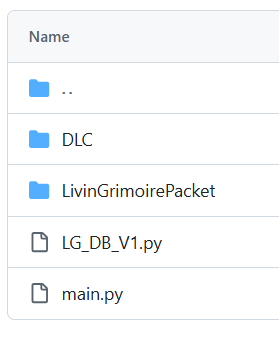
Structure Supreme is a project layout for LivinGrimoire built around dynamic dispatch: skills live in standalone .py files, grouped and loaded through DLC files, with zero manual wiring in main.py.
The layout has three parts:
-
main.py— the runner. Boots theBrain, starts the tick/brain/input threads, and callscall_add_DLC_skills(). Never touches individual skills directly. -
LivinGrimoirePacket/— the LivinGrimoire core itself. -
DLC/— a folder ofDLC_*.pyfiles, each one bundling a related group of skills and theadd_DLC_skills(brain)function that wires them into theBrain.
-
Skill bundling — related skills live together in one DLC file instead of being scattered across
main.py. ADLC_hardware.py,DLC_ear.py,DLC_logical.py, etc. keeps each concern in its own file.
Two separate paths to add or remove skills:
-
DLC files as config — adding or removing a skill is as simple as editing which
brain.add_*_skill(...)calls appear inside a DLC file'sadd_DLC_skills()function. No changes tomain.pyare ever needed. -
Drop-in installs — to hand someone a new capability, just give them the DLC file plus whatever skill
.pyfiles it depends on. They paste both into the project and the loader picks them up automatically on next run (and you can remove skills by removing their files also).
No coding required — this is for whoever just received a folder of skill files from someone and wants to turn them on or off. There are two ways to add skills, depending on whether the DLC file is already in your project or not.
If you were handed a brand-new capability — a DLC_*.py file plus the skill .py file(s) or directories it depends on:
- Paste the DLC file (e.g.
DLC_pills.py) into your project'sDLC/folder. - Paste the dependency skill file(s) or directories it needs (e.g.
pills.py) into theDLC/folder as well. - Run
main.py.call_add_DLC_skills()automatically scansDLC/, hot-loads everyDLC_*.pyfile it finds, and calls itsadd_DLC_skills(brain)— nothing to register by hand. - That's it — the skill is live. To disable it later, use Method 2 (comment out its line), or just delete the DLC file to remove it entirely.
If the skill is already listed inside one of your DLC_*.py files but is currently disabled, just comment or uncomment its line:
def add_DLC_skills(brain: Brain):
    brain.add_skill(PillAccelo(brain))
# brain.add_skill(PillSedate(brain)) # <- uncomment this line to turn it on- To turn a skill off, put a
#in front of itsbrain.add_skill(...)line. - To turn a skill on, remove the
#in front of it. - Save the file and run
main.pyagain — no other changes needed.
import threading
import time
import os
from queue import Queue
import sys
import importlib.util
from pathlib import Path

from LivinGrimoirePacket.LivinGrimoire import Brain


def get_resource_path(relative_path):
    """Get absolute path to resource, works for dev and PyInstaller."""
    if getattr(sys, 'frozen', False):
        base_path = Path(sys.executable).parent
    else:
        base_path = Path(__file__).parent
    return str(base_path / relative_path)


def call_add_DLC_skills(brain):
    """Dynamically load DLC scripts from DLC/ directory."""
    dlc_dir = get_resource_path("DLC")
    if not os.path.exists(dlc_dir):
        os.makedirs(dlc_dir)

    for file in os.listdir(dlc_dir):
        if file.endswith('.py') and file.startswith('DLC_'):
            module_name = file[:-3]
            file_path = os.path.join(dlc_dir, file)

            # Skip if not a valid Python file
            if not os.path.isfile(file_path):
                continue

            spec = importlib.util.spec_from_file_location(module_name, file_path)
            if spec is None or spec.loader is None:
                print(f"Invalid DLC module: {file}")
                continue

            module = importlib.util.module_from_spec(spec)
            sys.modules[module_name] = module
            spec.loader.exec_module(module)

            if hasattr(module, 'add_DLC_skills'):
                module.add_DLC_skills(brain)
                print(f"Loaded DLC: {file}")
            else:
                print(f"DLC module {file} missing add_DLC_skills function")


def brain_loop():
    while True:
        message = brain_queue.get()
        b1.think_default(message)


def input_loop():
    while True:
        user_input = input("> ")
        if user_input.strip().lower() == "exit":
            print("Exiting...")
            sys.exit(0)
        brain_queue.put(user_input)


def tick_loop():
    next_tick = time.monotonic()
    while True:
        now = time.monotonic()
        if now >= next_tick:
            brain_queue.put("")
            next_tick = now + b1.get_tick_interval()  # reads live from Brain
        time.sleep(0.01)


if __name__ == "__main__":
    b1 = Brain()
    brain_queue = Queue()

    call_add_DLC_skills(b1)

    threading.Thread(target=brain_loop, daemon=True).start()
    threading.Thread(target=tick_loop, daemon=True).start()
input_loop() # blocks main threadfrom DLC.pills import PillAccelo
from LivinGrimoirePacket.LivinGrimoire import Brain
def add_DLC_skills(brain: Brain):
brain.add_skill(PillAccelo(brain))
passThis is DLC_pills.py — a real bundle. PillAccelo is imported from DLC/pills.py (its dependency file), and add_DLC_skills(brain) adds it to the Brain. To disable it without deleting anything, comment out the brain.add_skill(PillAccelo(brain)) line — see Method 1 above.
DLC stands for Downloadable Content — the same idea as game DLC, applied to skills.