Structure Personality
The personality structure is a plug-and-play minimalist LivinGrimoire directory structure for programming languages that don't support dynamic dispatch (e.g. C#, Swift).
Paste in the livingrimoire packet directory, a DLC directory, and the main file.
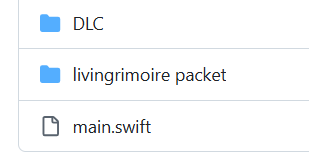
While in Structure Supreme a skill can be added by only copy-pasting files into the DLC directory, in the personality structure the only method is by editing the personality file.
-
Centralized skill overview — every active skill is listed in one
Personalityfile, so you can see the whole skill set at a glance instead of it being scattered across DLC files. -
Easy packaging — a complete set of skills can be handed off as a single
Personalityfile plus its skill files, ready to paste in as one unit. - No dynamic dispatch required — works in languages where runtime module loading/hot-plugging (as Structure Supreme relies on) isn't available or practical.
-
Paste in the skill files. Add the skill files (e.g.
DiHelloWorld,DiTime,DiSysOut) into theDLCdirectory. -
Open the
Personalityfile. This is the single centralized file that lists every skill the brain uses. -
Add a line per skill. Call
brain.AddSkill(new Di...())for each skill you want active, insidePersonality.LoadSkills(brain). -
To disable a skill, comment out or delete its line in the
Personalityfile — there's no separate config file to touch. -
Run the main file.
Personality.LoadSkills(brain)runs once at startup and wires every listed skill into theBrain— no runtime loading involved.
| Feature | Structure Personality | Structure Supreme |
|---|---|---|
| Skill Addition | Manual (edit personality) | Automatic (drop-in DLC files) |
| Centralized Skill Overview | ✅ Yes | ❌ No |
| Packaging Skills | ✅ Easy | |
| Language Compatibility | ✅ Works without dynamic dispatch (e.g. C#, Swift) | ❌ Requires dynamic dispatch |
| Runtime Skill Loading | ❌ Not supported | ✅ Hot-plugging via DLC |
using System;
using System.Threading;
using System.Threading.Tasks;

class Program
{
    static Brain brain = new Brain();

    static void Main(string[] args)
    {
        Personality.LoadSkills(brain);

        // Start tick loop in background
        Task.Run(() => TickLoop());

        // Start input loop
        BrainLoop();
    }

    static void BrainLoop()
    {
        while (true)
        {
            string message = Console.ReadLine() ?? "";
            brain.ThinkDefault(message);
            if (message.ToLower() == "exit")
            {
                Console.WriteLine("Exiting...");
                Environment.Exit(0);
            }
        }
    }

    static void TickLoop()
    {
        DateTime nextTick = DateTime.Now;
        while (true)
        {
            if (DateTime.Now >= nextTick)
            {
                Task.Run(() => brain.Think());
                nextTick = nextTick.AddSeconds(brain.getTickInterval());
            }
            Thread.Sleep(10);
        }
    }
}public class Personality
{
public static void LoadSkills(Brain brain)
{
brain.AddSkill(new DiHelloWorld());
brain.AddSkill(new DiTime());
brain.AddSkill(new DiSysOut());
// brain.Chained(new DiHelloWorld()).Chained(new DiTime()).Chained(new DiSysOut());
}
}