Extended CE: GitHub Synchronization
The GitHub synchronization feature allows you to link your Overleaf project to a GitHub repository, which acts as the remote repository for your project and provides a way to synchronize changes between the two. For details, refer to the Overleaf documentation.
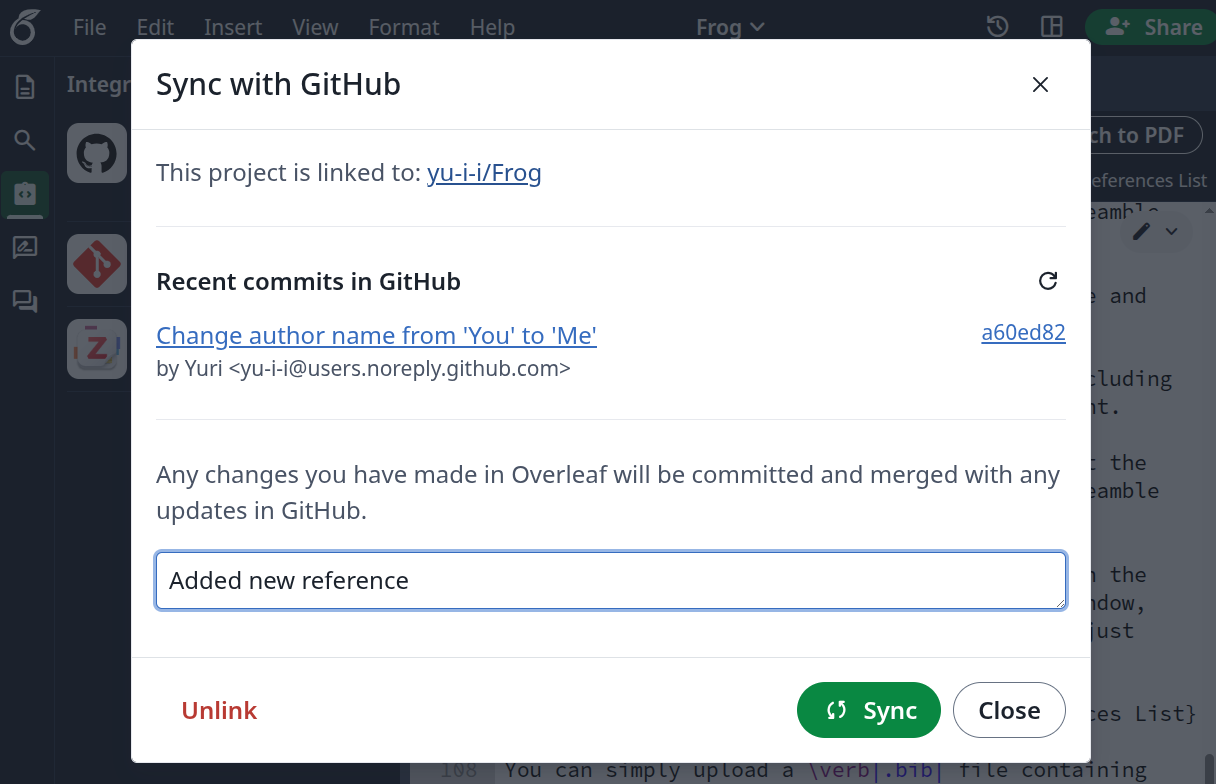
Please note that the implementation in CE+ differs from the official Overleaf implementation in several ways:
- There is no misleading distinction between Push and Pull, which effectively perform the same operation in the upstream implementation. CE+ provides a single Sync operation that performs a two-way merge.
- Synchronization is performed on behalf of the user who initiates it, so GitHub correctly attributes the created commits.
- Repositories that have been force-pushed are handled more reliably than in the upstream implementation, reducing the need for manual conflict resolution.
- A GitHub repository can be unlinked from a project and replaced with a different one.
To enable GitHub synchronization in CE+, the site administrator must first create a GitHub OAuth application.
During the application setup, configure the Authorization callback URL as follows:
https://your.overleaf.site/user/github-sync/oauth2/callback
Replace https://your.overleaf.site with the value of OVERLEAF_SITE_URL.
For step-by-step instructions on creating an OAuth application, see the GitHub documentation.
After creating the OAuth application, configure the following environment variables:
GITHUB_SYNC_ENABLED=true
GITHUB_SYNC_CLIENT_ID=xxxxxxxxxxxxxxxxxxxx
GITHUB_SYNC_CLIENT_SECRET=xxxxxxxxxxxxxxxxxxxxxxxxxxxxxxxxxxxxxxxx
The Client ID and Client Secret are provided when the OAuth application is created.
GitHub authorization tokens are stored in MongoDB in encrypted form. By default, a random encryption password is generated on the first startup and stored in the following file:
/var/lib/overleaf/data/.token-cipher.json
Note: This file is also used by default to store the encryption password for Zotero authorization tokens.
Once this file has been created, keep it safe and do not delete it. Otherwise, all users whose authorization tokens were encrypted with the password stored in this file will need to reconnect their GitHub accounts.
If necessary, you can create this file manually. It has the following format:
{
  "cipherLabel": "OL_CEP-v3",
  "cipherPasswords": {
    "OL_CEP-v3": "xxxxxxxxxxxxxxxxxxxxxxxxxxxxxxxxxxxxxxxxxxxx",
    "2026.7-v3": "yyyyyyyyyyyyyyyyyyyyyyyyyyyyyyyyyyyyyyyyyyyy"
  }
}
In most cases, a single password is sufficient.
The cipherLabel field specifies which entry from cipherPasswords is used to encrypt newly created tokens. The label format is almost arbitrary: it must not contain a colon (:), and it must end with the suffix -v3.
You can change the default location of the file using environment variables:
-
GITHUB_TOKEN_CIPHER_FILEorTOKEN_CIPHER_FILE- Specifies the location of the password file. If both are defined,
GITHUB_TOKEN_CIPHER_FILEtakes precedence.
- Specifies the location of the password file. If both are defined,
Example:
GITHUB_TOKEN_CIPHER_FILE=/var/lib/overleaf/data/.github-token-cipher.jsonAlternatively, you can define the encryption password directly using environment variables instead of a file:
-
GITHUB_TOKEN_CIPHER_PASSWORDorTOKEN_CIPHER_PASSWORD- Specifies the encryption password. If both are defined,
GITHUB_TOKEN_CIPHER_PASSWORDtakes precedence. - If either of these variables is defined, the password file is ignored.
- Specifies the encryption password. If both are defined,
-
GITHUB_TOKEN_CIPHER_LABELorTOKEN_CIPHER_LABEL- Specifies the label associated with the encryption password. If both are defined,
GITHUB_TOKEN_CIPHER_LABELtakes precedence. - Defaults to
OL_CEP-v3.
- Specifies the label associated with the encryption password. If both are defined,
At the moment, GitHub synchronization in Overleaf CE+ has the following known limitations:
-
If a repository is very large or contains too many files, operations may fail because of Overleaf restrictions, timeouts or GitHub rate limits ("Too Many Requests"). In such cases, the user receives only a generic server error without any additional explanation.
-
The upstream implementation rejects repositories containing symbolic links. The CE+ implementation allows such repositories to be synchronized. Since Overleaf does not support symbolic links, each symbolic link is imported as a regular file. If that file is later modified in Overleaf and synchronized back to GitHub, the original symbolic link is replaced with a regular file.
-
Files linked into Overleaf from external sources (for example, external URLs or Zotero) become regular read-only files if they are modified in GitHub. This behavior is inherited from the upstream implementation.