Repository navigation
Releases: zenithblue-oss/fluxlinux
Release list
FluxLinux v2.0.1

What's Changed
Features
- Terminal starts faster; PRoot sessions launch directly (no proot-distro Python), chroot prep runs off the UI thread
- Shared storage access in guests (all-files access) and a new onboarding page (#48, #29)
- Disable the Android phantom-process killer via Shizuku, root or adb (#41)
- Auto-install Mesa Turnip on Adreno and PanVK on MediaTek Mali v10+ (with fallback and retry)
- KDE runs on the built-in X11 server; compositing and effects off by default; opt-in zink GL on Turnip/PanVK
- One-time notice that v1.x Termux distros were not removed on upgrade (#37)
Bug Fixes
- Crash on foreground-service notifications (monochrome small icon) (#42, #46)
- Chromium/Electron typing in X11 (#45)
- Host env and paths refresh after an app update and on app start
- Desktop waits for the X socket; stale running-desktop state is cleared
- KDE on PanVK no longer exhausts RAM
- UI contrast in dark/light themes, unified top bars, correct GPU tag in the distro picker
Build / F-Droid
- All native code (host packages, loader.apk, guest helpers, terminal-emulator, libXlorie) is built from source without Docker
- All native libraries are 16 KB page aligned
- Reproducible release: the APK is built from the tagged commit with the F-Droid recipe (
com.ivarna.fluxlinux.yml) and signed with the release key
v2.0.0

FluxLinux v2.0.0 Release Notes
1. Embedded host (no external Termux)
FluxLinux now ships its own Termux-prefix host inside the app. External Termux and Termux:X11 APKs are no longer required.
- Host bootstrap (
bash,proot, Pulse) forcom.ivarna.fluxlinux - First-run host setup with F-Droid opt-in consent
- Settings → Legacy Termux for leftover PRoot trees still living in the old Termux app (≤ v1.8.0)
2. Embedded X11
The X11 display is the in-app Termux:X11 activity. libXlorie.so is compiled from source (NDK 29 + CMake, vendored lorie tree + 16 submodules).
- Java
LorieViewmatches the native per-instance JNI (nativeInit()J) so the display opens without crashing
3. Multi-distro catalog
Twelve guests, PRoot and Chroot, downloaded on demand from the GitHub rootfs release (SHA256-gated). Nothing is baked into the APK.
- Debian, Alpine, Fedora, Void, openSUSE, Deepin, Chimera, Manjaro, Ubuntu, Kali, Parrot, Arch Linux
- Settings → PRoot / Chroot storage: list, size, stop
- Universal guest login shell (bash / zsh)
4. Host PulseAudio
Pulse runs as the Android app uid (no root). Guests are TCP clients on 127.0.0.1 only.
- AAudio sink with SLES fallback
- W^X-safe exec of
libpulseaudio.so/libpactl.sofromnativeLibraryDir(targetSdk 36)
5. Chroot without a BusyBox NDK module
Chroot uses Magisk / KernelSU / APatch BusyBox already on the device.
- Fedora chroot flux login via staged
setuidgid(Android busybox has nochroot --userspec)
6. F-Droid 2.0.0 recipe
- Flavor
ivarnaonly (gradle: [ivarna]) libXlorie.sobuilt onbuildserver-trixie; host W^X bins stay documented Termux-docker prebuilts +scanignore- Lint and scanner green;
assembleIvarnaReleaseproven on the F-Droid image
Migration Notes
External Termux is optional. Distro rootfs is no longer in the APK — first install of a distro downloads it from the rootfs tag (opt-in). Leftover v1.8.0 containers in Termux are managed from Settings → Legacy Termux.
Known Issues
- Optional guest stacks (Kali/Parrot extras, SDK/NDK zips) may be flagged
NonFreeAdd/TetheredNeton F-Droid. Disclose, do not hide.
v1.8.0
FluxLinux v1.8.0 Release Notes
1. Uninstall Option for Feature Packages (T1)
Users can now cleanly remove installed feature packages without re-running scripts or wiping the distro:
- Uninstall button on each component card in Distro Settings
- 13 component scripts updated with
uninstallbranch that removes packages, cleanup wrappers, .desktop files, venvs, and reverts shell config changes - Confirmation dialog before uninstall with size estimate
- State management: component marked as not-installed only on successful completion
- Hidden for: mandatory components, coming-soon components, and XFCE4 Desktop (uses base-install script)
2. Foreground Service for Install Server (T3)
Android's background process killer no longer breaks the install bridge:
- InstallServerService: new foreground service hosts the local HTTP install server
- Persistent notification keeps the process alive when the app is backgrounded
- 5-minute idle timer for base-install path (matches previous behavior)
- Auto-stop when install queue drains or user cancels
- Port discovery: activity awaits on a StateFlow for the bound port
3. Termux Version Warning Banner (T4)
New users with outdated Play Store Termux now see a prominent warning:
- Top-of-screen banner when installed Termux < v0.118.3
- Inline warning on the Termux prerequisite card with download button
- Continue button disabled until correct version is installed
- SHA256 verification on downloaded APKs with corrupt APK redownload option
4. Monochrome Themed Icon (T6)
- Single-color vector monochrome layer added to adaptive icon
- Material You / Dynamic Color support on Android 13+
- Themed icons now work on supported launchers
5. Termux Native Desktop Support (T9, T10, T11)
Termux Native is now fully enabled (no longer "coming soon"):
- XFCE4 Desktop: native XFCE4 via Termux:X11 — no container overhead
- KDE Plasma Desktop: full KDE running natively in Termux
- Hardware Acceleration: VirGL & Turnip GPU drivers for native acceleration
- Customization: FluxLinux theme, wallpapers, and fonts for both DEs
- KDE launch fixes: proper Turnip/Software renderer detection, dark splash screen in dark theme
6. Script Restructure (Refactoring)
Scripts reorganized into a per-distro hierarchy for clarity:
common/→debian/common/setup/,debian/common/addon/, etc.termux/— native Termux scriptsarch/— Arch-based distro scripts- setup/start/stop/addon sub-folders within each distro
7. Build & Quality Improvements
- Concurrent install prevention (T2): verified already implemented — queue-based install manager
- Exit code propagation: all install paths now capture script exit codes and fire success/error callbacks
- Deep link callback fix: strict task ID matching prevents stale callback attribution
- Dark mode forced: theme picker removed, app now permanently dark
- Discord card + tutorial docs added to Settings screen
- Version string updated: Settings now shows v1.8.0 • Jun 17, 2026
Migration Notes
No breaking changes. No migration required.
Known Issues
cancelledByUsernotification state not reset on new enqueue (cosmetic, tracked as T12)
Flux Linux v1.7
Flux Linux v1.7 Release Notes
1. KDE GPU Renderer Picker
A new GPU renderer selection dialog has been added for KDE Plasma launches:
- Turnip (Adreno Vulkan): Launches KDE using the Turnip Vulkan driver via Zink — best performance on Snapdragon devices with Adreno 6xx/7xx/8xx GPUs.
- Software Rendering (LLVMpipe): Launches KDE with CPU-only software rendering — compatible with all devices, including those where GPU drivers cause black screens.
- Removed VirGL: The VirGL option has been dropped due to persistent black screen issues that could not be reliably resolved.
- XDG_RUNTIME_DIR Fix: Fixed a long-standing ownership conflict (
uid 1000vs Termux uid) that caused dbus and KDE session failures. - Forced Compositor Disable:
kwinrccompositing is now force-disabled on every KDE launch to prevent rendering regressions.
2. AI / LLM Support — Vulkan llama.cpp + Qwen2.5-1.5B
Local AI inference is now available inside the Linux environment:
- Vulkan llama.cpp: Installs
llama.cppcompiled with Vulkan GPU backend, enabling hardware-accelerated inference on Adreno GPUs via Turnip. - Qwen2.5-1.5B Model: Downloads the
Qwen2.5-1.5B-InstructGGUF model (~938 MB) with integrity verification. - Auto-detection: Launch script automatically detects available CPU/GPU and falls back gracefully if Vulkan is unavailable.
- Home Screen Integration: A "Run Qwen2.5-1.5B" button is available directly from the distro launch dialog.
3. Onboarding Improvements
- In-App APK Downloads: Step 1 of onboarding now downloads Termux and Termux:X11 APKs directly within the app, with a progress bar, and installs them via
FileProvider— no need to navigate to a browser. - Auto-cleanup: Downloaded APK files are automatically removed after installation.
- Termux X11 Detection Fix: Improved detection logic for Termux:X11 — resolves issue #5 where the app failed to detect X11 even after correct installation.
- F-Droid Termux Notice: Added a check and user-facing message to inform users that FluxLinux only supports the F-Droid version of Termux, not Play Store builds — addresses issue #3.
4. Themed Icon Support
- Monochrome Adaptive Icon: Added a monochrome layer to the adaptive icon, enabling proper themed icon support on Android 13+ (Material You / Dynamic Color).
5. Build & F-Droid Reproducibility
- AGP Downgrade to 8.7.3: Downgraded Android Gradle Plugin from 8.13.2 to 8.7.3 to fix F-Droid reproducible build failures caused by DEX binary mismatches between local and F-Droid build server toolchains.
- Explicit F-Droid Build Entry: Added a Builds entry for
versionCode 8(v1.6) in the F-Droid metadata YAML — F-Droid requires an explicit entry per published version. - Corrected Signing Keys: Fixed
AllowedAPKSigningKeysin F-Droid metadata to match the actualfluxlinux.jkscertificate fingerprint.
FluxLinux v1.6
XFCE4 Compositing Fix (v1.6)
Fixes:
- XFCE4 window decorations now load correctly (disabled compositing in xfwm4)
- Matches KDE fix - both desktop environments now have compositing disabled for better compatibility
Full Changelog: v1.5...v1.6
FluxLinux v1.5
KDE Plasma Desktop & Zsh Optimizations (v1.5)
New:
- KDE Plasma 6 desktop environment - full install via kde-standard metapackage
- KDE launch/stop buttons on home screen (moved from settings)
- Re-install/re-configure options for XFCE4 and KDE in settings
- Correct Stop button - stops the right DE (XFCE4 or KDE) based on what is running
Fixes:
- KDE window decorations now load correctly (disabled OpenGL compositing in kwinrc)
- KDE customization script no longer fails on qt5-style-plugins
- KDE stop script now uses correct Plasma 6 process names
- PulseAudio properly integrated in KDE (TCP loopback, same as XFCE4)
Performance:
- Zsh startup 96% faster (removed zsh-autocomplete plugin)
- Fastfetch + pokemon-colorscripts backgrounded on shell start
- Disabled zsh update prompts and compfix checks
Full Changelog: v1.3...v1.5
v1.4
Flux Linux v1.4 Release Notes
1. Advanced GPU Acceleration (Turnip/Zink drivers)
A significant focus was placed on improving GPU acceleration, particularly for snapdragon devices:
- Major Driver Update: Switched to
lfdevs/mesa-for-android-containerTurnip drivers with KGSL support, enabling compatibility with the newest Adreno 8xx GPUs. - Improved Exisiting Support: Updated the Turnip driver to
v26.0.0to drastically improve support for Adreno 7xx and 8xx series GPUs. - Hardware Acceleration fixes: Added the
MESA_VK_WSI_DEBUG=swflag for Turnip inside PRoot environments and created a/dev/dricompatibility layer forvkmarkbenchmarking. - Compositor Fixes: Disabled the XFCE4 compositor directly via
xfwm4.xmlto ensure Turnip compatibility and prevent visual glitches or crashes.
2. HyperOS Compatibility Enhancements
- Implemented specific fixes for Termux X11 compatibility specifically tailored for Xiaomi's HyperOS, resolving socket access bugs and freezing issues.
3. Core Functionality & Environments
- Root Terminal: Added support for launching a direct root terminal.
- Development Setup Fixes: Fixed issues with Java installations inside the chroot environment and cleaned up the NodeSource repository scripts.
FluxLinux v1.3
Release v1.3 - F-Droid compliant build
FluxLinux v1.2 - BusyBox & Policy Update

FluxLinux v1.2 - BusyBox & Policy Update
Run full Linux desktop environments on your Android device
This release addresses Google Play Policy Compliance regarding Accessibility Services and introduces a major feature for Rooted Users to simplify Chroot environment setup. We have also refined the UI permissions flow for a smoother onboarding experience.
🚀 What's New in v1.2
| Category | Features |
|---|---|
| Compliance | • Accessibility Disclosure: Added prominent, compliant disclosure for Accessibility Service usage (Step 8) • Privacy: Explicitly declared no data collection for navigation services |
| Root Support | • New BusyBox Step: Automatically detects root and guides users to install the required BusyBox NDK module • Direct Download: One-click download for osm0sis BusyBox module• Smart Skip: Non-rooted users can safely skip this step |
| UI / UX | • Visual Refinements: Updated permission cards to use secondary theme colors for better visibility• Bug Fixes: Corrected duplicate step numbering in the setup wizard (Steps 6-11) |
📸 Visual Updates
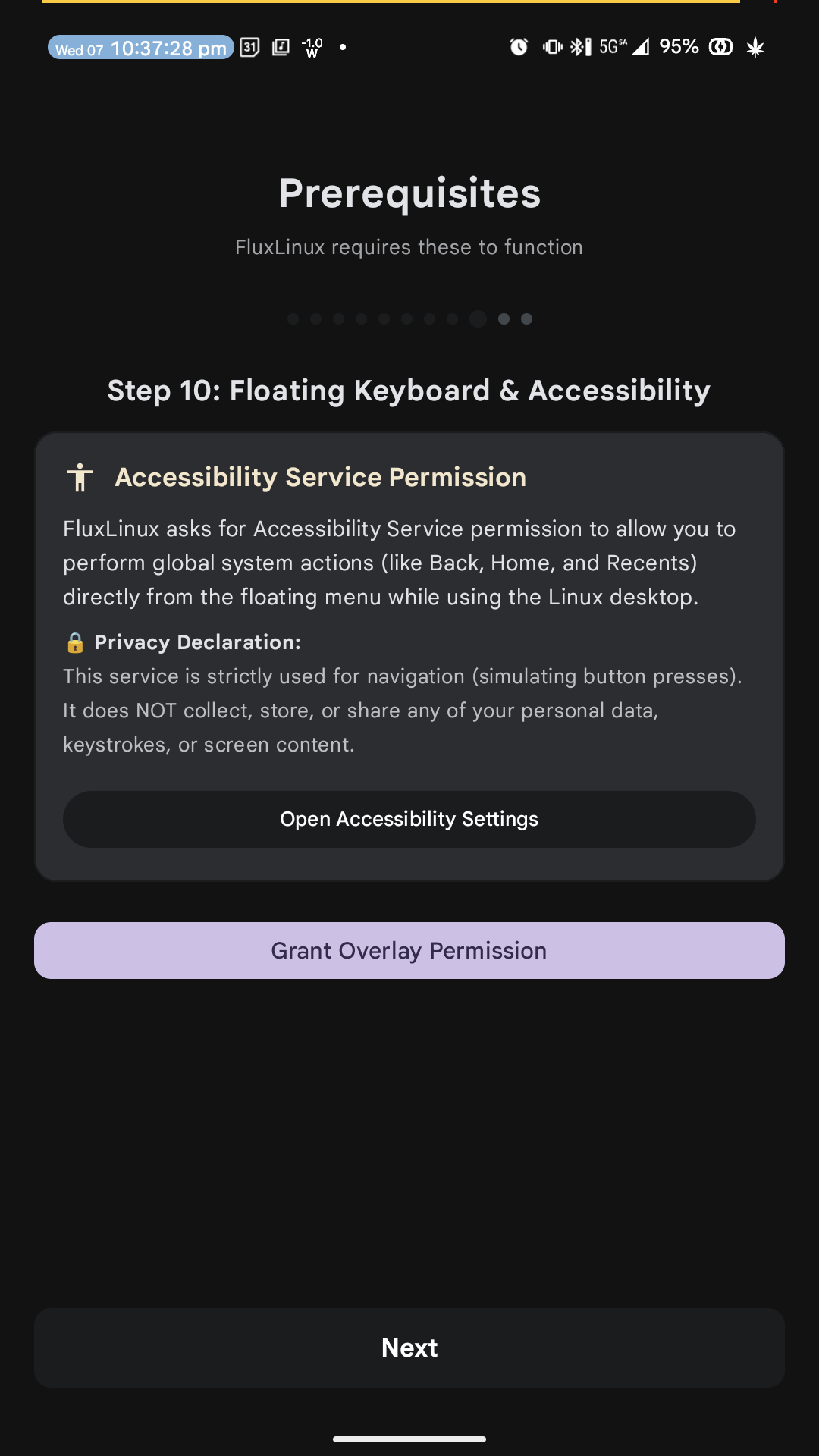 Accessibility Disclosure |
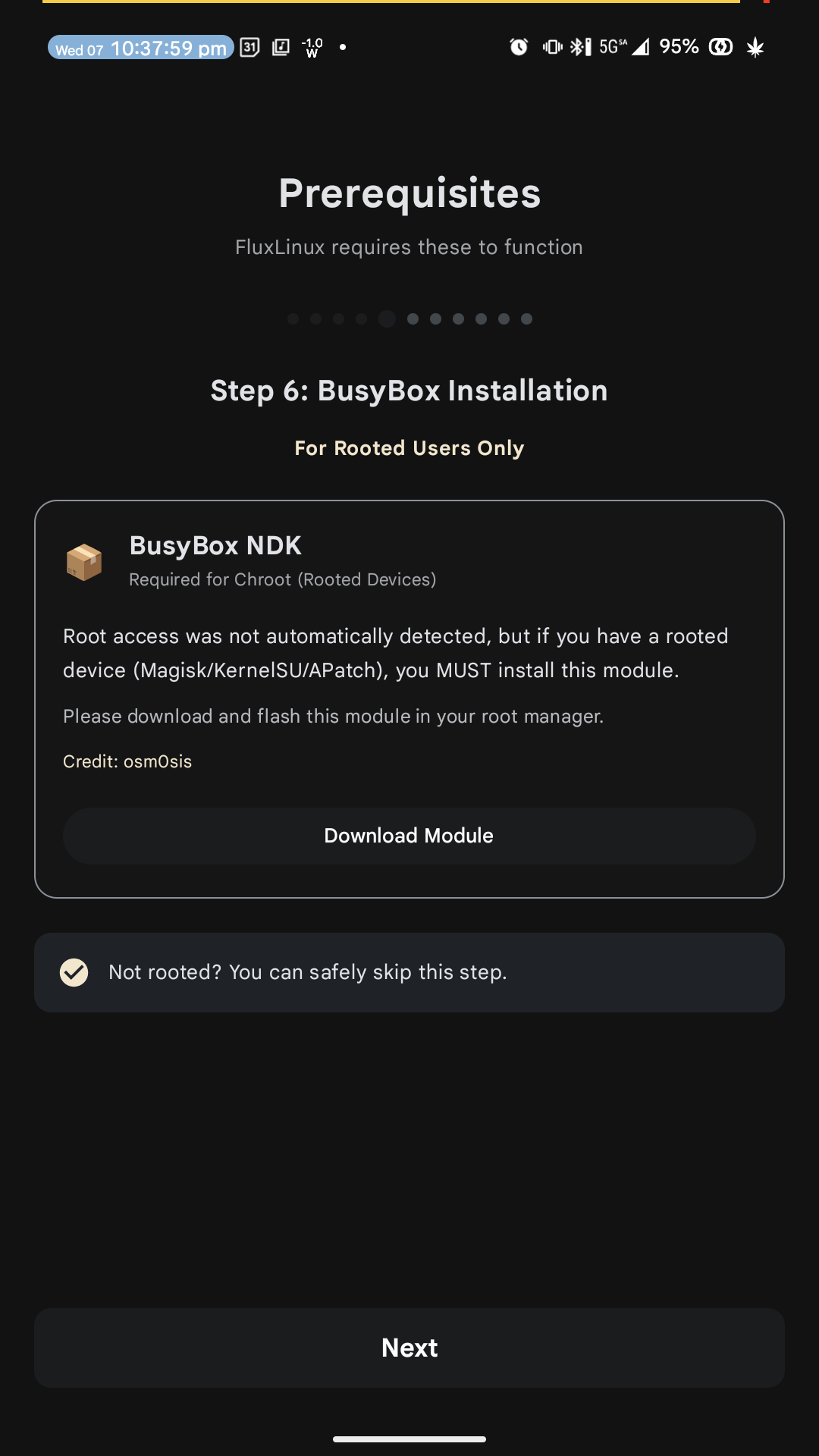 BusyBox Installation |
🛠️ Key Changes
- Version: Bumped to v1.2 (Code: 3)
- New Feature: BusyBox Installation Step (Root Only logic)
- Policy: Added
AccessibilityServiceusage disclosure - Refactor: Renumbered
PrerequisitesScreensteps for consistency
📦 Installation
- Uninstall any previous version if you have signature conflicts (otherwise update).
- Download and install
app-release.apk. - Follow the setup wizard; rooted users should see the new BusyBox step.
📝 Notes
- BusyBox: If you are rooted, installing the NDK module is highly recommended for full Linux compatibility.
- Accessibility: The service is used only for global Back/Home/Recents actions from the floating menu.
v1.1 - Policy Compliance Update
FluxLinux v1.1 - Policy Compliance Update
Run full Linux desktop environments on your Android device
This release focuses on Google Play Policy Compliance and stability improvements. We have refactored the application to better handle package installations and permissions, ensuring a safer and more transparent experience for all users.
🚀 What's New in v1.1
| Category | Features |
|---|---|
| Compliance | • Removed restricted permissions (REQUEST_INSTALL_PACKAGES, QUERY_ALL_PACKAGES, PACKAGE_USAGE_STATS)• Deleted automatic APK installer mechanism • Dependencies (Termux) are now downloaded via browser for transparency |
| Privacy | • Added comprehensive Privacy Policy • Removed all analytics and tracking code • Confirmed zero personal data collection |
| UI / UX | • Step 5 & 6 Layout Fixes: Resolved button overlap issues on smaller screens (Process Killer Fix & System Check) • Visual Updates: Updated primary/secondary button colors for better readability • Version Info: Updated settings screen with accurate version tracking |
| Stability | • Fixed syntax errors in state management • Improved Termux connection troubleshooting • Updated dependency links to latest stable releases |
🛠️ Key Changes
- Target SDK: Updated to Android 16 (API 36)
- Dependencies: Bumps
androidx.core:core-ktxand Compose BOM - Removed Features: In-app APK installer (replaced with deep links)
📦 Installation
- Uninstall any previous version of FluxLinux (due to signature change).
- Download and install
app-release.apk. - Follow the expanded Prerequisites wizard to setup Termux.
📝 Notes
- Ensure you have Termux and Termux:X11 installed. The app will guide you to their download pages.
- For Android 12+ users, follow the "Process Killer Fix" steps carefully.