Repository navigation
Releases: 0x64616e6e/draftpaper
Release list
Draftpaper 0.7.5

A desktop that costs almost nothing while you are not using it. Idle on two displays, the compositor
went from about 5% of a core to 0.15% and from 67 wakeups a second to 4; the readings stopped starting
four programs every five seconds. Nothing about the sheet changed: this release is all measurement and
what it found.
- The compositor draws only when something may have changed. After a frame in which nothing had
changed it looked again a refresh later, and again, forever: element lists built and compared 60 times
a second for each display, frame callbacks sent each time, the GPU woken. With nothing moving that was
about 5% of a core. Now a display whose frame did not change goes idle, and every source that can
change the picture — a client, input, an IPC request, a display coming or going, the session, Xwayland,
config.toml, a signal, a key held down — wakes it again, never sooner than a refresh after its last
frame, so a client asking for frame after frame still gets the display's rate and no more. Idle, a
display looks again once a second as a safety net. - What the compositor tells the shell is built only when something may have changed. After every turn
of its event loop it built the displays, the workspaces and the windows as JSON and compared each with
what it last sent — after every frame drawn or retried as well, a sixth of an idle compositor's time. - The readings ask the daemons themselves.
draftpaper readings, which the shell runs every five
seconds, startedbluetoothctl,busctlandnmclitwice to ask three daemons three questions: four
processes thrown away each time, about 35 ms of a core, and invisible in the shell's own figures
because they were its grandchildren. All three answer on D-Bus, so one system bus connection now asks
BlueZ for the devices connected, power-profiles-daemon for the profile (under either of its names) and
NetworkManager for the access point and the wired address. 35 ms a run became 6 ms, and about 69,000
processes a day became none. Without a daemon, or without a system bus at all, the reading is left out
as it was when the program was missing, and the sensors are never held up by one that does not answer. - A schedule's and the graph's window is made when it is called up, and let go 20 s after it goes.
Each is a window of its own with its scene graph and its drawing context on the GPU, some 25 MB a
screen, and they were all made with the shell whether or not they were ever shown. A sheet whose
schedules and graph stay away now pays nothing for them, and in use the shell holds about 20 MB less
over two displays. - An idle desktop is tested.
compositor/tests/idle.sh(part ofmake pixels) puts the shell on two
displays of different scales and checks that each draws only the frames something changed, that the
compositor stays under 1.5% of a core and 20 wakeups a second, and that a workspace switch is still
drawn within 0.3 s.draftpaper-compositor msg framescounts the frames drawn with a change, per
display. - A plan for the sheet's own client (
docs/sheet-client.md): the margins and the title block drawn by
a small Rust client into shared memory instead of Quickshell, which costs about 40 MB and 26 threads a
display for lettering that changes a few times a second. Measured, staged and costed; nothing built.
Two cheaper ways out were tried and turned down — software rendering (two and a half times the CPU on
every repaint) and one render thread (the title block's lettering crossed the frame's line at scale
1.25).
Draftpaper 0.7.4
The network and the disks on the graph, the graph beside the title block on every display, and Firefox's
menus on the 4K display.
- Firefox's menus open again on a display whose window's shadow reaches the display beside it (Firefox at
the left margin of the 4K display, next to the panel): they were kept inside the panel, where the window
is not drawn, and never showed. - The network's and the disks' throughput on the graph, over the same year: a click on NETWORK in the
title block shows received and sent, a click on STORAGE in the equipment schedule read and written, on a
logarithmic scale from 1 kB/s (bytes to gigabytes a second). Counted on the machine's own interfaces and
disks only (not lo, bridges, VPN tunnels, containers, partitions or zvols). A store kept by 0.7.3 goes on. - A schedule's row can do something: tinted under the pointer, clicked without dragging the schedule.
- The graph's place is worked out on each display, as the title block's is: level with the title block
(its top line to the frame's) and across from the frame's left line to it, 6 mm clear of either. It is no
longer dragged, and[sheet] load_atand the settings' GRAPH pages are gone: a place set in millimetres
put it mid-sheet, across two rows of zones, on the 4K display. A schedule placed above it keeps its rows
above it.
Draftpaper 0.7.3
A year of readings on the graph.
- A year of readings on the graph, on a logarithmic time scale: now at the right, then the last 5 minutes,
the hour, the day, the week, the month and the year, each period ticked and named.draftpaper metrics keep(draftpaper-metrics.service, part of the session) samples every 5 s into six periods of fixed slots
(5 s, a minute, a quarter hour, an hour, a quarter day, a day): each slot keeps its count, sum, least
and most, so the year is some 870 slots a reading. One line through all the periods, the bold reading's
least to most a band under it, broken where nothing was kept. The file is in the runtime directory,
kept on disk every 5 minutes;draftpaper metricsprints it. The shell no longer samples on its own.
Draftpaper 0.7.2
The graph within its zone, notes that show where they fit, and a quieter shell.
- The graph is no taller than a zone of the sheet (it could reach 72 mm and looked stretched), and by
default fills the bottom row of zones, from its top line to the frame's: within its zone. - The shell reads the memory, the CPU line and the backlight in place, and the network comes with
draftpaper readings: nosh,nmcli,grep,awk,iporheadstarted every second or two. - A graph or schedule placed where it does not fit on a display (a place dragged to on a larger one)
shows where it fits instead of not at all: the graph on the panel stayed away.
Draftpaper 0.7.1
The revisions in the title block's column, the schedules off the frame, and draftpaper apply quiet when
nothing changed.
- The revisions take their turn in the title block's column with the schedule of equipment and the
process schedule (Mod+i: equipment, processes, revisions, none), drawn as they are, as many commits
as fit (up to 30); with[title] revisions = truethey come by themselves when nothing else is
chosen. Nothing is drawn above the title block any more. - The schedules sit 6 mm in from the frame's top and right lines (they sat on them), with no margin of
their own; one with more rows than fit fills the column, its last row 6 mm above the title block, as
the plotted load keeps from it (the millimetres left over go to its heading). draftpaper applyreloads an application (tmux, Alacritty, Neovim, Emacs, X, GTK's settings) only when
its theme file changed, each file written once with [text]'s fonts in it: an apply that changes
nothing redraws nothing (tmux was re-sourced, and Alacritty reloaded around it, on every one).
Draftpaper 0.7.0
One settings tool for the whole desktop, the machine and its load drawn on the sheet, colour correction,
and everything on the sheet on one millimetre grid.
- Settings (#36). The settings (Mod+t) gain Displays, Text, Sheet, Rulers, Session, Input and
Idle · lock pages, each a list of config.toml's keys with their values to pick. A pick shows at once;
Enter keeps it, Escape puts config.toml back as it was. The Displays page draws the displays as
arranged, to scale, and sets each one's scale and which side of the one before it it sits. The Text
page sets one interface face and one monospace face with their sizes for GTK, Qt, the terminals, Emacs
and the sheet's lettering ([text]), each size with its x-height and the angle it makes at the
viewing distance, lettered red below the legibility target.draftpaper config set table.key=value
writes any key, the file's comments and order kept (quoted names too:outputs."ASUS MB166C".scale=1);
draftpaper config jsonreads them. - A display's settings follow it.
[outputs."ASUS MB166C"], by its model, before[outputs.DP-3],
by its port; a key taken out puts the display back as plugged in. - The schedules and the graph (#49). Mod+i (
draftpaper schedule next) brings a schedule of
equipment (machine, processor, graphics, memory, storage, system, each display, the sheet:draftpaper machine), then a process schedule (draftpaper processes: the busiest programs, each one's processes
counted as one, its share of a processor ruled as a bar), then neither, fading in and out in the title
block's column from the top of the frame; PROJECT and a new PROCESSES cell in the title block bring
them too. A click on a reading's cell (CPU / memory, temperature and fan, power, battery) shows its
last ten minutes on millimetre squares that fade out, each line lettered with its name and value. All
part of the sheet: no outline or panel; over a wallpaper on the paper's halo. A zone ([sheet] schedule_at,load_at) or a drag moves them, a whole millimetre at a time. - Colour correction (#50).
[outputs."<model>"] icc = "profile.icc"loads an ICC profile's
calibration curves (vcgt) into the display's gamma table, as xcalib does on X11; and wlr-gamma-control,
so gammastep and wlsunset work (a tool's ramps while it runs, the profile's again when it quits).
draftpaper-compositor msg gamma. - One millimetre grid. A design invariant, in docs/wayland-design.md: everything on the sheet sits at
whole millimetres from the frame's corner, then on whole pixels. The sheet's 5 mm dots are counted from
the frame's corner, each on its nearest pixel (they drifted a millimetre across a 5.6 px/mm display);
the rulers' zero too (it was 2 pixels off) and each of their ticks on its pixel, so a level ruler's
ticks fall on the dots.make pixelschecks every dot and tick on its pixel. - Rulers.
[rulers]: the steps, turns, numbered edges, centre line, width and pointer hold. - Two displays at different scales. A window whose shadow reaches over onto the other display
(Firefox at the left margin of a 4K display beside the panel) is told only its own display's scale and
drawn only there: it flickered and was drawn whole on the other. - The pointer comes along on a workspace switch to another display, so the focus stays there.
- A clickable cell of the title block takes the click over the whole of it and shows a tint under the
pointer. Hatching can be set in config.toml's[sheet], over the theme's. - For scripts and tests:
draftpaper-compositor msg button left down|up; headless displays take their
models from DRAFTPAPER_MODELS.
Draftpaper 0.6.0
The sheet keeps a drawing's conventions, and gets rulers to measure and draw by.
- Rulers (Mod+r): a horizontal and a vertical ruler, frame line to frame line, crossing at a point that slides anywhere on the sheet, one piece where they cross. Both edges graduated in true millimetres, numbered by one (the top, the right), counted both ways from each ruler's own sliding zero. The crossing and the zeros move 1 mm (10 with Shift); a ruler turns 1° (15°), freely or locked to the other at any angle, its degrees shown; angles can be typed in the panel. While they are out, the pointer is held to their millimetres at any angle, so what you draw lands on them.
- A scale bar in the bottom margin, true to size on each screen: a ruler held to the screen reads the same. NTS on a display that reports no size.
- A revision block above the title block: the latest commits of the git repository the focused window works in. Off by default (
[title] revisions = true). - Hatching for parked windows' cells, broken around their lettering.
- A key plan with several screens: their outlines as arranged, this one filled, the focused one heavier, and a north mark with the arm toward each other screen thickened.
- A website, https://draftpaper.este.systems/, with a theme generator and a wallpaper generator.
- Under the hood: the headless test backend drives several outputs;
makealways rebuilds what changed; toml 1.1 and png 0.18.
Install (Debian 13, amd64; Quickshell from trixie-backports):
sudo apt install -t trixie-backports quickshell ./draftpaper_0.6.0_amd64.deb
Draftpaper 0.5.1
A security fix. Everyone on 0.5.0 who uses tmux should update.
- Security (#41): tmux restore no longer types control characters. A program saved in a tmux pane is typed back into its shell when the tmux server starts. A file name holding control characters (Ctrl+C, Enter), opened in
less,nvimor the like inside tmux, could run a command of its own at that moment. A word with a control character is no longer typed: the pane gets its shell alone. - The login screen's fingerprint glyph lights up while the reader listens. It stayed faint: Qt 6.8's curve renderer does not repaint a stroke colour changed after the first frame.
- The dependencies are audited against the RustSec advisories on every change and weekly, and SECURITY.md says how to report a vulnerability privately (Security → Report a vulnerability).
- The README's pictures are new, in Soft Glow, with the settings' wallpaper page among them.
Install (Debian 13, amd64; Quickshell from trixie-backports):
sudo apt install -t trixie-backports quickshell ./draftpaper_0.5.1_amd64.deb
Draftpaper 0.5.0
After a logout or a reboot, the session comes back as you left it: every application, each window in its place, with its files, tabs and editors. And the lock screen is now Draftpaper's own, matching the login screen.
What's new in 0.5.0
- The session comes back (#38): every application open at the end starts again at login, and each window goes back to its workspace and zones, floating, fullscreen or parked in its cell.
[session] restore = falseturns it off;skipleaves applications out. - The applications as they were left.
- Terminals start in their shell's directory and run again what they ran: an editor, a pager, a monitor or tmux, never a build, a script or ssh.
- An application started with documents opens them again.
draftpaper applyswitches on each application's own restore ([session] apps):- Firefox and Chromium: their windows and tabs.
- Emacs: its files, each at its place.
- Neovim: the cursor in every file, and a session per directory.
- tmux: its sessions, windows and panes, across a reboot.
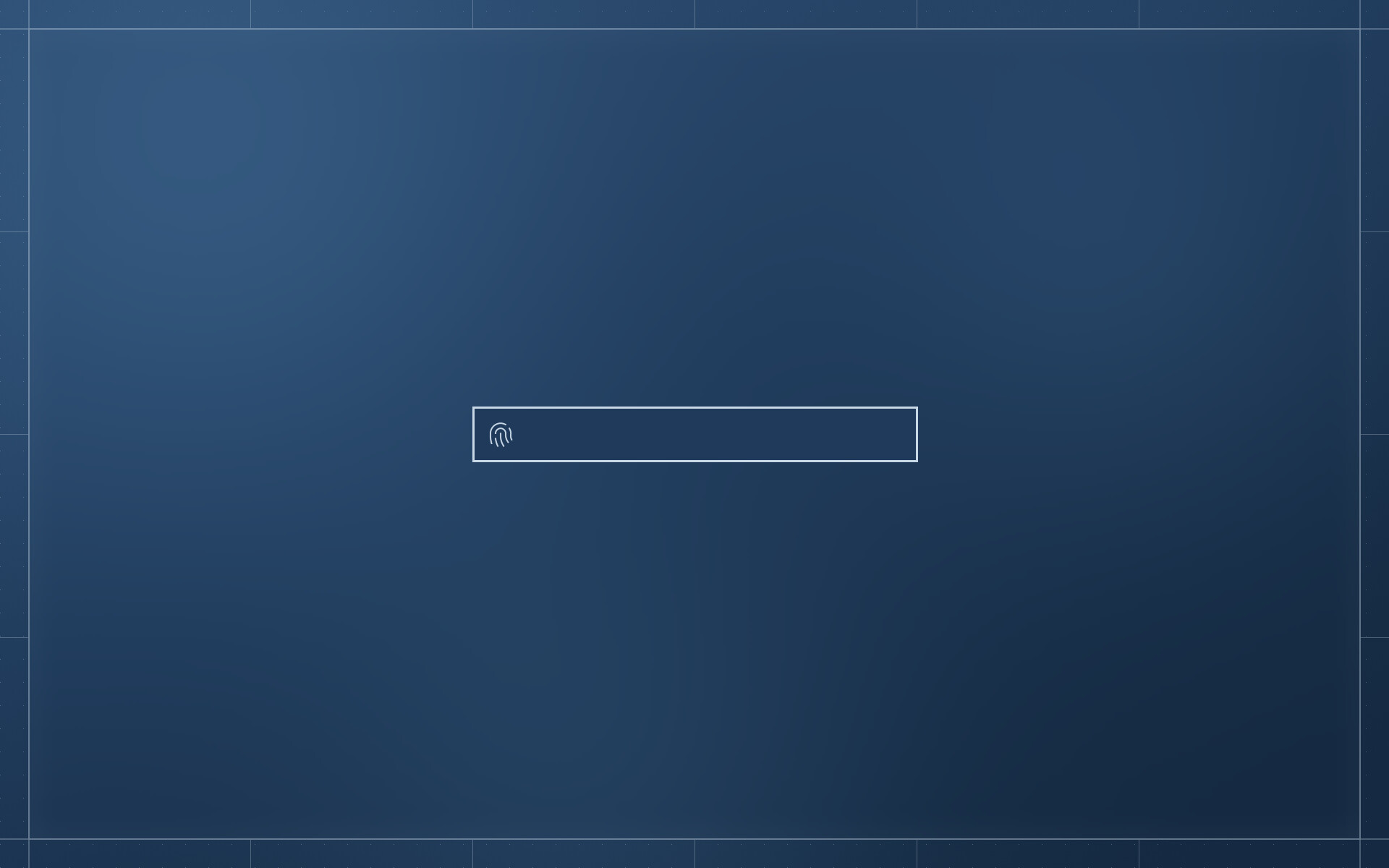
- A lock screen of its own, matching the login screen: the sheet blurred, nothing of the windows, one field. swaylock stays as a fallback.
- The fingerprint reader listens as often as it takes, on both the login and lock screens. When it gives up, it listens again; a finger not recognised shakes the field. A password can be typed at any time.
- The login and lock screens are one field with no words. The login screen no longer gets stuck after Escape.
- The settings' wallpaper page scrolls through every picture. A better fingerprint glyph. The log level is
DRAFTPAPER_LOG.
Install (Debian 13, Quickshell from trixie-backports):
sudo apt install -t trixie-backports quickshell ./draftpaper_0.5.0_amd64.deb
Every change: CHANGELOG.md.
Draftpaper 0.4.0
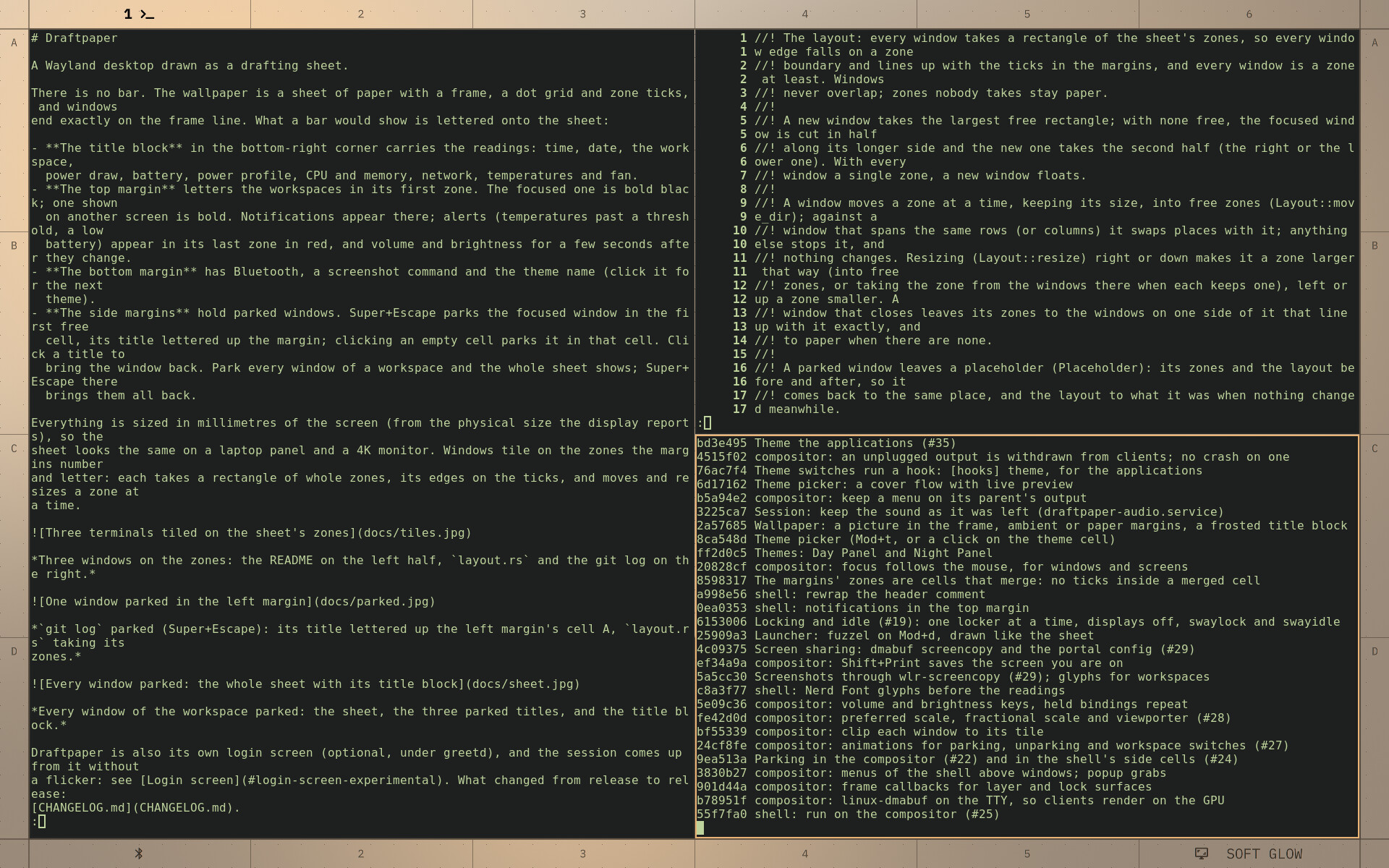
Draftpaper is now a Wayland compositor of its own: the desktop is a drafting sheet, windows tile on its zones, and what a bar would show is lettered in the margins and the title block. This is the first release since the i3 edition (0.1.1); it brings 0.2.0 and 0.3.0 with it.
What's new in 0.4.0
- A login screen of its own (experimental, under greetd; #37): your sheet, blurred, with a sign-in card on whole zones. A fingerprint reader listens from the start, or type the password. Signed in, your name slides into the title block and the session starts on the same VT.
- No flicker between the login screen and the session, either way: the displays are taken over in their mode, the last frame stays on screen, and the next compositor opens on that very picture and reveals the desktop as the blur fades.
- Hardware-decoded video (Firefox on Intel) no longer blanks or freezes the screen; sound is checked after logging in again; the compositors log to the journal.
Since 0.1.1
- The compositor (Smithay) replaces the i3 edition (0.2.0, #31): the sheet drawn by the compositor, the shell over its IPC, parking with animations, wallpapers with ambient margins, screenshots and screen sharing, locking and idle, fractional scaling, Xwayland.
- Free-form tiling (0.3.0): every window a rectangle of whole zones, moved and resized a zone at a time.
- A launcher of its own (Mod+d, #34),
draftpaper menufor scripts. - The sheet to the pixel at every scale, checked headless; a magnifier (Mod+z); settings on the board (themes, a colour scheme built from choices with every word legible, the wallpaper); window rules; displays arranged with kanshi or wlr-randr.
Everything, release by release: CHANGELOG.md.
Install (Debian 13, amd64)
sudo apt install -t trixie-backports quickshell ./draftpaper_0.4.0_amd64.debthen pick Draftpaper from the display manager's session menu. For the login screen (optional), see the README's Login screen: greetd, a directory for the sheet's copy, and fbcon=vc:2-63 on the kernel command line.
Tested on a ThinkPad T14 Gen 6 (Intel Arrow Lake, Linux 6.12) with Quickshell 0.3.1; the flicker-free handoff needs Linux 6.8 or later.