Repository navigation
Roles and Access
Generated from
docs/RBAC.mdin the repository. Edit it there; this wiki is rebuilt on every change.
EdgeShell is an in-house multi-user tool. Many people can be logged in at once;
each session is isolated by Flask-Login's signed cookie, so concurrent logins do
not interfere. Roles decide what each person may do, enforced centrally in
app/services/rbac.py.
| Role | Rank | Can do |
|---|---|---|
| monitor | 0 | View dashboards, monitoring, node logs |
| operator | 1 | Everything monitor can, plus node CRUD, terminal, remote desktop (opening it where it runs), file deploy, bulk import |
| administrator | 2 | Everything operator can, plus user management, VPN config, platform settings, the activity log (audit trail), and installing software on nodes (Fleet Setup, Install on Fleet, OpenRemoteGUI install, the MQTT heartbeat agent and its settings), and opening SenseHive |
Hardware (HARDWARE.md): every role sees the hardware history,
faults, parts and numbers and reports issues (also through the API with the
report permission). Operators and administrators move faults on, resolve
them, confirm or reject detected hardware changes and link replacement nodes.
Administrators edit the fault categories and manage webhooks.
The activity log is the audit trail, so only administrators see it: the page, its
sidebar link, the Recent Activity and Recent Errors panels on the dashboard, and
GET /api/v1/activity (403 for other roles). Operators and monitors still read
node logs in the Log Viewer.
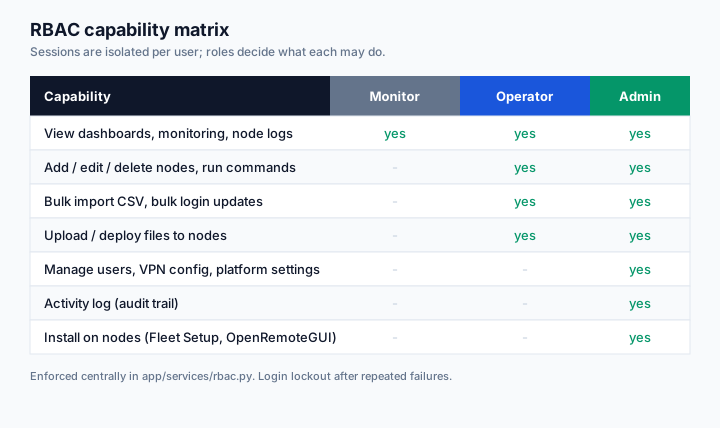
Monitor is strictly read-only: no terminal, no remote desktop, no file deploy, no node control. Terminal, remote desktop, file deploy, bulk import, and OpenRemoteGUI actions are hidden in the UI and blocked at the route for monitors. User management, platform settings, VPN config, and email (useSend) settings are admin only, hidden and route-blocked for operators and monitors.
Apps (APPS.md): operators see the packages, each node's apps and versions, and the audit, and can read the nodes again; uploading a package, rolling it out, rolling back, switching versions, cleaning up, removing an app and removing a package from the bucket are admin only. Monitors do not see Apps.
from app.services.rbac import role_required, operator_required, admin_required

@nodes_bp.route('/add', methods=['GET', 'POST'])
@login_required
@operator_required          # rank >= operator
def add(): ...
role_required(minimum) compares the user's role rank against the minimum. AJAX
and API callers get a JSON 403; browser navigation gets a flash and redirect.
- After
MAX_FAILED_LOGINS(default 5) failures, the account is locked forLOCKOUT_MINUTES(default 15). Both are configurable in.env. While locked, even the correct password is refused. - The login route is rate-limited (20/min per IP).
- Every failure shows the same message and takes the same time, so the form does not reveal which usernames exist.
-
nextredirects are restricted to same-origin paths (open-redirect guard).
- Every account signs in with a password and a 6-digit code from an authenticator app (Google Authenticator, Microsoft Authenticator, Authy, 1Password, Bitwarden, ...). Nothing is signed in before the code passes.
- First sign-in shows a QR code to scan, then 10 one-time backup codes to save privately. A backup code works once in place of the app code.
- Failed codes count toward the same lockout as failed passwords.
- Who checks the codes: in the Docker stack, privacyIDEA
in its own container on the internal network (no published port, no internet
route); EdgeShell keeps only the token serials. Without that container
(
run.py, single container) a built-in verifier is used: the secret is encrypted withCREDENTIAL_KEY, backup codes are stored hashed. Set withMFA_PROVIDER; if privacyIDEA is down, sign-in fails closed. - My account: backup codes left, new backup codes, and "Reset 2FA" for a new phone (password plus a current code required).
| Who | How |
|---|---|
| Monitor or operator | "Forgot password?" emails a reset link to the account's verified address (single use, valid 30 minutes). The link opens one page asking for the new password and a 2FA code (or a backup code); wrong codes count toward the lockout. Without mail, or without a verified address, the request goes to the administrators, who set a temporary password; that also removes the user's 2FA, so it is set up again at the next sign-in, and ends every session. |
| Administrator | The same emailed link, or "use a backup code": username + one backup code + new password. 2FA stays on either way. The owner can also reset another administrator. |
| Owner | Emailed link or a backup code. Nobody else can reset the owner. |
The reply to "Forgot password?" is the same whether or not the account exists. Administrators see waiting reset requests and sign-ups as a badge on User Management, and open tickets as a badge on Issues.
With outgoing mail set up (SMTP_* or useSend, and PUBLIC_URL), every
account needs a verified email before the app opens: the first sign-in goes
2FA, then the email, then a new password.
- EdgeShell sends a link to the address; opening it (on any device, valid 24 hours) confirms that the address works. Until then the account keeps its previous address, so a typo or someone else's address never replaces one that works.
- Requesting another address makes older links stop working. An address used by another account is refused.
- Reset links only ever go to a verified address.
- Accounts from before 1.8.2 confirm their current address at the next sign-in.
- An administrator held at this step can still open Issues, Email settings, so a broken mail setup can be fixed without locking everyone out.
Without outgoing mail nothing is verified (it could not be) and only administrators must enter a personal address, as before.
- At most 5 administrators.
- The first administrator is the owner (primary or super administrator), with full control: the only account that can grant or remove the administrator role, and it can change, reset (password and 2FA), sign out, disable or delete any other account, administrators included. The owner is prompted to add up to 4 more administrators so the platform is never locked out.
- The owner is permanent. It cannot step down, be demoted, disabled, deleted or replaced, and ownership never passes to anyone else. Its own password and 2FA are recovered with the emailed link or a backup code.
- Other administrators manage monitors and operators only. They cannot change another administrator, and nobody can change the owner.
- Other administrators may leave the role from My account ("Step down"),
confirming with password, a 2FA code and typing
STEP DOWN.
With SIGNUP_ENABLED=true (default) anyone can request an account. It stays
inactive until an administrator approves it in User Management, choosing the
role (monitor or operator; administrator only by the owner) and how many
devices it may use, or rejects it.
- Each sign-in is a row in
user_sessions; the browser holds only a random token in its signed cookie, and every request is checked against the row. - Each account allows
max_sessionsdevices at once: 1 by default (admins included), up to 4, set only by an administrator. - Logout, password change, password reset, 2FA reset, disabling a user, and "Sign out everywhere" revoke sessions server-side immediately.
- Each session records its device type (Desktop, Mobile, Tablet), IP and the last real interaction (click, key press, page load; background polls do not count). My account and User Management list them, and any single device can be signed out. The activity log records the device for every action.
- After
IDLE_MINUTES(default 10) without interaction the page asks "Are you still there?" and signs that session out unless answered withinIDLE_WARNING_MINUTES(default 5). The server enforces the same deadline. - Sessions also end after
SESSION_HOURS(default 8) without any request. - Cookies are HttpOnly, SameSite=Lax, and Secure in production.
- CSRF tokens protect every state-changing request; the token rides the session.
The control plane sits on a host already joined to the mesh. Users authenticate to the portal over HTTPS at a domain. They never need mesh credentials, which keeps mesh membership small and access control in one place (this app).