Repository navigation
Sandbox
Generated from
README.mdin the repository. Edit it there; this wiki is rebuilt on every change.
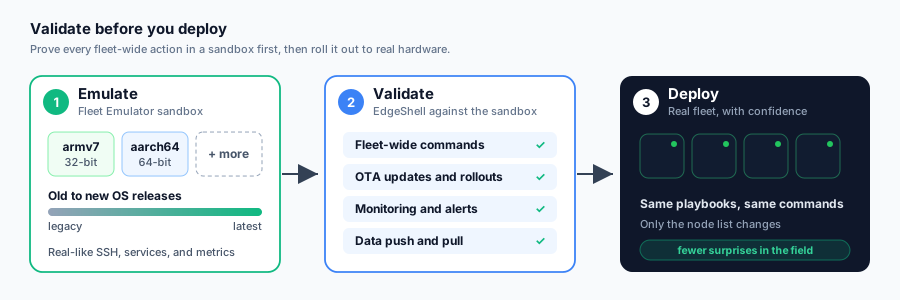
A command that works on one Pi can still break a hundred. Field fleets are
mixed: different boards, 32-bit and 64-bit images, and OS releases from years
apart. Pi Fleet Emulator,
a companion project built alongside EdgeShell, recreates such a fleet in Docker:
every node runs real OpenSSH and Node-RED, reports an ARM architecture and
Raspberry Pi OS, and answers docker and systemctl like a real Pi. To
EdgeShell it looks like hardware.
The sandbox/ directory wires the two together and proves every
fleet operation end to end. It runs on every push in CI, on both amd64 and
native arm64 runners.
The sandbox fleet:
| Node | Architecture | OS |
|---|---|---|
bookworm64 / bookworm32
|
aarch64 / armv7l | Raspberry Pi OS 12 (Bookworm) |
bullseye64 / bullseye32
|
aarch64 / armv7l | Raspberry Pi OS 11 (Bullseye) |
buster64 / buster32
|
aarch64 / armv7l | Raspberry Pi OS 10 (Buster) |
Change sandbox/fleet.json to test any mix, up to 20 nodes.
What sandbox/run.sh verifies:
| Area | Checks |
|---|---|
| Onboarding | Emulator export imported as JSON; every node reachable over SSH |
| Fleet control | Connection test and architecture detection per node; one command across the fleet returns each node's own OS and architecture |
| Monitoring | Metrics from every node; Node-RED detected on every node |
| Data push and pull | A file deployed to every node, then fetched back from each |
| OTA-style rollout | An update package pushed, applied with sudo and its version verified on every node |
| Ansible |
ansible-core inside the image runs a play on every host with per-host results |
| Security | Session limits and takeover prompt, stolen cookie rejected after logout, password reset ends sessions, brute-force lockout, identical login errors, monitor role blocked from commands and deploys |
| Image hardening | Non-root user, read-only code, no .env, databases or keys inside the image |
| Resilience | Admin password and all nodes survive a container restart |
bash sandbox/run.sh                                                 # build from source, test, tear down
EDGESHELL_IMAGE=devprincekumar/edgeshell:1.17.0 bash sandbox/run.sh  # test a published image
Your own workflow: run a change (command, playbook, file rollout) against the sandbox fleet, check the results on the dashboard, then repeat it on the real fleet with the same commands. Only the node list changes.
Note
Emulated nodes report ARM but run on your host's CPU. Use the sandbox to
validate management, deployment and monitoring flows, not ARM-compiled
binaries. The older sim/ demo is kept for
reference; the sandbox replaces it.