Library and sharing EN
Español · Welcome · User guide
The YT Looper toolbar icon opens a library from any page. When the active tab contains a video with valid A and B points, a current-fragment card also appears below the tree.
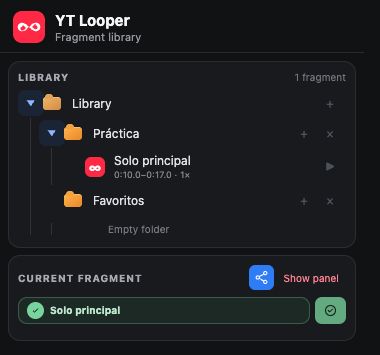
- Click a folder to expand or collapse it.
- Use + on Library to create a root folder.
- Use + on any folder to create a nested folder.
- Drag a fragment onto a folder to move it.
- The editor's folder selector provides another way to move it.
- Deleting a folder safely reparents its contents to the parent; fragments are not silently erased.
Click a fragment name to open the modal editor. The tree's ▶ button opens it directly in YouTube with its loop enabled.
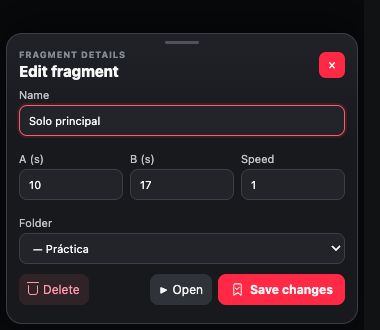
The editor can:
- Rename a fragment. The new name appears in all badges.
- Change A, B, and speed.
- Move it to another folder.
- Open it in YouTube.
- Delete it through a two-step confirmation.
The name is cosmetic. Duplicate detection uses video, A, B, and speed. Renaming therefore neither creates a copy nor breaks the relationship with the active loop.
The lower card follows the same visual language as the widget:
- Blue for a new loop ready to save.
- Green for a synchronized saved fragment.
- Orange when its parameters have changed.
Click the badge to review or edit it. Depending on state, the side button saves a new loop or quickly updates the selected fragment's parameters.
Click the blue share icon in the widget or current-fragment card. YT Looper copies a canonical YouTube URL with a validated Base64URL payload.
The link contains only:
- Format version.
- Video identifier.
- A point.
- B point.
- Playback speed.
It does not contain the name or folder, and nothing is uploaded to a loop server. Opening the link with YT Looper installed validates the data, seeks to A, and enables the loop. The recipient can use it without saving or add it to their own library under any name. Without YT Looper, the URL still opens the regular YouTube video near the fragment's start.
If no name is supplied, YT Looper proposes one from the video title and interval. It can be changed during saving or later in the editor. The chosen name remains the fragment's visible name when its parameters are updated.