Repository navigation
Features and Configuration
Right-click any lodestone while holding a Loaded Compass, then name it. Every binding becomes a separate saved location. The compass is a separate item from the vanilla compass, so ordinary Minecraft navigation remains unchanged.
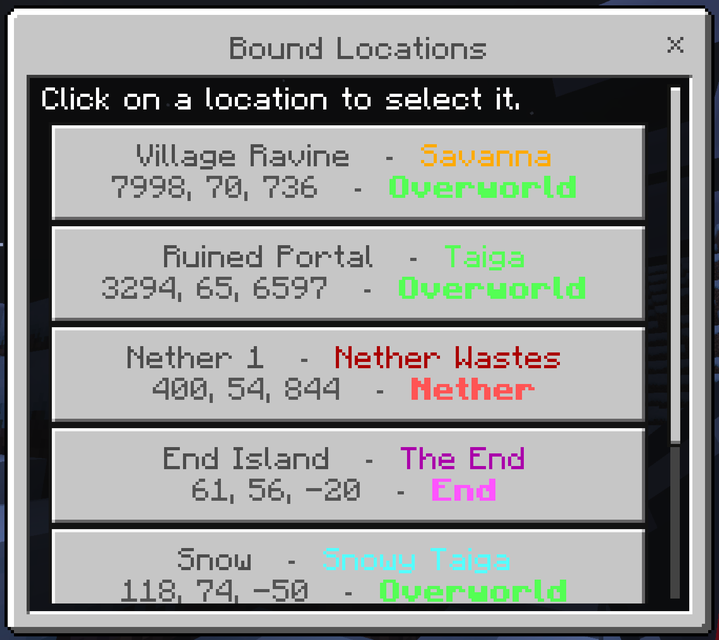
Crouch and right-click while holding a Loaded Compass to open your saved-location list. Choose any entry to make it the active target.
Each entry includes its name, coordinates, and dimension:
Base Camp - 128, 71, -344 - O
- O means Overworld and is green.
- N means Nether and is red.
- E means End and is purple.
The active target is marked in the list.
Choose Delete a location… at the bottom of the saved-location list. Deleting uses its own screen, so selecting a destination cannot accidentally delete it.
Deleting removes only the compass entry. It does not break or otherwise change the lodestone in your world.
If a bound lodestone is broken, its entry is removed from your list and you are told which place was lost. If it was broken while you were offline, cleanup happens the next time you play.
- With no saved target, the needle points to world spawn like an unbound vanilla compass.
- With an active target in the same dimension, it points continuously toward that lodestone in your hand and inventory.
- With an active target in another dimension, it spins idly, matching vanilla compass behaviour when a lodestone cannot be reached.
Locations are stored on your player, not on the compass item. Dying, losing the compass, or crafting a replacement does not remove them. In multiplayer, each player sees and controls only their own list.
There are no world settings or operator controls to configure.