Repository navigation
Getting Started
- Minecraft Bedrock Edition 1.26.30 or newer
- No experiments, cheats, operator permissions, or companion add-ons
- Standard graphics and Vibrant Visuals / PBR supported
- Download the current
.mcaddonfile. - Double-click it to open Minecraft and import both packs.
- Open your world settings and activate Andy's Loaded Compass under Behavior Packs. The Resource Pack activates with it.
- Download the
.mcaddon. - Open it with Minecraft.
- Activate the behavior pack in the world settings.
Import the add-on on a phone or PC, then join a Realm with it enabled.
Upload both packs and enable them on the world. Each player keeps a private saved-location list.
Import the newer .mcaddon, then select the newer version in the world's pack list.
Pick up an iron ingot once to unlock the recipe.
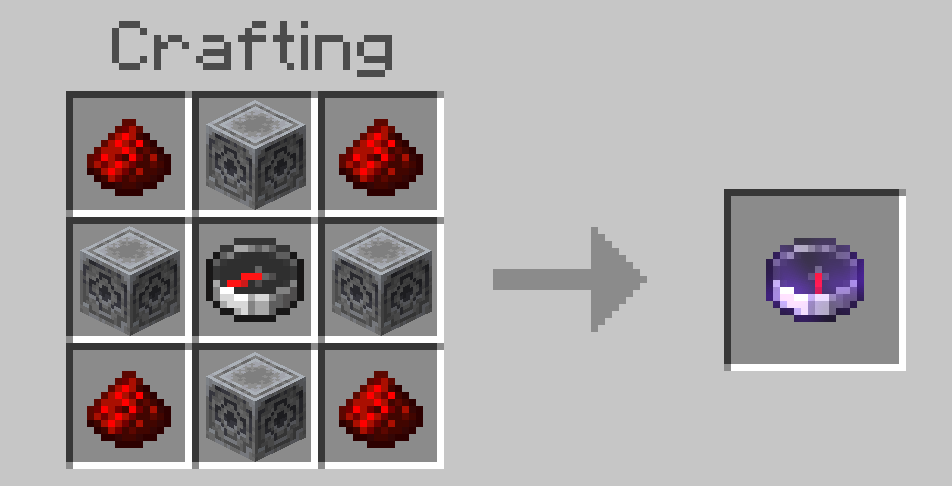
Redstone Dust | Lodestone | Redstone Dust
   Lodestone  |  Compass  |   Lodestone
Redstone Dust | Lodestone | Redstone Dust
The recipe uses four lodestones, four redstone dust, and one vanilla compass. The vanilla compass, lodestone, and their recipes are not changed.
- Place or find a lodestone.
- Hold the Loaded Compass.
- Right-click the lodestone.
- Enter a name and confirm it.
The needle immediately starts pointing at the lodestone. Repeat those steps for every place you want to save.
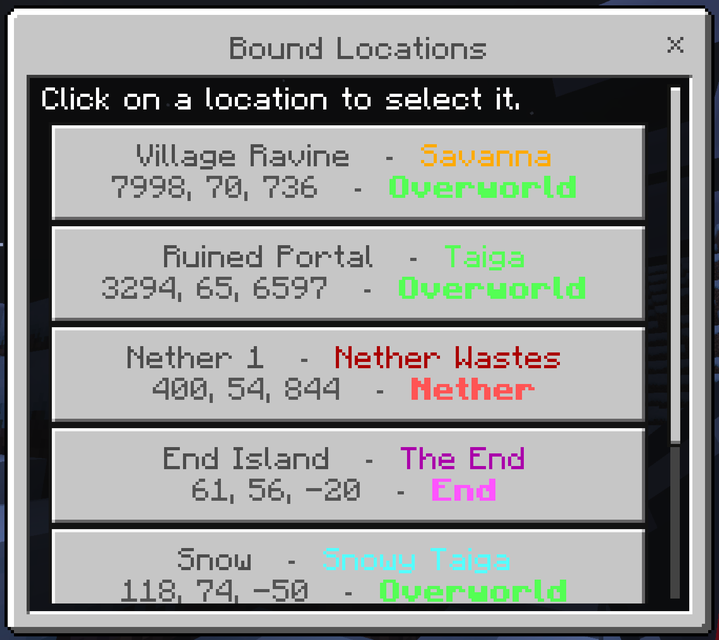
Next: choose a destination and manage your locations.