Getting Started
| Minimum Bedrock version | 1.26.30 |
| Graphics | Standard graphics and Vibrant Visuals |
| Experimental toggles | None required |
| Cheats | Not required for any player-facing feature |
| Dependencies | None |
| Achievement compatible | Yes |
Both packs must be active. The Behavior Pack supplies all behaviour; the Resource Pack supplies the tool sprites and the selection outline. They are linked to each other, but it is worth verifying both.
- Download
Andys_Advanced_Hammers_Excavators_And_More_0.1.28.mcaddonfrom the official project page. - Open it with Minecraft Bedrock.
- Wait for both Andy's Advanced Hammers, Excavators & More [BP] and [RP] to import.
- Create a world, or edit an existing one.
- Under Behavior Packs → My Packs, select the [BP] pack and choose Activate.
- Confirm the [RP] pack is active under Resource Packs.
- Enter the world.
Download the .mcaddon, then open or share it to Minecraft. Allow both packs to import, then activate both on the intended world. The exact sharing steps vary by device and OS version.
Consoles do not offer local .mcaddon import. Prepare the world on a Windows or mobile device with the add-on active, upload that world to a Realm, and join the Realm from the console. Minecraft delivers the world packs through its normal Realm process.
Install and activate both packs on the world before uploading or starting it. Joining players must accept the Resource Pack or they will not see tool sprites or outlines. Test on a backed-up staging copy before deploying to an established shared world.
- Back up the world.
- Import the newer
.mcaddonand wait for both pack updates to complete. - Confirm the world is using the updated packs.
Your saved shape, crop, and Tiller settings are stored per player and survive updates. Tools already in chests and inventories keep working — the internal identifiers do not change between versions.
Every family is crafted at a Crafting Table from a tier material and Sticks.
Each family has its own original shape, chosen so none of them collide with a vanilla Pickaxe, Shovel, Hoe, or Axe recipe. Empty cells must be left empty.
Material in the grids below means whichever tier you are making:
- Wooden — any Planks: Oak, Spruce, Birch, Jungle, Acacia, Dark Oak, Mangrove, Cherry, Pale Oak, Bamboo, Crimson, or Warped
- Stone — Cobblestone, Blackstone, or Cobbled Deepslate
- Copper — Copper Ingot
- Golden — Gold Ingot
- Iron — Iron Ingot
- Diamond — Diamond
- Netherite — not crafted in a grid. Upgrade a finished Diamond tool at a Smithing Table with a Netherite Upgrade Smithing Template and a Netherite Ingot.
The Tiller, Scythe, and Seeder Rake shapes are not symmetric, so each of them also crafts mirrored if you prefer to build it the other way round.
| Material | Material | Material |
| Material | Stick | Material |
| Stick |
5 Material + 2 Sticks. Material: any Planks, Cobblestone, Copper Ingot, Gold Ingot, Iron Ingot, or Diamond.
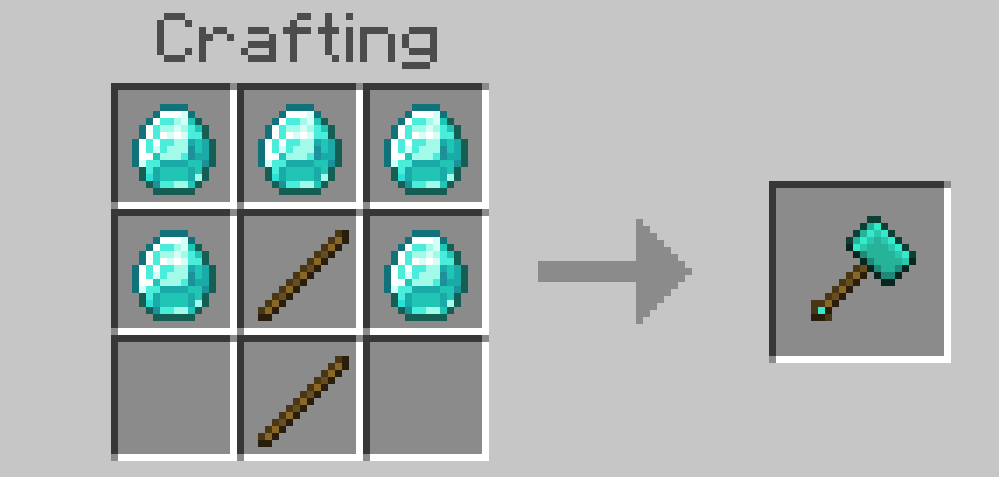
The Hammer at Diamond tier.
| Material | Material | |
| Material | Material | Material |
| Stick |
5 Material + 1 Stick. Material: any Planks, Cobblestone, Copper Ingot, Gold Ingot, Iron Ingot, or Diamond.
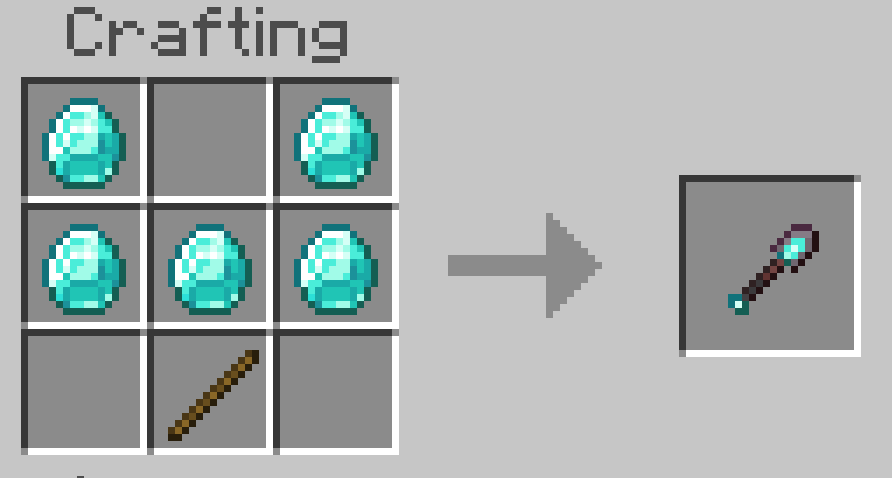
The Excavator at Diamond tier.
| Material | Material | Material |
| Material | Stick | |
| Stick |
4 Material + 2 Sticks. Material: any Planks, Cobblestone, Copper Ingot, Gold Ingot, Iron Ingot, or Diamond.
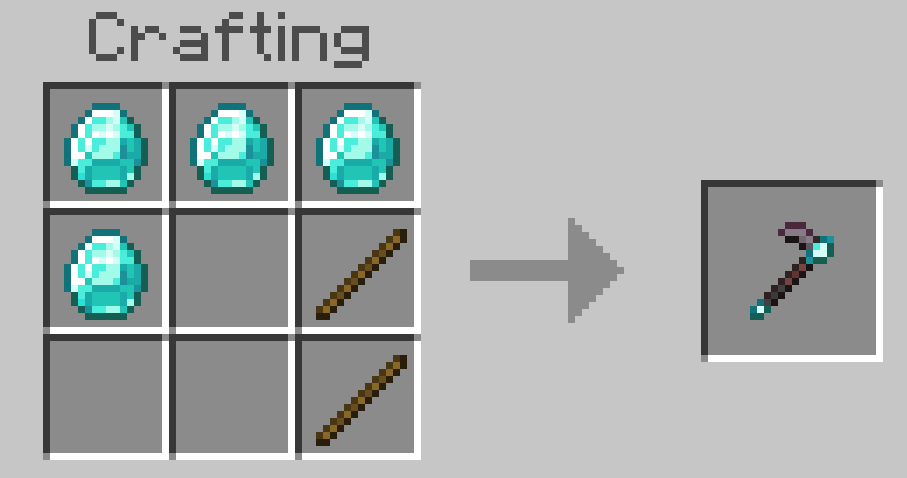
The Tiller at Diamond tier.
| Material | Material | Material |
| Stick | ||
| Stick |
3 Material + 2 Sticks. Material: any Planks, Cobblestone, Copper Ingot, Gold Ingot, Iron Ingot, or Diamond.
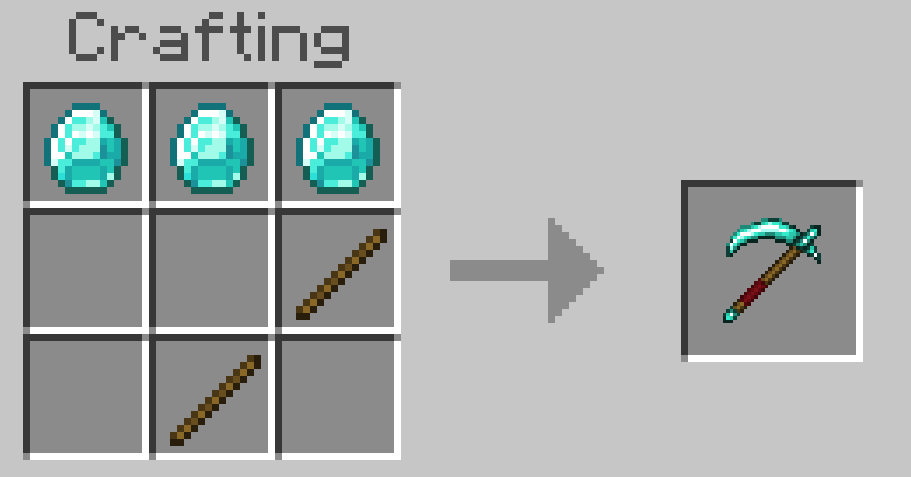
The Scythe at Diamond tier.
| Material | ||
| Stick | Stick | Material |
| Material |
3 Material + 2 Sticks. Material: any Planks, Cobblestone, Copper Ingot, Gold Ingot, Iron Ingot, or Diamond.
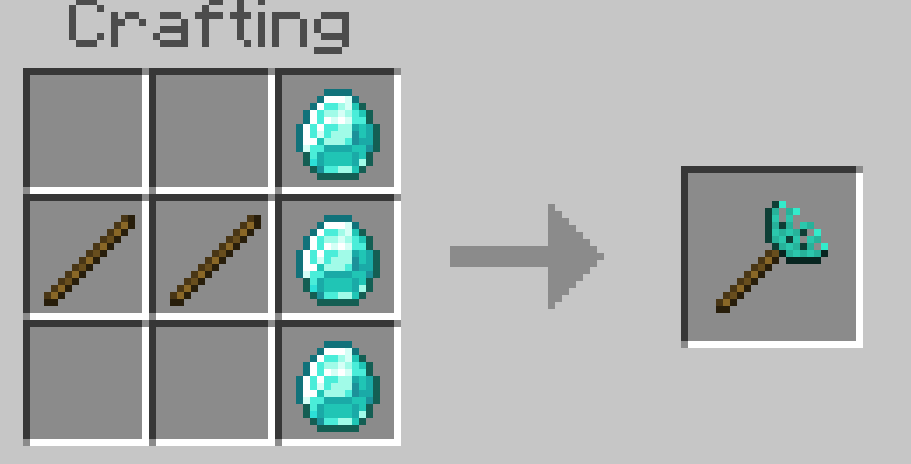
The Seeder Rake at Diamond tier.
All thirty-five recipes appear in the Recipe Book and in five Creative inventory groups, one per family.
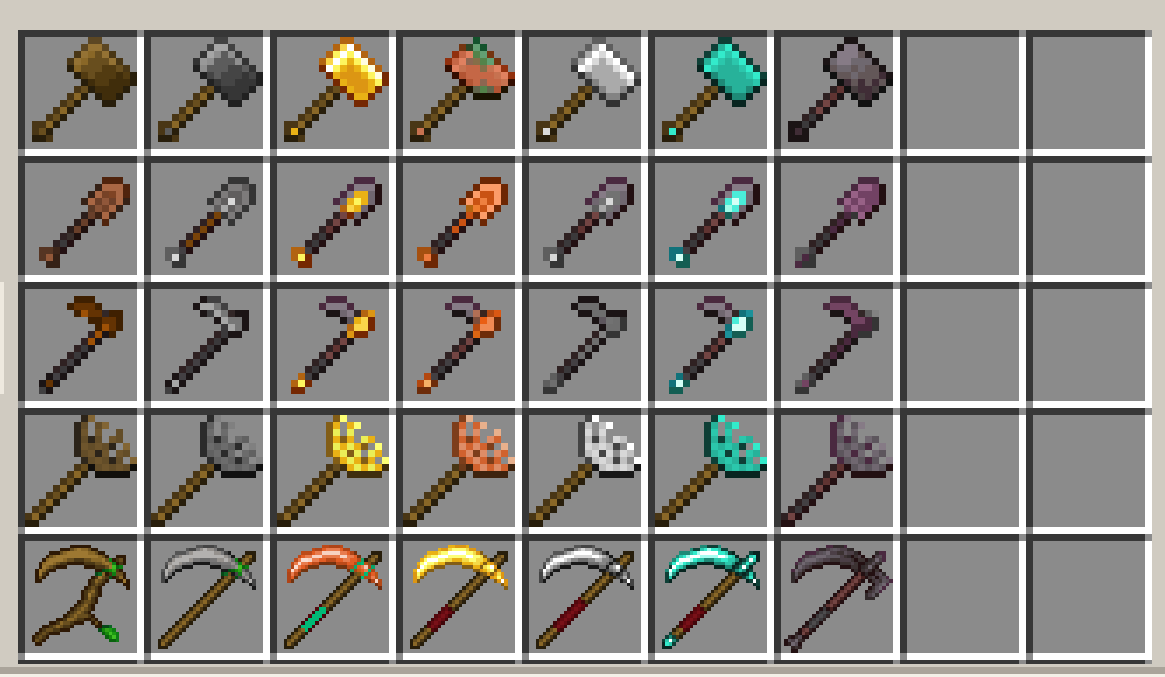
All five families across all seven tiers — 35 tools.
| Action | Hammer | Excavator | Tiller | Scythe | Seeder Rake |
|---|---|---|---|---|---|
| Break a block | Area mine | Area dig | — | Sweep or harvest | — |
| Use on a block | — | — | Prepare the plot | Sweep or harvest | Plant the 4×4 |
| Crouch + use | Shape menu | Shape menu | Tiller menu | — | Crop selector |
"Use" is right-click on desktop, the use button on a controller, or tap on touch.
Crouching also hides the preview outline, so a menu always opens with a clear view of the world.
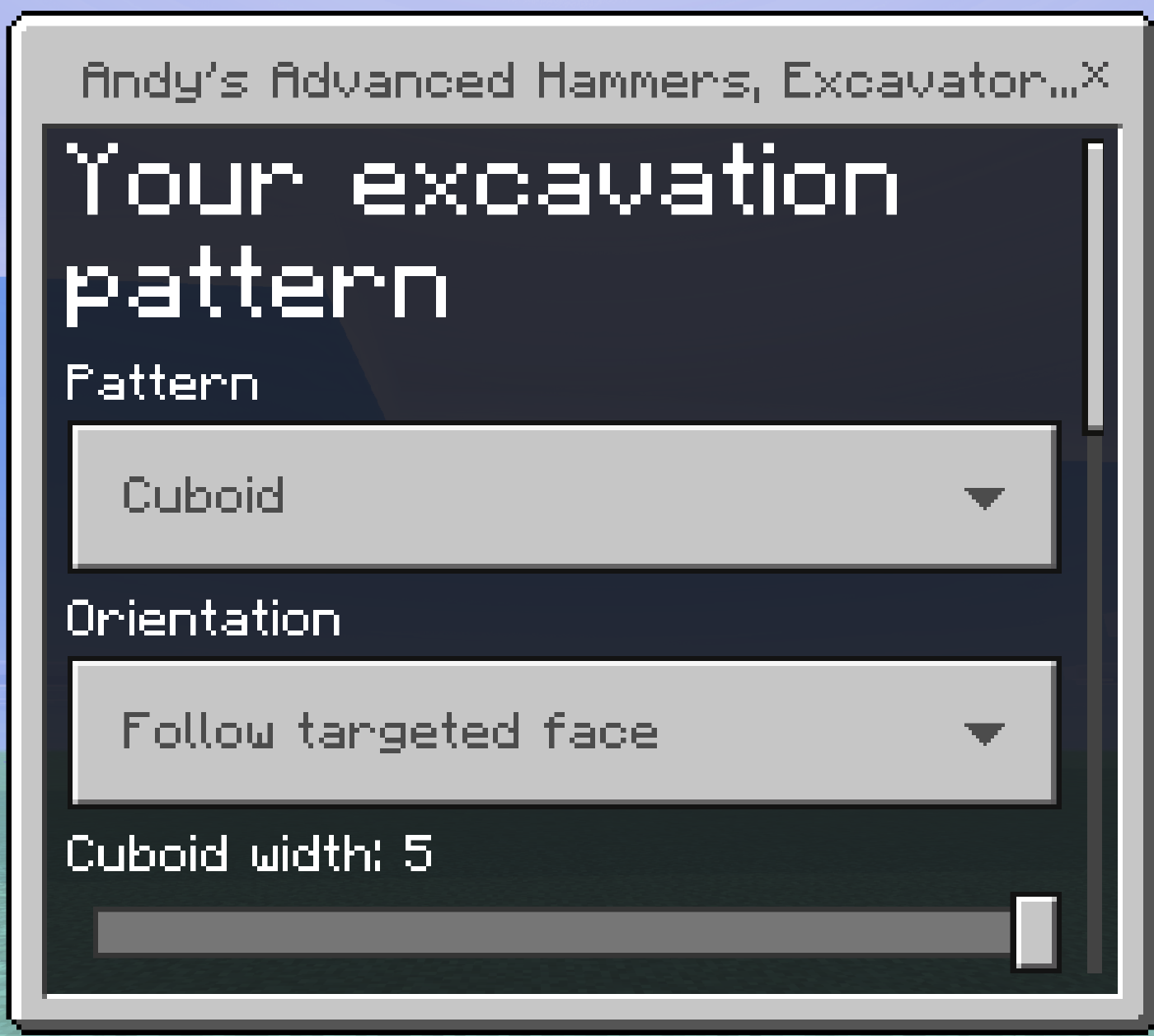
Crouch-using a Hammer or Excavator opens the shape menu.
Nothing needs configuring to start — every tool works immediately with sensible defaults.
- Hammer and Excavator default to a Cuboid 3 × 3 × 2 region that follows the face you hit. Crouch-use either one to change it.
- Tiller defaults to the Standard 9×9 field with both irrigation options off. Crouch-use it to pick a plot layout.
- Seeder Rake defaults to Wheat Seeds. Crouch-use it to choose a different crop.
- Scythe has no settings. It reads what you aim at and does the right thing.
Every one of these is saved per player, so each person on a server keeps their own.
Before any swing, the outline tells you what will happen:
| Colour | Meaning |
|---|---|
| White | Will be broken, or tilled to farmland. |
| Blue | Water: the Tiller's centre irrigation hole, and every dug sugar cane channel. |
| Green | Left open on purpose — the fruit rows of a pumpkin plot, the growing rows of a cane plot. |
If nothing outlines, that swing would change nothing — you are aiming at something the tool does not handle, or at ground that is already in the state the layout wants.
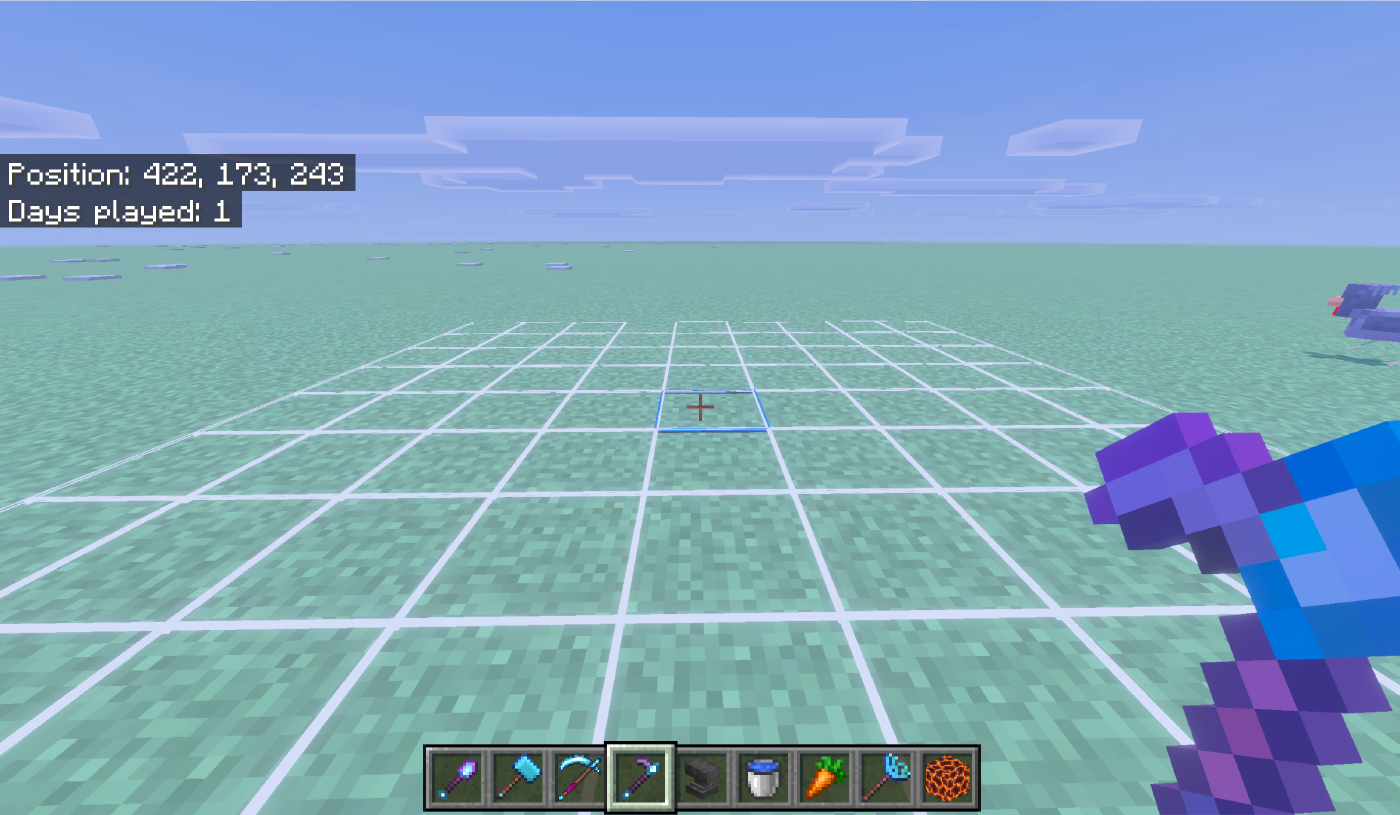
A Tiller preview: eighty white cells become farmland, and the blue centre becomes the irrigation hole.
Operators can turn each of the five tool families on or off for the whole world. See Features and Configuration for the operator menu and the full scriptevent command list. Ordinary players never need operator permission for anything.