Repository navigation
Twingate
Before this page: Networking basics explains why an outbound-only connector can still be reached, and Identity, secrets and zero trust basics explains groups, identity providers and per-resource access.
Twingate is the only way to reach a droplet in this project. This page covers the moving parts, how they are wired up in stacks/10-access, and why each choice was made. For the "why not a VPN" argument itself, see Why ZTNA and not a VPN.
| Piece | Runs where | What it does | What it does not do |
|---|---|---|---|
| Controller | Twingate's cloud | Holds configuration, delegates sign-in to the identity provider, signs ACLs for clients and connectors | Never carries your traffic |
| Client | Your laptop | Signs you in, gets a signed ACL, intercepts traffic only for addresses on that ACL, builds the tunnel | Route anything that is not an assigned resource |
| Connector | Your network (here: two droplets) | Keeps outbound connections to the controller and relays, verifies every client connection, forwards to the resource | Listen on any public port |
| Relay | Twingate's cloud | Joins client and connector when a direct path is impossible, like a TURN server | Terminate or store the encrypted connection |
Source: How Twingate works.
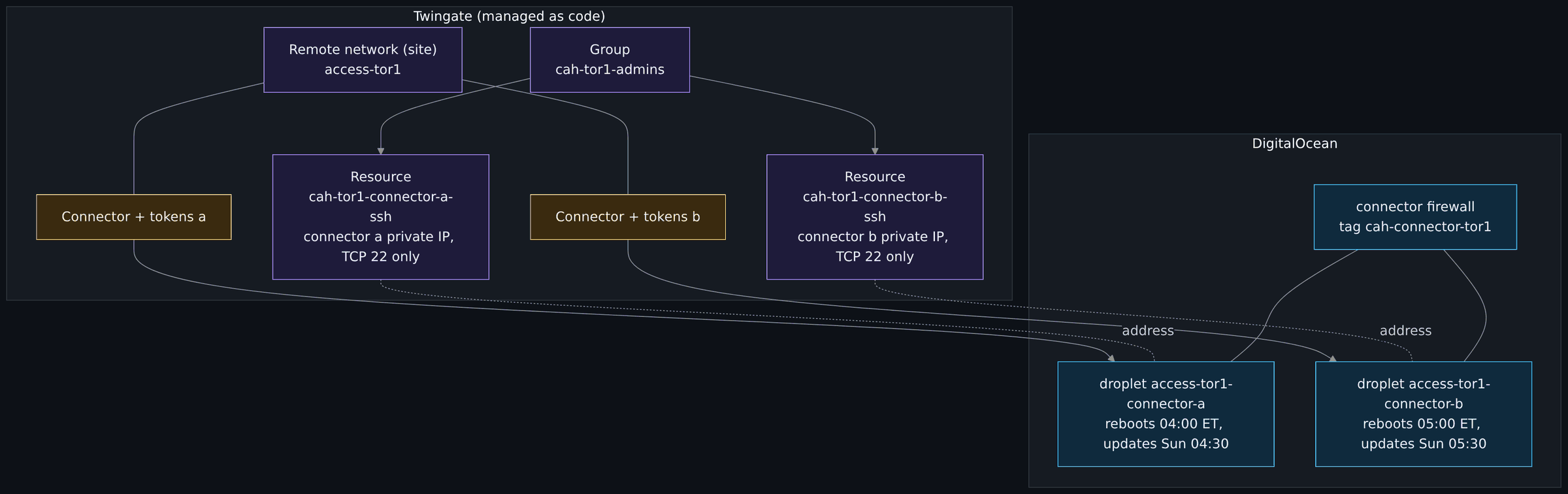
Diagram source (Mermaid)
flowchart TB
    subgraph tg["Twingate (managed as code)"]
        site["Remote network (site)<br/>access-tor1"]:::ctrl
        grp["Group<br/>cah-tor1-admins"]:::ctrl
        ra["Resource<br/>cah-tor1-connector-a-ssh<br/>connector a private IP, TCP 22 only"]:::ctrl
        rb["Resource<br/>cah-tor1-connector-b-ssh<br/>connector b private IP, TCP 22 only"]:::ctrl
        tka["Connector + tokens a"]:::secret
        tkb["Connector + tokens b"]:::secret
    end
    subgraph doside["DigitalOcean"]
        da["droplet access-tor1-connector-a<br/>reboots 04:00 ET, updates Sun 04:30"]:::cloud
        db["droplet access-tor1-connector-b<br/>reboots 05:00 ET, updates Sun 05:30"]:::cloud
        fw["connector firewall<br/>tag cah-connector-tor1"]:::cloud
    end
    site --- tka --> da
    site --- tkb --> db
    grp --> ra
    grp --> rb
    ra -. "address" .- da
    rb -. "address" .- db
    fw --- da
    fw --- db

    classDef ctrl fill:#1e1b3a,stroke:#a78bfa,color:#ede9fe
    classDef cloud fill:#0f2a3d,stroke:#38bdf8,color:#e0f2fe
    classDef secret fill:#3a2a0f,stroke:#fbbf24,color:#fef3c7
Screenshot to take yourself: the Twingate admin console, the Connectors page and the Resources page. Capture: the Remote Network with both connectors listed, then the Resources page with one resource per host and port. Look for: each connector's status reading Alive (check the wording your console version uses), the two connectors in one remote network, and resources that name one address and one port, not a whole range. Redact: the tenant name in the address bar and header, connector names that carry a hostname, IP addresses and CIDR ranges, group member names and email addresses, and the connector token if a dialog shows it.
Twingate recommends at least two active connectors per remote network so one can be down without losing access. That matters more than usual here, because SSH to a connector goes through Twingate: if the only connector dies, so does the only way in. Two s-1vcpu-1gb droplets cost $12 a month instead of $6, and that was the cheapest insurance on the bill.
They are also deliberately out of step:
- Each reboots (only if an update requires it) an hour apart: 04:00 and 05:00 Eastern.
- Each updates the connector package on Sundays, half an hour after its own reboot window: 04:30 and 05:30.
So there is never a moment where both are restarting.
It would be one line to create a resource for 10.78.0.0/24 with all ports open. That would rebuild a VPN with extra steps. Each resource here is a single private address with tcp restricted to port 22, UDP denied and ICMP off. When stage 3 adds workloads, each gets its own narrow resource.
twingate_group.admins holds the user ids from Doppler (ADMIN_USER_IDS). The stack refuses an empty list, because a missing secret would otherwise create a host nobody can reach. Granting or removing access is a pull request plus a Spacelift run, which means it is reviewed and logged like any other change.
An earlier version expected a hand-made site. Now the stack creates access-<region> itself, so the whole access layer can be destroyed and rebuilt from code. If you are following along, delete any hand-made site with that name first, or the apply collides with it.
The first build piped Twingate's setup script into bash, both connectors came up "successfully" with no config file and a dead service, and the log said everything was fine. The fix and the reasoning are on Lessons learned. The short version: cloud-init writes /etc/twingate/connector.conf itself (root-only, mode 0600), installs twingate-connector from https://packages.twingate.com/apt/ after checking the repository key against a pinned fingerprint, and only reports success when the service is actually active.
Twingate can route a session for connector b's address through connector a. Connector a then opens TCP 22 to b inside the VPC, and DigitalOcean firewalls filter VPC-internal traffic too. So the connector firewall allows TCP 22 between droplets that carry the connector tag, in both directions, and from nothing else. DigitalOcean network and firewalls explains why that needed an outbound rule as well as an inbound one.
| Port | Why |
|---|---|
| TCP 443 | Controller and relay connections, package downloads |
| TCP 80 | Ubuntu package mirrors |
| TCP and UDP 53 | DNS |
| UDP 123 | NTP via chrony |
| TCP 30000 to 31000 | Twingate relay connections |
| UDP, any port | Peer-to-peer connections with clients, per Twingate's outbound allowlist article |
All outbound. Inbound from the internet: none.
The connector can write its own logs, expose Prometheus metrics and carry labels. All of it is configured on the connector, in /etc/twingate/connector.conf; none of it lives in the Admin Console or the Twingate provider. One variable, connector_telemetry, turns it on in both stacks. Default {} changes nothing. The research and sources are in the findings note (read 2026-10-16).
| Setting | Line in connector.conf
|
Verified from Twingate's docs |
|---|---|---|
log_level |
TWINGATE_LOG_LEVEL=3, 4, 5 or 7 |
Yes. 3 is the default, 7 is DEBUG and very verbose. There is no log format setting. |
connection_logs |
TWINGATE_LOG_ANALYTICS=v3 |
Yes, for systemd. One JSON object per connection, on stdout, so in the journal (journalctl -u twingate-connector), prefixed ANALYTICS . Each line names the user's email, client IP and city. |
metrics_port |
TWINGATE_METRICS_PORT=<port> |
Yes. Needs connector v1.80.0 or later. Plain HTTP at /metrics, no authentication. Which interface it listens on is not documented. |
labels |
TWINGATE_LABEL_<KEY>=<value> |
The mechanism is documented; its use in the systemd config file is not shown on the pages read. Check the connector page after the first apply. |
status_updates_enabled |
none (a provider attribute) | Yes, in the provider schema. The provider default is true, which is what the live connectors already have; this code does not send it unless you set it. |
There is no health-check port. The check is a command on the host, twingate-connectorctl health, and it only says the service runs, not that the connector reached Twingate.
Turning any of the first four on changes user_data, so the plan shows a replace of the droplet (or instance), not an in-place update. Use connector_telemetry_instances to do it one connector at a time: ["a"], apply, SSH through Twingate to the new connector, then ["a", "b"] (for a later change to settings already on, put the old value in connector_telemetry_previous so the connector not yet changed keeps its config; Trace one change end to end, variant C). Merging with the variable unset is expected to plan no change, but a template hash cannot prove a live plan: confirm with the saved plan in Spacelift before applying. Labels are shown in the Twingate Admin Console, so never put a secret in one. No firewall port is opened by this. Reading the metrics from another host needs a separate change: a firewall rule from that host's tag (inbound_from_other_tags), a rule from the connector tag for the other connector, and a Twingate resource for the endpoint. Treat the port as reachable by anything the firewall lets through, because the bind address is not something you can set.
The connector's access and refresh tokens end up in two places: OpenTofu state (held by Spacelift) and the droplet's cloud-init user-data. They are marked sensitive, each token belongs to one connector and is revocable, and rotation is documented. The open follow-up is that any process on the droplet can currently read user-data from the metadata endpoint at 169.254.169.254; locking that to root is on the list. See Threat model.
Replace module.connector_a.module.bootstrap.twingate_connector_tokens.this (or connector_b; the tokens moved into the shared bootstrap module, and the old address no longer exists once a run has applied that change) through a Spacelift run with the replace option, one connector at a time. Because the token is in user-data, the droplet is rebuilt and probably gets a new private IP; its SSH resource follows the new address automatically. The other connector keeps access up meanwhile.
- Both connectors show online in the Twingate admin console under
access-tor1. - From the Twingate client:
ssh cah-admin@<private IP>works for each connector. - From anywhere outside Twingate:
nmap -Pn -p 22,80,443 <public IP>reports every port filtered. Scanning your own droplet is fine; scanning other people's is not.
Next: DigitalOcean network and firewalls, step 13 of the core path on the Reading order page.