Repository navigation
What Is Infrastructure as Code
Start-from-zero page 4 of 8. Previous: Identity, secrets and zero trust basics. Next: Git, GitHub and pull requests.
If you have ever rebuilt a Raspberry Pi from scratch and tried to remember every package you installed and every config file you edited, you already understand the problem that infrastructure as code solves.
The normal way to set up a cloud environment is to log in to the provider's web console and click. Create a machine here, attach a firewall there, add a rule, change a setting. It works, and it is how most people start.
Six months later nobody knows exactly what exists, why that one rule is there, or whether the second environment matches the first. If the account is lost or the machine dies, the rebuild is from memory. If someone opens a port by accident, nothing notices. The industry's name for this is ClickOps, and it is said with a wince.
Infrastructure as code (IaC) means you write down, in text files, what the environment should look like: this network with this range, this firewall with these rules, this machine of this size with this tag. A tool reads the files, compares them with what actually exists, and creates, changes or deletes things until reality matches the files.
Three things fall out of that immediately:
- The files are the documentation. There is no "what did we set up" question, because the answer is in the repository, with history.
- The files can be reviewed. A change to the firewall is a change to a text file, and someone can read it before it happens.
- The environment can be rebuilt. Delete everything, run the tool again, get the same thing. This is why "destroy and recreate" is the recovery plan for this project's droplets rather than a disaster.
Terraform is the tool that made this approach mainstream, created by HashiCorp in 2014. You write files in a language called HCL (HashiCorp Configuration Language), run terraform plan to see what would change, and terraform apply to do it.
In 2023 HashiCorp changed Terraform's license from open source to a "source available" license that restricts some uses. The community forked the last open-source version and continued it under the Linux Foundation as OpenTofu. Same language, same providers, same commands with tofu instead of terraform, open license (MPL 2.0).
This project uses OpenTofu. Many pages, settings and file names still say "Terraform" because the ecosystem does (the provider registry, Spacelift's workflow setting, the .terraform.lock.hcl file name). When you read "Terraform" here, read "OpenTofu". When you read a job posting that says Terraform, everything you learn here applies.
A provider is a plugin that knows how to talk to one service's API. The DigitalOcean provider knows how to create droplets and firewalls; the Twingate provider knows how to create connectors and access rules. You declare which providers you need and OpenTofu downloads them. In this repo, versions.tf in each folder lists them.
A resource is one thing the tool manages: one VPC, one firewall, one droplet. You write a block that names the resource type and the settings you want. Here is the smallest real one in this repository, from modules/vpc/main.tf:
resource "digitalocean_vpc" "this" {
  name     = "${var.layer}-${var.region}-vpc"
  region   = var.region
  ip_range = var.ip_range
}
Read it as: "there should be a DigitalOcean VPC, which I will refer to as this, named from the layer and region, in that region, with that address range." var.region means "the value of the input variable called region". That is most of HCL: blocks, names, and values.
tofu plan reads your files, asks the provider what currently exists, and prints the difference as a list: + to create, ~ to change in place, - to destroy, -/+ to destroy and recreate. Nothing happens. You read the plan.
tofu apply carries out that list, after asking you to confirm.
The plan is the most important artifact in the whole workflow. It is where a human catches "wait, why does changing a comment destroy a droplet?" before it happens. In this project the plan is read on Spacelift by a human before every apply, and the Terraform reference ends with a checklist of what to look for in one.
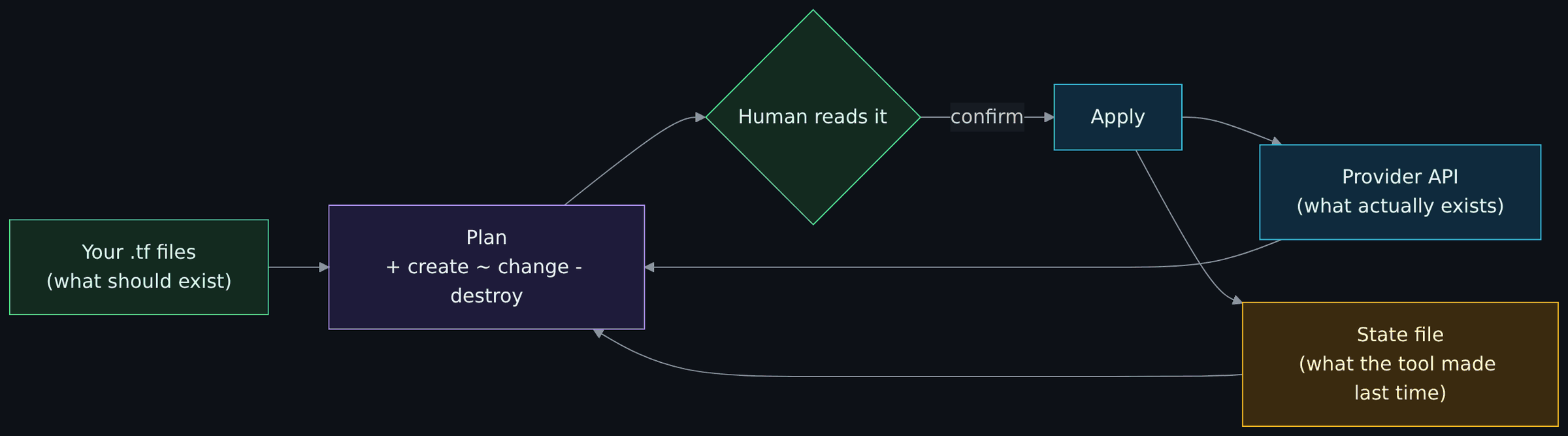
Diagram source (Mermaid)
flowchart LR
    files["Your .tf files<br/>(what should exist)"]:::you
    state["State file<br/>(what the tool made last time)"]:::warn
    api["Provider API<br/>(what actually exists)"]:::cloud
    plan["Plan<br/>+ create ~ change - destroy"]:::ctrl
    human{"Human reads it"}:::you
    apply["Apply"]:::cloud
    files --> plan
    state --> plan
    api --> plan
    plan --> human
    human -- "confirm" --> apply --> api
    apply --> state

    classDef you fill:#132a1f,stroke:#4ade80,color:#dcfce7
    classDef ctrl fill:#1e1b3a,stroke:#a78bfa,color:#ede9fe
    classDef cloud fill:#0f2a3d,stroke:#38bdf8,color:#e0f2fe
    classDef warn fill:#3a2a0f,stroke:#fbbf24,color:#fef3c7
After an apply, OpenTofu writes a state file: a record of every resource it created and the real-world ID the provider gave it. Next time, it uses the state to know which droplet is "its" droplet, so it can change or delete the right one.
State is where beginners get hurt:
- Lose the state and the tool forgets what it built. The resources still exist and still bill you, but the tool will try to create them again. The provider then refuses or you get duplicates.
- State contains everything about the resources, including secrets that were passed in. A token written into a machine's configuration is in the state file in plain text. So where the state lives, and who can read it, is a security question. This project keeps state in Spacelift and lists "connector tokens are in state" as an accepted risk in the Threat model.
- Two applies at once can corrupt state when nothing locks it, for example two laptops each holding a copy. Shared backends lock the state while an apply runs, and a runner such as Spacelift queues runs one at a time per stack. That is one reason to run the tool in one shared place rather than on laptops.
A shell script says "do these steps". IaC says "this is the end result"; the tool works out the steps. The difference shows up the second time you run it. A script run twice creates two machines. An IaC configuration applied twice does nothing the second time, because reality already matches. The word for that property is idempotent, and it is what makes "just run it again" a safe recovery move.
Drift is when reality stops matching the files because someone changed something by hand in the console. The next plan shows the difference and offers to put it back. That is a feature: a port someone opened "just for a minute" shows up as a change the next time anyone runs a plan. The rule in this project is that nothing is changed by hand, so a plan that shows unexpected changes is itself an alarm.
As files grow, you split them. A module is a folder of HCL that does one thing and takes inputs, like a function. This repo has three: vpc, firewall and twingate-connector. The same firewall module is called twice with different inputs to make two different firewalls.
A stack (this project's term; Terraform calls it a root module) is a folder you actually apply, which calls modules and has its own state. This repo has two: 00-foundation and 10-access. The OpenTofu, stacks and modules page explains why they are layered, and it comes down to blast radius: a mistake in the access layer cannot touch the network layer, because the network is not in that state file.
OpenTofu creates the machine. Something still has to configure what is on the machine: users, packages, settings. Tools like Ansible do that by logging in afterwards. This project instead uses cloud-init, a standard first-boot mechanism: you hand the machine a text file when you create it, and the machine configures itself before anyone can log in. The file is a template in the repo, filled in by OpenTofu, so the machine's whole setup is in the same review and the same plan. Droplet hardening walks through it. The cost is that any change to that file means the machine is rebuilt, which is fine for machines that hold nothing.
You could run tofu apply from your laptop. Problems: the state is on your laptop, the write-capable cloud token is on your laptop, and nothing stops you applying something nobody reviewed. You could run it from GitHub Actions. Problems: the token is in CI, which is one bad workflow away from leaking it.
This project runs it in Spacelift, a hosted service for exactly this. Spacelift holds the state, runs the plan when code lands on the main branch, and then stops and waits for a human to read the plan and press confirm. Secrets reach the run from Doppler at the last moment. GitHub Actions only ever tests; it never holds a cloud credential. Spacelift explains the choice and the one way it is not perfect.
Start with the smallest file and work up:
-
modules/vpc/variables.tf,main.tf,outputs.tf: three short files, one resource. Notice thevalidationblock that refuses a public address range before anything is created. -
modules/firewall/: one resource withdynamicblocks that turn a list of rules into real rules. -
stacks/00-foundation/main.tf: see how a stack calls modules and passes values between them. -
modules/twingate-connector/main.tf: the droplet and thetemplatefile()call that fills in cloud-init. -
stacks/10-access/main.tf: everything wired together.
The Terraform reference explains every line of all of those, in that order.
The tests in this repo use mocked providers: fake DigitalOcean and Twingate that accept any request and return made-up IDs. So you can run the whole test suite with no account and no cost.
# install OpenTofu 1.8 or newer first: https://opentofu.org/docs/intro/install/
git clone https://github.com/ChiefGyk3D/Clouds-Against-Humanity.git
cd Clouds-Against-Humanity
tofu -chdir=modules/vpc init -backend=false
tofu -chdir=modules/vpc test
You should see tests pass, including one that proves a public address range is rejected. Change the range in a test to 8.8.8.0/24, run again, watch it fail, and you have just experienced what "validation at the edge" means. Then repeat for modules/firewall and read modules/firewall/tests/ to see what a security property looks like when it is written as a test.