Repository navigation
Coq
Quantifiers, logical connectives and the top-level keywords of Coq proofs. Requires an extension that provides the language id coq (e.g. VsCoq).
The rules go into your VS Code settings.json. Open the command palette (Ctrl+Shift+P) and run Preferences: Open User Settings (JSON) to enable them for all projects, or edit .vscode/settings.json to enable them for one workspace. Add an entry for this language to the prettifySymbols.substitutions array (if the setting already exists, add the entry to the existing array; entries for different languages sit side by side):
Changes take effect as soon as you save settings.json. The extension is enabled by default; the animation at the bottom starts with it switched off only to show the difference.
"language": ["coq", {"pattern": "**/*.v"}],language can also be a list that mixes language ids and file patterns. The pattern is there because .v files are sometimes opened as Verilog or plain text; with it, the rules apply to every *.v file regardless of the detected language.
Basic substitutions:
{ "ugly": "forall",      "pretty": "∀", "pre": "\\b", "post": "\\b" },
{ "ugly": "exists",      "pretty": "∃", "pre": "\\b", "post": "\\b" },
{ "ugly": "fun",         "pretty": "λ", "pre": "\\b", "post": "\\b" },
{ "ugly": "=>",          "pretty": "⇒", },
{ "ugly": ":=",          "pretty": "≜", },
Logical:
{ "ugly": "False",       "pretty": "⊥", "pre": "\\b", "post": "\\b" },
{ "ugly": "True",        "pretty": "⊤", "pre": "\\b", "post": "\\b" },
{ "ugly": "/\\\\",       "pretty": "∧", },
{ "ugly": "\\\\/",       "pretty": "∨", },
{ "ugly": "<->",         "pretty": "⟷", },
{ "ugly": "->",          "pretty": "⟶", },
Top level:
{ "ugly": "Defined[.]",  "pretty": "□", "pre": "\\b", "post": "(?:$|\\s)" },
{ "ugly": "Admitted[.]", "pretty": "😱","pre": "\\b", "post": "(?:$|\\s)" },
{ "ugly": "Proof[.]",    "pretty": "∵", "pre": "\\b", "post": "(?:$|\\s)" },
{ "ugly": "Qed[.]", "pretty": "∎", "pre": "\\b", "post": "(?:$|\\s)" },Each rule is one line: ugly is a regular expression for the text to hide, pretty is what is shown instead, and the optional pre and post are regular expressions that must match the text just before and after, without being replaced themselves. Backslashes are written twice because the value is parsed by JSON and then as a regular expression. See Settings for all fields.
-
Basic:
forall,exists,funbecome∀,∃,λ;=>becomes⇒and:=becomes≜. -
Logical:
True,Falsebecome⊤,⊥;/\and\/(written/\\\\and\\\\/in JSON) become∧,∨;<->and->become⟷and⟶. -
Top level: the proof terminators
Defined.andQed.become□and∎,Proof.becomes∵, andAdmitted.becomes 😱 so that unfinished proofs are hard to miss. The trailing.is part of the match, andpostmakes it apply only at the end of the sentence.
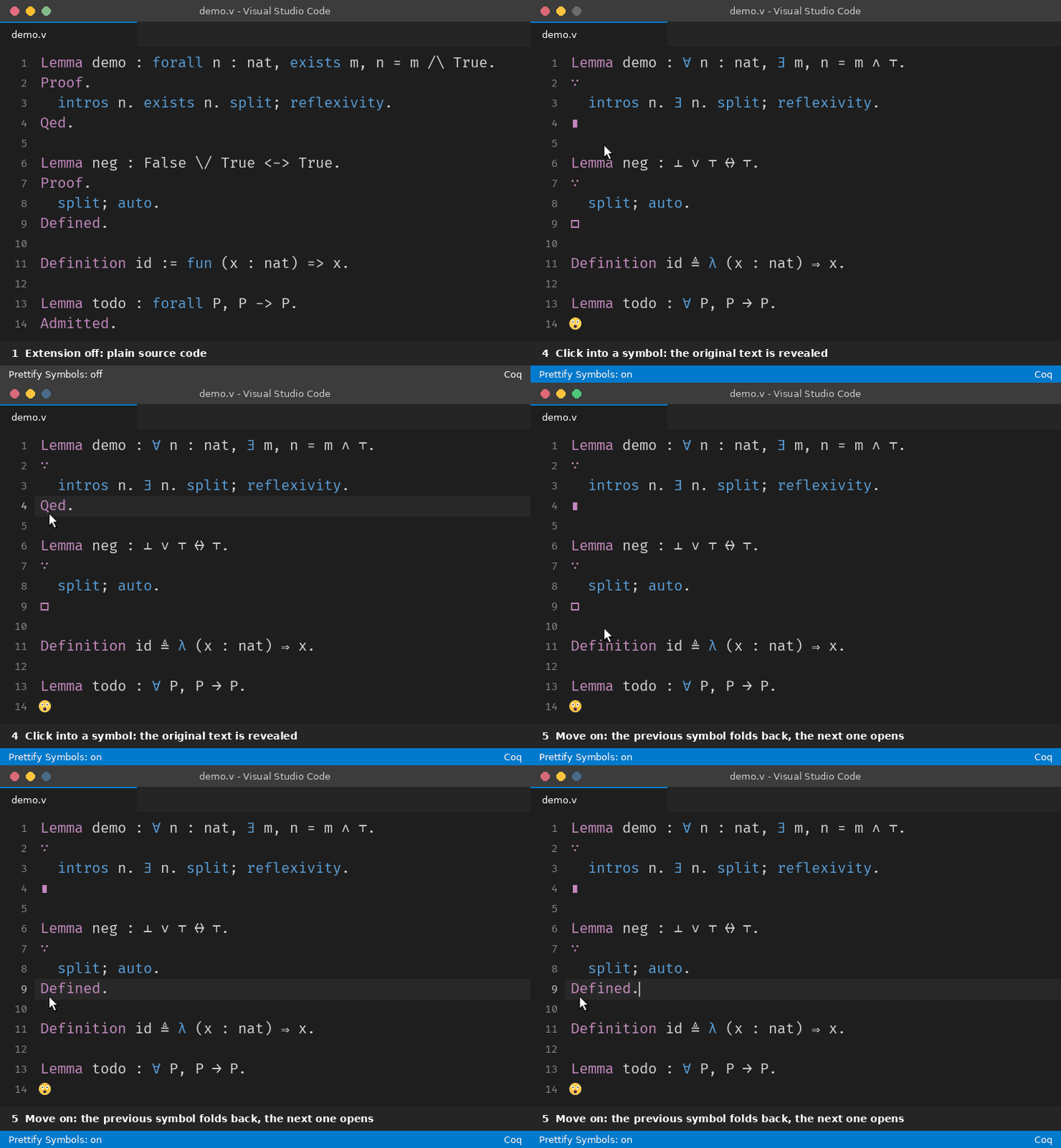
The animation is rendered from the rules on this page. The code is never modified: clicking into a symbol (or moving the cursor onto it) shows the original text again, and the symbol returns when the cursor leaves.