Repository navigation
Python
Operators and keywords of Python that read well as math: and, or, lambda, True, False, comparisons, **2, math.sqrt, sum. Requires a Python extension (or any other that provides the language id python).
The block below is a complete settings entry. Paste it into your settings.json (command palette Ctrl+Shift+P, then Preferences: Open User Settings (JSON) for all projects, or .vscode/settings.json for one workspace). If you already have a prettifySymbols.substitutions setting, add only the { "language": "python", ... } entry to that array. Changes take effect as soon as you save the file. The extension is enabled by default; the animation at the bottom starts with it switched off only to show the difference.
"prettifySymbols.substitutions": [{
    "language": "python",
    "substitutions": [
        { "ugly": "and", "pretty": "∧", "pre": "\\s|^", "post": "\\s|$" },
        { "ugly": "or", "pretty": "∨", "pre": "\\s|^", "post": "\\s|$" },
        { "ugly": "\\s?\\*\\*\\s?2", "pretty": "²", "post": "\\b" },
        { "ugly": "\\s?\\*\\*\\s?3", "pretty": "³", "post": "\\b" },
        { "ugly": "\\*", "pretty": "·", "pre": "[^\\*]|^", "post": "\\s|$" },
        { "ugly": ">=", "pretty": "≥", "pre": "[^=\\-<>]|^", "post": "[^=\\-<>]|$" },
        { "ugly": "<=", "pretty": "≤", "pre": "[^=\\-<>]|^", "post": "[^=\\-<>]|$" },
        { "ugly": "=", "pretty": "≔", "pre": "[^<>=!]|^", "post": "[^<>=]|$" },
        { "ugly": "==", "pretty": "=", "pre": "[^<>=!]|^", "post": "[^<>=]|$" },
        { "ugly": "!=", "pretty": "≠", "pre": "[^<>=!]|^", "post": "[^<>=]|$" },
        { "ugly": "lambda", "pretty": "λ", "pre": "\\b", "post": "\\b" },
        { "ugly": "True", "pretty": "⊤", "pre": "\\b", "post": "\\b" },
        { "ugly": "False", "pretty": "⊥", "pre": "\\b", "post": "\\b" },
        { "ugly": "math.sqrt", "pretty": "√", "pre": "\\b", "post": "\\(" },
        { "ugly": "sum", "pretty": "∑", "pre": "\\b", "post": "\\(" }
    ]
}]Each rule is one line: ugly is a regular expression for the text to hide, pretty is what is shown instead, and the optional pre and post are regular expressions that must match the text just before and after, without being replaced themselves. Backslashes are written twice because the value is parsed by JSON and then as a regular expression. See Settings for all fields.
-
and,or:preandpostrequire whitespace (or the line boundary) around the word, so names likeandroidororderare left alone. -
**2,**3: the exponent with optional spaces becomes a superscript.post: \\bstops**20from being cut into²0. -
*: a lone*between spaces becomes·;**and*argsare not touched. -
>=,<=,!=:≥,≤,≠. Thepre/postclasses make sure that e.g. the>=in>>=is not picked up. -
=and==: assignment is shown as≔and equality as=, as in mathematical notation. This is a matter of taste: delete these two lines if you would rather keep=as it is. -
lambda,True,False:λ,⊤,⊥. -
math.sqrtandsum:√and∑, only when directly followed by(.
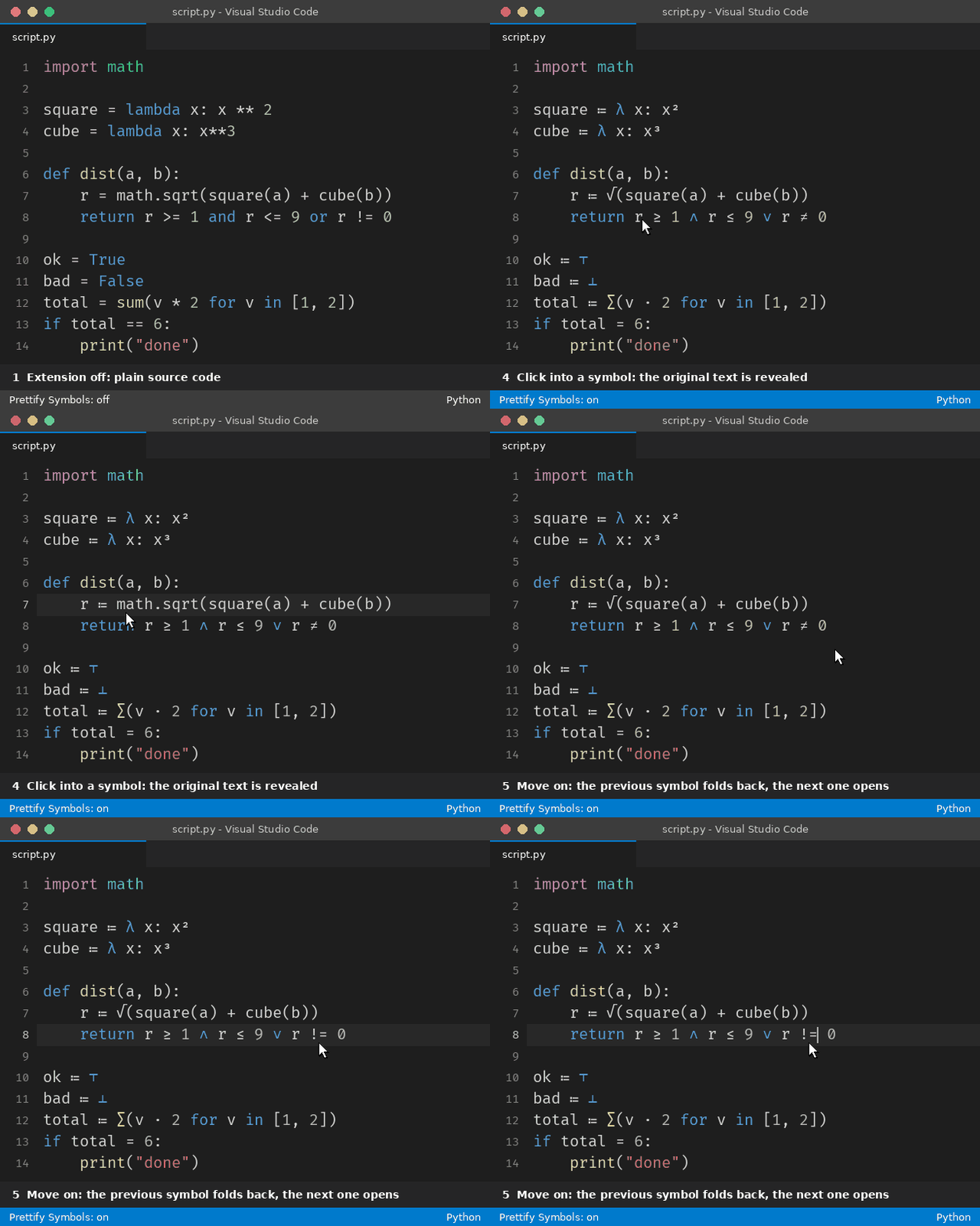
The animation is rendered from the rules on this page. The code is never modified: clicking into a symbol (or moving the cursor onto it) shows the original text again, and the symbol returns when the cursor leaves.