Mods and Workshop
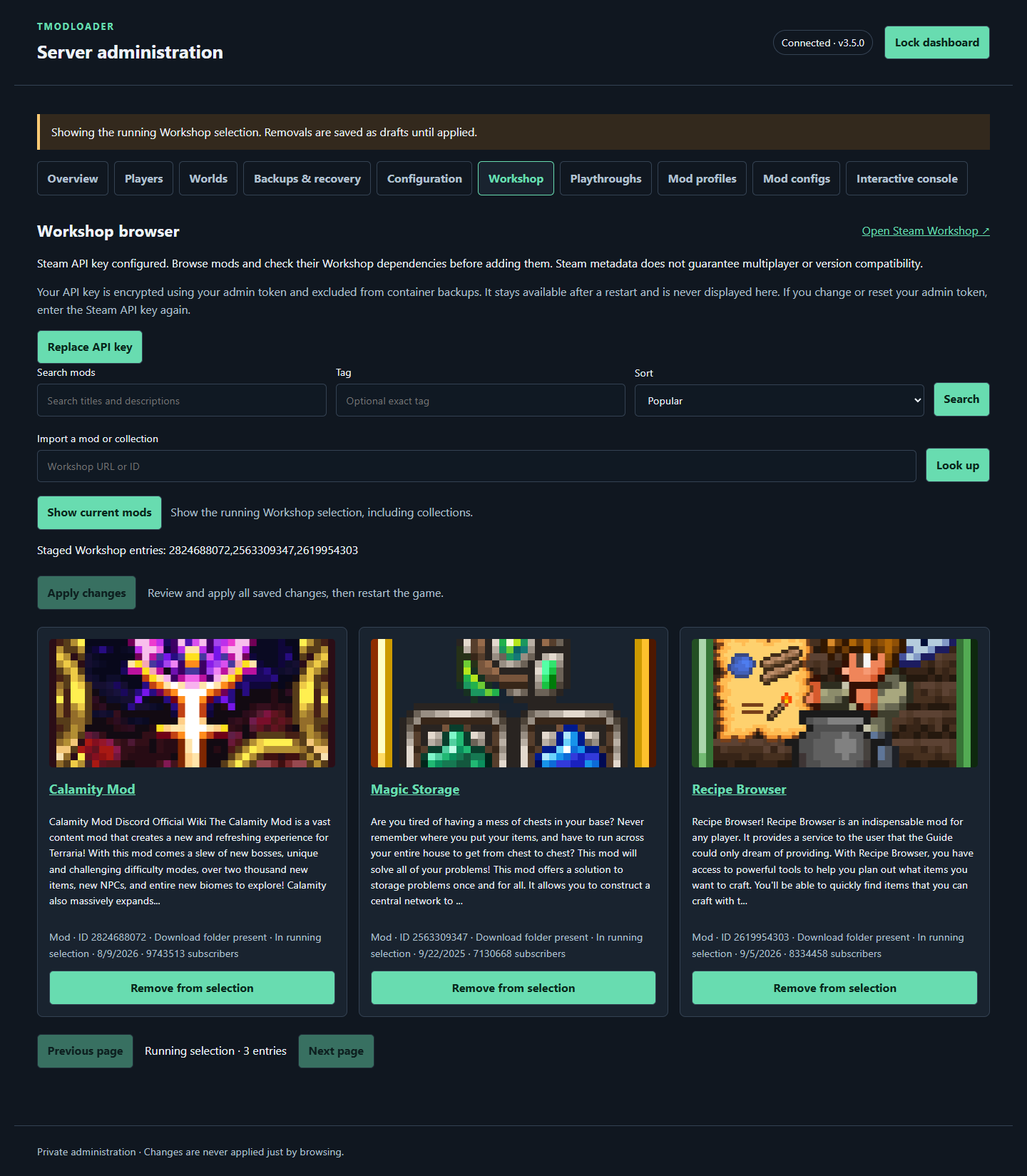
The 3.4.1 Workshop interface with demonstration search results and real public Steam titles and artwork, captured September 22. No live authenticated search was performed. Select the image to view full size.
TMOD_MODS accepts comma-separated Workshop item IDs and collections prefixed with collection:. For example, the format is ITEM_ID,collection:COLLECTION_ID; replace these placeholders with numeric Workshop IDs.
In web mode, use Workshop to look up an item URL or ID, review the selection, and stage changes. Review and apply the draft to restart the game with the chosen mods. In environment mode, edit TMOD_MODS in .env and recreate the container with docker compose up -d.
Removing an entry disables it on managed startup while retaining cached downloads. Check the dashboard and startup logs for the mods actually loaded.
Mods explicitly identified as client-only are excluded from the server selection. Workshop cards mark these entries, and the apply flow reports removed client-only mods. This filtering does not guarantee that every remaining mod is compatible with your server or world; review the confirmed loaded-mod list and console output after startup.
- URL and ID lookup does not require a Steam API key.
- Workshop catalog search and dependency checks require a Steam API key.
- Saving and loading mod profiles does not require a key.
On Workshop, enter a Steam Web API key and choose Validate & save key. The dashboard validates it with Steam, then hides the entry field; use Replace API key to change it. The saved key persists across restarts, is encrypted using your admin token, and is excluded from container backups. Changing or resetting the admin token requires entering the Steam key again. A saved dashboard key takes precedence over TMOD_WORKSHOP_KEY_FILE.
Alternatively, supply a mounted key file as described below. Recreate the container after changing mounts or environment settings.
- Save your Steam Web API key in
secrets/steam-api-keybeside your Compose file. The file should contain only the key; keep it private. - Add this line to
.env:
TMOD_WORKSHOP_KEY_FILE=/run/secrets/steam-api-key- Add this entry to the existing
volumeslist under thetmodloaderservice, keeping the data and backup mounts:
- "./secrets/steam-api-key:/run/secrets/steam-api-key:ro"- Run
docker compose up -d, then open Workshop and search. In web mode, stage your chosen mods, review the saved selection, and apply it to restart the game.
Without a key, use a Workshop item or collection URL/ID through the lookup controls instead.
Adding a mod checks Steam's declared requirements, including nested dependencies and collections. Review missing server items in the Add / Cancel dialog before staging them; client-only dependencies are excluded. Adding without a key requires acknowledging that dependencies have not been checked. These checks cannot detect undeclared requirements or version conflicts.
Staging does not change the running server. Review and apply the draft when ready to disconnect players and restart. Client-only removal notices remain available across draft edits.
Open Mod configs, choose an existing file, then Open / Reload. Files appear after mods generate them under /data/tModLoader/ModConfigs; nested folders are supported and grouped by path.
Edit the UTF-8 content, use Check syntax, and choose Save file. JSON, YAML, TOML, INI, and XML receive syntax checks; other extensions use text mode. Valid syntax does not guarantee that a mod accepts the values. Saves write directly to disk, separately from the settings draft, and use atomic writes with stale-file protection. If the file changed since loading, reload and reconcile your edits before saving again.
Restart the server to ensure mods load the new values. Keep a backup before editing; cancelling a settings draft does not undo these file saves. Configuration changes are blocked during active administration or backup operations.

The 3.4.1 editor with a fictional ExampleMod configuration and a demonstration validation response. These example fields are not settings for an actual mod. Select the image to view full size.
| Setting | Default | Meaning |
|---|---|---|
TMOD_MOD_OFFLINE_POLICY |
use-cache |
Allow available cached mods when Steam cannot be reached |
TMOD_DOWNLOAD_RETRIES |
3 |
Download attempts for transient failures |
TMOD_DOWNLOAD_RETRY_DELAY |
10 |
Seconds between attempts |
TMOD_COLLECTION_MAX_ITEMS |
1000 |
Maximum expanded collection items |
Use strict for the offline policy to fail startup when required update/download checks fail. Cache mode cannot supply a mod that has never been downloaded successfully.
Linux AMD64 uses SteamCMD for Workshop downloads; Linux ARM64 uses native DepotDownloader. The image selects the architecture-appropriate tooling.
Open Mod profiles to save a named running or saved-draft mod selection. Load a profile into the draft in web mode, then review and apply it. Review confirmation prompts before replacing or deleting a profile.
Profiles contain mod selections, not worlds or world settings, and do not pin mod versions. Use Playthroughs to pair selections with a world and backups to preserve data before changing a mod pack.