Home
A ComfyUI custom-node pack for weighted wildcards, module-based prompt assembly, per-iteration looping, and a persistent library of reusable building blocks. Build a Context node once, drop wildcards / fixed values / combines / derivations / constraints into it, then assemble the resolved $variables into a prompt — all without leaving ComfyUI.
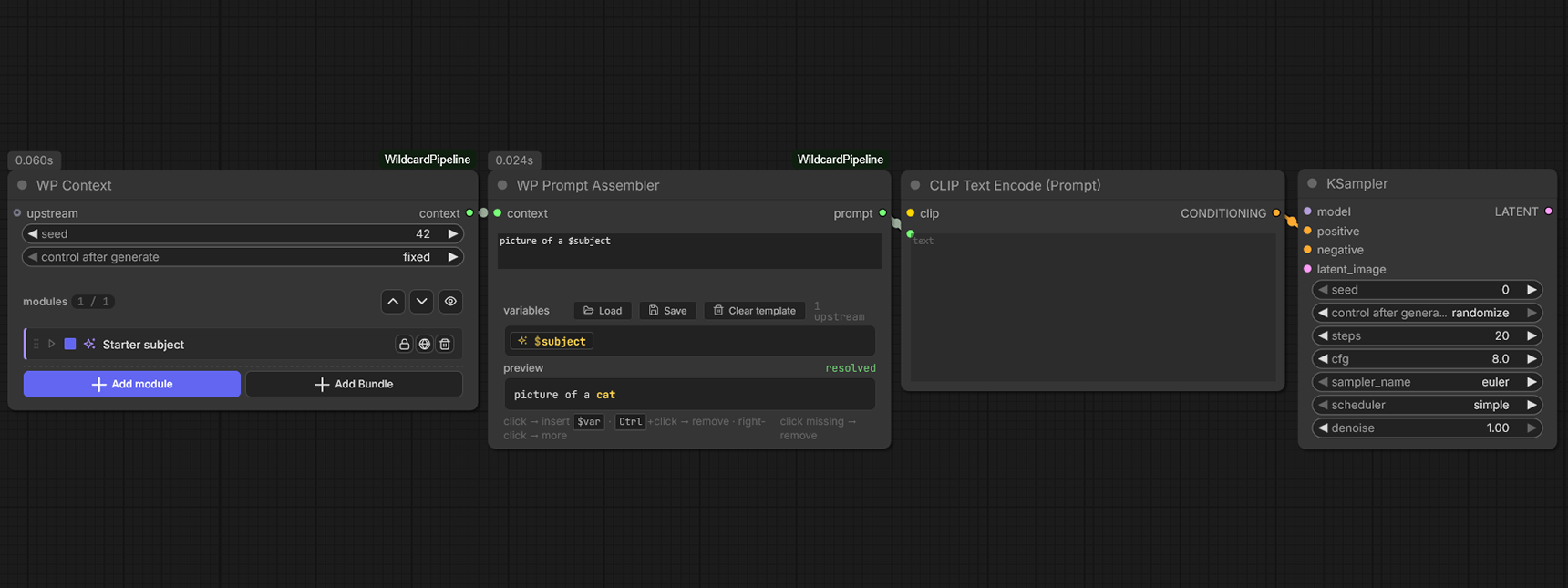
WP Context (Starter subject wildcard) → WP Prompt Assembler (template a $subject) → CLIP Text Encode → KSampler.
- Quick Start — five-minute walkthrough from clean install to first generated prompt
- Nodes — every WP_* node with controls, inputs, outputs
- Modules — wildcard / fixed_values / combine / derivation / constraint / bundle
-
Concepts —
$variablepipeline, context chaining, seeds + loops, constraints, internal vars
| Layer | What it does |
|---|---|
| Nodes | ComfyUI graph nodes (WP_Context, WP_ContextLoop, WP_SeedList, WP_PromptAssembler, etc.) |
| Modules | Stack items inside a Context node — each writes a $variable (or, for constraints, re-weights another module's pool) |
| Library | Persistent SQLite store of reusable modules + bundles, browsed through the manager SPA |
| Bundles | Frozen groups of modules you can drop into any Context as a unit |
| Templates | Saved Prompt Assembler template strings, loadable from any assembler |
ComfyUI prompt nodes either (a) take a single literal string or (b) pick from a flat wildcard file with no awareness of what else is in the prompt. Wildcard Pipeline lets a module read what previous modules picked ($mood reads $weather via a constraint, a combine interpolates $style $subject into $scene, a derivation flips $accent based on $mood), so a single Generate produces a coherent multi-element prompt instead of a Frankenstein concatenation.
- 📦 Main repository
- 📖 README
- 💬 Discord — chat + show-and-tell + fastest path to a response
- 💭 GitHub Discussions
- 🐛 Issue tracker
- 🤝 Contributing guide