Modules
Modules are stack items inside a WP Context node. Each one (except constraint) writes a $variable to the context; the order of the stack is the order the engine runs them.
| Module | Writes | What it does |
|---|---|---|
| Wildcard | $<name> |
Weighted random pick from a pool |
| Fixed Values |
$<name> (× N) |
Static name → value bindings |
| Combine | $<name> |
Template-fill $vars into one output $var
|
| Derivation | $<name> |
IF/ELIF/ELSE rules that read picked $vars and rewrite others |
| Constraint | (none) | Tilt a downstream wildcard's odds based on what a source wildcard picked |
| Bundle | (group) | Frozen group of modules — drop in as a reusable unit |
| Template | (asm side) | Saved Prompt Assembler template string |
Weighted random pick from a pool of options. Writes the picked value to a $variable.
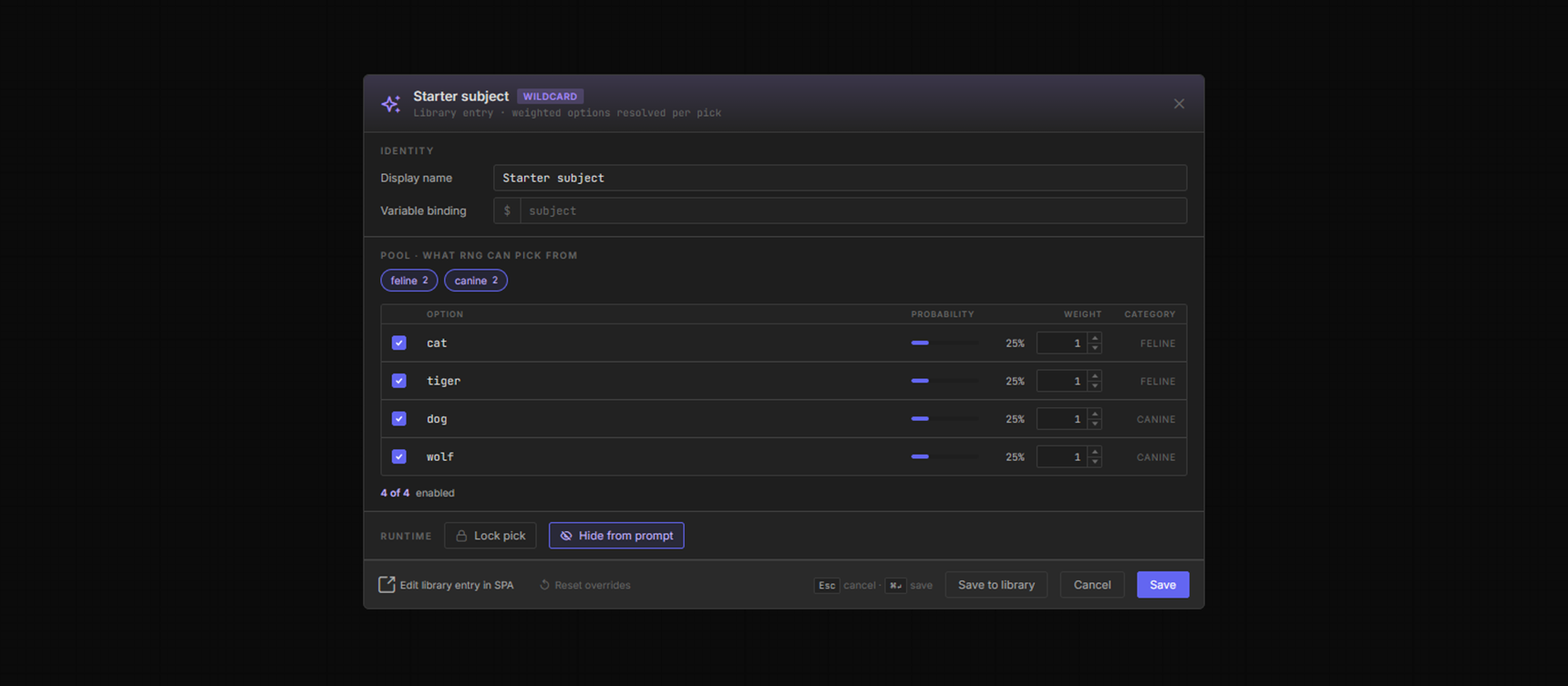
The Starter subject wildcard modal — $subject variable binding, sub-category chips feline · 2 / canine · 2 above a four-row pool (cat, tiger, dog, wolf — each at 25% probability, weight 1). Footer carries Lock pick + Hide from prompt runtime toggles.
Per-option fields
- Value — the text that lands in the prompt when this option is picked.
- Weight — relative likelihood. Weight 2 is twice as likely as weight 1. Weight 0 disables without deleting.
- Sub-categories — one or more labels per option, for grouping (constraint matrix axes, bulk selection) and the per-instance category filter.
- Null option — at most one per pool. When picked the wildcard resolves to an empty string ("no pick").
Per-instance options (set on the canvas, override library defaults)
- Random mode (default) — pick any option using weights.
- Subcategory mode — pre-narrow the pool to a chosen sub-category, then pick.
- Pinned mode — lock to one specific option regardless of seed.
- Lock seed — freeze the pick across loop iterations (every iter gets the same result).
- Hide from prompt — mark the variable internal so it doesn't render in the Assembler.
-
Category filter — a sub-category boolean expression (
and/or/not, parens; comma = OR, e.g.feline and warm, not lynx) that narrows the pool before the pick. - Exclude null — drop the null option for this instance.
Multi-pick
A wildcard can pick a count of options instead of one. Set Pick to a number or an N–M range (equal = fixed count), a separator that joins the picks, and Allow repeats (independent / with replacement — the default is unique, no repeats). The result is a list: a bare $name joins it with the separator, $name.K indexes it 0-based ($colors.0). The null option stays in the pool unless excluded — a Pick of 0–N allows "maybe nothing".
Nested references
An option's value can embed a @{uuid} reference to another wildcard ("nested wildcard"), with the :filter (sub-category boolean) and !null segments, plus inline {a|b} picks — e.g. @{abcd1234:warm}. On the wildcard surface @{} refs + {a|b} picks resolve, but $var reads do not (a wildcard is a producer). See Concepts → the $variable pipeline for the full token grammar + surface gate.
Constraint interaction
Place a Constraint module between a source wildcard and this one to tilt its option weights based on what the source picked. Stack order matters:

Source → Constraint → Target. The pink left-border on the constraint + target row visually pairs them; the constraint claims the first instance of $mood downstream of itself.
Hard-coded name → value bindings. Like a wildcard with one option you can't roll past.
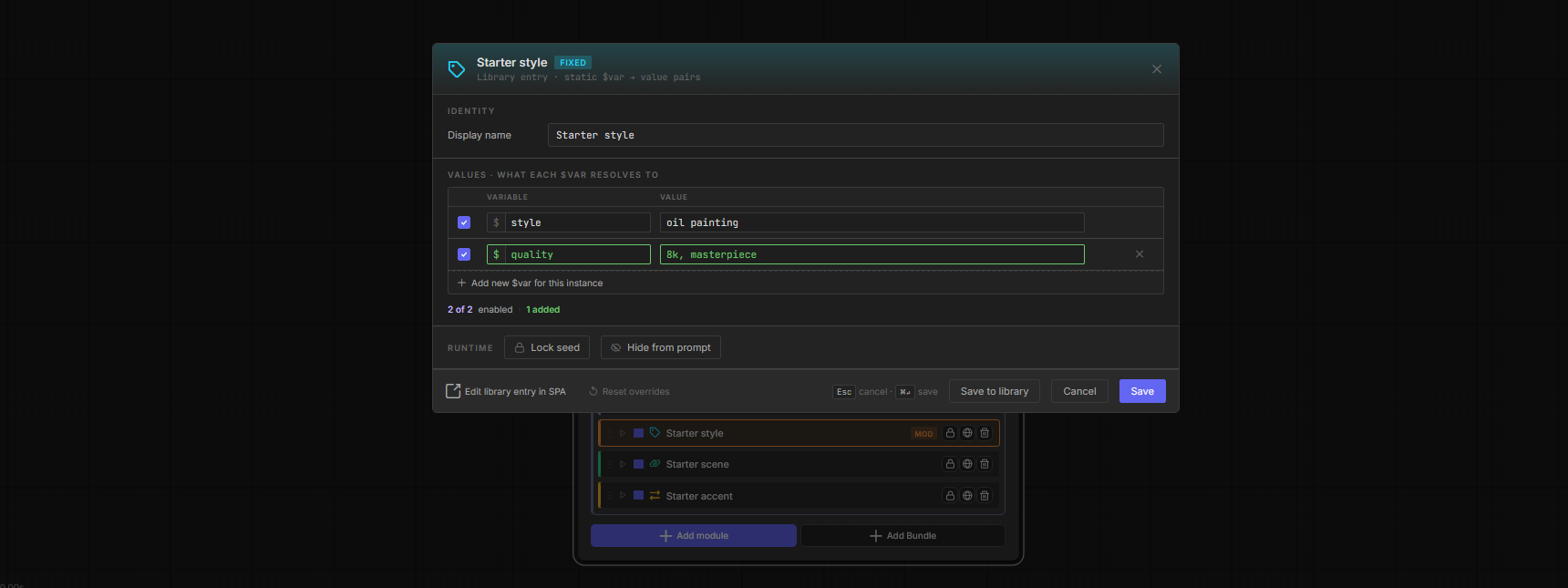
Starter style modal — two rows: $style = oil painting, $quality = 8k, masterpiece. Each row has its own enable checkbox; footer 2 of 2 enabled · 1 added flags the instance-added row over the library baseline.
Use cases
- Pin a style ("oil painting") across every variation.
- Set quality booster tags (
8k, masterpiece) once at the top of the stack. - Hold a reusable negative-prompt fragment.
Per-instance options
- Add new
$varrows to ONE instance without modifying the library entry (the row carries a green ADDED chip; instance unique). - Disable individual rows (enable checkbox per row).
- Lock seed / Hide from prompt — same runtime toggles as every other module.
Templated string that interpolates $variables from earlier modules into a single output $variable.
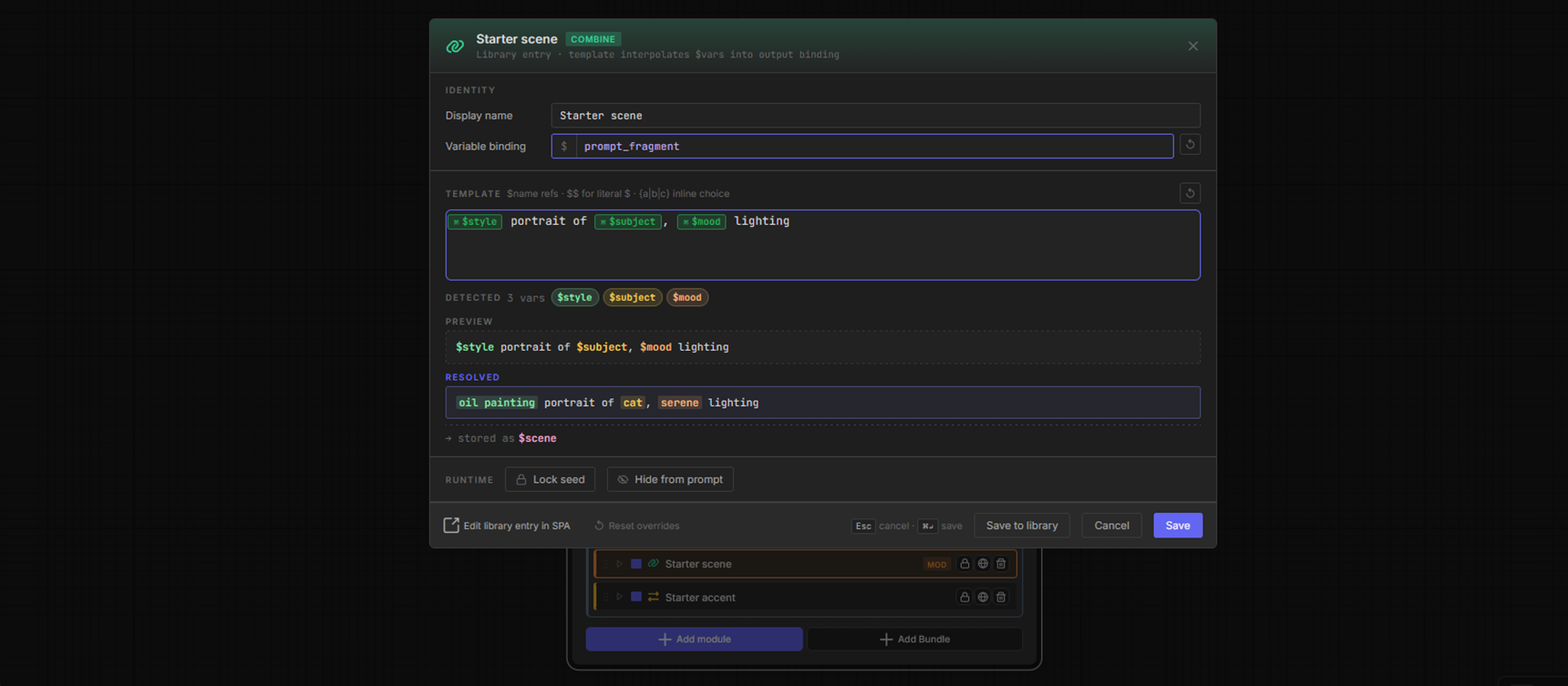
Starter scene combine modal — output binding $prompt_fragment, template $style portrait of $subject, $mood lighting. Detected vars chip strip lists $style $subject $mood. Resolved preview swaps in static picks → oil painting portrait of cat, serene lighting.
Template syntax
-
$varname— substituted with whatever that variable holds at this point in the stack. -
{a|b|c}— inline pick at render time. Good for small variations that don't need their own wildcard. -
$$— literal$character.
Notes
- The Detected strip flags missing variables — add an upstream module that writes them, or rename.
- The Resolved preview uses deterministic (no-RNG) resolution so you can iterate on the template without re-running the graph.
IF/ELIF/ELSE rules that read what previous modules picked and rewrite or extend the context accordingly. Conditional logic for your prompt.
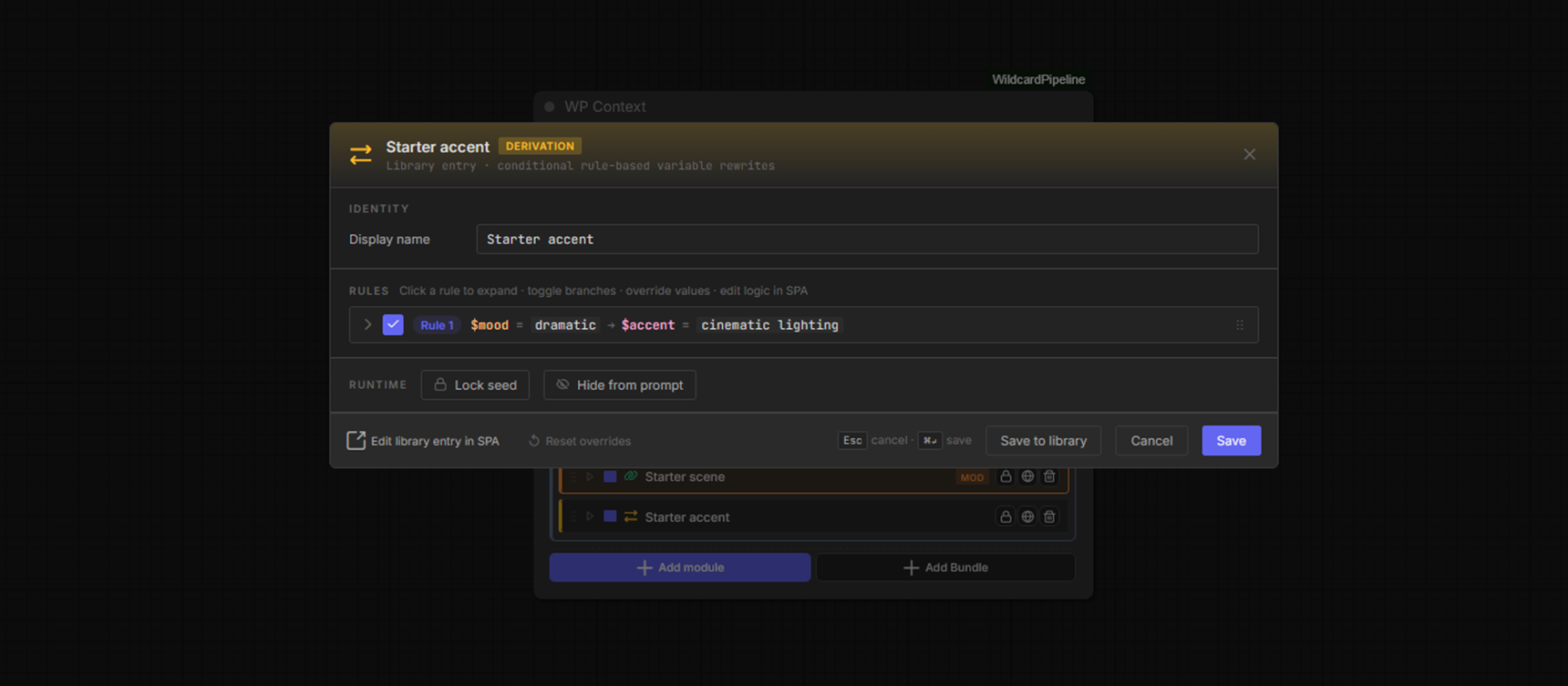
Starter accent derivation modal — Rule 1: $mood = dramatic → $accent = cinematic lighting. The engine falls through to the rule's else branch when $mood resolves to anything else.
Rule shape
A rule has one or more branches. Each branch has:
-
Condition — read a
$variable, check it against a value (equals,not_equals,contains, …). -
Action — write a
$variable(replace,append,prependmodes).
When no branch matches, the rule's else action fires (or skips if no else defined). Multiple rules run top-to-bottom.
Per-instance options
- Disable a whole rule, or just one branch within it.
- Override the value any specific action writes (instance-only).
- Reorder rules.
Nested references in actions
A rule's action value is fully resolved when the rule fires — it can embed @{uuid} wildcard refs (with :filter / !null), inline {a|b} picks, and $vars, e.g. $accent = cinematic lighting, @{abcd1234:dramatic}. The condition value stays a plain literal / $var comparison (refs + picks there are not resolved). See Concepts → the $variable pipeline.
The only module that writes no $variable. Watches a source wildcard's pick and adjusts a downstream target wildcard's option weights before that target makes its own pick.
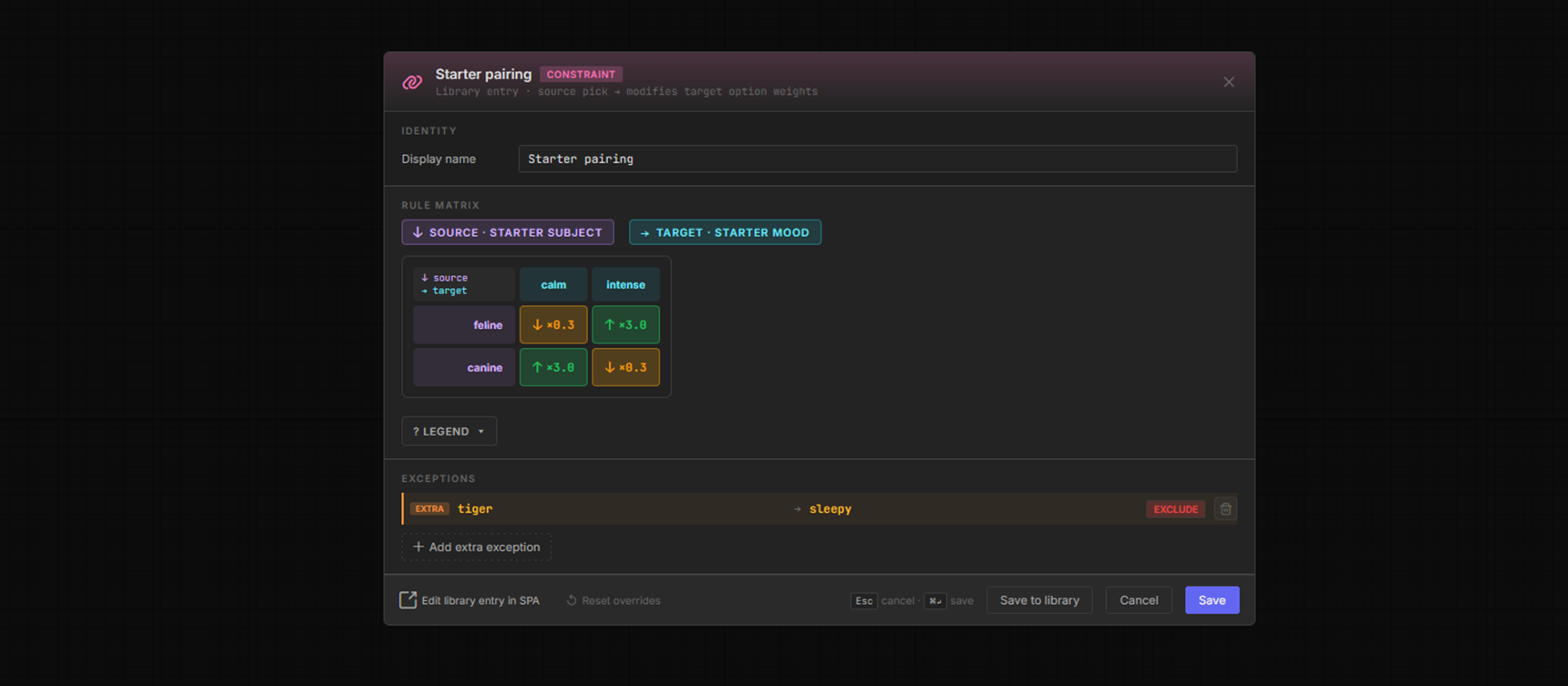
Starter pairing — source Starter subject (feline/canine) → target Starter mood (calm/intense). Matrix boosts feline×intense + canine×calm by ×3.0 and reduces the mismatched diagonals to ×0.3. Exceptions row below overrides tiger → sleepy = EXCLUDE.
Reweight modes
- Allow — only these options can be picked; everything else is removed.
- Exclude — these options are removed; everything else stays.
- Boost — multiply matched options' weights by a factor (e.g. ×3).
- Reduce — multiply matched options' weights down (e.g. ×0.3).
Matrix vs Exceptions
- Matrix rules sit at the sub-category × sub-category level — broad nudges (feline → intense).
- Exceptions are per-option overrides (tiger → sleepy = Exclude). Exceptions win when both apply to the same pick.
Stack order + reach
The Constraint must sit after its source wildcard and before its target wildcard. By default it re-weights every matching target instance downstream; a per-instance Target reach selector narrows that to the first, the next N, or specific picked targets (direct instances or nested-ref carriers). A reach that covers no reachable target is flagged constraint_orphan_target.
Reattach a broken axis
If the source or target wildcard is missing from your library, that axis is stranded — the editor shows the dead uuid and locks the matrix read-only. Reattach re-points it at a local wildcard (or downloads the missing one from the community); the matrix + exceptions remap onto the new wildcard's sub-categories.
See Concepts → Constraints in depth for the full picture (target reach, carrier-via-nested-ref, never-fired warnings).
A frozen group of modules you can drop into any Context as a single unit. Think of it as a library-saved "preset" of an entire module stack.
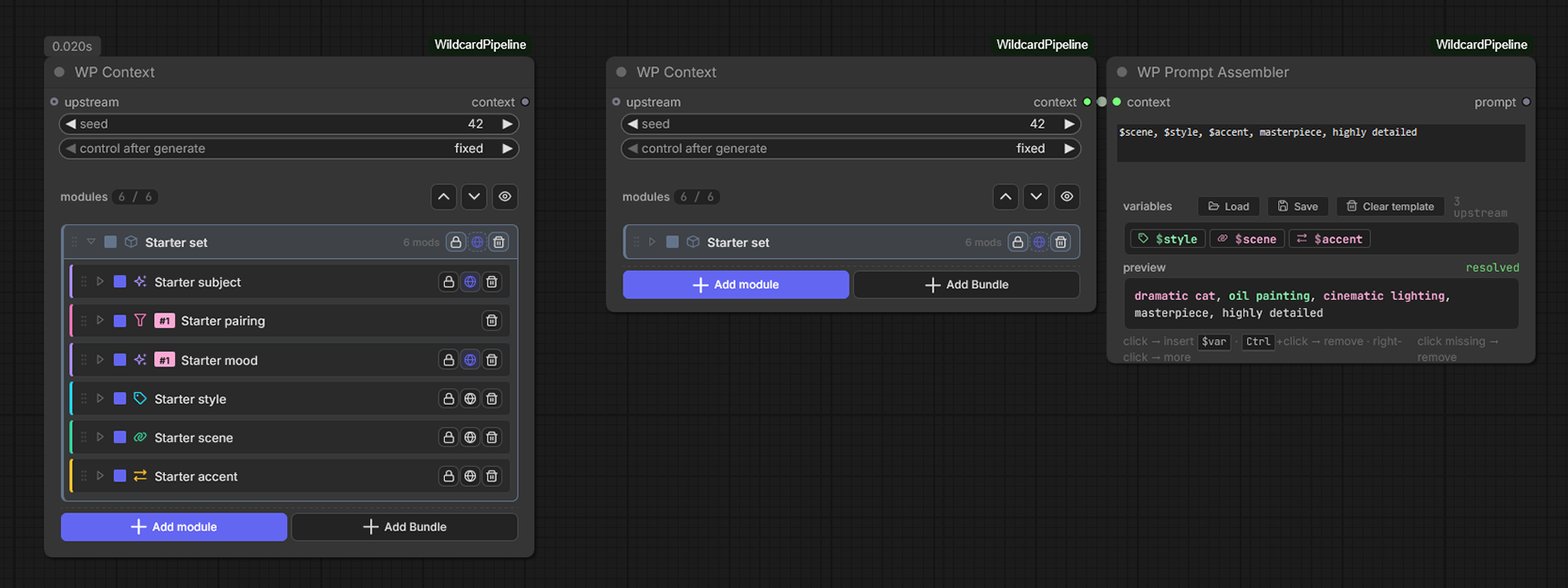
Three nodes. Left WP Context: Starter set bundle expanded (6 child rows: subject, pairing, mood, style, scene, accent). Middle Context: same bundle collapsed into a single row. Right Prompt Assembler reads the resolved $vars from either Context the same way — the bundle is transparent at runtime.
Frozen snapshot
When you create a bundle, the editor takes a snapshot of every child module's payload at that moment. Later edits to the library entries do not propagate into already-inserted bundle instances — the snapshot keeps the bundle reproducible across machines + workflow saves.
Drift detection
If a library module a bundle references changes after the bundle was saved, the canvas flags the bundle row with a MODIFIED chip so you can re-snapshot if you want the update.
Bundle of bundles
A bundle can reference another bundle — inner bundles resolve by id at insert time, with the same frozen-snapshot semantics.
Not a Context-stack module — a saved Prompt Assembler template string living in the library. Lets you reuse a template across multiple Assembler nodes / workflows without retyping.
How
- In any WP Prompt Assembler, click Save to push the current template into the library.
- Click Load to swap any saved template into the current Assembler.
- Manage / edit / categorize templates from the manager SPA → Templates page.