Skip to content

[CP Staging] Revert #98030 - Add Auto-categorize new expenses workspace setting to let strict admins disable auto-categorization - #100217

Merged
roryabraham merged 1 commit into
mainfrom
francois-revert-98030
Sep 2, 2026
Merged

[CP Staging] Revert #98030 - Add Auto-categorize new expenses workspace setting to let strict admins disable auto-categorization#100217
roryabraham merged 1 commit into
mainfrom
francois-revert-98030

Conversation

@francoisl

@francoisl francoisl commented Sep 2, 2026

Copy link
Copy Markdown
Contributor

Explanation of Change

Straight revert of #98030 to fix blockers

Fixed Issues

$ #100111
$ #100117
$ #100115
$ #100108
$ #100110

Tests

Test that blockers above are no longer repro.

  • Verify that no errors appear in the JS console

Offline tests

QA Steps

Test that blockers above are no longer repro.

  • Verify that no errors appear in the JS console

PR Author Checklist

  • I linked the correct issue in the ### Fixed Issues section above
  • I wrote clear testing steps that cover the changes made in this PR
    • I added steps for local testing in the Tests section
    • I added steps for the expected offline behavior in the Offline steps section
    • I added steps for Staging and/or Production testing in the QA steps section
    • I added steps to cover failure scenarios (i.e. verify an input displays the correct error message if the entered data is not correct)
    • I turned off my network connection and tested it while offline to ensure it matches the expected behavior (i.e. verify the default avatar icon is displayed if app is offline)
    • I tested this PR with a High Traffic account against the staging or production API to ensure there are no regressions (e.g. long loading states that impact usability).
  • I included screenshots or videos for tests on all platforms
  • I ran the tests on all platforms & verified they passed on:
    • Android: Native
    • Android: mWeb Chrome
    • iOS: Native
    • iOS: mWeb Safari
    • MacOS: Chrome / Safari
  • I verified there are no console errors (if there's a console error not related to the PR, report it or open an issue for it to be fixed)
  • I followed proper code patterns (see Reviewing the code)
    • I verified that comments were added to code that is not self explanatory
    • I verified that any new or modified comments were clear, correct English, and explained "why" the code was doing something instead of only explaining "what" the code was doing.
    • I verified any copy / text that was added to the app is grammatically correct in English. It adheres to proper capitalization guidelines (note: only the first word of header/labels should be capitalized), and is either coming verbatim from figma or has been approved by marketing (in order to get marketing approval, ask the Bug Zero team member to add the Waiting for copy label to the issue)
  • If a new code pattern is added I verified it was agreed to be used by multiple Expensify engineers
  • I followed the guidelines as stated in the Review Guidelines
  • I tested other components that can be impacted by my changes (i.e. if the PR modifies a shared library or component like Avatar, I verified the components using Avatar are working as expected)
  • If a new CSS style is added I verified that:
    • A similar style doesn't already exist
    • The style can't be created with an existing StyleUtils function (i.e. StyleUtils.getBackgroundAndBorderStyle(theme.componentBG))
  • If new assets were added or existing ones were modified, I verified that:
    • The assets are optimized and compressed (for SVG files, run npm run compress-svg)
    • The assets load correctly across all supported platforms.
  • If the PR modifies code that runs when editing or sending messages, I tested and verified there is no unexpected behavior for all supported markdown - URLs, single line code, code blocks, quotes, headings, bold, strikethrough, and italic.
  • If the PR modifies a generic component, I tested and verified that those changes do not break usages of that component in the rest of the App (i.e. if a shared library or component like Avatar is modified, I verified that Avatar is working as expected in all cases)
  • If the PR modifies a component related to any of the existing Storybook stories, I tested and verified all stories for that component are still working as expected.
  • If the PR modifies a component or page that can be accessed by a direct deeplink, I verified that the code functions as expected when the deeplink is used - from a logged in and logged out account.
  • If the PR modifies the UI (e.g. new buttons, new UI components, changing the padding/spacing/sizing, moving components, etc) or modifies the form input styles:
    • I verified that all the inputs inside a form are aligned with each other.
    • I added Design label and/or tagged @Expensify/design so the design team can review the changes.
  • I added unit tests for any new feature or bug fix in this PR to help automatically prevent regressions in this user flow.
  • If the main branch was merged into this PR after a review, I tested again and verified the outcome was still expected according to the Test steps.

Screenshots/Videos

Android: Native
Android: mWeb Chrome
iOS: Native
iOS: mWeb Safari
MacOS: Chrome / Safari

This reverts commit c293b8c, reversing
changes made to b71529e.
@francoisl francoisl self-assigned this Sep 2, 2026
@francoisl francoisl changed the title [CP Staging] Revert #98030 [CP Staging] Revert #98030 - Add Auto-categorize new expenses workspace setting to let strict admins disable auto-categorization Sep 2, 2026
@francoisl
francoisl marked this pull request as ready for review September 2, 2026 20:50
@francoisl
francoisl requested review from a team as code owners September 2, 2026 20:50
@melvin-bot
melvin-bot Bot requested review from joekaufmanexpensify and truph01 and removed request for a team September 2, 2026 20:50
@melvin-bot

melvin-bot Bot commented Sep 2, 2026

Copy link
Copy Markdown

@truph01 Please copy/paste the Reviewer Checklist from here into a new comment on this PR and complete it. If you have the K2 extension, you can simply click: [this button]

@melvin-bot
melvin-bot Bot requested review from a team and removed request for a team September 2, 2026 20:50
@codecov

codecov Bot commented Sep 2, 2026

Copy link
Copy Markdown

Codecov Report

❌ Looks like you've decreased code coverage for some files. Please write tests to increase, or at least maintain, the existing level of code coverage. See our documentation here for how to interpret this table.

Files with missing lines Coverage Δ
...c/components/ReportActionItem/MoneyRequestView.tsx 78.95% <100.00%> (ø)
src/libs/API/types.ts 100.00% <ø> (ø)
src/libs/TransactionUtils/index.ts 92.05% <100.00%> (-0.02%) ⬇️
src/libs/actions/Policy/Category.ts 50.41% <ø> (+0.54%) ⬆️
...egories/DynamicWorkspaceCategoriesSettingsPage.tsx 0.00% <0.00%> (ø)
... and 16 files with indirect coverage changes

@roryabraham
roryabraham merged commit dc4291c into main Sep 2, 2026
51 of 52 checks passed
@roryabraham
roryabraham deleted the francois-revert-98030 branch September 2, 2026 21:05
OSBotify pushed a commit that referenced this pull request Sep 2, 2026
[CP Staging] Revert #98030 - Add Auto-categorize new expenses workspace setting to let strict admins disable auto-categorization

(cherry picked from commit dc4291c)

(cherry-picked to staging by roryabraham)
@OSBotify OSBotify added the CP Staging marks PRs that have been CP'd to staging label Sep 2, 2026
@OSBotify

OSBotify commented Sep 2, 2026

Copy link
Copy Markdown
Contributor

✋ This PR was not deployed to staging yet because QA is ongoing. It will be automatically deployed to staging after the next production release.

@francoisl

Copy link
Copy Markdown
Contributor Author

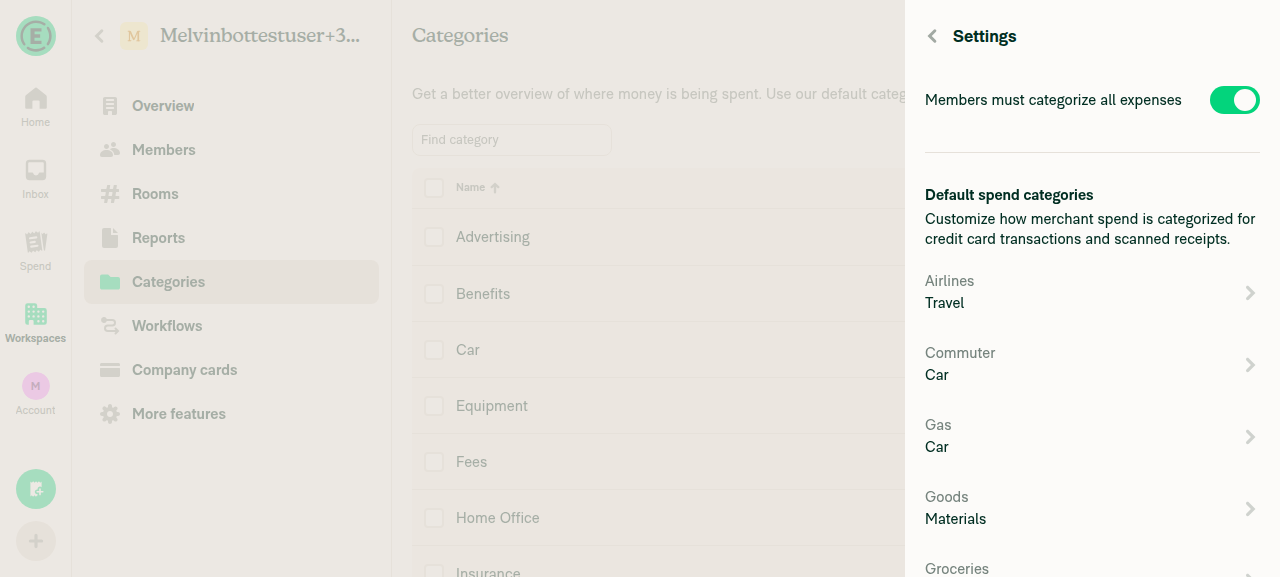
Verified on staging web that the Auto-categorize option is no longer there

image

@os-botify

os-botify Bot commented Sep 2, 2026

Copy link
Copy Markdown

🔁 Filed a Staging retest request for deploy blockers #100111, #100117, #100115, #100108, #100110 after this PR was cherry-picked to staging.

@OSBotify

OSBotify commented Sep 2, 2026

Copy link
Copy Markdown
Contributor

🚀 Cherry-picked to staging by https://github.com/roryabraham in version: 9.4.68-1 🚀

platform result
🕸 web 🕸 success ✅
🤖 android 🤖 success ✅
🍎 iOS 🍎 success ✅

@MelvinBot

Copy link
Copy Markdown
Contributor

No new help site changes are required for this revert — but there's a stale docs PR that must not merge.

main's docs/articles never documented the Auto-categorize new expenses setting, so reverting it leaves the published help site already correct. I did not create a docs PR.

Action needed: #100099Docs updates for E/A#98030 Document Auto-categorize new expenses workspace setting — is still open (draft, HelpDot). It adds a "How to turn off Auto-categorize new expenses" section to Create-expense-categories.md and Require-tags-and-categories-for-expenses.md for the setting this PR just removed. It should be closed.

Evidence

Code: the revert removes the autoCategorizeNewExpenses translation key from all 11 locale files, the SetPolicyAutoCategorizeNewExpenses write command, the setPolicyAutoCategorizeNewExpenses action, the Policy.autoCategorizeNewExpenses field, and the toggle from DynamicWorkspaceCategoriesSettingsPage.tsx. The remaining toggles on that page are Members must categorize all expenses and Show GL codes when categorizing expenses.

Docs: grep -rn "Auto-categorize" docs/articles/ on main returns nothing. Nothing on the live help site describes the setting or the "analyzing" category state it controlled.

Live UI (web, dev build on main): opened Workspaces > [workspace] > Categories > More > Settings. No Auto-categorize new expenses toggle is present. Members must categorize all expenses and Default spend categories are shown. Show GL codes when categorizing expenses was also absent, but the test workspace is on the Collect plan, which gates that row — unrelated to this revert.

Categories Settings page with no Auto-categorize new expenses toggle

@francoisl, please confirm this reading. Since no docs changes are required here, there is no new help site PR to review — instead, please close #100099 so the reverted setting doesn't get documented.


view run

@OSBotify

OSBotify commented Sep 2, 2026

Copy link
Copy Markdown
Contributor

🚀 Deployed to production by https://github.com/francoisl in version: 9.4.68-1 🚀

platform result
🕸 web 🕸 success ✅
🤖 android 🤖 success ✅
🍎 iOS 🍎 success ✅

Bundle Size Analysis (Sentry):

@OSBotify

OSBotify commented Sep 2, 2026

Copy link
Copy Markdown
Contributor

🚀 Cherry-picked to staging by https://github.com/roryabraham in version: 9.4.69-0 🚀

platform result
🕸 web 🕸 success ✅
🤖 android 🤖 success ✅
🍎 iOS 🍎 success ✅

@github-actions

github-actions Bot commented Sep 3, 2026

Copy link
Copy Markdown
Contributor

🚧 roryabraham has triggered a test Expensify/App build. You can view the workflow run here.

@OSBotify

OSBotify commented Sep 3, 2026

Copy link
Copy Markdown
Contributor

🚀 Deployed to production by https://github.com/francoisl in version: 9.4.69-1 🚀

platform result
🕸 web 🕸 success ✅
🤖 android 🤖 success ✅
🍎 iOS 🍎 success ✅

Bundle Size Analysis (Sentry):

Sign up for free to join this conversation on GitHub. Already have an account? Sign in to comment

Labels

CP Staging marks PRs that have been CP'd to staging

Projects

None yet

Development

Successfully merging this pull request may close these issues.

5 participants