Repository navigation
Releases: Eymistaken/Pcbridge
Release list
pcbridge v2.6.0

Install
curl -fsSL https://github.com/Eymistaken/Pcbridge/releases/latest/download/install.sh | shThis installs the newest release into your home directory without root, or updates an existing install, and then runs pcbridge setup. To install this release rather than the newest one, give its version:
curl -fsSL https://github.com/Eymistaken/Pcbridge/releases/latest/download/install.sh | sh -s -- --version v2.6.0To read and verify the script before running it, or to install the .deb or Arch package from the assets below instead, see the install guide.
This release gives agents a browser of their own, moves files of any size between a phone and this machine, lets agents read and edit large files without the shell, and changes remote access so that pcbridge no longer stores the password or any token it can read back. It also ships the install script as a release asset.
Full documentation for this release: https://github.com/Eymistaken/Pcbridge/blob/v2.6.0/docs/usage.md
Let an agent use a browser, and take it over when it needs you
Seven new tools drive a Chrome, Brave or Chromium that pcbridge starts on its own profile. An agent lists tabs, opens pages, reads a page as an outline of headings, text, links, form fields and tables, and clicks, types or selects by naming an element from that outline. Every action answers with the page as it is afterwards, and an element from a page that has since changed is refused, so an agent works from fresh state rather than from what it saw a minute ago. You sign in to a site or to a router panel once in that browser and the sign-in stays.
It is a separate profile on purpose. Chrome 155 ignores the remote-debugging flags on the everyday profile, and its chrome://inspect switch asks in a dialog for every connection, so attaching to your normal browser was measured not to work. The browser talks to pcbridge over a pipe held by a small keeper process: it opens no network port and survives a daemon restart.
The browser tools are not desktop tools. They need no desktop_unlock, keep working with [desktop] enabled = false, after desktop_lock and after the grant expires, and cannot type into another window. Password values are never shown, typing into a password field is refused unless [browser] allow_password_fields = true, and the audit log records the action and the host, never typed text or page content.
The browser starts hidden and keeps working hidden. pcbridge browser show and hide, a button in the terminal UI and browser_visibility bring it on screen without taking the keyboard focus. The window is found by the process id of the browser pcbridge started, so your own browser windows are never touched. On GNOME the extension minimizes it (it needs the updated extension, which loads after the next log-in), on KDE Plasma a KWin script also takes it off the task bar, and on Hyprland it waits on the special:pcbridge workspace.
For a captcha, a two-factor code or a first sign-in, an agent hands the browser to you with browser_handoff. The window comes on screen and a notification gives the reason with a Give it back to the agent button. Until you give it back, every agent action that would change the page is refused, while reading still works so the agent can wait; an agent cannot take the browser back on its own. You give it back from the notification, the GNOME panel menu, the terminal UI or pcbridge browser resume. Away from the machine, the hand-over also gives a link to a page behind your tunnel that shows the browser live and passes your taps and typing to it. The link belongs to that one hand-over and ends with it.
Move files between your phone and this machine
fs_download_link and fs_upload_link return a one-time link through the tunnel that you open in the phone's browser, so a PDF, a photo or a video moves between the phone and this machine without passing through the model. The download page shows the file's name, size and SHA-256. The upload page stores one file at the path the link names, never replacing an existing file unless the link says so, and shows the stored SHA-256 next to the one your browser computed.
A link works for one complete transfer, which must start within five minutes ([files] link_ttl_seconds). A used, expired or unknown link answers 404. Uploads are limited to 512 MB and downloads to 2048 MB by default. A link can only be made when the remote tool profile offers the tool, so a readonly client gets download links and never upload links. Through Funnel, a real Chrome emulating an Android phone moved 50 MB each way with matching hashes; a physical phone has not been tested yet.
These links exist because the alternative was measured to fail. Small files can still go through fs_read and fs_write as base64 chunks, each now carrying its own SHA-256. Through claude.ai, a 36 KB picture went down and back up intact, but in a larger transfer the model changed one character in its fifth chunk and the client cut a later upload off halfway. Base64 through the model suits files of a few tens of kilobytes; anything larger should use a link.
Read and edit large files without the shell
fs_read used to return only the last part of a file, so the start and middle of a large file could only be reached through shell_run. It now reads in pages from the beginning, from start_line (negative counts from the end, so -200 is the last 200 lines of a log) or from the cursor the previous page returned. Each page says which lines it covers, the file's size and SHA-256, and either that the file ended or how to get the next page. If the file changes between two pages the cursor is refused, so pages never skip or repeat content. Images come back as pictures, scaled when they are large.
The new fs_edit changes part of a file by exact text replacement without resending the whole file. A missing or ambiguous match changes nothing and says where the text is; line endings and a byte-order mark are kept; dry_run shows the diff first. With the SHA-256 from fs_read, a change someone else made in the meantime is reported as a conflict instead of being overwritten. fs_write now replaces files atomically and accepts the same check.
Remote access stores no secret it can show
The remote password and the static token are now stored only as hashes, and so is every token in the OAuth database. A leaked config.toml, backup or report gives nothing away, and no command can show the password again. Existing configs and remote clients are converted on the first start and keep working.
A password is created only when you turn remote access on, from pcbridge remote start, the terminal UI's Remote tab, the end of setup or pcbridge set auth.password. You type one or let pcbridge generate a six-word passphrase, which is easier to type on a phone. It is shown once, next to the remote address, until you confirm you saved it. Creating or replacing it asks for your own login password first, checked through PAM rather than sudo, so nobody at the keyboard can hand themselves remote access.
pcbridge remote clients lists the apps that connected through the tunnel, and pcbridge remote revoke cuts one or all of them off; the Remote tab has the same buttons. [tools] remote_profile gives remote clients a smaller tool set than local ones, and the new readonly profile offers only tools that change nothing.
Install with one command
install.sh is now a release asset and the recommended way to install:
curl -fsSL https://github.com/Eymistaken/Pcbridge/releases/latest/download/install.sh | sh
It refuses root, checks the wheel against the release's checksums, and installs into your home directory. Setup now starts with a plan of what will and will not work on this machine and which system packages it needs, asks once, and prints every sudo command before running it. With a system Python older than 3.12, it offers a private Python for pcbridge instead of failing. OCR is offered as an optional component, with your locale's language included.
[power] keep_awake keeps the machine from suspending while jobs run, so a long agent task is not frozen halfway.
Fixes
Setup now restarts a daemon that is running older code even when the version number is the same, and no longer restarts one that already runs the installed code. Before, a reinstall from a newer commit left the old process running until pcbridge update.
The consent page answered with a server error for an expired request and after too many wrong passwords; it now shows the page it was meant to. The Remote tab no longer claims the config does not load until Refresh is pressed. fs_read no longer returns a PDF, an image or a non-UTF-8 file as text full of replacement characters. Setup and doctor now read the desktop of the graphical session when run over SSH.
Compatibility
The tool set grows from 37 to 47: fs_edit, fs_download_link, fs_upload_link and seven browser tools. The core profile offers 31 and readonly 16. fs_read reads from the beginning by default instead of from the end.
The config gains [browser], [files], [power] and [tools] remote_profile; a config without them keeps the old behavior. Because the password and tokens are converted to hashes on the first start, going back to 2.5.0 afterwards needs a new password and static token, and every remote client has to connect again.
pcbridge v2.5.0
PcBridge now supports Hyprland 0.56.2 on Wayland through its native desktop helper. A two-output Arch VM passed the scoped MCP acceptance suite; physical Hyprland hardware has not been validated.
Full documentation for this release: https://github.com/Eymistaken/Pcbridge/blob/v2.5.0/docs/usage.md#on-hyprland
Use desktop tools on Hyprland
The existing screen, window, accessibility, mouse, and keyboard tools use the selected Hyprland session. Screen capture uses native image-copy, and window activation selects an exact compositor window identity. Relative pointer input under Wayland pointer lock and touch through the frame were verified in the VM. The grant draws a slowly breathing white frame on each active output. If lock state, user activity, or current frame presentation cannot be verified, desktop actions refuse until the evidence recovers.
Shot coordinates were checked across fractional rotation, negative origins, vertical layouts, swapped outputs, simulated output removal, and VM mirroring. A shot from a changed output is refused. A fresh source shot can direct pointer input while another VM output mirrors it; physical mirror connectors and hotplug remain untested.
Fixes
Batch keyboard actions recheck focus after waits and shared rate delays. A batch stops before sending the next key if another window takes focus. Canceled sequences release held input before another desktop writer takes the execution lock.
Native typing preserves a different clipboard value written by another application during paste. The check compares clipboard content; identical replacements or changes after the re-read can still race restoration. GTK button roles now agree between Python and native accessibility readers.
Compatibility
The MCP tool set remains at 37, and the pcbridge config format is unchanged. Hyprland desktop control requires the packaged native helper and the compositor's image-copy protocols; GNOME and KDE Plasma keep their existing backends.
pcbridge v2.4.2
Pi connections now work with pi-mcp-adapter 3.x. The Connections switch registers pcbridge in the adapter's current configuration, so Pi can load its MCP tools again.
Full documentation for this change: https://github.com/Eymistaken/Pcbridge/blob/v2.4.2/docs/usage.md#connecting-and-disconnecting-clients
Fixes
pi-mcp-adapter 3.0 stopped reading Pi's mcp.json, but pcbridge still wrote its connection there. Connecting Pi now writes mcp-adapter.json. If an older pcbridge entry exists in mcp.json, connecting moves that entry and its settings while leaving other servers untouched. Disconnecting and uninstalling also use the appropriate adapter configuration.
Compatibility
pi-mcp-adapter 2.x continues to use its original mcp.json path. The pcbridge config format and MCP tool set are unchanged; the tool set remains at 37.
pcbridge v2.4.1
The terminal Settings tab now controls when pcbridge's GNOME panel icon appears. This release also fixes how pcbridge detects and disconnects oh-my-pi when that client starts the bridge through another client's configuration.
Full documentation for everything below: https://github.com/Eymistaken/Pcbridge/blob/main/docs/usage.md#the-terminal-ui
Control the GNOME panel icon from Settings
Open Settings > Panel icon in the terminal UI to show the icon all the time or hide it while desktop control is closed. The choice takes effect immediately and persists across logins. It uses the same GNOME extension setting as the panel_icon MCP tool, so no config.toml edit or daemon restart is needed.
An open desktop grant still shows the icon in either mode. On KDE Plasma, where pcbridge has no panel icon, Settings explains that there is nothing to change.
Fixes
oh-my-pi can start pcbridge through Claude Code's, Codex's, or OpenCode's configuration when that source is enabled in oh-my-pi. pcbridge clients now reports that connection, and pcbridge disconnect oh-my-pi switches it off through oh-my-pi's disabledServers list. Disconnecting also clears an enabledServers override when present. The configuration path follows PI_CODING_AGENT_DIR and PI_CONFIG_DIR.
Compatibility
The MCP tool set remains at 37, and the pcbridge config format is unchanged. The panel icon control uses the GNOME extension's existing indicator-mode setting. Distribution packages and the wheel contain the same terminal UI behavior.
pcbridge v2.4.0
pcbridge can now connect itself to every MCP client on the machine that it knows, and disconnect itself again, from a single list. Besides Claude Code, Codex and Claude Desktop, that list now includes Antigravity CLI, Hermes Agent, OpenCode, Pi and oh-my-pi.
Full documentation for everything below: https://github.com/Eymistaken/Pcbridge/blob/main/docs/usage.md#connecting-and-disconnecting-clients
One switch per client
pcbridge clients lists each client with its state: connected, outdated, switched off, not connected or not installed. pcbridge connect NAME... and pcbridge disconnect NAME... change them, and the terminal UI has a new Connections tab with a switch per client. Turning a switch on registers pcbridge stdio, the same relay every local client uses. Turning it off stops the client from starting pcbridge. A client that is already running picks the change up when it restarts.
An entry that runs an older command is marked outdated. It still works, and connecting it again, or Update in the UI, points it at the installed pcbridge. On the reference machine three clients were in that state, still running the pre-2.0 command from a git checkout, which is how this state came to be shown at all.
pcbridge setup and a bare pcbridge connect still register only Claude Code, Codex and Claude Desktop. The other clients are connected only when asked for, so installing or updating pcbridge never adds it to an agent on its own.
Changes that keep the client's own settings
Where a client has its own command for managing MCP servers, pcbridge uses it: claude mcp for Claude Code, agy mcp for Antigravity and hermes mcp for Hermes. For the others, only pcbridge's entry in the client's config file is changed, and every other line stays as it was. Every file a change touches is copied first to ~/.local/state/pcbridge/backup-<time>/, next to a ROLLBACK.md that says how to put it back.
Disconnecting switches the entry off wherever the client supports that: Codex, Antigravity, OpenCode, Pi and oh-my-pi. The entry stays in place, so settings kept with it, such as Codex's per-tool approvals, are still there when it is switched back on. On the reference machine, switching Codex off and on again left its config file byte-identical. Claude Code, Claude Desktop and Hermes have no such switch, so for them the entry is removed.
Each change is checked by reading the client's config back afterwards. That check caught a real case while this was being tested: over an existing entry, Hermes asks a second question, and an unanswered one cancels with a successful exit code. pcbridge now answers both questions.
Notes per client
Pi has no MCP support of its own. It reads pcbridge's entry through the pi-mcp-adapter extension, and pcbridge clients points to pi install npm:pi-mcp-adapter when the extension is missing. An OpenCode configuration that exists only as opencode.jsonc with comments is not rewritten; pcbridge connect opencode explains how to add the entry by hand. The oh-my-pi entry follows oh-my-pi's published documentation and has not been tried on a real installation. Every other client was switched off and on again on the reference machine and checked with its own listing command.
pcbridge doctor now reports all eight clients and warns about an enabled entry that runs an old command. pcbridge uninstall removes pcbridge from all of them.
Fixes
Piping a command into a reader that stops early, as in pcbridge list | head, used to print a BrokenPipeError traceback. The command now exits quietly with code 141, like other command-line tools.
Compatibility
The MCP tools are unchanged, still 37, and so is the config file. pcbridge connect --client NAME still works alongside the new pcbridge connect NAME. PyYAML, which was already installed as an indirect dependency, is now declared directly, because it is used to read Hermes Agent's config.yaml.
pcbridge v2.3.0
Every pcbridge setting can now be read and changed from a terminal, without opening the config file. pcbridge alone opens a terminal UI for the settings, the desktop grant and the tools, and each part of it is also a plain command for scripts and quick changes.
Full documentation for everything below: https://github.com/Eymistaken/Pcbridge/tree/main/docs
A terminal UI for settings, the grant and the tools
Typing pcbridge in a terminal opens the UI. It uses the terminal's own colors with a single accent, and it takes mouse clicks in terminals that report them; this was measured in GNOME Terminal, and Konsole, kitty and tmux with mouse on use the same protocol. Everything also works from the keyboard: 1 to 4 switch tabs, r restarts the daemon and q quits.
A bar at the top stays on every tab. It shows whether the daemon is running and the state of the desktop grant, with the time left. While the grant slides, that is, while it closes a set time after the last desktop action, the bar shows both that end and the hard ceiling, since either can be the one that ends the grant. One button next to it locks or unlocks the grant. The l key locks at once but asks before it unlocks: during testing, a key typed while the focus was elsewhere reached the bar, and an accidental lock is harmless where an accidental unlock is not.
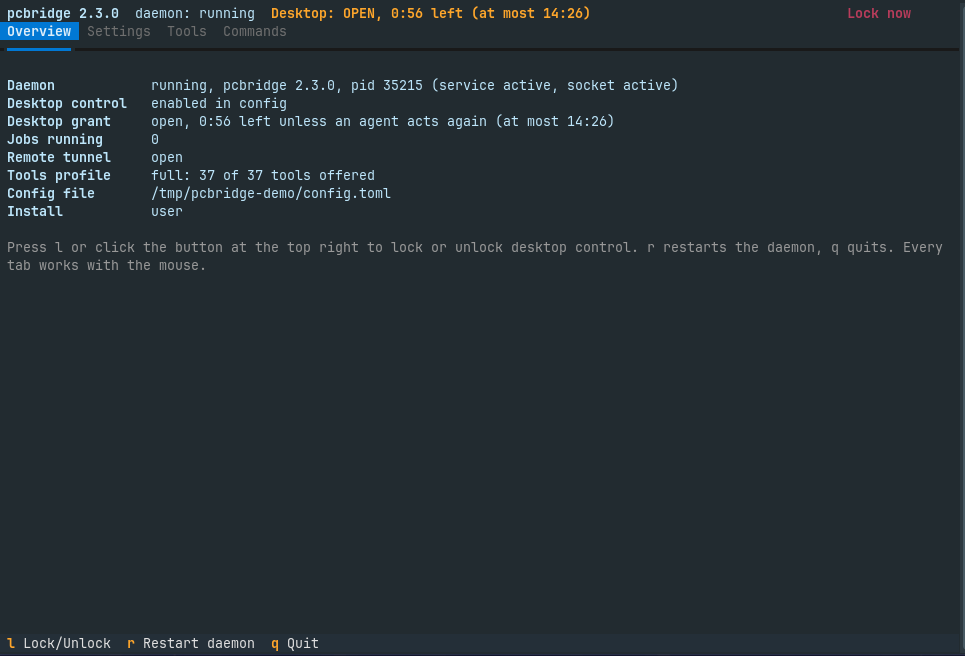
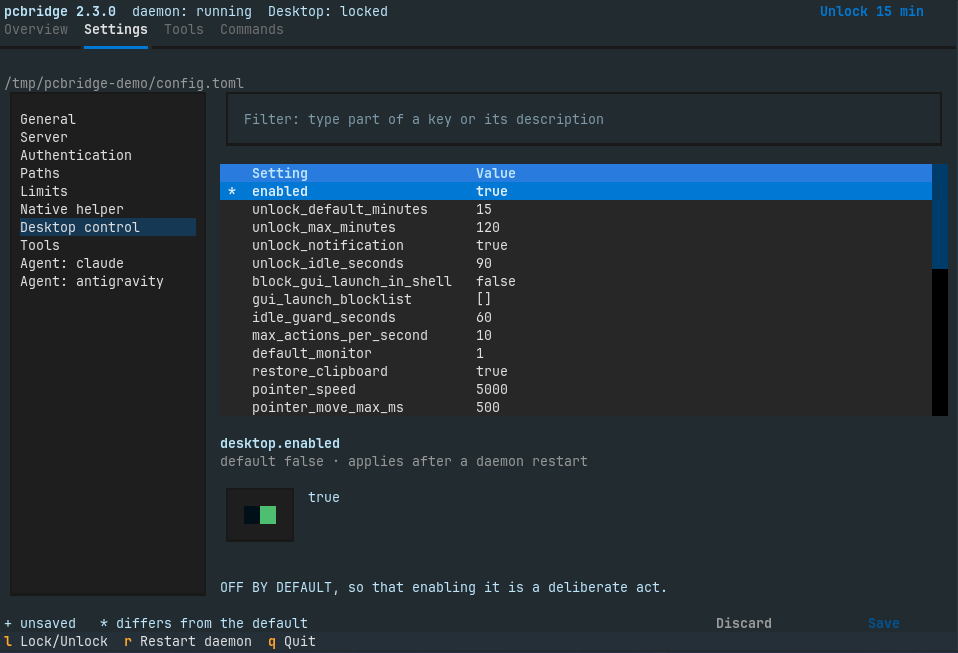
The Settings tab lists the sections on the left and their settings on the right, with a filter box that searches keys and descriptions. The selected setting is edited with a control that fits its type: a switch, a list of choices, or a text field, with TOML for lists and tables. Its description is the comment above it in config.example.toml, so the UI and the reference file say the same thing. Changes are collected and written together by Save. Changing desktop.enabled, anything under [auth], host, port or public_url asks once more before it is written, and Restart daemon appears when a saved change needs it.
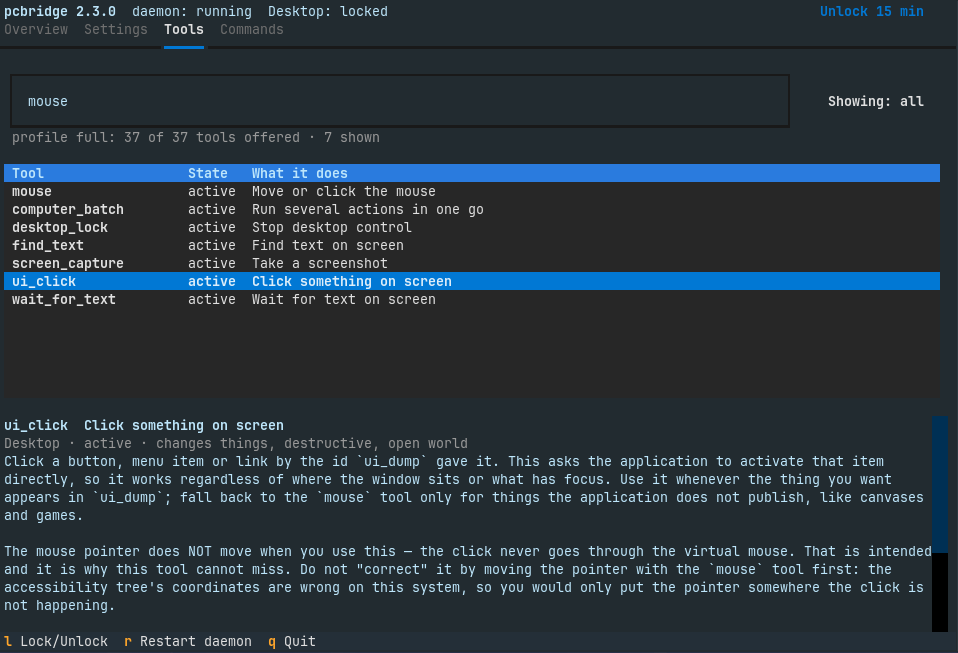
The Tools tab lists all 37 tools with their state: active, left out by the [tools] profile, or waiting for desktop control to be enabled. A search box filters by name, title and description as you type, a toggle shows only the offered tools, and the selected tool's description, hints and parameters appear below the list.
Piped or started from a script, pcbridge with no arguments still prints the help as before, so nothing that already calls it changes.
Every setting from the command line
The same work is available as commands. pcbridge settings lists every setting with its value and marks the ones that differ from the default; pcbridge get KEY explains one setting; pcbridge set KEY VALUE changes it and pcbridge reset KEY puts it back to its default. pcbridge tools lists and searches the tools and shows one tool's parameters, pcbridge restart restarts the daemon to apply settings, and pcbridge list prints every command by group.
A save is built so that it cannot lose anything. The new file is checked with the loader the daemon itself uses, so a value it would refuse is reported and never written. The old file is copied to config.toml.backup-<timestamp> next to it, and the new one is written atomically with mode 0600. Only the changed lines change: comments and every other block stay as they were. A file edited by hand while the UI had it open is not overwritten.
The password and the static token are never shown, in the UI or in any command's output. A new password is not accepted on the command line, where it would stay in the shell history: pcbridge set auth.password asks for it or reads it with --stdin, and pcbridge set auth.static_token --generate makes a new token without printing it.
pcbridge restart restarts only when no job is running and the desktop grant is closed; otherwise it says what is still running and restarts nothing.
Compatibility
The config format is unchanged (config_version = 2) and no setting was added, so existing files keep working as they are. The MCP tools are unchanged, still 37 (core offers 21, desktop 23). The UI needs two new Python packages, Textual and tomlkit, which ship inside the venv of the .deb, the Arch package and the wheel, so no distribution package is needed.
pcbridge v2.2.0
pcbridge's icon in the GNOME top bar can now be hidden, and a connected agent can do it on request through a new tool, panel_icon. The tool takes show, hide or status. The setting persists across logins and takes effect at once.
Hidden means hidden only while desktop control is closed. The icon is one of the signals that an agent has the desktop, so the extension shows it for as long as a grant is open, whatever the setting says. An agent that hid the icon therefore cannot hide its own access with it. The frame around the screens is not affected. The kill switch remains available as pcbridge lock, and so does the optional shortcut.
The setting belongs to the extension. It is called indicator-mode and takes always (the default) or when-granted, so it can also be changed with gsettings without an agent. An extension older than 2.2 ignores it, and the tool then says the change applies after the next login. KDE Plasma has no panel icon; there the grant shows as a notification only while it is open, and the tool says so.
This release adds panel_icon to the tools, which now number 37 (core offers 21, desktop 23). The extension's D-Bus interface is unchanged, and existing configurations keep working.
Full documentation lives in the repository:
https://github.com/Eymistaken/Pcbridge/tree/main/docs
pcbridge v2.1.0
pcbridge 2.1 runs on KDE Plasma 6 as well as GNOME, and on Arch Linux as well as the Debian family. The tools, their arguments and the safety gate are the same on both desktops; what changes is which part of the desktop answers each question. Plasma was tested end to end in an Arch Linux VM with Plasma 6.7.5, and GNOME 50.5 and 46.0 in headless shells.
Full documentation for everything below: https://github.com/Eymistaken/Pcbridge/tree/main/docs
Desktop control on KDE Plasma
On Plasma the screen lock is read from org.freedesktop.ScreenSaver, which KWin owns, and the monitor table from kscreen-doctor. Coordinates, scale and rotation go through the same resolver as on GNOME, so a click lands where it does there. KWin does not publish idle time over D-Bus. The daemon therefore runs pcbridge-native idle-watch, a small Wayland client that tracks input idleness, so the "someone is at the machine" guard works on Plasma too.
Screenshots come from KWin's own screenshot interface. They take 7 to 12 ms a frame, with no dialog, flash or sound. KWin allows the interface only for programs that a .desktop file names. pcbridge authorizes exactly one, its native helper, by full path. Authorizing the system Python would have let every Python script take screenshots. pcbridge setup writes the entry, and both packages ship it. Capturing the focused window crops it out of its monitor's frame.
A short-lived KWin script raises and names windows in about 90 ms. It applies the GNOME extension's matching rules, so an ambiguous name raises nothing rather than the wrong window. KRunner replaces GNOME search as the fallback.
Qt applications join the accessibility tree only while a session-wide switch is on. desktop_unlock turns it on for the grant, so ui_dump can read Kate, Konsole, Dolphin and System Settings. When the grant ends, pcbridge restores the previous value. The switch is stored persistently, so leaving it on would have changed the session for good.
The grant is visible on Plasma
KWin's screenshots leave no sharing indicator on screen, and Plasma has no pcbridge extension to draw a frame. The grant is therefore shown as a critical notification. It stays for as long as desktop control is open, and its Lock now button runs the kill switch. Every end of the grant closes it: a lock, expiry, or pcbridge lock from another process. For this reason [desktop] unlock_notification should stay on under Plasma. A pcbridge-lock.desktop entry is installed so that a shortcut can be bound to the kill switch in System Settings > Shortcuts.
An Arch Linux package
packaging/arch/PKGBUILD builds pcbridge from a checkout, native helper included, with the same layout as the .deb: a self-contained environment under /usr/lib/pcbridge, launchers in /usr/bin, the systemd user units, the uinput rule, the GNOME extension and the Plasma entries. CI builds, installs and tests the package, and it is attached to this release.
The bundled environment is bound to the Python it was built with, so the package pins that Python minor version. When Arch moves to a new Python, pacman reports that the upgrade breaks pcbridge's dependency, rather than leaving an install that no longer starts. Rebuild the package and upgrade both together. setup, doctor and error messages now name pacman packages on Arch and apt packages on the Debian family.
GNOME 50
The extension now declares GNOME 46 and 50, the two versions verified. On GNOME 50 it disabled itself at startup because a parameter it passed to the shell no longer exists. GNOME 47 to 49 are expected to work but are untested, and system_capabilities says so when it sees one.
Fixes
If a checkout named ~/pcbridge existed, the daemon failed to start with "cannot import name 'version'". The service runs in the home directory, and Python loaded the checkout before the installed package. The service, the relay and the kill switch now start Python with -P, which keeps the working directory off the import path.
pcbridge setup could start the previous version of the daemon after moving leftover user units aside, because it did not reload systemd. The .deb was affected as well.
Native screen capture crashed with PipeWire 1.6 after the first frame. The capture stream disconnected itself inside its own callback, which older PipeWire tolerated. It now detaches outside any callback.
With animations turned off, the GNOME extension's frame recursed without end. This affected headless shells and the Reduce Animation setting. With animations off, an animation completes at once and immediately started the next one. The frame now stands still instead. GNOME 46 was affected too.
Existing configurations keep working unchanged; this release adds no settings. An install recorded as a .deb keeps that record.
For developers
The 36 tools and their input schemas are unchanged. system_capabilities adds platform.environment (gnome, kde or null) and platform.plasma. On Plasma it reports the KWin backends linux.kwin.screenshot2, linux.kwin-script and linux.freedesktop-screen-saver. The native helper protocol stays at 1.0 and changes only by addition: a display_id can carry the kwin: scheme, and capture.session_open can answer not_needed. Backwards compatible: existing clients keep working unchanged.
Full protocol documentation: https://github.com/Eymistaken/Pcbridge/blob/main/docs/native/protocol-v1.md
pcbridge v2.0.0
pcbridge 2.0 turns a personal setup into an installable product: one
resident daemon that every client reaches without manual steps, English
messages throughout, any monitor layout, and packaging with CI.
Fixed
- Monitor tables under Mutter's physical layout mode. GNOME uses the
physical layout mode unless fractional scaling is enabled; positions and
sizes are then framebuffer pixels. The resolver divided them by the scale
regardless, so a 4K monitor at scale 2 was reported as 1920x1080 next to a
neighbor at x=3840, with a phantom gap between them, a wrong pointer axis
and misplaced clicks. Python and Rust now readlayout-mode. - The xrandr fallback did not normalize the canvas origin like the
Mutter path, so the two paths described different canvases. - Configuration errors and an unwritable state directory ended in a
Python traceback, and the service restarted every second until systemd's
start limit. They now print one line saying what to fix and exit with
code 78, which the unit does not restart. - A job could start without a record. The process started before its
record was written, so a full disk left a job that no tool could list or
stop. The record is now proven writable first, and a failed write stops the
process. - A crashed native helper stayed in the process registry until the next
call, so diagnostics could show a helper that no longer existed. - The daemon died on SIGTERM without cleanup: held input was not
released by the daemon, the socket file stayed and the status file kept
saying "running". SIGTERM now shuts down cleanly (bounded by
TimeoutStopSec=15). - An install restarted the daemon twice.
setupwrote the version stamp
after restarting the daemon, which then saw a newer install and restarted
again. - A late answer to a cancelled request terminated the stdio server
(an assertion in the MCP SDK'sRequestResponder.respond); such answers
are now dropped. - The client's broken environment reached tools: Claude Code's
CLAUDE_*variables leaked into agent jobs, and Codex's literal
$DBUS_SESSION_BUS_ADDRESSbroke the desktop tools. Tools now run in the
daemon's environment plus an allow-list from the client. - Five tools carried no MCP hints, so clients assumed the spec defaults
(destructive, open world); several read-only tools were not marked
read-only. [tools] profilewas accepted but never read.pcb-do --dry-runrequired a config file although it only parses.- Missing dependencies were reported as a bare error code; the
capability report now names the package to install. - An unsupported session (X11, a non-GNOME desktop) was reported as an
unreadable screen lock; it is now named. - The non-live test suites depended on the machine they ran on (the
GNOME session, the monitors and the real config, including its grant), so
they could not run in CI and a grant opened during a run could let a test
act for real.
Added
- A resident daemon (
pcbridge serve) behind a systemd user socket
($XDG_RUNTIME_DIR/pcbridge/mcp.sock, mode 0600), serving local sessions
and HTTP from one process. A new client reaches the tool list in 22-47 ms
instead of ~700 ms; with the daemon stopped, socket activation starts it
in ~0.7 s. pcbridge stdio, a standard-library relay for local clients. On a
daemon failure it returns retryable errors for requests in flight,
reconnects and replaysinitialize; without a daemon it runs the server
in-process and reports the degraded mode.- Jobs in their own systemd scopes, so a daemon crash or an update
restart does not kill them;pcbridge stopstill ends them. - Updates without interruption: the daemon restarts into a new install
only when no job, grant or call is active. - The
pcbridgecommand:setup,connect,doctor(--json,
--fix),status,lock,unlock,stop,remote,logs,report
(redacted),update,uninstall. Every changesetupmakes is backed up
with aROLLBACK.md. - Packaging: a wheel that carries the native helper, a user-level
installer, and a.debper distribution release built withdpkg-deb. - CI: Python 3.12, 3.13 and 3.14 suites, the extension's gjs tests, a
headless GNOME Shell smoke test, container installs on Ubuntu 24.04,
Debian 13 and Ubuntu 26.04, and draft releases from tags. - A panel indicator in the GNOME extension: daemon up or down, the grant
and its time left, running jobs, remote access, and "Lock desktop control
now". It readsstate_dir/status.json, which the daemon writes on change.
An optional kill-switch shortcut, off by default. - A D-Bus
Versionproperty on the extension's interface, reported by
pcbridge doctorfor the running session. - Any monitor layout: a 14-layout fixture matrix (single, 4K at scale 2
in both layout modes, fractional scales, ultrawide, portrait 90/270,
vertical stack, three mixed monitors, negative origin, gaps) resolved
identically by Python and Rust, and verified in a headless GNOME Shell. - A pixel-area cap for scaled screenshots (default 1536x864), so a
16:10 or 4:3 monitor costs no more than 16:9, and a note when small text
shrinks below half its size. - A platform report in
system_capabilities: GNOME Shell version,
session type, and whether Mutter's ScreenCast and RemoteDesktop are
present; an untested GNOME version is reported, not refused. [tools] profile:full(default),coreordesktop.- Agent CLI discovery beyond PATH (
~/.local/bin, npm, bun, cargo,
nvm), because a systemd daemon does not see a login shell's PATH.
Changed
- Every message a user or a model reads is English: tool results,
errors, suggested actions, the CLI, the installer, the extension, the
shell scripts,config.example.tomland the computer-use skill. A contract
test guards it. Error codes, categories, scopes, field names and
configuration keys are unchanged. - Configuration moved to XDG locations (
~/.config/pcbridge/config.toml)
withconfig_version = 2, migrated with a backup. A 1.x file loaded as is
keeps its meaning. - The computer-use skill no longer hard-codes this machine's monitors.
MCPtool hints are decided for every tool in one table and a tool
cannot be registered without them.- The systemd unit no longer sets
PATHorDISPLAY(both are derived)
and does not restart on configuration errors. - Documentation was rewritten as a small English set; the project's
measurements live indocs/dev/measured-facts.md.
Removed
- The per-client stdio server as the default path (still available as the
fallback and throughPCBRIDGE_IN_PROCESS=1). add_client.pyandcapture.sh, which served Gemini Spark only; Gemini
Spark is no longer a target.- The development journals (
WALKTHROUGH.md,PLAN.md,UYGULAMA.md,
ADIMLAR.md,GOREV-kurallar.md,GELISTIRME.md,KURULUM.md,
KULLANIM.md,KURALLAR.md,JARVIS.md); their valid content moved to
docs/, and git history keeps them.
API
- Entry points. Clients register
pcbridge stdio. The 1.x command
python -m pcbridge.server --stdiostill works and now relays to the
daemon.pcbridge serveruns the daemon;pcbridge-nativeis unchanged
as a binary name. - Tools. The same 36 tools with the same names and input schemas. Their
annotations now always carry all four hints. Output text is English;
clients that matched Turkish text must match the stable
structuredContent.errorfields instead. - Error codes (
ErrorCode), categories and permission scopes are
unchanged. Configuration errors exit with 78 (EX_CONFIG). - Configuration. 1.x files load unchanged;
pcbridge setupmigrates
them to version 2. New keys:[desktop] screenshot_max_pixels,
[tools] profile(now read). Unknown keys warn instead of failing. - State files keep their formats: the grant file (
desktop_unlock.json),
job records, the shot records andpointer.jsonare readable by 1.x and
2.0 processes at the same time.topology_idgains a,psuffix only for
a monitor whose pixel ratio differs from its scale, so ids at scale 1 are
identical to 1.x. - Native helper protocol: version 1.0, unchanged.
display.snapshot
adds apixel_ratiofield per monitor; older hosts ignore it. - GNOME extension: the UUID is unchanged.
ActivateWindowand
FocusedWindoware byte-compatible;Versionis new. A 1.x extension
works with a 2.0 server and the reverse.
Full Changelog: https://github.com/Eymistaken/Pcbridge/commits/v2.0.0