Setting up a central ECCE server
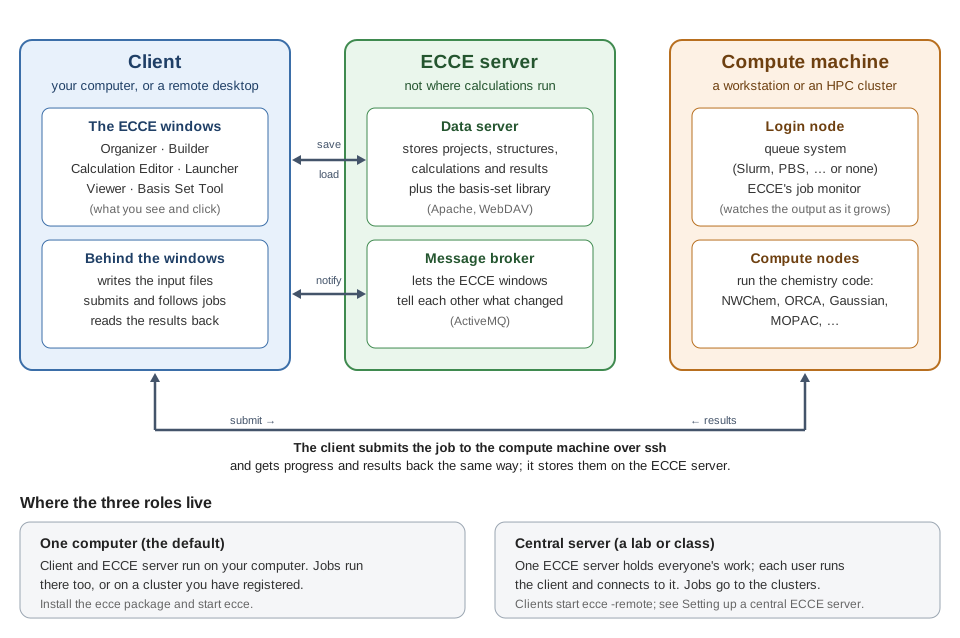
ECCE can run two ways.
Per user (the default). Each user gets their own data server and
message broker, started automatically the first time they run ecce.
Nothing to configure. Right for a workstation.
Central server. One server holds everyone's calculations and the shared structure and basis-set libraries, and many clients connect to it. This is how ECCE was originally deployed. Use it for a class, or when several workstations should all see the same data.
Both modes work from the same installation: ecce still runs locally,
ecce -remote uses the central server. This page describes ECCE 8.17.0
and later.
| Who | Where | How often | Command |
|---|---|---|---|
| admin | server | once |
ecce-remote-setup --server all, then start the services |
| admin | server | once per user, or once per class |
ecce-dataserver-adduser, or ecce-dataserver-adduser --from class.csv
|
| admin | server | when machines change |
sudo ecce -admin (the machines everyone may run jobs on) |
| admin | each client | once, and after the machine list changes | sudo ecce-remote-setup SERVER |
| user | a client | every session | ecce -remote |
The server stores data. Jobs run on whatever compute machine a user picks in the Launcher: their own workstation, a cluster, or the server itself if the codes are installed there.
- A machine to be the server, reachable from every client.
- ECCE installed on the server and on each client
(
sudo apt install ./ecce_<version>_amd64.deb). - Root on each machine, once.
- Two ports open from the clients to the server:
| Port | What |
|---|---|
| 8096 | data server (Apache/WebDAV) |
| 8088 | message broker (ActiveMQ) |
Or keep the server on loopback and have clients reach both ports through ssh tunnels.
As the account that will run the server. A dedicated account (e.g.
ecce) is better than someone's own login.
ecce-remote-setup --server all
ecce-dataserver-start && ecce-gateway-start
--server marks this account's broker as a server's, so a plain quit
never stops it under its clients; all makes the data server and broker
listen on every interface (the default is this machine only). Leave out
all if clients will come through ssh tunnels.
Check:
ecce-dataserver-status
ecce-gateway-status
Every user needs an account on the server. These are ECCE logins, not Unix accounts.
One at a time (prompts for name, user name and password):
ecce-dataserver-adduser
A whole class from a file, one line per student, username,password,first,last:
username,password,first,last
stud1,,Ada,Lovelace
stud2,,Alan,Turing
ecce-dataserver-adduser --from class.csv
A blank password is generated and written to class.csv.passwords
(readable only by you): hand them out, then delete the file. Existing
accounts are skipped, never overwritten; a user name may contain only
letters and digits.
Register the compute machines once, for everyone, with
sudo ecce -admin on the server. The server publishes this list, and
each client copies it in Part 2.
Once per client machine, as root:
sudo ecce-remote-setup SERVER
It:
- points this installation's
ecce -remoteat the server's data server and broker; - copies the server's machine list (Part 1, step 3). Run it again after that list changes;
- keeps the original local settings, so plain
eccestill works.
A lab can put this command in the machines' image.
ecce -remote
Log in with the account from Part 1. The Organizer's title says
ECCE Organizer on SERVER, so it is always clear whose data you are
looking at. Plain ecce runs a local session as before.
To log in as a different ECCE user for one session:
ecce -remote -l NAME
A user name typed in the login box is remembered for the next session;
-l is for this session only.
- The login box accepts an account created on the server.
- The title bar names the server.
- A calculation created on one client appears on another.
- A user cannot open another user's folder without that user's password ("… has no access to this folder").
ecce -remote says the central server is not answering. Nothing
answers on the server's ports: the services are stopped, a firewall is
in the way, or the server listens on loopback only (Part 1, step 1).
On the server: ecce-dataserver-status, ecce-gateway-status.
The login box never accepts anything. The account does not exist on
the server, or the client points at the wrong host: check
/opt/ecce/siteconfig/RemoteServer/DataServers.
The shared machines are missing on a client. Run
sudo ecce-remote-setup SERVER again after registering them on the
server.
Upgrading ECCE. From 8.17.0 the site configuration is kept across
upgrades. If apt asks about jndi.properties or Machines, keep your
version.
Something else. Run the session with ecce --bug -remote and attach
the archive it writes to a
new issue.
The data server's passwords keep users' data apart on a shared server. They travel over plain HTTP, so they are not protection against someone who can watch the network: keep the server on a trusted network, or on loopback with ssh tunnels.