Troubleshooting
Open the addon and head to the tools menu at the very bottom:
- Clear Cache
- Rebuild Database
- Wipe Addon Data (This is Optional)
- Reinstall The Addon (This Fixes Most Issues)
- Reinstall InputStream Adaptive (This Fixes Most Crashing Issues)
- Reinstall Kodi (This is Optimal if nothing solves your issue)
Connection issues can also be the cause as well:
- Unplug your device and plug it back in
- Unplug your router and plug it back in
- Disable IPV6 on either your router or device
- Mess with your Kodi Cache Settings
Reconfigure your accounts again in addon settings:

- Make sure they are authorized by looking at the Username.

- Verizon blocks torrent sites like Nyaa.si and Mangadex. Luckily we have Animetosho and a Nyaa Alt Provider to satisfy your anime needs.
Make sure you have your Kodi video settings set to the default setting like I have, otherwise, playnext will not work all the time.

In case you guys are having issues with the Watchlist, authorize them again by logging in again:

- If you're still getting errors, change Watchlist to Update to something else.
Enable any provider proxies that show like below:
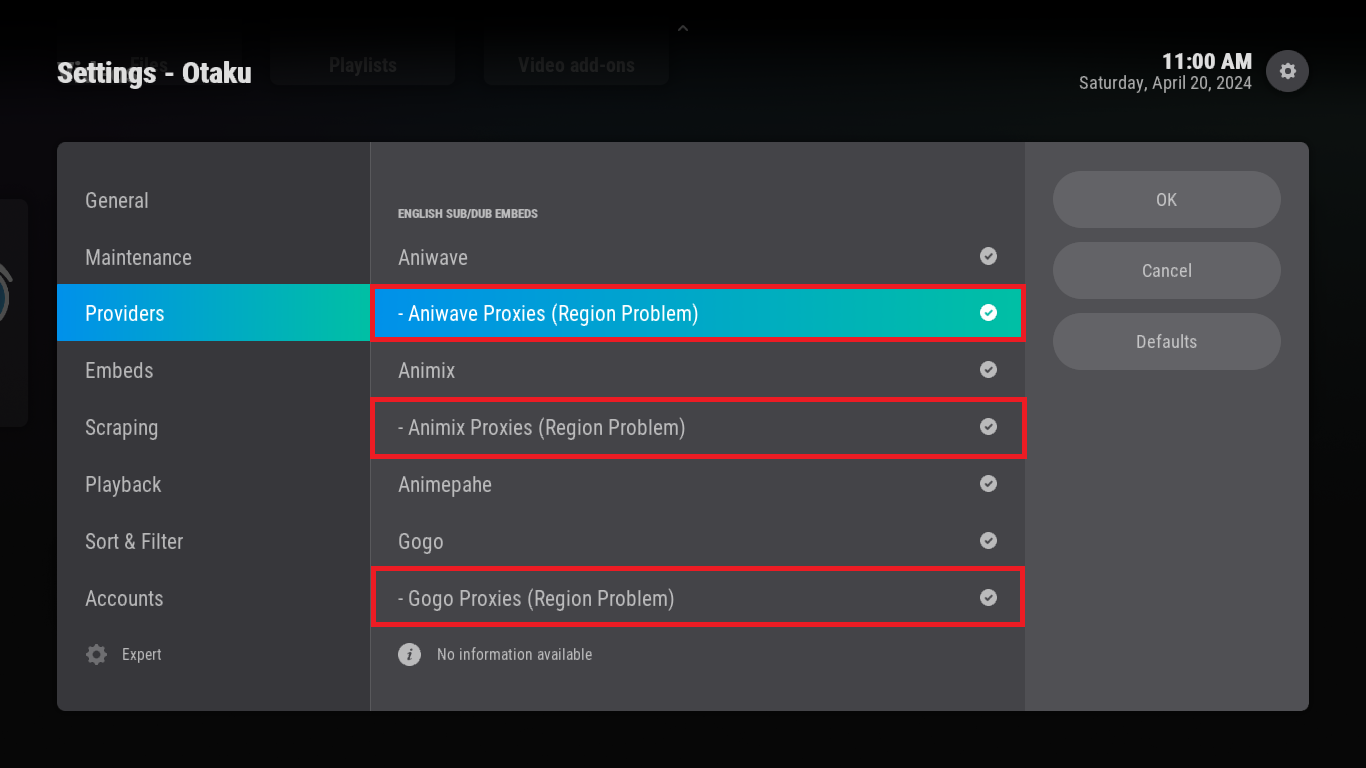
- If this problem doesn't solve, you should change your DNS for sure.
- This method is for lazy people to change DNS or troubleshooting solver in Android TV.