Home

IAP Desktop is a Windows application that allows you to manage multiple Remote Desktop and SSH connections to VM instances that run on Google Cloud.
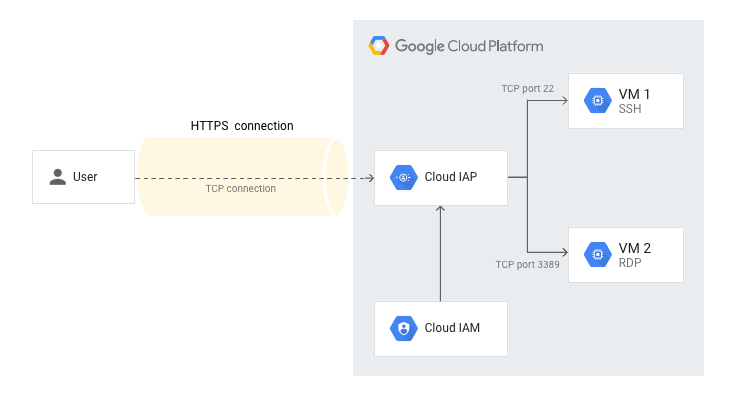
IAP Desktop uses Identity-Aware-Proxy TCP tunneling to connect to VM instances, combining the convenience of a Remote Desktop connection manager with the advantages of Identity-Aware-Proxy.
Using RDP over a Cloud IAP TCP forwarding has several key advantages:
- You can connect from anywhere, not only from selected networks.
- You can connect to VM instance that do not have a public IP address or NAT access to the internet.
- Because the TCP forwarding tunnel is established over HTTPS, you can connect even if your workstation is behind a corporate firewall or proxy.
- You can control who should be allowed to connect to a VM in a fine-grained manner by using Cloud IAM.
- You do not need to expose SSH or RDP over the public internet.
IAP Desktop also provides a number of additional features that make working with Windows VMs on Google Cloud more convinient:
- Generate Windows logon credentials lets you generate credentials for a Windows VM instance. The credentials are encrypted by using the Windows Data Protection API (DPAPI) and stored in the current user part of the Windows registry.
- Show serial port output tails the serial port output of an instance. This feature allows you to observe the boot process or analyze startup issues.
- Open in Cloud Console takes you to the instance details in the Cloud Console.
- Show event log lets you view events related to VM lifecycle and access from within IAP Desktop.