Repository navigation
Plugin Grid
The grid plugin renders the timetable as a calendar-like grid with times on the left and days as columns. It is the most flexible plugin if you want a compact schedule overview.
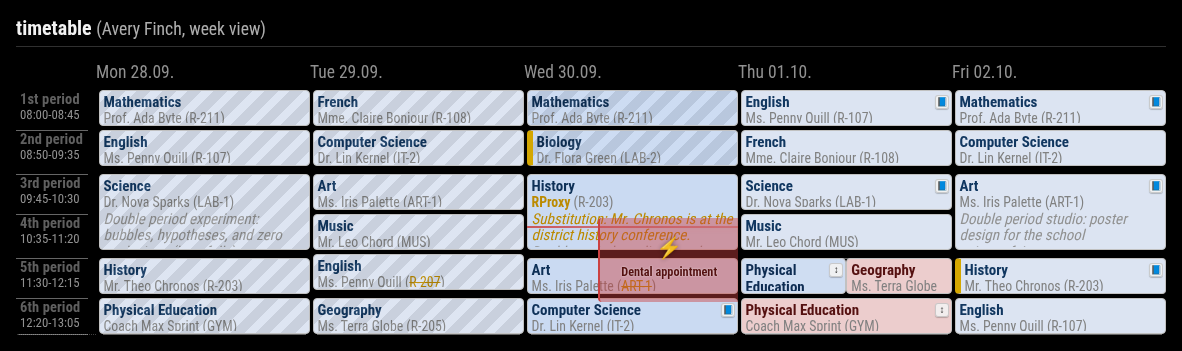
Simple activation via displayMode:
displayMode: 'grid'Canonical activation via plugins.grid:
plugins: {
  grid: {
    enabled: true,
    config: {
      nextDays: 4,
    },
  },
}
The old top-level namespace grid: { ... } is still accepted for compatibility, but plugins.grid.config is the canonical form.
| Option | Type / Values | Default | Effect |
|---|---|---|---|
nextDays |
number >= 0
|
4 |
Future days shown when weekView is false
|
pastDays |
number >= 0
|
0 |
Previous days shown when weekView is false
|
weekView |
boolean | false |
Shows a Monday-Friday work week instead of a rolling day window |
dateFormat |
string | EEE dd.MM. |
Date format for column headers |
hideWeekends |
boolean | false |
Hides weekend columns when possible |
showNowLine |
boolean | true |
Shows the live current-time marker |
mergeGap |
number >= 0
|
15 |
Merge nearby lesson blocks when the gap is small enough |
maxLessons |
number >= 0
|
0 |
Maximum visible lesson periods per day, 0 means unlimited |
pxPerMinute |
positive number | 0.8 |
Vertical grid density in pixels per minute |
naText |
string | N/A |
Fallback label for missing changed field values |
fields.primary |
subject, teacher, room, class, studentGroup, info, none
|
subject |
Main text line inside lesson cells |
fields.secondary |
subject, teacher, room, class, studentGroup, info, none
|
teacher |
Second text line inside lesson cells |
fields.additional |
array of field names | ['room'] |
Additional values appended to the lesson cell |
fields.format.subject |
short, long
|
long |
Subject display format |
fields.format.teacher |
short, long
|
long |
Teacher display format |
fields.format.class |
short, long
|
short |
Class display format |
fields.format.room |
short, long
|
short |
Room display format |
fields.format.studentGroup |
short, long
|
short |
Student-group display format |
fields.format.info |
short, long
|
short if set manually |
Optional formatting for the info field |
-
weekView: truealways renders one school week from Monday to Friday. - In live mode,
weekViewautomatically advances to the next week on Friday late afternoon and during weekends. -
pxPerMinuteis supported even though it is not shown in every example config. Use smaller values for denser grids and larger values for taller grids. - Invalid
fields.*values fall back to the plugin defaults. -
hideWeekendsmatters mostly for rolling mode. InweekView, the plugin already uses Monday to Friday. - Lessons can be hidden with
excludeLessons(this also hides homework and exams of the same subject) and own lessons added withaddLessons, see Hiding and Adding Lessons.
plugins: {
  grid: {
    enabled: true,
    config: {
      weekView: true,
      showNowLine: true,
      maxLessons: 8,
      pxPerMinute: 0.65,
      fields: {
        primary: 'subject',
        secondary: 'teacher',
        additional: ['room'],
        format: {
          subject: 'long',
          teacher: 'short',
          room: 'short',
        },
      },
    },
  },
}students: [
{
title: 'Alice',
qrcode: 'untis://...',
plugins: {
grid: {
config: {
weekView: false,
nextDays: 2,
hideWeekends: true,
},
},
},
},
]