Repository navigation
Hardware
What to buy, how many, and where to put it. Short version: 3 or more Bluetooth receivers that hear every spot you care about, and something Bluetooth on each person. You may already own most of it.
BPS gets its distances from Bermuda, so any receiver Bermuda supports works. Two kinds:
| ESPHome Bluetooth proxy | Shelly Gen2 or later | |
|---|---|---|
| What it is | A small ESP32 board running ESPHome | A relay, dimmer or plug you may already have |
| Visible? | A small box on a shelf or a wall (USB or PoE power) | Invisible: behind a switch or in a wall box |
| Price | About 5–30 € | About 15–30 €, and it also switches a light |
| Setup | Flash ESPHome (the ready-made Bluetooth proxy installs from the browser) | Turn on the Bluetooth scanner in the Shelly integration's options in HA |
| Auto calibration | Add one esp32_ble_beacon block |
Add one script on the device |
| Best for | Best range and accuracy | A clean look with no extra boxes |
Both mix freely: a few ESP32s where you want accuracy, Shellys behind the switches elsewhere.
- Cheapest: a classic ESP32 dev board (for example a D1 Mini ESP32) on a USB charger. Works well; stick to the classic ESP32 if you want the browser installer.
- Best: an ESP32 with Ethernet, for example an Olimex ESP32-PoE-ISO (the board ESPHome's own docs use) or a GL.iNet GL-S10. ESPHome recommends Ethernet because the radio then only does Bluetooth, not WiFi. With PoE one cable gives both power and network.
- Already have ESP32 gadgets? Many ESP32-based devices that run ESPHome can be proxies too, for example wall panels such as the Sonoff NSPanel.
- Shelly Gen2 and later (Plus, Pro, Gen3, Gen4) that run on mains power. Battery models and Shelly BLU devices are not receivers.
- In HA: Settings → Devices & services → Shelly → (device) → Configure and set the Bluetooth scanner mode (the HA Shelly docs recommend Auto).
- A Shelly inside a wall box hears less than a board in the open, and metal wall boxes reduce range further. Fill the gaps with an ESP32 if the placement heat map shows red.
- Mains wiring: follow your country's rules; in many countries that means an electrician.
- The USB Bluetooth adapter in your HA machine. Bermuda can use it, but it does not timestamp packets, so the distances are too poor to position people on a map.
-
At least 3 receivers must hear every spot you want a position for; 4 or more makes it steady. As a rule of thumb, start with one per room you care about and then let BPS tell you where the next one helps most.
-
Surround the area, don't line them up. Three receivers along one wall give a poor fix even when they are close; corners and opposite walls work best.
-
Mount height doesn't have to match. Shelf, ceiling or wall box all work. Telling BPS the height is optional; it helps most when receivers sit at very different heights (ceiling and low shelf) or right above where people walk. Receivers in wall boxes at switch height gain little.
To set it: Map & Setup (1) → in Zones & Receivers, open the zone and click Height? on the receiver's row (2). Enter metres above the floor, for example
2.4for a ceiling, then Save Floor Plan and run Receiver Calibration again. The row then shows the height, for example 2.4 m.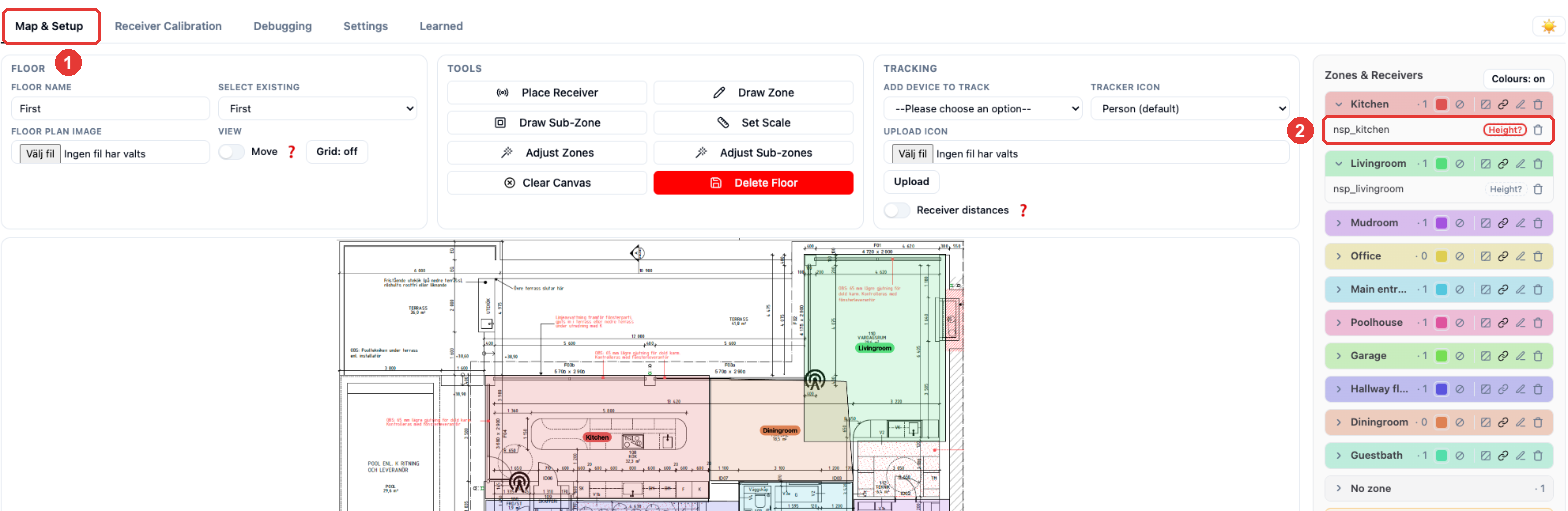
-
Keep them away from metal: not behind a TV, inside a fuse box or on a fridge.
-
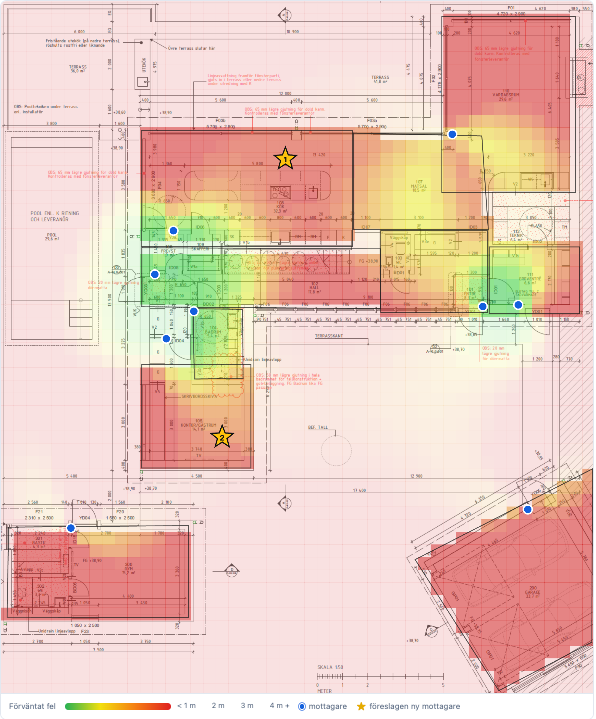
Then measure. Place the receivers on the floor plan, run Receiver Calibration, and open Receiver placement → Analyze. The heat map shows where precision is poor and marks the best one or two spots for another receiver.
BPS tracks whatever Bermuda tracks; Add a phone or watch walks you through each kind. With Persons you can give each person several trackers; BPS uses the best one at the moment.
| Tracker | How | Notes |
|---|---|---|
| Android phone | HA Companion app → Settings → Companion app → Manage sensors → BLE transmitter | Sends an iBeacon; works in the pocket |
| iPhone, Apple Watch | HA's Private BLE Device integration with the device's IRK | Bermuda picks it up automatically |
| Smartwatch or band | Most broadcast all the time | A watch is on the body and follows the person best |
| Beacon tag | A cheap iBeacon tag on a key ring, a bag or a collar | Good for kids and pets; check the battery life |
A phone lying on the kitchen table is not the person. That is why a person can have several trackers, and why BPS skips one that is charging or lying still while another one moves.
- 4–6 receivers per floor. Mix: ESP32 with Ethernet in the big rooms, Shellys behind the switches where you don't want boxes.
- One tracker per person: the phone you already have, plus a watch or tag for those who leave their phone around.
- Nothing else; BPS and Bermuda are free in HACS.
Next: Installation → Initial set-up → Receiver placement.