Repository navigation
Suggestions
BPS can ask the people in a room before it does something for them, and learn from the answers.
Turn it on: Settings → Features → Suggestions.
When it is a good moment is up to an automation; who to ask and how is BPS's job:
automation:
  - alias: Cozy lights when the TV is on
    triggers:
      - trigger: state
        entity_id: binary_sensor.tv_watching   # your own condition
        to: "on"
        for: "00:03:00"
    actions:
      - action: bps.suggest
        data:
          id: tv_cozy                 # stable key; answers are learned per id
          zone: Livingroom            # ask the people BPS sees here
          title: "📺 Cozy?"
          message: Dim the lights for the TV?
          changes:                    # only lights linked to the zone
            light.livingroom_ceiling: 25      # brightness in %
            light.livingroom_spots: 50
            light.livingroom_floor: "off"
          done_message: I made it cozy.
          unknown_message: Someone is watching TV. Make it cozy?
  - alias: TV off - drop the question
    triggers:
      - trigger: state
        entity_id: binary_sensor.tv_watching
        from: "on"
    actions:
      - action: bps.suggestion_clear
        data:
id: tv_cozychanges may only list lights that are linked to the zone (link icon on the zone → Lights). Anything else, a light in another room, a switch or a script, is refused and the automation shows the error. BPS never runs a script for a suggestion on its own.
A level is a percentage (30, "30%"), "off", "on", or {brightness_pct: 30, color_temp_kelvin: 2500} / {rgb_color: [255, 150, 80]} for lights that support it.
The notification lists exactly what will happen, for example Ceiling 25 % · Spots 50 % · Floor lamp off.
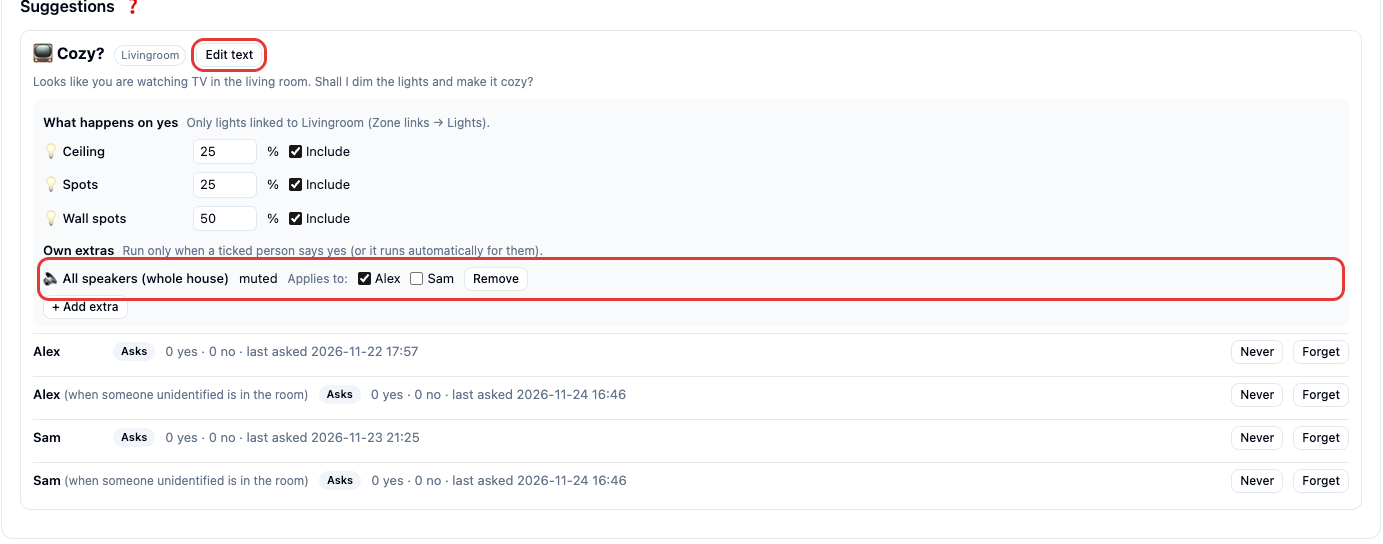 Learned tab: What happens on yes lists the zone's lights and levels; Own extras (framed) shows an extra with a checkbox per person; Edit text (framed) changes the title and texts.
In the Learned tab everyone can add their own extras to a suggestion:
- more lights, also in other rooms, with a level or off;
- speakers: one speaker or all speakers in the house, mute, pause or a volume;
- a script, scene or automation they pick themselves.
Each extra has a checkbox per person (like notifications). It runs only when a ticked person answers yes, or when the suggestion runs automatically for them; someone else's yes never runs your extras. The question each person gets lists the base changes plus their own extras.
- A regular user can only tick themselves. Administrators (or everyone, with Full access for all users) can tick anyone, and can also change the base levels (for example 30 % → 20 %) or leave a light out.
- Other rooms are safe: an extra light in another zone is left as it is when someone who did not decide is in that zone.
- Undo restores lights and speakers. Scripts, scenes and automations can't be undone; the panel says so.
id is the suggestion's identity: answers, extras and level changes are tied to it, so keep it stable (changing it starts over). title and the messages are what people see; change them in the automation, or in the Learned tab with Edit text (administrators). Text changed in the panel wins over the automation's; Use the automation's text goes back.
-
Who is asked. Each known person in the zone gets a notification with Yes / No / Don't ask again. The open question is also shown in
sensor.bps_suggestionfor a dashboard card, so it is not lost if the notification is dismissed. The first answer settles it for everyone asked. -
Unidentified people. When the room sensors see someone without a tracker and
unknown_messageis set, BPS asks the people at home instead. This never runs automatically. - Learning, per person. After 3 yes in a row it just happens next time, with an Undo button. Don't ask again stops it. Undo goes back to asking.
-
How often. At most once per
once_per(defaultevening, which resets at noon; orday,hour,none). An unanswered question disappears after 30 minutes or onbps.suggestion_clear.
Settings → Notifications → Dashboard card (YAML) gives a card that only shows while a question is open. Its buttons call bps.suggestion_answer, which answers as whoever presses them.
The Learned tab shows:
- every suggestion with exactly what it does, its base levels and everyone's own extras;
- every suggestion per person (Asks / Automatic / Never), with buttons to change it. Don't ask again lasts until someone presses Allow again here; it is per person, so others in the room are still asked;
- the last 30 days of questions, answers, automatic runs and follow-me sessions;
- how far BPS has come towards learning routines on its own: it needs 14 days with someone at home.
Administrators see everyone. Other users see only themselves.