Repository navigation
Zone links
Each zone can be linked to what physically belongs to it. Follow me, suggestions, the history and the people counters all build on these links. A zone without links still tracks people, but has no speaker, no room sensors and no lights for suggestions.
Open the dialog: the link icon next to a zone in the Zones & Receivers sidebar (Map & Setup tab).
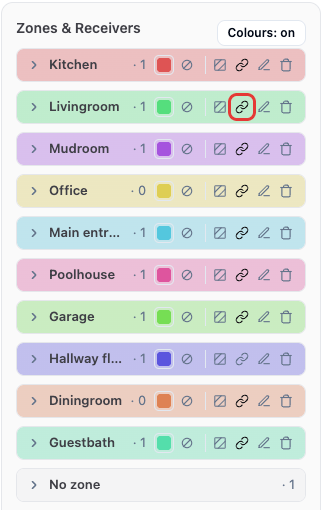 The link icon (framed) next to each zone.
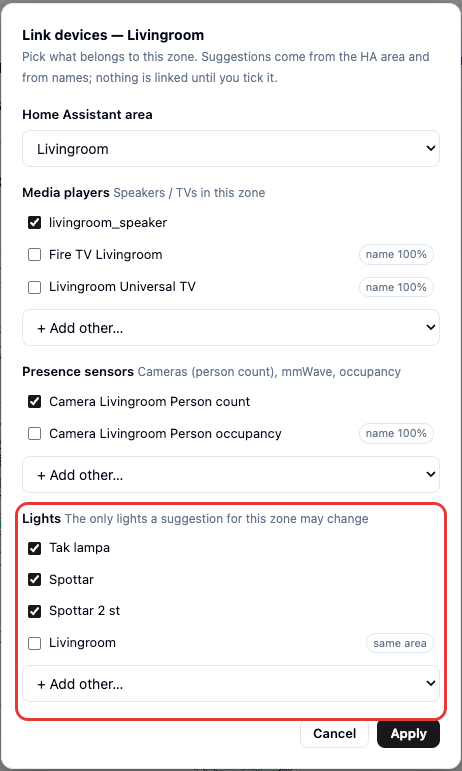 The dialog: ticked items are linked, the rest are suggestions with their reason (same area, name match).
| Link | Used for |
|---|---|
| Home Assistant area | Lights, covers etc. in that area count as "in this zone" for the history (who switched on the kitchen light?). |
| Media players | The first linked player that can group (a Sonos or similar) is the zone's speaker for Follow me. |
| Presence sensors | Cameras with a person count (e.g. Frigate sensor.<camera>_person_count), mmWave or occupancy sensors. They let BPS notice people without a tracker (kids, guests). |
| Lights | The zone's lights. A suggestion for the zone may change these and nothing else (see Suggestions). |
Suggestions come from the area and from names (tolerant of typos and separators); nothing is linked until you tick it. Press Save Floor Plan to keep the links.
sensor.bps_zone_<zone> counts the people in a zone: the BPS persons who are there (known) plus anyone else the room sensors see (unknown).