Repository navigation
Persons
A person (HA person.*) can carry several BPS trackers: a wearable, a watch, a phone. Link them under Settings → Persons, best first.
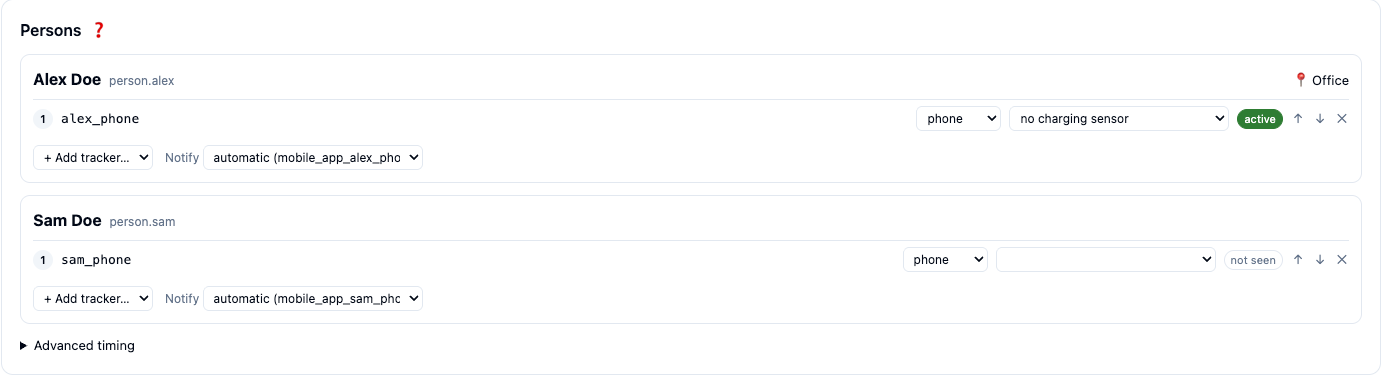 Settings → Persons: trackers in priority order (arrows to reorder), its kind and charging sensor, status, and the notify service.
The first usable tracker decides where the person is. BPS skips a tracker that is:
- not seen recently;
- charging (pick its battery-state or charging sensor);
- lying still while a lower one moves (a watch left on the nightstand must not keep you in the bedroom while your phone walks around).
The zone has to hold for a few seconds before it changes, so room borders don't flicker. The timings are under Advanced timing.
-
sensor.bps_person_<person>_zone: the person's zone (attributes: the chosen tracker and every tracker's status); - a
bps_person_zoneevent on every confirmed change (person,from,to,tracker), handy for automations.
A person also needs a Home Assistant user to use the dashboard buttons for Follow me and suggestions (BPS acts for whoever presses them), and the companion app for notifications. BPS picks the person's phone automatically; you can choose another notify service.