BLE Research

CYM uses the ESP32-C5's Bluetooth 5 radio with Apache NimBLE v1.6.0 (Bluetooth 5.4 stack). In Wardrive mode, WiFi + BLE run concurrently via hardware coexistence (
CONFIG_ESP_COEX_SW_COEXIST_ENABLE=y/CONFIG_SOC_COEX_HW_PTI=y) with BLE at a 12.5% duty cycle (320 ms interval / 40 ms window) to protect WiFi promiscuous throughput. On all other screens, WiFi and BLE use exclusive radio access — switching between them stops the active radio first.
Continuous passive BLE scan. Logs every advertisement packet: MAC, address type (public/random), RSSI, advertisement type (connectable/non-connectable/scannable), raw payload, and decoded common fields (name, service UUIDs, manufacturer data, TX power).
Device discovery in target environments
Passive BLE scanning discovers every advertising device in range without transmitting. A 10-second scan in a corporate office, hospital, or retail environment typically surfaces:
- Wireless keyboards and mice (often nRF24 dongles or BLE HID)
- BLE beacons (iBeacon, Eddystone)
- Medical devices (glucometers, infusion pumps, wearables)
- Smart locks and access control readers
- POS terminals with BLE interfaces
- Industrial sensors
OUI-based vendor identification
CYM resolves the manufacturer OUI from every public MAC address. Unknown vendors, Chinese ODM MACs on unexpected device types, or consumer-grade hardware in sensitive environments are all immediately visible.
Tracking window analysis
Devices using static BLE MACs (most IoT, many medical) appear in every scan at the same address. Devices using random resolvable addresses (modern phones) cycle their MAC every 10–15 minutes. Observing rotation intervals lets you characterize the privacy posture of a device fleet.
Connectable vs. non-connectable inventory
Connectable advertisements (ADV_IND) mean the device will accept a GATT connection — a significant attack surface. Non-connectable beacons (ADV_NONCONN_IND) are information-only. CYM flags connectable devices so you can prioritise GATT Walker sessions.
You arrive at a hospital for a medical device security assessment. Before touching a single device, you open BLE Observer and let it run for ten minutes in the waiting room. By the time you sit down with the IT team, you already have a list of 47 advertising devices — including three infusion pumps in a nearby ward, two glucometers, and a BLE-enabled nurse call system that nobody mentioned in the asset register. Two of the pumps are advertising as connectable. That becomes the first item on the day's agenda.
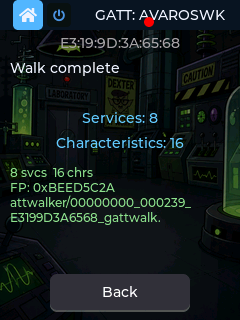
Connects to a selected BLE device and sequentially walks every service, characteristic, and descriptor. For each characteristic it reads the value (if readable), notes properties (read/write/notify/indicate), decodes the value as UTF-8 ASCII where possible, and identifies it by name from the Bluetooth SIG assigned numbers list.
Output is saved as structured JSON to /sdcard/lab/gatt/ with:
- Service and characteristic UUIDs + SIG-assigned names
- Properties string (
read | write | notify | indicate | …) - Raw value (hex) + ASCII interpretation
- OUI-resolved manufacturer name
- GPS coordinates if GPS module is attached (geotags the assessment)
- FNV-32 fingerprint of the full GATT map (for device-type deduplication)
IoT device GATT surface assessment
Most BLE IoT devices expose more than they intend to over GATT. Walk the full service tree before reading the datasheet — undocumented characteristics (especially writable ones on vendor-specific UUIDs) are common and often control firmware update mode, factory reset, or configuration parameters.
Authentication bypass detection
Many BLE devices rely entirely on pairing for security but leave characteristics readable or writable without authentication. GATT Walker connects without pairing by default — any characteristic that returns a value or accepts a write without requiring bonding is potentially accessible to any BLE-capable device in range.
BLE HID device analysis
BLE keyboards, mice, and barcode scanners expose HID Report descriptors over GATT. Walking these reveals the exact HID report format, button mapping, and battery service — useful when reverse-engineering a proprietary wireless peripheral.
Firmware update service fingerprinting
OTA DFU services (Nordic DFU 0x0001, TI OAD, custom vendor UUIDs) appear in the GATT tree. Identifying which DFU service a device uses determines the attack surface for firmware manipulation research.
Device fingerprinting database

The FNV-32 fingerprint of a GATT map is stable across devices of the same firmware version. Run GATT Walker across multiple units of the same device and compare fingerprints to confirm firmware consistency — or detect that a "same model" device has unexpected services enabled.
You're doing an IoT assessment for a client whose warehouse uses BLE-enabled industrial temperature sensors. Nothing in the datasheet mentions remote configuration. You connect GATT Walker and let it run for two minutes. The JSON that lands on your SD card tells a different story: buried inside the vendor-specific service tree is a writable characteristic labelled 0xFF03 — not documented anywhere. You write a test value to it. The sensor immediately changes its reporting interval from 60 seconds to 1 second, flooding the backend. That one undocumented write characteristic could crash the entire telemetry pipeline or mask legitimate environmental readings. It goes straight into the report as a critical finding.
Continuous BLE scanner that compares every observed advertisement against a watchlist of target MACs and OUI prefixes. On each match it logs a timestamped entry to /sdcard/lab/bt_lookout/watchlist.csv and fires a haptic alert: 3 × 1-second vibration bursts with 500 ms gaps. The alert is non-audible — felt in a pocket or on a surface without drawing attention in a quiet environment.
- Full MAC — exact 6-byte match (identifies a specific known device)
- OUI prefix — 3-byte match (identifies any device from a specific manufacturer)
Rogue device detection
Load your target organization's OUI prefixes (e.g., your fleet of Apple, Zebra, or Honeywell devices). Any device from those manufacturers that appears in an unexpected location triggers an alert. Alternatively, load the OUI of a known attacker device (rubber ducky dongle, Flipper Zero Bluetooth adapter) to detect its presence.
Asset tracking during physical assessment
Tag specific MAC addresses you want to follow. Walk the facility; CYM alerts you whenever a target device is in range, building a presence map of where the device appears throughout the day.
Detecting wireless implants
After a physical intrusion assessment, run BT Lookout against a list of known implant OUIs (common BLE microcontrollers used in hardware implants). Alerts during the post-assessment sweep indicate devices that shouldn't be there.
Personnel monitoring (authorized)
In authorized insider-threat simulations, load the BLE MAC of a specific person's phone or wearable. The CSV log provides a timestamped movement record.
Covert alerting during walk-throughs
Because the alert is haptic-only, you get a clear "target detected" signal in your hand while maintaining a natural appearance — no screen to glance at, no audible ping. Walk a facility at a normal pace; the burst pattern is distinctive enough to feel through a jacket pocket.
Red team exercise. You've been told the client's security team will try to identify you during the engagement. You load the OUI prefix for their brand of security laptops and their MDM-managed iPhone fleet into BT Lookout, hit Go Dark so the screen goes completely black, and drop CYM into your jacket pocket. You sit down in the lobby with a coffee and a newspaper. Eleven minutes later your jacket buzzes — one, pause, two, pause, three. Security just walked past you in the hallway behind you. You don't reach for your phone, don't look up, don't change your posture. You set your coffee down and turn to a new page. You knew they were coming before they rounded the corner.
Locks onto a selected BLE device's MAC and tracks its signal strength in real time. Unlike BT Lookout's binary match/no-match, BT Locator uses variable-intensity haptic feedback tied directly to RSSI — the motor spins faster and stronger as you get closer to the target.
Haptic scaling: Pulses fire every 500 ms. Motor intensity is computed from RSSI: strength = 10 + (RSSI + 69) × 90 / 29, clamped to 10–100 %. Silent below −69 dBm (device out of useful range). At −40 dBm and above the motor runs at full strength. Both the pulse feel and cadence change with distance — experienced users can navigate by touch alone.
Physical locating of a known BLE device
Once you have a target MAC (from a prior BLE Observer scan or GATT Walker session), BT Locator guides you to it by feel. Walk toward stronger feedback. Useful for locating:
- Hidden BLE beacons or trackers in a facility
- An asset tag attached to a specific piece of equipment
- A rogue BLE device planted during a prior access
Covert search during physical assessment
Keep CYM in a pocket and navigate to a target device without looking at the screen. The haptic intensity gradient gives you directional guidance through walls and furniture — you'll feel the peak as you pass through the strongest-signal zone.
Beacon placement validation
After deploying your own BLE beacons, walk the coverage area and use BT Locator to verify that RSSI falls off at the expected rate. Sharp drop-offs indicate RF obstructions; unusually long range indicates antenna misplacement or excessive TX power.
Post-assessment sweep of a data center. The client wants to know if there are any unauthorized wireless devices. BLE Observer flagged an unknown MAC during the initial scan — unknown OUI, advertising every two seconds, slightly too regular to be a phone. You lock it into BT Locator and slip CYM into your bag. The motor is barely breathing. You walk the floor. Near the back of a row of racks the pulses start coming faster. Stronger. By the time you're standing in front of rack 14 it's running full strength every half second. You look underneath the cable management arm. Zip-tied to the back of the rack frame: a small ESP32 dev board on a USB battery pack, blinking its status LED once every two seconds. You found it without looking at a screen once.
Passive BLE scanner tuned to decode drone Remote ID (RID) advertisements per ASTM F3411 / ASD-STAN prEN4709-002. Displays operator ID, drone ID, position, altitude, velocity, and emergency status from advertising drones.
Detecting unauthorized drones
Most commercial drones (DJI, Autel, and others) broadcast Remote ID as a mandatory BLE advertisement. CYM decodes this in real time — no app, no network connection required. Run it during an outdoor event, facility perimeter survey, or critical infrastructure inspection.
Remote ID compliance verification
Verify that drones operating in your airspace are broadcasting compliant Remote ID packets with valid operator credentials. Non-compliant or spoofed RID packets (missing operator ID, static position, obviously false altitude) appear immediately.
Drone operator location estimate
Remote ID includes operator GPS coordinates. If the drone is within BLE range (~100 m line of sight), the operator location field gives you an approximate position of the person flying it.
Fleet validation
For organizations operating their own drone fleets, run the Drone Detector to confirm every drone is broadcasting its correct ID and that no unauthorized drones are mixed into the formation.
Outdoor event security assessment. Your client wants to know if unauthorized drones are operating over the venue. You set CYM on the production table and let Drone Detector run through the show. Within the first 20 minutes: three drones detected, all broadcasting Remote ID. Two match the authorized fleet — correct operator IDs, GPS positions inside the approved flight corridor. The third doesn't. Its Remote ID shows an operator location 200 metres outside the perimeter fence and a flight path arcing directly over the stage during the headliner's set. No app, no subscription, no network connection. CYM decoded it off a BLE advertisement. Security has a grid reference for the operator before the song ends.
Takes the advertisement profile captured by GATT Walker (device name, service UUIDs, manufacturer data, TX power) and re-broadcasts it from CYM as a connectable advertisement. Any device or app that connects is logged — MAC, address type, timestamp, and every GATT operation it performs (reads, writes, subscriptions).
Discovering hidden scanners and seekers
Most BLE attack-surface analysis focuses on what a target device advertises. The Honeypot flips the question: who is actively looking for this device type? Place CYM near a target environment impersonating a known device (a medical monitor, an industrial sensor, a POS terminal peripheral) and watch what connects. Background apps, rogue scanners, and unauthorized companion apps reveal themselves without any active probing on your part.
Client-side trust assumption testing
Many BLE companion apps connect to any device that matches a target name or service UUID without verifying the device identity beyond the advertisement. The Honeypot confirms this by accepting connections and logging whether the connecting app sends credentials, commands, or sensitive data before any authentication step. This is a high-value finding in mobile app BLE security assessments.
Post-assessment rogue device detection
After a red team engagement, leave the Honeypot running impersonating your own implant's BLE profile. If the client's blue team has deployed BLE monitoring, their detection system should alert — this validates whether their defensive tooling actually catches connectable rogue BLE devices.
Mapping the attack surface of a target device type
Clone a device you're researching (e.g., a smart lock or glucose monitor) and observe what the manufacturer's companion app sends on first connection, pairing request, and subsequent reconnect. The log gives you the full client-side command sequence without needing a second physical unit.
Hospital BLE security assessment. You spend five minutes running GATT Walker on a bedside infusion pump to capture its full advertisement profile. CYM creates a matching advertisement — same device name, same service UUIDs, same manufacturer data — and starts broadcasting as a connectable device. You set it on a supply cart and walk away to interview the IT team. Four minutes later something connects to the Honeypot. Not a nurse's tablet. Not the companion app running on an authorized device. A background process on a laptop three rooms over that was silently scanning for connectable infusion pump profiles. It immediately tried to read the drug dosage characteristic without any pairing request, no authentication, no handshake. The hospital had no idea that laptop had a background process doing that. The Honeypot found it without you actively probing anything — it just waited, and the threat revealed itself.
Scope note: "GATT Clone" is the UI label used in firmware. What is stored and served is a static GATT profile snapshot — the service tree, characteristic UUIDs, properties, and attribute values captured by GATT Walker at a point in time. CYM serves these static values to connecting apps; responses do not reflect live device state. The feature is useful for companion app assessment and regression testing, not for full operational device emulation.
After GATT Walker maps a real device, CYM can serve that device's captured GATT profile to any connecting client — identical service UUIDs, characteristic UUIDs, properties, and the attribute values read at capture time. Connecting apps receive the same profile structure as the original device, with static values from the snapshot.
Reproducing device behavior without physical hardware
Once a GATT map is captured, you can leave the original device behind and continue assessment work with CYM standing in as the target. Useful when physical access to the device is limited (time-sensitive, locked enclosure, single unit in production use).
Client app security assessment
Connect your target mobile app to a GATT Clone and observe its full interaction sequence: which characteristics it reads, which it writes, what values it sends, and whether it validates response data. Without a real device, the app behaves identically — but now every byte is under your control and everything is logged.
Authentication bypass research
A GATT Clone that serves expected characteristic values can bypass basic "is this the right device" checks in companion apps that don't perform cryptographic pairing verification. If the app accepts the clone as a legitimate device, no pairing was cryptographically enforced.
Regression and compatibility testing
For developers, clone a known-good device GATT profile and use it as a stable test fixture. Any client app change that breaks against the clone breaks against the real device too — without needing the hardware on the bench.
You're auditing the companion app for a smart lock. The lock is installed on the client's front door — you can't take it into the lab. You run GATT Walker on it for two minutes in the field, capturing the full service tree to a JSON file on the SD card. Back at your desk, CYM serves that exact GATT profile to any connecting app. You install the lock's companion app on a test device, connect it to CYM instead of the real lock, and watch every byte it sends. On first connection the app transmits the unlock PIN in plaintext to a writable characteristic. No crypto, no auth challenge, no certificate pinning. The real lock stayed on the door. The clone gave you everything you needed from a desk fifty miles away.
Load up to four saved BLE scan lists and find devices that appear across multiple scans — the intersection of who was present at multiple locations. Results can be pushed directly to BT Lookout as a live watchlist in one tap. Combined with Go Dark (display off, device fully active), the entire workflow runs covertly with no visible screen.
Cross-location device correlation


Scan BLE at each location where a subject or incident of interest was present. Devices that appear in all four lists were physically co-located with the subject every time. Modern phones rotate their MAC every 10–15 minutes and almost never survive a cross-scan intersection. Static-MAC devices — AirTags, Fitbits, Tile trackers, Garmin watches, Galaxy Buds, cheap BLE earbuds — appear identically every time. The intersection filter separates the signal from the noise automatically.
Rogue tracker detection
Scan your own environment at multiple points during the day. Any device that persists across all four scans and resolves to a tracking device OUI is a candidate for an unwanted tracker attached to your vehicle, bag, or equipment.
Authorized personnel tracking
In authorized insider-threat scenarios, four scans at four locations where a subject was present narrows hundreds of BLE devices down to the handful of personal devices that never leave the subject's possession.
You're doing a counter-surveillance assessment for a client who suspects they're being followed. You don't have a face, a plate, or a name. What you have is a pattern — the same feeling of being watched at four completely unrelated locations over two weeks: a coffee shop downtown, a parking garage near their office, a hardware store across town, and a restaurant they visited once. You were there for the debrief at each one. At every location you ran a passive BLE scan for ten minutes and saved the list. Four lists. Hundreds of devices in each — phones, laptops, store beacons, other customers' earbuds. A sea of MACs.
Here's the thing about modern phones: they rotate their BLE MAC address every ten to fifteen minutes for privacy. Across four independent scans days apart, a phone almost never appears in more than one list. But certain devices don't rotate. AirTags. Tile trackers. Fitbits. Garmin watches. Galaxy Buds. Cheap BLE earbuds from Amazon. Static factory MACs. They show up identically every single time.
You load all four scan files into the List Wizard and run the intersection. Out of hundreds of devices per scan, the common set collapses to nine MACs. Two resolve to store fixture OUIs — the coffee shop's in-store beacons, coincidentally present at two locations. You discard them. One is your client's own Fitbit. Two more resolve to a known tracking device OUI. Four are unresolved consumer electronics.
Those four unknown devices were in the same physical space as your client at four locations chosen at random over two weeks. That is not a coincidence.
You tap Push to Lookout. All four MACs land directly in the BT Lookout watchlist in one shot. Then you hit Go Dark. The screen goes black — not sleep, Blackout. The display is completely off. No glow through a shirt pocket. No reflection in a window. No bright rectangle for anyone to clock. CYM is invisible in your hand. It is still scanning. Every advertisement packet in the air is still being checked against those four MACs in real time. Fully awake, fully silent — light, sound, nothing. Just a warm rectangle in your jacket.
You sit down at a table near the entrance and order a coffee.
Eleven minutes later your jacket buzzes. One second on, half a second off. One second on, half a second off. One second on. Three beats. The BT Lookout pattern. You don't reach for the device. You don't look down. You lift your coffee and scan the room with your eyes the way anyone would when they hear a door open.
A man in a grey jacket just sat down at the bar. He's looking at his phone. One of those four MACs walked through the door with him.
You set your coffee down and say, quietly, to your client across the table: "Don't turn around. We have a problem."
That is the full loop. Four passive scans. A list intersection that no human eye could perform across hundreds of devices. A one-tap push to a real-time watchlist. A blacked-out screen that reveals nothing. And a haptic alert felt through fabric in a crowded room before you made a single visible move. The tail never knew the net was already closing. They just walked into a room with a $20 board that had been waiting for them for eleven minutes.
Transmits a high-rate stream of crafted BLE advertisements mimicking Apple Nearby devices, Google Fast Pair, Samsung Pairing notifications, and other proximity protocols. Supports randomized MACs per packet.
Scope: Resilience testing only. Intended to verify how target OS/device firmware handles unexpected advertisement floods — notification fatigue, UI freezes, battery drain under scan load.
Notification fatigue testing
Apple devices running iOS show pairing prompts for nearby accessory advertisements. Test how your organization's managed iOS fleet handles a stream of these — MDM-managed devices should suppress them, unmanaged devices surface the attack vector.
BLE stack robustness
Some embedded BLE stacks (IoT sensors, medical devices, industrial controllers) have documented vulnerabilities in their advertisement processing path. Flood testing with varied payload lengths and advertisement types is a standard first step in BLE fuzzing.
Scanner performance under load
Verify that your own BLE monitoring infrastructure (SIEM sensors, asset tracking gateways) handles high-density advertisement environments without dropping packets or crashing.
You're validating an organization's MDM policy before a large conference. Policy says all managed iOS devices must suppress pairing prompts from unauthorized accessories. You start BLE Spam in the break room before the morning session. If any attendee's phone starts showing pairing popups, that device either isn't enrolled in MDM or the policy isn't enforced correctly. You find three devices popping. All three belong to contractors using personal phones. MDM gap confirmed, documented, and reported before lunch.
Lab environments only. Transmitting in a way that disrupts BLE communications without authorization is illegal in most jurisdictions. Use only with explicit written authorization.
BT Attacks menu (not BT Attacks > Directed Attacks — no target device required).
Runs four simultaneous BLE advertising instances on all three BLE advertising channels (37/38/39 = 2402/2426/2480 MHz), each with a different randomly-generated static MAC address. MACs rotate every 500 ms to prevent scanner firmware from collapsing the flood into a single deduplicated entry — each rotation forces every nearby scanner to process four new device records simultaneously.
Unlike BLE Spam (which crafts protocol-specific payloads to trigger OS notifications), BLE Blaster transmits minimal ADV_NONCONN_IND packets — just a flags byte, no device name, no service UUID — purely to saturate the advertising channels at maximum packet rate with minimum per-packet processing overhead.
Stack: Apache NimBLE v1.6.0 (Bluetooth 5.4), bundled with ESP-IDF v6.0.2. No RF-HAT required.
When the NM-RF-HAT is installed and DIP switch 2 is ON, pressing BLAST automatically also starts the nRF24 in BLE-only CONT_WAVE mode — a hardware unmodulated carrier on the same three advertising channels (nRF24 ch 2/26/80). The two radios are entirely independent hardware paths:
- ESP32-C5 native BLE (WROOM-1U antenna) → protocol-layer packet flood
- nRF24L01+ AT2401C +20 dBm (RF-HAT antenna) → physical-layer CW carrier
Both run simultaneously. The layer status label shows BLE flood + RF jam ACTIVE when both are running, or BLE flood ACTIVE when the HAT is not installed or DIP 2 is off. If the screen shows BLE flood only / NM-RF-HAT? Enable DIP 2 for RF jam, flip DIP 2 on and re-enter the screen to activate the RF layer.
| Layer | Mechanism | Effect |
|---|---|---|
| BLE packet flood (always) | Valid ADV_NONCONN_IND PDUs at 100ms intervals × 4 instances |
Scanner device tables fill with fake entries; BLE discovery contention increases; real advertising packets must compete for channel time |
| nRF24 CONT_WAVE (RF-HAT, DIP 2 ON) | Unmodulated carrier on ch 2/26/80 (CE-toggle per hop required; see 2.4 GHz ISM Research for CE-toggle and hardware limitations) | Physical RF energy on advertising channels; actual disruption of active links depends on proximity, dwell time, and target device resilience |
The packet flood approach is the mechanism used in open-source tools like Bruce firmware (as implemented on devices like the LILYGO T-Embed, which has no nRF24 and relies entirely on the native BLE radio). The nRF24 physical layer adds a second independent attack surface that does not depend on any BLE stack behaviour.
BLE discovery resilience testing
How quickly does a target device's BLE stack recover discovery after channel saturation? Measure the time from BLAST start to first dropped advertisement from your DUT. Test auto-reconnect behaviour under sustained channel load.
Scanner deduplication stress testing
Four instances rotating MACs at 500 ms means ~8 new device records per second landing in every nearby scanner's device table. Verify that your BLE monitoring infrastructure (SIEM sensors, asset tracking gateways, spectrum monitors) doesn't OOM or drop legitimate device records under this load.
Advertising channel vs. data channel separation
BLE advertising channels (37/38/39) are completely separate from data channels (0-36) used for established connections. BLE Blaster only targets the advertising channels — existing paired connections using AFH on data channels are unaffected. This makes it useful for testing whether a target environment correctly separates discovery traffic from connection traffic.
Physical RF layer vs. protocol layer comparison
With the NM-RF-HAT, you can compare the effect of the native BLE flood alone vs. the combined flood + CONT_WAVE. Running BLE Only mode on the nRF24 Jammer screen and BLE Blaster together tests whether a target device's BLE radio can reject the physical carrier independently of the stack-level flood.
You're assessing the BLE advertising infrastructure for a large retail environment — ceiling-mounted BLE gateway sensors that track customer devices. The gateways feed a real-time analytics backend. Your question: how does the infrastructure handle a high-density BLE advertising environment, and does sudden channel saturation cause packet drops in the event log?
You open BLE Blaster. No RF-HAT on this unit. BLE flood ACTIVE appears on the layer label. Four instances, rotating MACs. The analytics backend is showing 200-250 device sightings per minute in normal operation. Within 30 seconds of pressing BLAST, the backend shows 800+ sightings per minute, and the gateway's processing queue is falling behind. Three minutes in: the event log starts dropping records.
The gateways are overwhelmed not by an attack they can identify — there are no malformed packets, no stack exploits, no invalid PDUs — just a higher-than-anticipated density of valid advertising traffic. The same condition could occur legitimately during a product launch or trade show. The infrastructure needed rate limiting at the gateway level. It didn't have it. That goes in the report.
You flip DIP 2 on and re-enter BLE Blaster. Now the layer label reads BLE + RF jam available. BLAST fires both radios. The gateways don't just fall behind the event log now — two of the three sensors in range stop responding entirely. The nRF24's +20 dBm carrier on ch 37/38/39 is blocking the physical channel; the gateways are receiving no valid PDUs at all. The third gateway, further away, stays up but shows zero events. Maximum channel occupancy, two radios, one button.
Access: Bluetooth tile → Passive Log
The Passive Observation System is a background classification engine that runs continuously whenever the BLE radio is active. Every advertisement packet is passed through a set of passive classifiers. Matched packets are stored in a persistent JSONL observation log on the SD card and surfaced in the Passive Log UI in real time.
Unlike BLE Observer (which requires the user to be on that screen) or the AirTag Scanner (which requires intentional scan), OBS runs automatically in the background across all BLE-active screens -- you receive a classified observation log for everything CYM heard during the session without any user action.
OBS includes 8 passive classifiers (v2.13.26 Phase 4):
| Classifier | Detection criteria |
|---|---|
| AirTag | Apple OUI + Find My payload type byte, 25-29 byte manufacturer data |
| SmartTag | Samsung SmartThings Find service UUID 0xFD5A in advertisement |
| Tile | Service UUID 0xFEED in advertisement |
| ESP-NOW | Espressif OUI + vendor-specific action frame marker 0x18:FE:34
|
| Drone Remote ID | BLE service UUID 0xFFFA (ASTM F3411) in advertisement |
| Matter device | BLE service UUID 0xFFF6 in advertisement |
| BLE HID device | HID service UUID 0x1812 in advertisement |
| Fast Pair device | Google Fast Pair service UUID 0xFE2C in advertisement |
Open Passive Log from the Bluetooth tile to view the live classified observation feed.
The log shows a scrollable list of all observations since the device started, newest at the top. Each row shows:
- Classifier type (AirTag, Tile, ESP-NOW, etc.)
- Source MAC (last 3 octets)
- RSSI at time of observation
- Timestamp
- Recurrence count -- how many times this device has been observed before in this session
The recurrence count is one of the most useful data points: a Tile tracker appearing 47 times across 20 minutes is much more significant than one appearing once. High recurrence + consistent RSSI indicates a stationary tracker near the user.
Tap any observation row to open the Device Detail screen:
- Full MAC address
- OUI manufacturer (if known)
- Classifier type and first/last seen timestamps
- RSSI history
From Device Detail, two actions are available:
- Locate -- enters RSSI proximity tracking for that MAC (same as BT Locator, driven by OBS MAC)
-
Ring -- for AirTag classifications only: connects via BLE and sends the Apple FMN
{0x01}non-owner ring command (see BLE Tracker Detection below for protocol details)
Observations are written to /sdcard/lab/obs/ as timestamped JSONL files. Each line is one observation event:
{"ts":"20260906_235412","type":"AirTag","mac":"5B:10:BD:7E:1A:2D","rssi":-72,"count":3}
{"ts":"20260906_235413","type":"Tile","mac":"FE:CE:A8:13:DF:11","rssi":-68,"count":1}
The JSONL format is easy to import into Python, grep, or any log analysis tool for post-session analysis.
Passive multi-category sweep during physical assessment
Without touching any scan screen, OBS silently classifies everything in BLE range. After a walkthrough, open Passive Log to see every tracker, Matter device, Fast Pair device, and ESP-NOW node that was present -- a complete environmental inventory from passive observation only.
Tracker persistence monitoring
Let OBS run for 30+ minutes in a suspected surveillance location. High-recurrence AirTag or Tile entries with consistent RSSI indicate a stationary tracker nearby. The recurrence count separates a passing tracker (count 2-3) from a planted one (count 50+).
ESP-NOW sensor network discovery
In warehouses and industrial facilities using DIY ESP-NOW sensor networks, OBS discovers them silently without the operator needing to open the ESP-NOW Scout screen. The observation log timestamps every appearance.
You spend 40 minutes doing a physical walkthrough of a client facility. You never open a scan screen -- CYM is in your bag with the display off in Go Dark mode. When you get back to your car, you open Passive Log. The log shows 12 unique observations: 3 AirTags (two with recurrence counts of 14 and 22 respectively), 1 Tile tracker (count 8), 2 Fast Pair devices (cheap Bluetooth earbuds), and 6 ESP-NOW sources you didn't know existed. The two high-recurrence AirTags were stationary -- you walked past them twice in different parts of the building, and they were there both times. The Tile has a recurrence of 8 with consistent RSSI: it's stationary too. You didn't stop to scan anything. The log built itself.
The AirTag Scanner (Bluetooth tile) is a passive BLE scanner that classifies and enumerates nearby BLE tracking devices across three manufacturer families: Apple AirTag, Samsung SmartTag, and Tile.
The scanner runs continuously in the background after start. It builds a deduplicated device list — the same tracker advertising 50 times registers as one device. Summary counts on the main screen show four categories:
AirTags:          2
AirTag? (Prox):   1
SmartTags:        1
Tiles:            1

Other BT Devices: 14
Total BT devices: 19
AirTag (orange badge) — Detected by Apple manufacturer data pattern: OUI 4C:00 (Apple), payload length 25-29 bytes, Find My type byte in the advertising payload. Indicates an AirTag not near its paired iPhone.
AirTag? Prox (yellow badge) — AirTag in owner-proximity mode. The owner's iPhone suppresses the standard Find My advertisement and replaces it with a Nearby Action 0x05 payload. These are real AirTags; their anti-stalking audio is suppressed because the owner is nearby.
SmartTag (cyan badge) — Detected by Samsung SmartThings Find service UUID 0xFD5A in the advertisement data. Samsung SmartTag and SmartTag2 models.
Tile (teal badge) — Detected by Tile service UUID 0xFEED in the advertisement data. Tile uses a static MAC address (does not rotate), which makes it the easiest tracker to correlate across sessions using List Wizard.
The following details were verified by connecting to real devices and running GATT Walker to enumerate their service trees.
| Property | Value |
|---|---|
| Detection | Manufacturer data: Apple OUI 4C:00, 25-29 byte payload, Find My type byte |
| GATT service |
7DFC9000-7D1C-4951-86AA-8D9728F8D66C (Apple Find My Network) |
| Sound characteristic |
7DFC9001-7D1C-4951-86AA-8D9728F8D66C — val_handle 95, properties: Write + Response |
| Ring command (non-owner) |
{0x01} single byte — triggers anti-stalking locator tone |
| Auth required | None — Apple deliberately left this path open. Anyone who finds an unwanted AirTag can ring it without owning it. |
| MAC behavior | Rotates approximately every 24 hours when not near its paired iPhone |
| Ring on CYM | Orange Ring button in Found Tags. Connects via NimBLE, discovers FMN service, writes {0x01} to char 7DFC9001. Status popup shows Connecting... → Writing... → Done - listen for chirp. ATT errors translated (err 0x08 = Insufficient Authorization). |
| Notes | Owner-initiated ring uses a challenge-response auth flow on 7DFC9001 and is separate from the non-owner path. If you own the AirTag, use the Find My app for full sound intensity. |
| Property | Value |
|---|---|
| Detection | SmartThings Find service 0xFD5A in advertisement |
| Device name | Reads Searching... when not bound to a Samsung account |
| GATT services |
0x1849 (BT SIG Unknown, 13 chars), 0x184C (BT SIG Unknown, 13 chars), 0x1855, SmartThings 594a34fc-31db-11ea-978f-2e728ce88125, Samsung FMM 0xFEF3, 0xFCF1
|
| Samsung FMM service |
0xFEF3 — char 00000100-0004-1000-8000-001a11000101 (Write), 00000100-0004-1000-8000-001a11000102 (Indicate) |
| SmartThings write char |
594a3010-31db-11ea-978f-2e728ce88125 — properties: Write + Write No Response |
| Ring command | Samsung account authentication required. CYM does not implement Samsung FMM auth. |
| Apple FMN |
Not present. SmartTag does NOT implement the Apple Find My Network service despite having similar advertising behavior. A GATT walk confirms no 7DFC9000 service. |
| Auth required | Yes — Samsung account session, server-signed token |
| Ring on CYM | No Ring button. "No ring / owner auth req" label shown in place of button. |
| MAC behavior | Randomized periodically |
| Notes | The SmartTag2 implements both 0x1849 and 0x184C which appear to be Samsung-specific tracking protocol services (BT SIG assigned, not public spec). The SmartThings service 594a34fc-... is the app-facing control plane. |
| Property | Value |
|---|---|
| Detection | Service UUID 0xFEED in BLE advertisement |
| GATT service | 0xFEED |
| Command characteristic |
9D410018-35D6-F4DD-BA60-E7BD8DC491C0 — properties: Write No Response (WNR, value 4) |
| Response/notify char |
9D410019-35D6-F4DD-BA60-E7BD8DC491C0 — properties: Notify (value 16) |
| Ring command | Requires an owner-account-signed authentication token issued by Tile's cloud servers. |
| Auth required | Yes — owner account key, server-issued signed token. Unauthenticated writes (any byte sequence including {0x01} and {0x08, 0x01}) are accepted by the WNR characteristic but silently ignored. No ATT error is returned — the command is received and discarded without triggering any action. |
| Ring on CYM | No Ring button. "No ring / owner auth req" label shown in place of button. |
| MAC behavior | Static — Tile does not randomize its advertising MAC. The same MAC persists indefinitely. This is useful for cross-session correlation in List Wizard. |
| Notes | The static MAC is a significant de-anonymization vector for Tile devices. A Tile that appears in two independent BLE scans at different times/locations is unambiguously the same physical device. Use List Wizard Common to find Tiles that consistently follow a subject. |
| Tracker | CYM detection | Ring (non-owner) | Track | GATT Walk | List Wizard |
|---|---|---|---|---|---|
| Apple AirTag | Yes |
Yes — {0x01} to FMN char |
Yes | Yes | MAC rotates ~24h; use GATT fingerprint |
| Samsung SmartTag | Yes | No — owner auth | Yes | Yes | MAC rotates; limited cross-session value |
| Tile | Yes | No — owner auth | Yes | Yes | Static MAC — ideal for cross-session tracking |
Usage: detect a hidden tracker
- Open AirTag Scan from the Bluetooth tile
- Let the scan run 10-30 seconds (longer = better coverage as tracker ads are intermittent)
- Check the four-category summary for any trackers
- Tap View Found Tags — review type, MAC, name, and RSSI
- Tap Track on any found tracker to enter RSSI proximity mode — walk toward increasing (less negative) RSSI
- For AirTag: tap Ring to chirp the tag and home in audibly
- Tap GATT Walk on any tracker to dump its full service tree to
/sdcard/lab/gatt/for deeper protocol analysis
Because Tile uses a static MAC, it is especially well-suited for multi-scan correlation:
- Perform a BT Scan & Select at location A, save as
location_a.json - Move to location B (different time), perform another scan, save as
location_b.json - Open List Wizard, select both files, tap Common
- Any Tile that appeared in both scans will appear in the common result — a reliable indicator that the device followed the subject between locations
AirTags with rotating MACs will not appear in Common unless the MAC happens not to have rotated between the two scans. Use GATT fingerprinting for persistent AirTag identification instead.