Settings Reference
All settings live under the integration's Configure menu: Settings → Devices & Services → BavarianData → Configure. Every action step and every option is listed here.
The menu has three kinds of entry: stream setup, settings screens, and one-shot fetch actions (which spend API quota). Changes to settings screens apply immediately — the integration doesn't reload the entry, because BMW allows only one concurrent stream per account and a reload risks racing the reconnect.
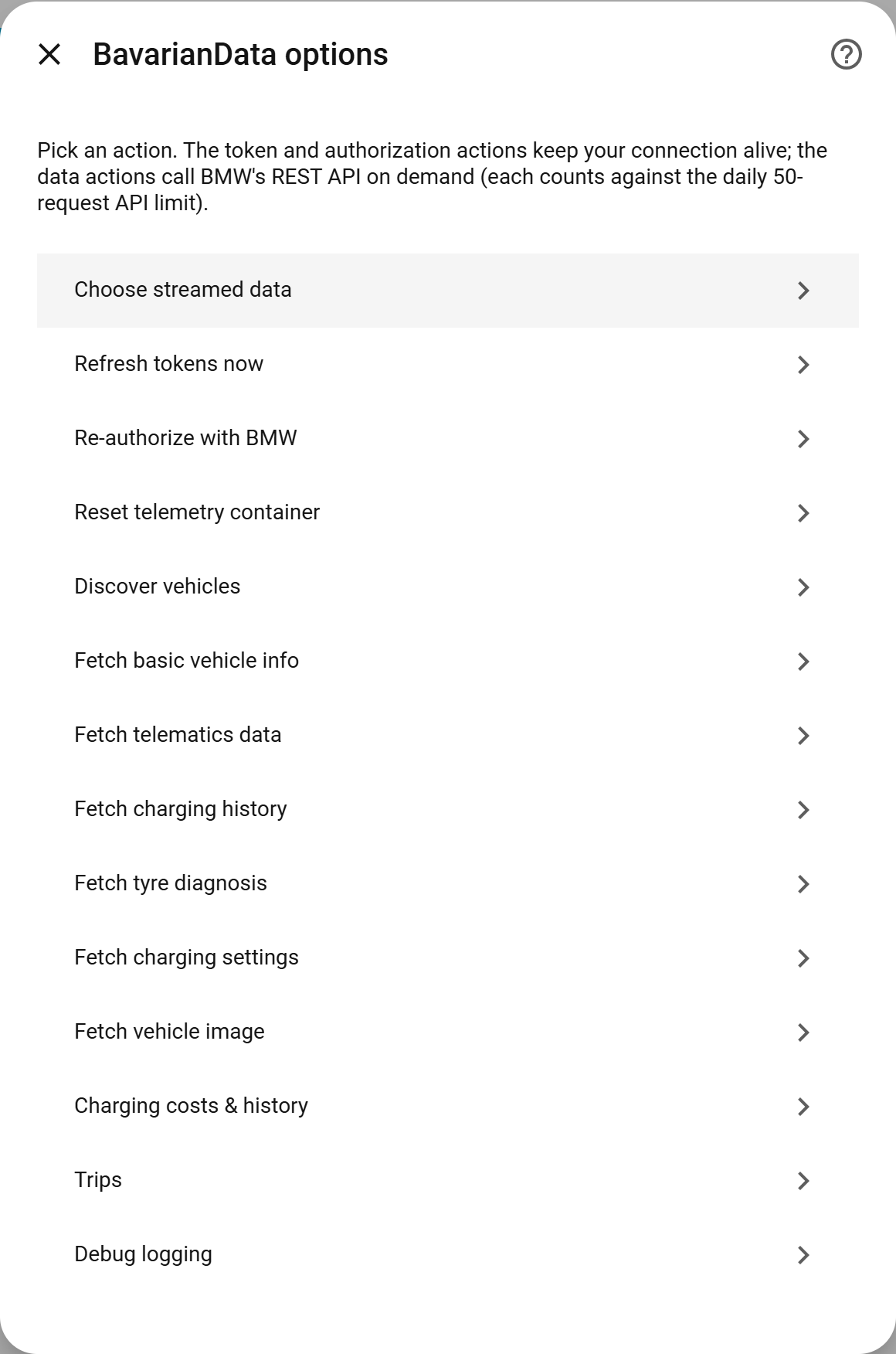
The menu labels below are exactly as they appear in the UI.
| Menu entry | Kind | What it does |
|---|---|---|
| Choose streamed data | setup | Re-open the cluster picker, then activate the fields with the one-click Activate BMW data bookmarklet (same activator as guided setup). Additive — it adds the chosen clusters to the live stream but never removes fields you already stream. |
| Refresh tokens now | action | Force an OAuth token refresh. |
| Re-authorize with BMW | action | Re-run device auth (after BMW invalidates the token). |
| Reset telemetry container | action | Clear the stored HV container id/signature so it's rebuilt on the next fetch. Use if telematics fetches start failing after a descriptor change. |
| Discover vehicles | action ⚡ | Fetch vehicle mappings. See Services. |
| Fetch basic vehicle info | action ⚡ | See Services. |
| Fetch telematics data | action ⚡ | " |
| Fetch charging history | action ⚡ | " |
| Fetch tyre diagnosis | action ⚡ | " |
| Fetch charging settings | action ⚡ | Location-based charging settings. " |
| Fetch vehicle image | action ⚡ | " |
| Charging costs & history | settings | Price source, retention, statistics — below. |
| Trips | settings | Work zone, default type, commute stop tolerance, address resolution and route recording — below. |
| Debug logging | settings | Verbose logging toggle — below. |
⚡ = spends one (or more) of your 50 requests / 24 h.
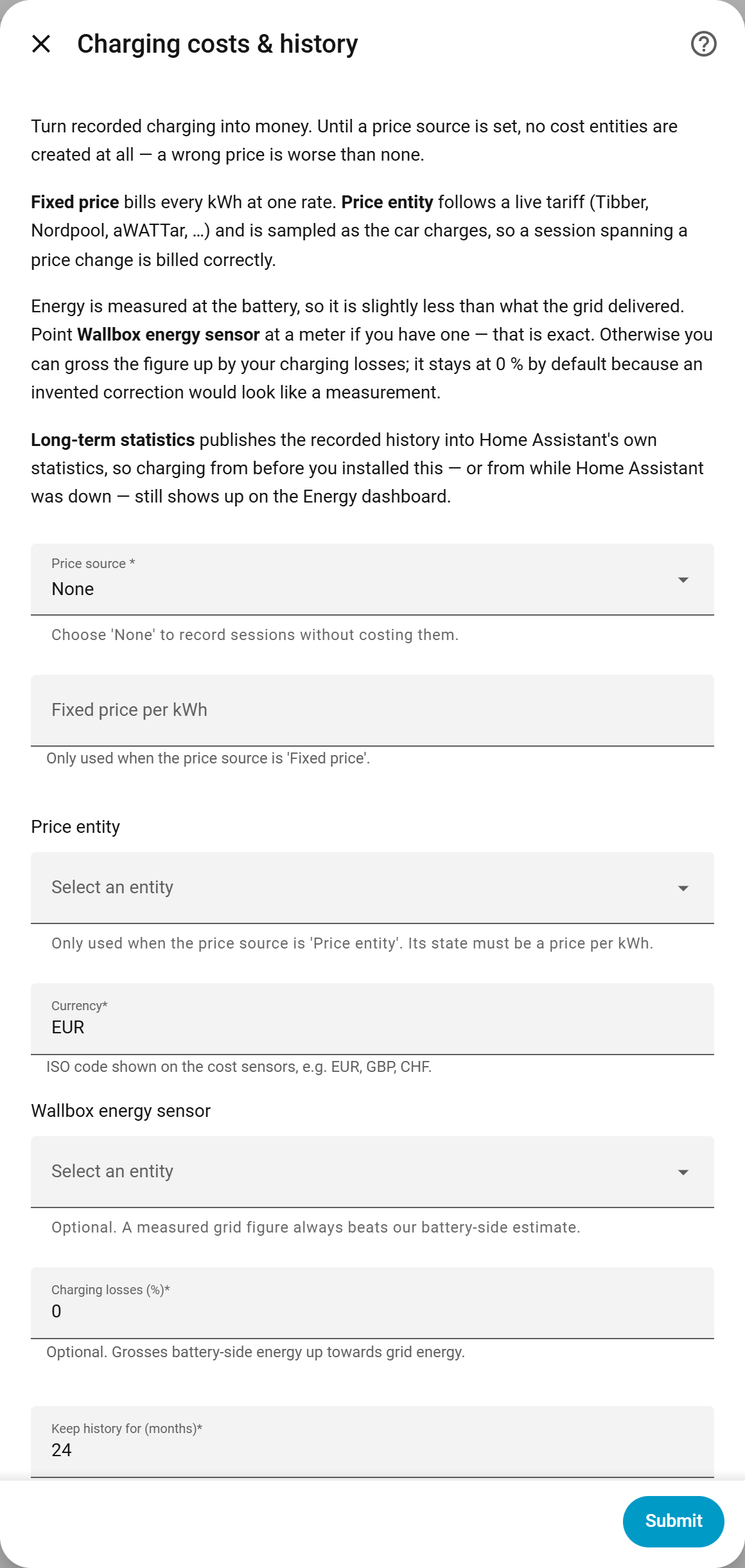
Screen: Configure → Charging costs & history. See Charging history & cost for the concepts.
| Option | Values | Meaning |
|---|---|---|
| Price mode |
none · fixed · entity
|
How energy becomes money. none creates no cost entities at all. |
| Fixed price | number | Price per kWh, when mode is fixed. Required in that mode. |
| Price entity | sensor / input_number | Live price source (Tibber/Nordpool/aWATTar), when mode is entity. Sampled while charging. Required in that mode. |
| Currency | text | Currency code for the cost entities. |
| Grid energy entity | sensor | Optional wallbox energy sensor; its exact grid figure replaces the battery-side estimate. |
| Charging loss % | 0–30 | Grosses the battery figure up by your losses. Default 0 (no invented correction). |
| History retain months | 0–120 | How long to keep recorded sessions/trips. 0 = keep everything. |
| Publish long-term statistics | on/off | Mirror history into the Energy dashboard. Turning it off deletes the published series. See Energy & statistics. |
Screen: Configure → Trips. See Trips for the concepts.
| Option | Values | Meaning |
|---|---|---|
| Work zone | zone entity | Drives commute classification (home↔work). |
| Default type | Private / Business / Leave unclassified | Default Private. What every trip that isn't a recognised home↔work commute is filed as. Always just a starting point: a correction on the card is never overwritten. Pick Leave unclassified to triage each trip by hand. |
| Commute stop tolerance | 0–180 min | Default 30. How long the car may stand between two drives for both to still count as one commute — the supermarket on the way to work. 0 switches chaining off. Stops under ~5 min never split a drive at all. |
| Resolve addresses | on/off | Off by default. When on, trip endpoints outside any zone are reverse-geocoded via OpenStreetMap; the address string is stored, never the coordinates. |
| Record route | on/off | Off by default. When on, each new trip stores its GPS track — coordinates along the drive, each stamped with its time ([lat, lon, t], t = seconds since start) — so a map can draw and replay the route. The only setting that persists raw coordinates, your exact start/end included. Served via get_trips; never in the export. |
| Trip-capture diagnostics | on/off | Off by default. A troubleshooting aid for improving trip detection: logs the raw substrate (every GPS fix with cadence/latency, the close-timer lifecycle, full segment batches, a per-message descriptor firehose and a per-trip post-mortem) under [trip.*] tags, and writes bavariandata_trip_capture.ndjson to your config folder. Independent of Debug logging. Verbose and contains GPS/VIN — turn it on for a test drive and back off. See Troubleshooting. |
Screen: Configure → Debug logging.
| Option | Values | Meaning |
|---|---|---|
| Debug logging | on/off | Off by default. Gates the integration's verbose logging (separate from HA's per-integration log level). Verbose and can include VIN/GPS — leave off unless chasing a problem. Applies immediately. |
Hidden overrides
A few advanced options aren't in the menu and are only set via the hidden overrides mechanism / imported options. Most users never touch them.
| Option key | Meaning |
|---|---|
mqtt_keepalive |
MQTT keepalive interval for the stream client. |
diagnostic_log_interval |
How often the diagnostic heartbeat is logged. |