Repository navigation
Getting Started
This guide covers everything you need to clone, build, and run SparkEngine from source. It includes platform-specific setup instructions, troubleshooting for common build issues, and verification steps.
For end-user hardware targets (CPU/RAM/VRAM minimums and recommended specs), see System Requirements.
| Requirement | Details |
|---|---|
| C++ Compiler | MSVC v143 (Visual Studio 2022 17.6+), GCC 13+, or Clang 17+ with C++23 support |
| CMake | 3.25 or newer |
| Graphics | DirectX 11 capable GPU (Windows). Vulkan SDK optional. OpenGL 4.5 optional. Metal 2.3+ on macOS. |
| Platform | Windows 10+ (primary), Linux x64 (experimental), macOS 11+ (experimental) |
| Git | For cloning with submodules |
| Linux packages |
build-essential, ninja-build, cmake
|
| macOS packages |
brew install cmake sdl2 openal-soft (plus molten-vk for Vulkan) |
-
Visual Studio 2022 (Community edition or higher) with the following workloads:
- "Desktop development with C++" workload
- Windows 10/11 SDK (any recent version)
- MSVC v143 build tools
- CMake 3.16+ (bundled with Visual Studio, or install separately from cmake.org)
-
Git (install from git-scm.com or via
winget install Git.Git)
To verify your Windows setup:
# Check Visual Studio compiler
cl.exe 2>&1 | Select-String "Version"

# Check CMake
cmake --version

# Check Git
git --versionsudo apt update
sudo apt install build-essential ninja-build cmake gitFor Clang builds (optional but recommended for matching CI):
sudo apt install clang clang-formatTo verify your Linux setup:
# Check GCC version (must be 11+)
g++ --version

# Check CMake version (must be 3.16+)
cmake --version

# Check Ninja (optional but faster)
ninja --versionsudo dnf groupinstall "Development Tools"
sudo dnf install cmake ninja-build git clang clang-tools-extrasudo pacman -S base-devel cmake ninja git clang# Install Xcode command-line tools
xcode-select --install
# Install CMake and Ninja via Homebrew
brew install cmake ninjaNote: macOS is experimental. OpenGL stubs are provided but DirectX 11 features are not available.
git clone --recurse-submodules https://github.com/Krilliac/SparkEngine.git
cd SparkEngine
If you already cloned without submodules:
git submodule sync
git submodule init
git submodule update --recursiveSparkEngine depends on 15 third-party libraries managed as Git submodules. After cloning, verify they are present:
# Check that ThirdParty directories are populated
ls ThirdParty/
You should see directories for: entt, JoltPhysics, imgui, angelscript, assimp, glm, rapidjson, spdlog, stb, miniaudio, DirectXTK, ImGuizmo, imnodes, miniz, tinyobjloader.
If any are empty, re-run:
git submodule update --init --recursive.\generate.bat -g "Visual Studio 17 2022" releasechmod +x generate.sh
./generate.sh release -g Ninjacmake -B build -G "Visual Studio 17 2022" -A x64 -DCMAKE_BUILD_TYPE=ReleaseSparkEngine includes CMakePresets.json with ready-made configurations:
| Preset | Platform | Description |
|---|---|---|
windows-debug |
Windows | VS 2022, Debug |
windows-release |
Windows | VS 2022, Release |
linux-gcc-debug |
Linux | GCC, Debug |
linux-gcc-release |
Linux | GCC, Release |
linux-clang-debug |
Linux | Clang, Debug |
linux-clang-release |
Linux | Clang, Release |
ci-linux-asan |
Linux | AddressSanitizer build |
ci-linux-tsan |
Linux | ThreadSanitizer build |
minimal |
Any | Core-only build without advanced features |
cmake --preset windows-release
cmake --build --preset windows-releaseIf you want the fastest possible build with only essential features:
cmake --preset minimal
cmake --build build --config Release
This disables the editor, advanced graphics, AI, animation, networking, and other optional subsystems. Useful for CI or for working on core engine code.
.\build.ps1 -config Release -editor -angelscriptOptions:
-
-config Debug|Release-- Build configuration -
-editor-- Include the SparkEditor -
-console-- Include SparkConsole -
-angelscript-- Include AngelScript scripting
./build.sh releaseOptions:
-
-g Ninja-- Use Ninja generator (faster) -
-E-- Disable editor -
-C-- Disable console
cmake --build build --config ReleaseSpeed up the build by specifying the number of parallel jobs:
# Linux/macOS
cmake --build build --config Release -- -j$(nproc)

# Windows (PowerShell)
cmake --build build --config Release -- /maxcpucount
A clean Release build typically takes 2-5 minutes on a modern machine with 8+ cores.
After a successful build:
build/
├── bin/
│   ├── SparkEngine.exe      # Main engine executable
│   ├── SparkConsole.exe     # Debug console (Windows) — see [SparkConsole](../gameplay-tools/SparkConsole.md)
│   ├── SparkEditor.exe      # Visual editor (Windows) — see [SparkEditor](../gameplay-tools/SparkEditor.md)
│   ├── SparkShaderCompiler.exe  # Shader compilation tool
│   ├── SparkTests           # Unit test runner (when BUILD_TESTS=ON)
│   └── SparkGame.dll        # Default game module
├── lib/                     # Static/shared libraries
├── Shaders/                 # Compiled shaders
└── Assets/                  # Game assets
cd build\bin
SparkEngine.exe
You should see:
- A DirectX 11 window with a blue background
- SparkConsole opens automatically
- Console shows initialization messages
cd build/bin
./SparkEngine
On Linux with a GPU, the engine uses the Vulkan or OpenGL backend. Without a GPU, the engine falls back to NullRHIDevice (headless mode) or can render on CPU using the OpenGL backend with Mesa llvmpipe:
# Software rendering (no GPU required)
sudo apt-get install -y xvfb libgl1-mesa-dri
Xvfb :99 -screen 0 1024x768x24 &
DISPLAY=:99 LIBGL_ALWAYS_SOFTWARE=1 ./SparkEngine| Option | Description |
|---|---|
-headless |
Run without graphics or audio (for dedicated servers). Falls back to NullRHIDevice automatically. |
-game <path> |
Load a specific game module DLL |
-scene <path> |
Load a specific scene on startup |
-width <N> |
Set window width in pixels |
-height <N> |
Set window height in pixels |
-fullscreen |
Start in fullscreen mode |
-console |
Force enable the debug console |
-noconsole |
Disable the debug console |
Example:
./SparkEngine -game MyGame.dll -scene Assets/Scenes/Level01.scene -width 1920 -height 1080| Input | Action |
|---|---|
| W / A / S / D | Move |
| Mouse | Look |
| Space | Jump |
| Ctrl | Crouch |
| Shift | Sprint |
| Left Click | Fire / Capture Mouse |
| Right Click | Aim Down Sights |
| R | Reload |
| E | Interact |
| 1 / 2 / 3 / 4 | Weapon slots |
| Esc | Release Mouse / Menu |
| ` (Backtick) | Toggle Debug Console |
| F1 | Toggle Editor (if enabled) |
| F3 | Toggle Performance Stats |
Once the engine is running, you should see the editor interface:
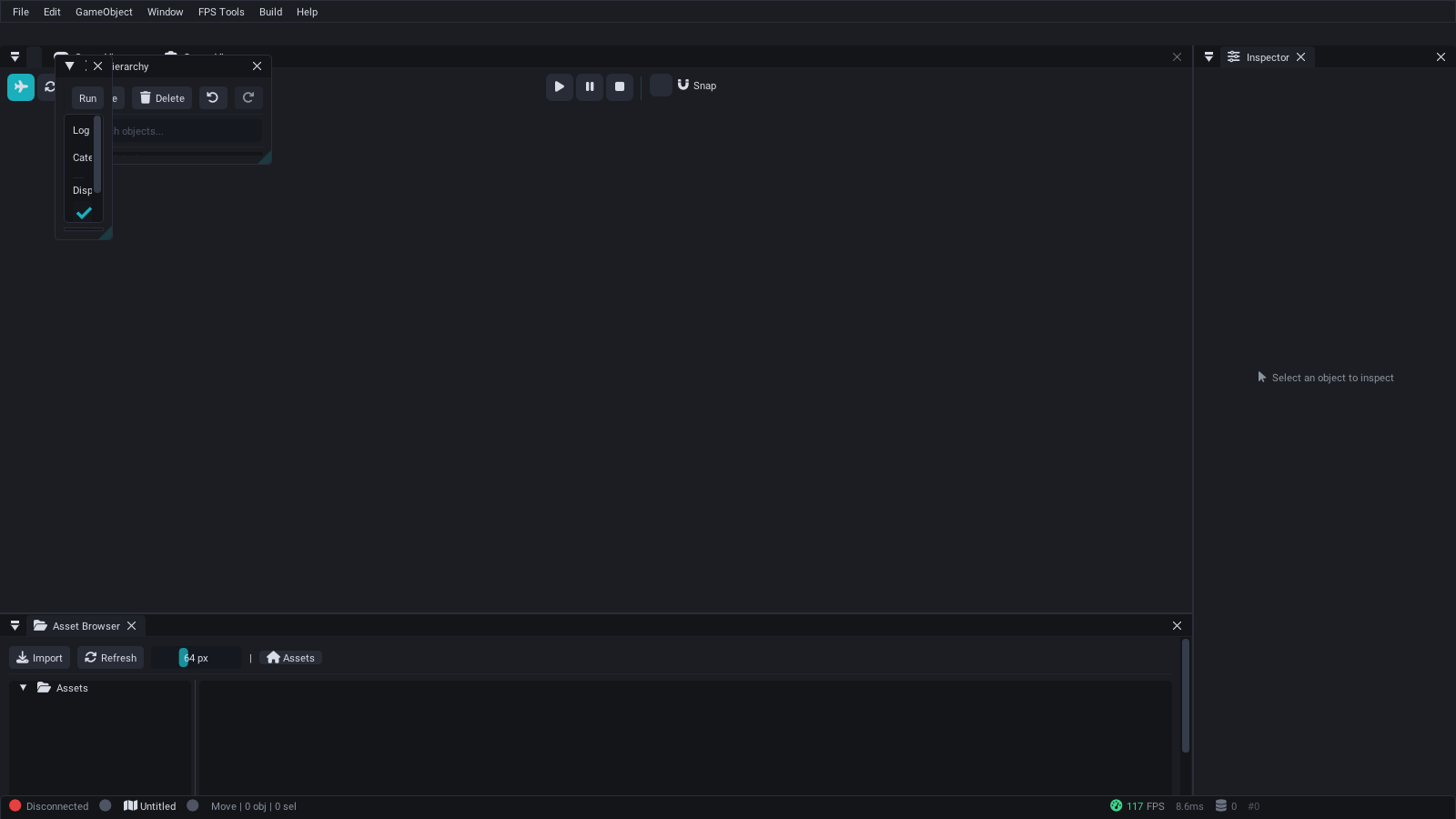
SparkEditor with docked panels — Material Editor, Physics tools, Scene View, Inspector, and Asset Browser.
Open SparkConsole and try:
help            # List all commands
engine_status   # Check system initialization
fps             # Show framerate
graphics_info   # Display GPU information
diag            # Run diagnostics
scene_info      # Show current scene info
physics_info    # Show physics system state
audio_info      # Show audio device information
To verify that the build is correct, run the test suite:
# Build with tests enabled (default)
cmake -B build -DBUILD_TESTS=ON
cmake --build build --config Release

# Run tests
ctest --test-dir build --output-on-failure
All 71 test files (864+ test cases) should pass. See Testing for details.
SparkEngine ships with SparkBuild, a cross-platform terminal-UI wrapper around CMake. The source lives in-tree under SparkBuild/ and is built as part of the normal engine build (opt-out with -DENABLE_SPARKBUILD=OFF).
cmake --build build --target SparkBuild
./build/bin/SparkBuild           # launches the interactive configurator
See Build System and CMake Modules -- SparkBuild for more details.
SparkEngine has 30+ toggleable CMake modules. Pass them during configuration:
cmake -B build -DENABLE_AI=OFF -DENABLE_NETWORKING=ON ...| Flag | Default | Description |
|---|---|---|
BUILD_TESTS |
ON | Build the unit test suite |
ENABLE_EDITOR |
ON (Windows) | Include the ImGui editor |
ENABLE_GRAPHICS |
ON | Enable graphics rendering |
ENABLE_PHYSX |
ON | Enable Jolt Physics integration |
ENABLE_AI |
ON | Enable AI and navigation |
ENABLE_ANIMATION |
ON | Enable skeletal animation |
ENABLE_NETWORKING |
ON | Enable networking (UDP sockets) |
ENABLE_PROFILING |
ON | Enable performance profiler |
ENABLE_HOT_RELOAD |
ON | Enable script hot-reload |
See Build System and CMake Modules for the full list of options.
Symptom: CMake fails with "Could not find EnTT" or similar missing dependency errors.
Fix: Ensure submodules are fully initialized:
git submodule update --init --recursiveIf submodules are stuck in a detached HEAD state:
git submodule sync --recursive
git submodule update --init --recursive --forceSymptom: CMake errors about unsupported features or policy warnings.
Fix: Update to CMake 3.16 or newer:
# Ubuntu (may need to add Kitware PPA for latest version)
sudo apt remove cmake
sudo snap install cmake --classic

# macOS
brew upgrade cmakeSymptom: Compiler errors about missing C++23 features, std::expected, std::print, or deducing this.
Fix: Ensure you are using MSVC v143 (Visual Studio 2022 version 17.6+) or newer. Open the Visual Studio Installer and update to the latest version. The engine requires full C++23 support.
Symptom: Linker errors about X11, GL, or Xrandr symbols.
Fix: Install the development packages:
# Debian/Ubuntu
sudo apt install libx11-dev libxrandr-dev libgl1-mesa-dev libglu1-mesa-dev

# Fedora
sudo dnf install libX11-devel mesa-libGL-develSymptom: CI rejects your PR with clang-format violations.
Fix: Format your code before committing:
find SparkEngine/Source SparkEditor/Source SparkConsole/src SparkShaderCompiler/src GameModules/SparkGame/Source \
-name '*.h' -o -name '*.cpp' | xargs clang-format -iSymptom: The engine executable starts but immediately crashes or shows a black window.
Fix: Check the following:
- Ensure your GPU supports DirectX 11 (Windows) or OpenGL 4.5 (Linux)
- Update your GPU drivers to the latest version
- Check the
spark.logfile in the working directory for error messages - Try running in Debug mode for better error messages:
cmake --build build --config Debug
Symptom: "The program can't start because XXXXX.dll was not found."
Fix: Ensure all DLLs are in the same directory as the executable. The build system should copy them automatically, but if not:
# Copy required DLLs to the bin directory
cmake --build build --config Release --target installSymptom: ASan build reports link errors or missing runtime libraries.
Fix: Ensure you are using GCC 11+ or Clang 14+ with ASan support:
cmake --preset ci-linux-asan
cmake --build build
cd build && ctest --output-on-failureSparkEngine/
├── SparkEngine/ # Core engine library + executable
│ └── Source/
│ ├── Core/ # Platform, EngineContext, entry point
│ ├── Graphics/ # DX11 renderer, post-processing
│ ├── Engine/ # ECS, AI, Animation, Events, Networking
│ ├── Physics/ # Jolt Physics integration
│ ├── Input/ # Keyboard, mouse, gamepad
│ ├── Audio/ # XAudio2 audio engine
│ └── Utils/ # Logger, Profiler, Console
├── SparkEditor/ # ImGui editor (Windows)
├── GameModules/ # Game modules
│ ├── SparkGame/ # Default game module (DLL)
│ └── SparkGameMMO/ # MMO game module (DLL)
├── SparkConsole/ # Standalone debug console
├── SparkShaderCompiler/ # Shader compilation tool
├── SparkSDK/ # Public SDK headers
├── Templates/ # Game module templates
├── ThirdParty/ # Git submodules (15 libraries)
├── Tests/ # Unit tests (71 files, 864+ cases)
├── Shaders/ # HLSL, GLSL shaders
├── Assets/ # Models, Scenes, Scripts
├── cmake/ # CMake helper modules
└── CMakeLists.txt # Root build configuration
- Architecture Overview -- Understand the engine's design
- Creating a Game Module -- Build your first game
- Entity Component System -- Work with entities and components
- Build System and CMake Modules -- Full build configuration reference
- Testing -- Running and writing tests
- Troubleshooting -- If you run into issues
- SparkConsole -- Debug console for engine interaction
- SparkEditor -- Visual editor for scenes and materials
- Architecture Overview -- Understand the engine's design
- Creating a Game Module -- Build your first game module
- Input System -- Configuring input bindings
- Scene Management -- Loading and editing scenes