Repository navigation
SparkEditor
The SparkEditor is an ImGui-based visual editor with 59 specialized dockable panels for creating and editing game content. It provides a full-featured workspace for scene editing, material authoring with Shader Graph, visual scripting (60 node types), animation timelines, cinematic sequencing, AI/dialogue/ability/destruction editors, debugging, profiling, and collaborative multi-user editing (HeroEngine-inspired node locking and presence awareness). Features include a command palette (Ctrl+P), full undo/redo, play-mode editing, layout save/load, theming, and a plugin system (built-in + DLL).
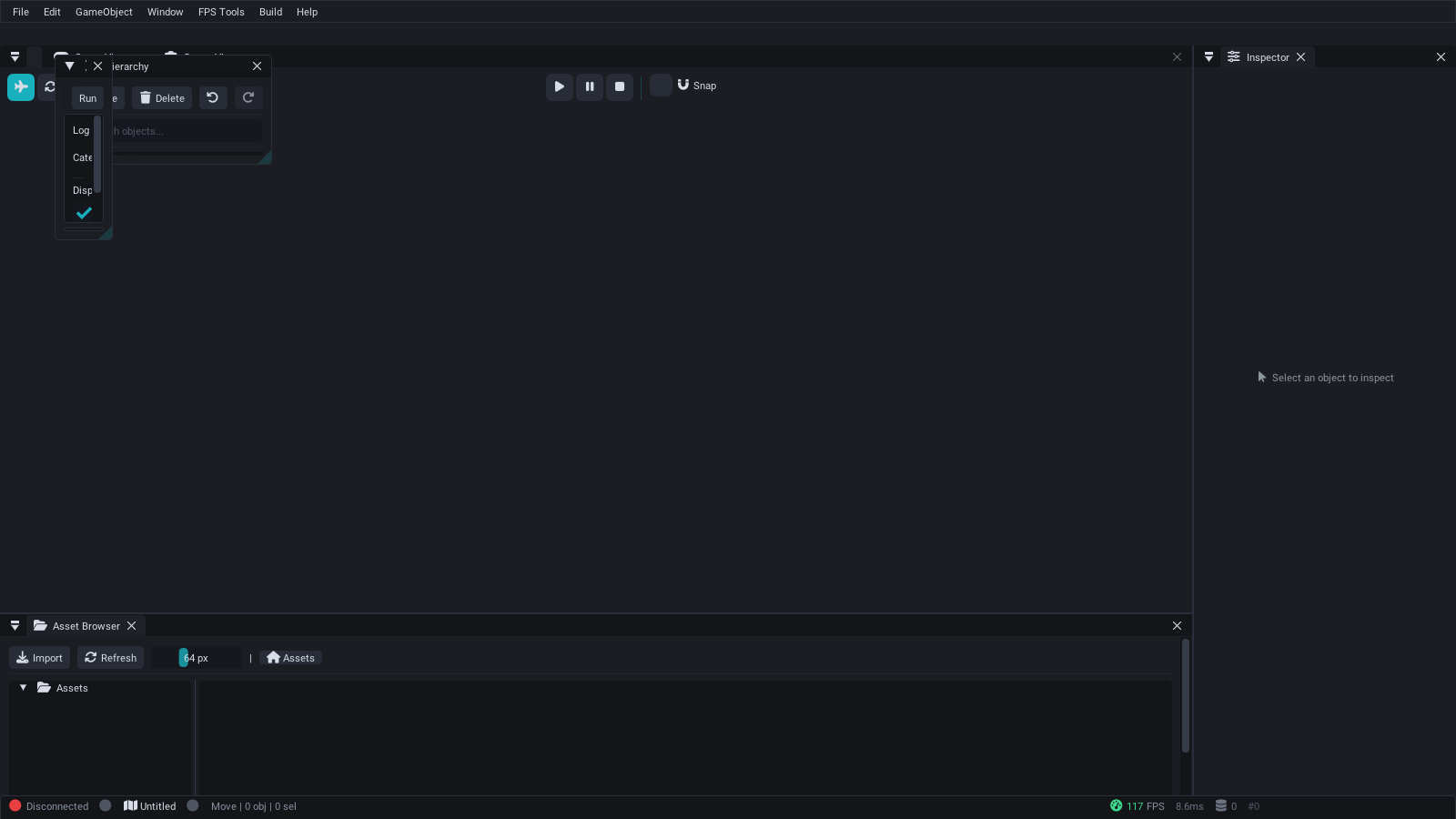
SparkEditor default layout — Hierarchy, Scene View, Inspector, Asset Browser, and Console panels with the Spark Professional dark theme.
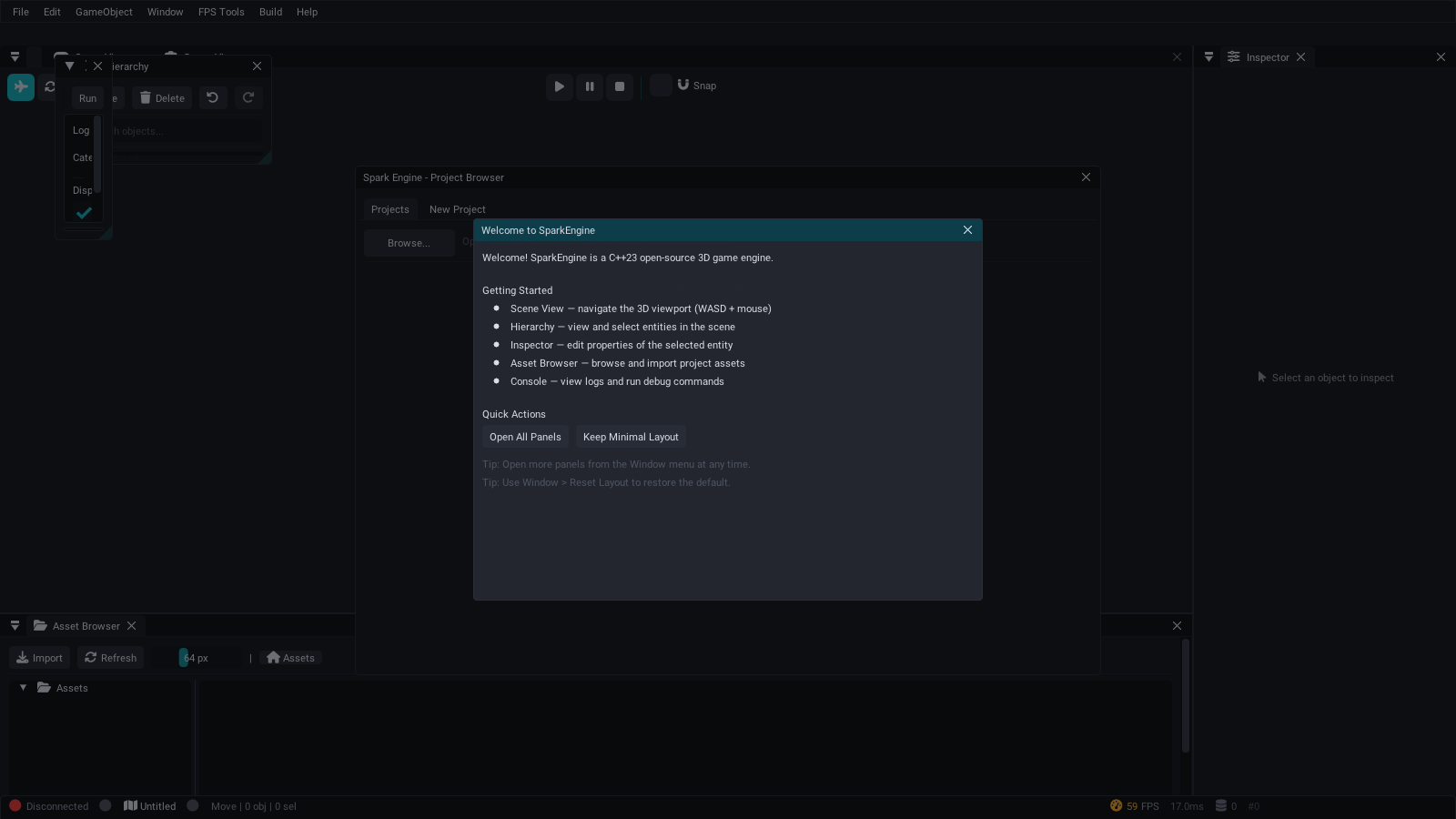
On first launch, a welcome screen introduces the core panels and offers quick actions:
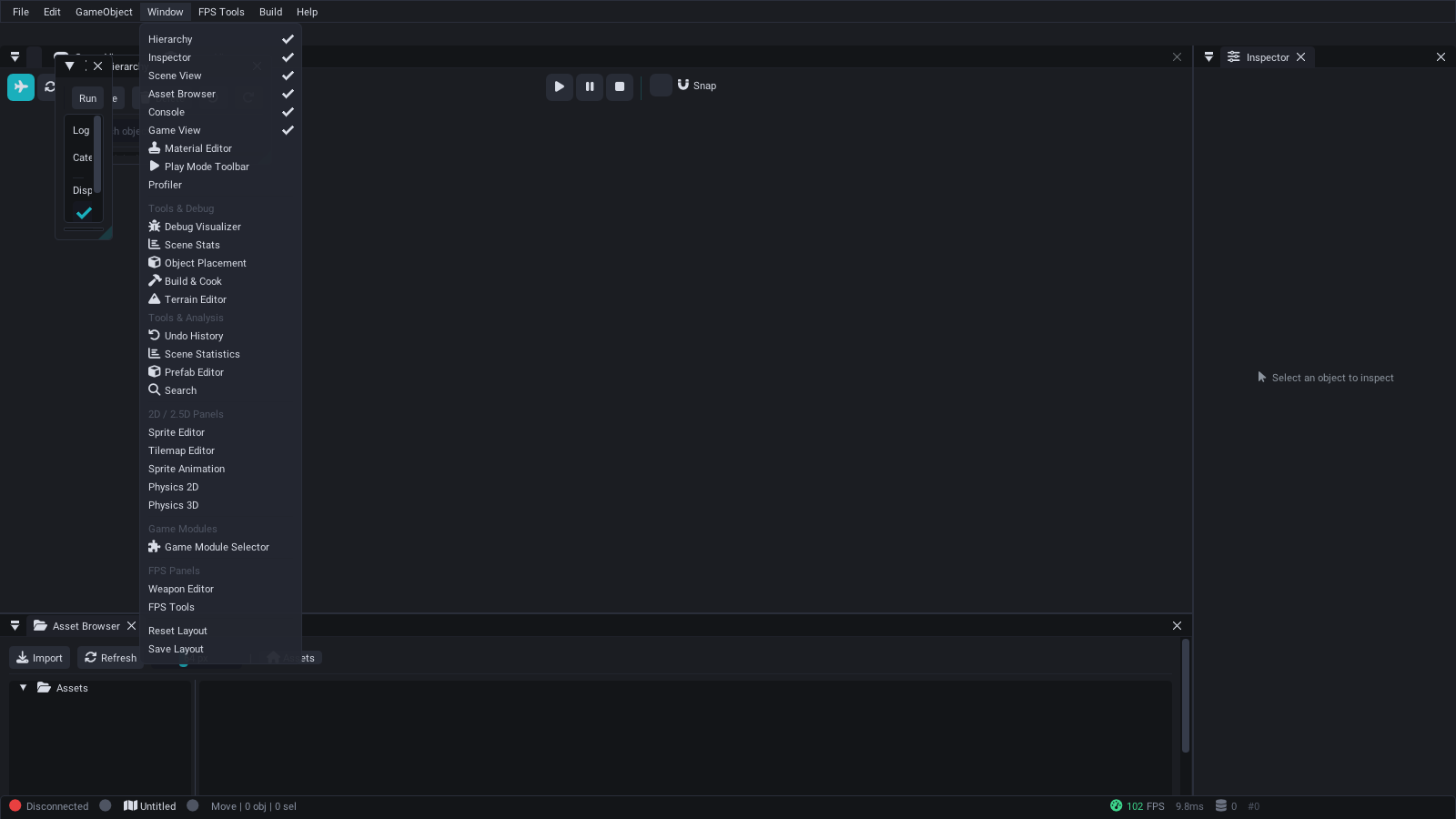
Additional panels can be enabled from the Window menu at any time:
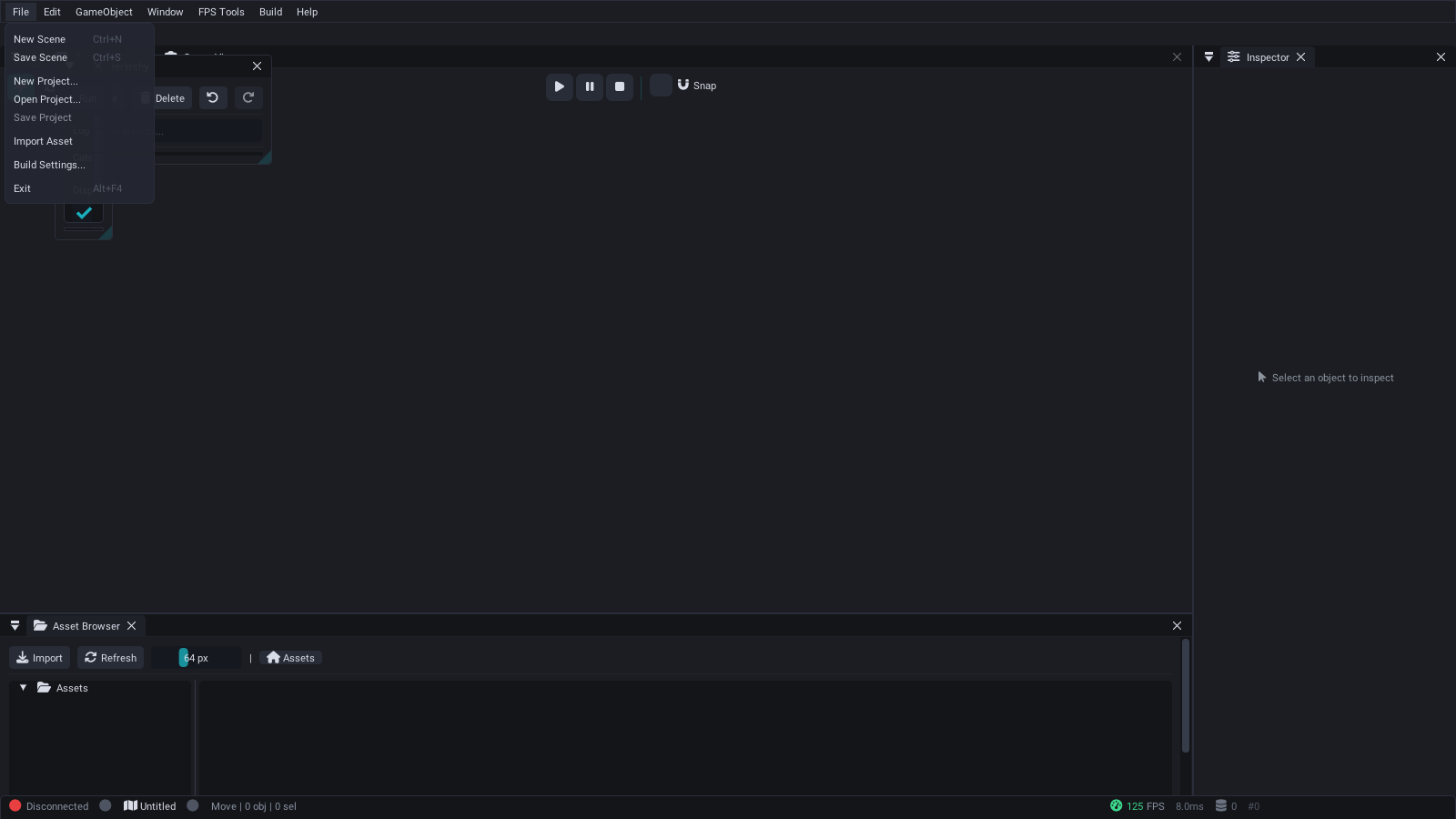
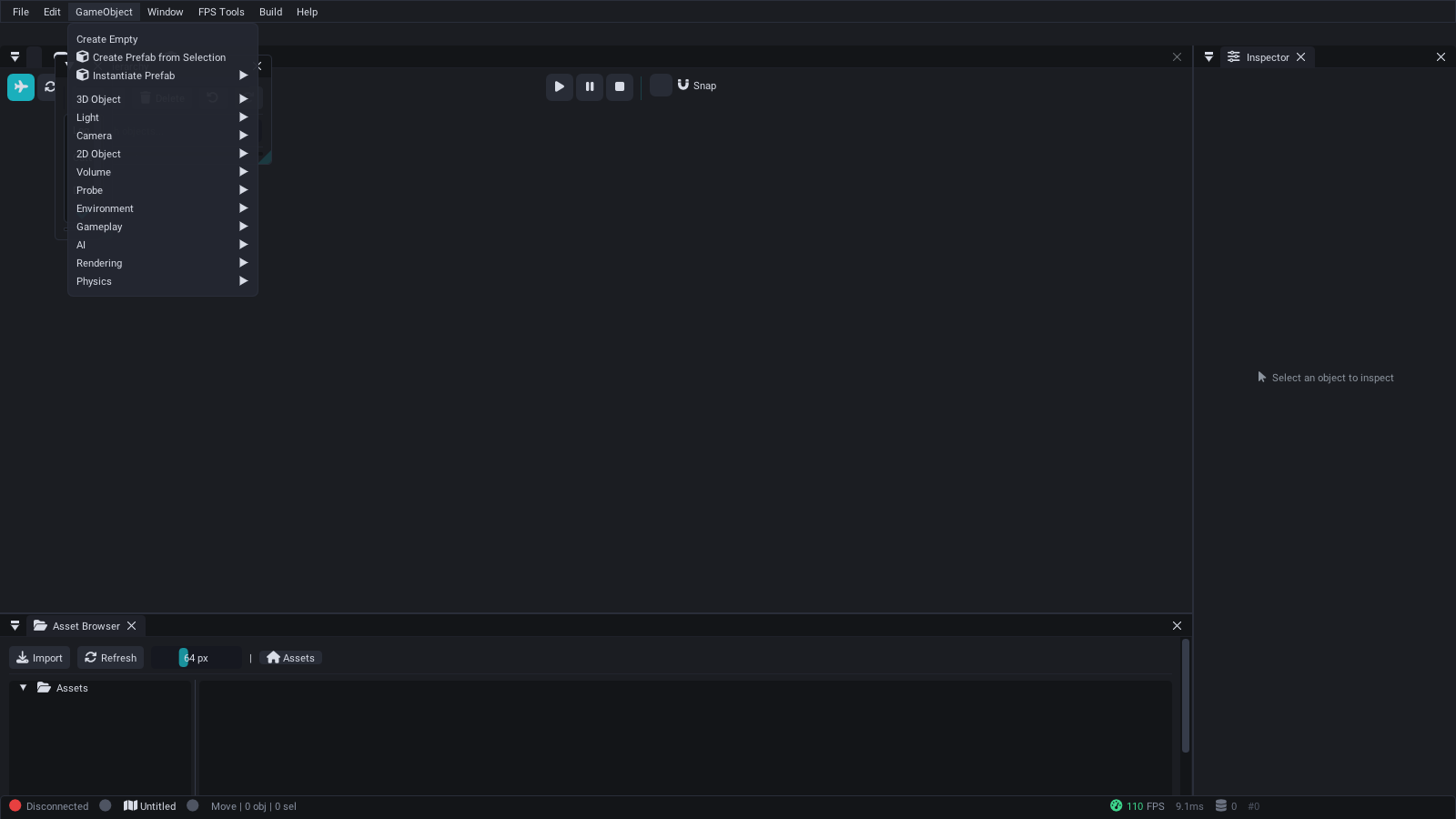
Create entities with pre-configured components:
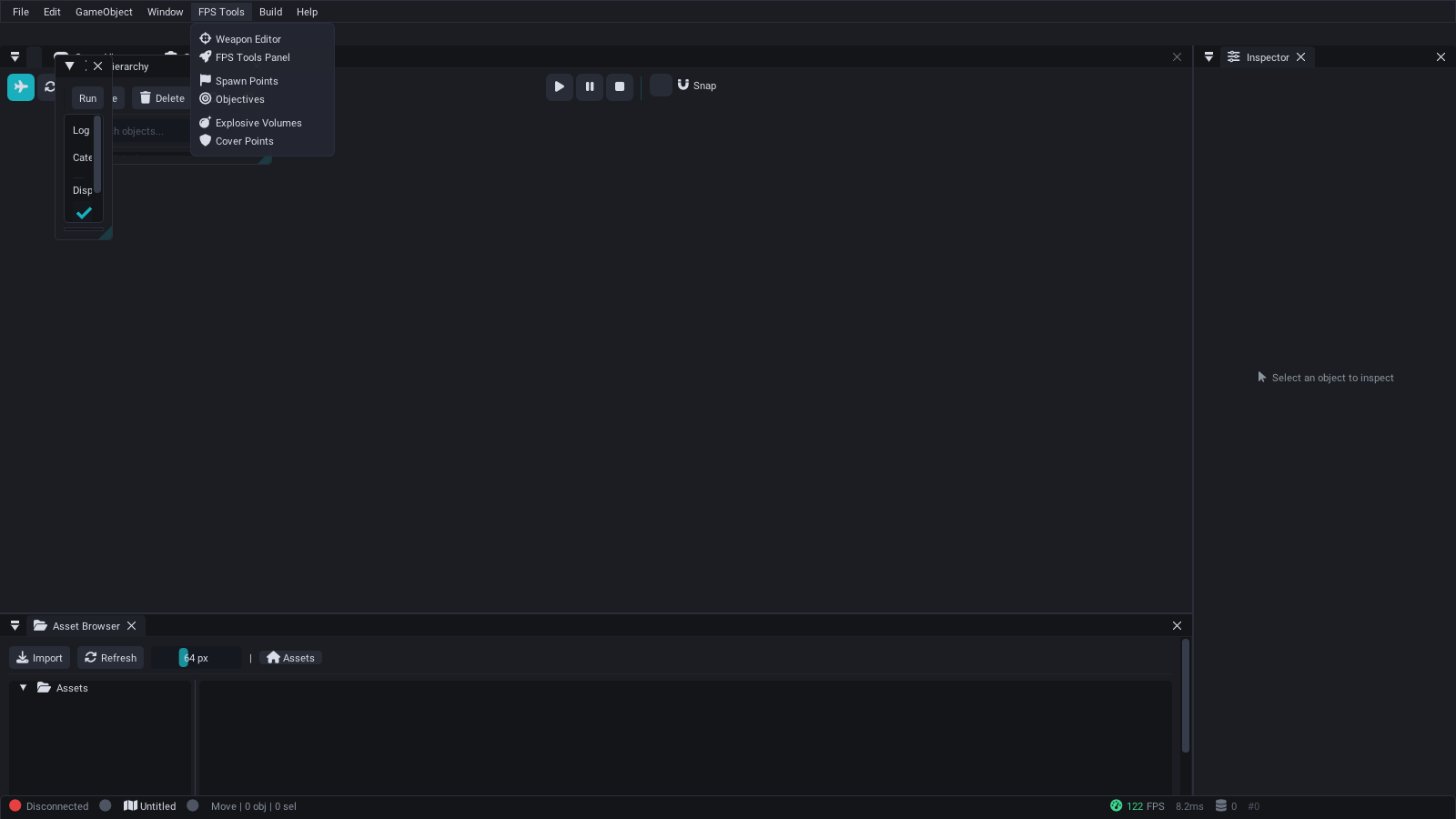
Weapon editor, spawn points, objectives, explosives, and cover points:
Source: SparkEditor/Source/
Platforms:
- Windows: Win32 + DirectX 11 ImGui backends (primary)
- Linux: SDL2 + OpenGL 3.3 ImGui backends (software rendering via Mesa llvmpipe supported)
ENABLE_EDITOR=ON
EditorApplication
  |
  +-- EditorUI
  |     |
  |     +-- EditorLayoutManager   (dock positions, panel visibility, layout save/load)
  |     +-- EditorTheme           (color palette, rounding, spacing, font config)
  |     +-- EditorPanel* panels[] (57 registered panels)
  |     +-- GizmoSystem           (translate/rotate/scale gizmos via DX11)
  |     +-- UndoRedoManager       (command history stack)
  |     +-- CommandPalette        (Ctrl+P quick-command search)
  |
  +-- EditorPluginManager         (built-in + DLL plugin lifecycle)
  +-- SceneManager                (scene load/save/serialize)
  +-- AssetDatabase               (file-system asset indexing)
  +-- PrefabManager               (prefab asset CRUD)
  +-- VersionControlSystem        (optional VCS integration)
  +-- BuildCookPanel               (cook, package, deploy)
  +-- PerformanceProfiler         (CPU/GPU timing, memory)
The entry point is EditorApplication (Core/EditorApplication.h). It owns the Win32 window, DirectX 11 device/context/swap chain, and the ImGui context.
struct EditorConfig
{
    std::string projectPath = ".";
    std::string layoutDirectory = "Layouts";
    std::string logDirectory = "Logs";
    bool enableLogging = true;
    bool startMaximized = true;
    float autoSaveInterval = 30.0f;
    int windowWidth = 1600;
    int windowHeight = 900;
};

class EditorApplication
{
public:
    bool Initialize(const EditorConfig& config);
    int  Run();
    void Shutdown();
    bool IsRunning() const;
    void RequestExit();
    PerformanceMetrics GetPerformanceMetrics() const;
    void OnWindowResize(int width, int height);
    void SetWindowTitle(const std::string& title);
};Each frame executes the following steps:
-
ProcessMessages()-- Win32 message pump (or SDL on Linux stubs) -
Update(deltaTime)-- tick all panels, gizmo system, profiler -
Render()-- ImGui new frame, render all visible panels, ImGui render, DX11 present
Every panel inherits from EditorPanel (Core/EditorPanel.h), which provides a consistent interface:
class EditorPanel
{
public:
    EditorPanel(const std::string& name, const std::string& id);
    virtual ~EditorPanel() = default;

    virtual bool Initialize() = 0;
    virtual void Update(float deltaTime) = 0;
    virtual void Render() = 0;
    virtual void Shutdown() {}
    virtual bool HandleEvent(const std::string& eventType, void* eventData);

    // Visibility and state
    bool IsVisible() const;
    void SetVisible(bool visible);
    bool IsFocused() const;
    void SetFocused(bool focused);
    bool IsClosable() const;
    bool IsModified() const;

    // Persistence
    virtual std::string SaveState() const;
    virtual bool LoadState(const std::string& state);

    // Geometry
    void GetSize(float& width, float& height) const;
    void SetSize(float width, float height);
    void GetPosition(float& x, float& y) const;
    void SetPosition(float x, float y);

protected:
    bool BeginPanel();   // Sets up ImGui window
    void EndPanel();     // Finishes ImGui window
    void NotifyStateChange();
};The editor includes 57 subsystem panels:
- Tree view of all scene nodes with parent-child relationships
- Drag-and-drop to reparent nodes
- Right-click context menu for add/delete/duplicate
- Search and filter nodes by name or type
- Property editor for the selected node/entity
- Transform editing (position, rotation, scale)
- Component editing with type-appropriate widgets
- Material assignment and configuration
- Component reflection via
ComponentReflection.h
- Real-time 3D preview of the scene
- Play/pause/stop game simulation via
PlayModeToolbarPanel - Camera controls (orbit, pan, fly-through)
- Grid and axis overlays
The GizmoSystem (Gizmos/GizmoSystem.h) provides industry-standard 3D object manipulation:
enum class GizmoMode
{
    TRANSLATE = 0,   // Move objects
    ROTATE    = 1,   // Rotate objects
    SCALE     = 2,   // Scale objects
    UNIVERSAL = 3    // All operations
};

enum class GizmoSpace
{
    WORLD = 0,       // World coordinate space
    LOCAL = 1        // Local coordinate space
};

enum class GizmoAxis
{
    NONE = 0,
    X = 1,    Y = 2,    Z = 4,
    XY = 3,   XZ = 5,   YZ = 6,   XYZ = 7,
    SCREEN = 8
};
Features:
- Axis-constrained and plane-constrained manipulation
- Grid snapping (
SetSnapToGrid(bool),SetSnapSize(float)) - Rotation snap (
SetRotationSnapAngle(float)-- default 15 degrees) - Adaptive gizmo size based on camera distance
- Multi-object editing support
- Undo/redo integration
Asset Browser (see Asset Pipeline)
- File-system view of project assets
- Drag-and-drop assets into the scene
- Thumbnail previews for textures and models
- Dependency tracking via
AssetDependencyPanel
Material Editor (see Shader Pipeline)
- PBR material authoring
- Texture slot assignment
- Real-time preview sphere
- Blend mode and shader selection
- Keyframe editing on a timeline
- State machine visualization
- Blend tree configuration
- Animation clip preview
Terrain Editor (see Terrain and Procedural Generation)
- Heightmap painting (raise/lower/smooth/flatten)
- Texture splatting brush
- Object placement brush via
ObjectPlacementPanel - Terrain configuration (size, resolution, LOD)
Weapon Editor (see Gameplay Systems)
- Weapon property configuration
- Projectile type selection
- Fire rate, damage, spread tuning
- Visual scripting nodes (see Scripting with AngelScript)
- Material graph editor
- Connection-based data flow
- CPU and GPU timing breakdown via
PerformanceProfiler - Per-system performance graphs
- Memory usage tracking
- Frame time history
Full-featured debug console with real-time log streaming, severity filtering, and command execution.
- Real-time log output with color-coded severity (Info, Warning, Error, Fatal)
- Command input with auto-completion and history
- Text search and regex filtering across log output
- Export logs to txt, csv, or json formats
- Configurable scroll behavior (auto-scroll, pause on hover)
Source: SparkEditor/Source/Panels/ConsolePanel.cpp (821 lines)
3D viewport for editing the scene with editor camera controls.
- Orbit, pan, and fly-through camera modes
- Grid overlay with configurable spacing
- Multiple render modes (lit, wireframe, unlit, normals)
- Gizmo rendering for selected entities
- Click-to-select entities via raycasting
Source: SparkEditor/Source/Panels/SceneViewPanel.cpp (404 lines)
Transport controls for play-in-editor (PIE) sessions.
- Play, Pause, Stop, and Step-Frame buttons
- Time-scale slider (0.1x to 10x)
- Per-subsystem toggle (physics, AI, audio, particles)
- Camera mode switching (editor camera vs. game camera)
- Frame statistics overlay during play
Source: SparkEditor/Source/Panels/PlayModeToolbarPanel.cpp (644 lines)
Build configuration and packaging pipeline.
- Profile selection: Debug, Development, Release, Shipping
- Asset cooking with progress tracking
- Platform targeting (Windows, Linux, macOS stubs)
- Output directory configuration
- Build log with error/warning highlights
Source: SparkEditor/Source/Panels/BuildCookPanel.cpp (591 lines)
Server management for multiplayer testing and deployment.
- Server cook settings and map rotation configuration
- PIE server launch for local testing
- LAN server browser with auto-discovery
- RCON console for remote administration
- Player list with kick/ban controls
Source: SparkEditor/Source/Panels/DedicatedServerPanel.cpp (999 lines)
Toggle debug overlays for various engine subsystems.
- Grid, wireframe, and collider visualization
- Physics contacts and constraint rendering
- Navigation mesh overlay
- Light radius and attenuation spheres
- Audio source range indicators
Source: SparkEditor/Source/Panels/DebugVisualizerPanel.cpp (245 lines)
Real-time EventBus inspector for debugging event-driven systems.
- Live event stream during play mode
- Filter by event type or source
- Event payload inspection
- Pause/resume event capture
Source: SparkEditor/Source/Panels/EventMonitorPanel.cpp (97 lines)
Visual dialogue tree authoring tool.
- Node types: Text, Choice, Branch, Event, End
- Speaker name and voice clip assignment per node
- Branching condition configuration
- Preview dialogue flow in-editor
Source: SparkEditor/Source/Panels/DialogueEditorPanel.cpp (175 lines)
Specialized tools for first-person shooter level design and balancing.
- Spawn point placement and team assignment
- Game mode configuration (Deathmatch, CTF, Domination)
- Player stats testing (health, armor, speed)
- Combat simulation for balance testing
- Level design helpers (cover analysis, sight lines)
Source: SparkEditor/Source/Panels/FPSToolsPanel.cpp (630 lines)
Real-time performance and scene metrics dashboard.
- Entity and component counts by type
- Render statistics: draw calls, triangles, batches
- Physics statistics: rigid bodies, contacts, constraints
- Memory usage breakdown
- Per-frame performance graphs with history
Source: SparkEditor/Source/Panels/SceneStatisticsPanel.cpp (391 lines)
Global fuzzy search across the entire project.
- Search entities by name, tag, or component type
- Search assets by filename or type
- Search components by property values
- Result filtering and sorting
- Search history with recent queries
Source: SparkEditor/Source/Panels/SearchPanel.cpp (435 lines)
Level editing tools for placing and arranging objects in the scene.
- Placement modes: Single, Brush, Line, Grid, Scatter
- Grid and surface snapping
- Prefab library with drag-and-drop
- Randomization controls (rotation, scale jitter)
Source: SparkEditor/Source/Panels/ObjectPlacementPanel.cpp (364 lines)
Create, edit, and manage prefab assets.
- Prefab browser with search
- Component editing within prefab context
- Property serialization and override tracking
- Create prefab from selected entities
- Apply prefab changes to all instances
Source: SparkEditor/Source/Panels/PrefabEditorPanel.cpp (393 lines)
Project-level hub for opening, creating, and managing projects.
- Recent projects list with last-opened timestamps
- New project wizard with templates (FPS, RPG, Blank)
- Existing project browser with folder navigation
- Project settings quick-access
Source: SparkEditor/Source/Panels/ProjectBrowserPanel.cpp (540 lines)
Visual particle system authoring.
- Emission rate, lifetime, and burst configuration
- Emitter shapes: Point, Sphere, Cone, Box
- Color gradient editor over particle lifetime
- Physics integration (gravity, wind, collision)
- Live preview in viewport
Source: SparkEditor/Source/Panels/ParticleEditorPanel.cpp (147 lines)
Post-processing effect configuration.
- Bloom intensity and threshold
- Tonemapping operator selection
- Fog density, color, and falloff
- Sky and atmospheric parameters
- Wind direction and strength
Source: SparkEditor/Source/Panels/PostProcessingPanel.cpp (166 lines)
String table editor for multi-language support.
- Supported languages: English, Spanish, French, German, Japanese, Chinese
- Key/value translation table with inline editing
- Missing translation highlighting
- Import/export CSV for translator workflows
Source: SparkEditor/Source/Panels/LocalizationPanel.cpp (149 lines)
Save/Load slot manager.
- View save slot metadata (timestamp, playtime, level)
- Create and delete save slots
- Autosave interval configuration
- Save file location management
Source: SparkEditor/Source/Panels/SaveSystemPanel.cpp (141 lines)
Spline path authoring for cameras, AI, and procedural content.
- Control point creation and editing
- Curve types: Catmull-Rom, Bezier
- Closed loop toggle
- Tension parameter adjustment
- Visual preview in scene view
Source: SparkEditor/Source/Panels/SplineEditorPanel.cpp (140 lines)
Weather preset editor.
- Preset types: Clear, Rain, Snow, Storm
- Precipitation intensity and particle density
- Wind speed and direction
- Fog distance and color
- Lighting adjustments per weather type
Source: SparkEditor/Source/Panels/WeatherFogPanel.cpp (184 lines)
Visual timeline of the undo/redo command stack.
- Chronological command list with descriptions
- Click to jump to any point in history
- Current position indicator
- Saved state marker
Source: SparkEditor/Source/Panels/UndoHistoryPanel.cpp (161 lines)
Behavior tree visual editor.
- Node creation for Selector, Sequence, Decorator, Action types
- Template management for reusable tree patterns
- Agent inspection with live blackboard values
- Tree validation and error highlighting
Source: SparkEditor/Source/Panels/AIEditorPanel.cpp (201 lines)
Real-time AI agent runtime inspector for play-mode debugging.
- Agent list with color-coded state (Idle, Patrol, Alert, Combat, Flee, Dead)
- Per-agent blackboard variable viewer with type-aware display
- Behavior tree execution trace with active node highlighting
- Perception overlay toggles (detection ranges, attack ranges, nav paths, target lines)
- AI system statistics (agent counts by state, targets)
- State filtering and configurable refresh rate
Source: SparkEditor/Source/Panels/AIDebugPanel.cpp (290 lines)
2D physics configuration and debugging.
- Gravity vector configuration
- Collision layer matrix editor
- Debug visualization: AABBs, contacts, grid
- Interactive raycast testing tool
Source: SparkEditor/Source/Panels/Physics2DPanel.cpp (308 lines)
Sprite configuration for 2D rendering.
- Texture selection and source rectangle editing
- Pivot point setup with visual indicator
- Sorting layer and order assignment
- Color tint and flip controls
Source: SparkEditor/Source/Panels/SpriteEditorPanel.cpp (329 lines)
2D animation clip authoring.
- Frame-by-frame timeline with keyframe editing
- Per-frame duration control
- Preview with play/pause/step controls
- Onion skinning for animation reference
Source: SparkEditor/Source/Panels/SpriteAnimationEditorPanel.cpp (534 lines)
Tile-based map editing.
- Tools: Paint, Erase, Fill, Rectangle
- Collision layer painting
- Auto-tiling rules configuration
- Zoom and pan viewport
- Full undo/redo support
Source: SparkEditor/Source/Panels/TilemapEditorPanel.cpp (540 lines)
Full game viewport with FPS HUD preview.
- Crosshair rendering with customizable styles
- Health and armor bar overlays
- Ammo counter and magazine display
- Minimap with configurable zoom
- Kill feed, damage indicators, and scoreboard
Source: SparkEditor/Source/Panels/GameViewPanel.cpp (1,163 lines)
SparkEditor supports multi-user collaborative editing sessions where multiple editor instances can work on the same scene simultaneously. See Collaborative Editing for full documentation.
Key features:
- Peer presence — see other editors' selections and viewport cameras
- Node locking — pessimistic locks prevent conflicting edits
- Edit broadcasting — changes are visible across all editors in real-time
- Auto-expiry — locks expire after 5 minutes to prevent blocking
Source: SparkEditor/Source/Communication/CollaborativeEditSession.h
The UndoRedoManager (UndoRedo/UndoRedoManager.h) maintains command stacks for full undo/redo support:
class UndoRedoManager
{
public:
    void ExecuteCommand(std::unique_ptr<EditorCommand> command);
    bool Undo();
    bool Redo();
    void UndoToIndex(size_t targetIndex);

    bool CanUndo() const;
    bool CanRedo() const;
    std::string GetUndoDescription() const;
    std::string GetRedoDescription() const;

    void Clear();
    void MarkSaved();
    bool HasUnsavedChanges() const;

    size_t GetMaxStackDepth() const;           // Default: 100
    void SetMaxStackDepth(size_t depth);
    void SetOnStackChanged(std::function<void()> callback);
};
All editor operations that modify scene state go through ExecuteCommand(). Each command implements EditorCommand::Execute() and EditorCommand::Undo(). Executing a new command clears the redo stack. The UndoHistoryPanel provides a visual timeline of the command history.
The EditorTheme class (Core/EditorTheme.h) provides professional theming with 8 built-in themes:
| Theme | Description |
|---|---|
| Unity Pro | Unity-inspired dark theme |
| Unreal Pro | Unreal Engine-inspired dark theme |
| VS Pro | Visual Studio-inspired dark theme |
| JetBrains | JetBrains IDE-inspired theme |
| Professional Light | Light theme for well-lit environments |
| High Contrast | Accessibility-focused high-contrast theme |
| Blue Accent | Custom blue accent dark theme |
| Orange Accent | Custom orange accent dark theme |
The EditorThemeData struct contains 60+ color properties organized into groups:
-
Background:
background,backgroundDark,backgroundLight,backgroundAccent,backgroundHeader,backgroundActive,backgroundHover,backgroundSelected -
Text:
text,textDisabled,textSecondary,textAccent,textWarning,textError,textSuccess -
Buttons:
button,buttonHovered,buttonActive,buttonDisabled -
Frames:
frame,frameHovered,frameActive -
Borders:
border,borderLight,borderAccent,borderSeparator - Tabs/Scrollbars/Menus: full color sets for each
- Style values: rounding, border sizes, padding, spacing, shadows, font size
// Apply a built-in theme
EditorTheme::ApplyTheme("UnityPro");

// Create a blended theme
EditorTheme::CreateBlendedTheme("UnityPro", "UnrealPro", 0.5f, "HybridTheme");

// Export/import custom themes
ThemeCustomizer::ExportTheme(theme, "MyTheme.json");
ThemeCustomizer::ImportTheme("MyTheme.json", theme);

// Live editing
ThemeCustomizer::ShowThemeEditor();The EditorLayoutManager (Core/EditorLayoutManager.h) handles docking, saving, and loading panel layouts:
enum class DockPosition { Left, Right, Top, Bottom, Center, Float };

struct PanelConfig
{
    std::string name;
    std::string displayName;
    DockPosition dockPosition;
    ImVec2 size;
    ImVec2 position;
    bool isVisible;
    bool isFloating;
    bool canClose;
    bool canDock;
    float dockRatio;    // Ratio of parent space to occupy
    int tabOrder;
    std::string parentDock;
};
The editor uses ImGui's docking branch for a fully customizable workspace:
- Drag panels to dock at any edge
- Create floating windows
- Save and load layout configurations
- Reset to default layout
The EditorPluginManager (Core/EditorPluginManager.h) supports both built-in and DLL-loaded editor plugins:
class EditorPluginManager
{
public:
    // Registration
    template<typename T> bool RegisterPlugin();
    bool LoadPlugin(const std::string& path);
    bool UnloadPlugin(const std::string& name);

    // Lookup
    IEditorPlugin* GetPlugin(const std::string& name) const;
    size_t GetPluginCount() const;
    std::vector<std::string> GetPluginNames() const;

    // Lifecycle
    bool InitializeAll(EditorApplication* app);
    void ShutdownAll();
    void UpdateAll(float deltaTime);
    void RenderAll();

    // Events
    void NotifySceneLoad(const std::string& scenePath);
    void NotifySceneSave(const std::string& scenePath);
    void NotifyEntitySelected(uint32_t entityID);
    void RenderMenuBarItems();

    // Panel registration from plugins
    void RegisterPanel(std::unique_ptr<EditorPanel> panel);
};
Plugins implement the IEditorPlugin interface and are loaded at startup or dynamically at runtime. Each plugin can register custom panels, menu items, and respond to editor events.
# Windows PowerShell
.\build.ps1 -config Release -editor

# Or via CMake
cmake -B build -DENABLE_EDITOR=ON
cmake --build build --config Release- All panel rendering uses immediate-mode ImGui; no retained scene graph overhead.
- The
PerformanceProfilertracks per-panel render time to identify bottlenecks. - Gizmo rendering uses dedicated DX11 vertex/pixel shaders with minimal draw calls.
- The
EditorApplicationframe loop targets 60 FPS; the editor can optionally cap to lower rates when idle.
- All editor UI code runs on the main thread.
- The
EditorApplicationholds the DX11 device and context; rendering is single-threaded. - Background asset imports (if any) communicate results back to the main thread via queues.
- The
SimpleConsolePanelwraps the engine's thread-safeSimpleConsole.
- Verify
ENABLE_EDITOR=ONis set in CMake. - Confirm you are building on Windows with MSVC.
- Check that DirectX 11 runtime is available (Windows 10+ includes it).
- Check that the panel's
SetVisibleInMenu(true)is called during registration. - If the panel was loaded from a plugin, verify the plugin initialized successfully.
- Ensure the
GizmoSystem::HandleMouseInput()is receiving mouse events before ImGui consumes them. - Check that
GizmoSystem::IsVisible()returns true. - Verify at least one object is selected in the hierarchy.
- Call
EditorTheme::ApplyProfessionalEnhancements()after applying the theme. - Verify custom fonts loaded successfully via
EditorTheme::ApplyCustomFonts().
- Time slider (0-24h) with formatted HH:MM display
- Time scale control (1x, 10x, 60x, 600x) with pause/resume
- Preset buttons: Dawn, Morning, Noon, Dusk, Midnight
- Sun direction, color, and intensity preview with color swatches
- Ambient lighting state display
- Day/night indicator and day period classification
- Day cycle progress bar
- Tabbed view: Abilities, Auras, Procs
- Ability authoring: targeting, range, cast time, cooldown, resource cost, channeling
- Aura authoring: type, school, duration, tick interval, modifiers, stacking
- Proc authoring: trigger mask checkboxes, chance, cooldown, charges
- Filterable lists with create/delete operations
- List of proximity trigger volumes with ID, shape, label, enabled state
- Create dialog for sphere/AABB triggers with center and size parameters
- Per-trigger detail editor (shape, center, radius/extents, enabled, occupant count)
- Viewport visualization toggle
- Visual condition set builder with AND/OR group logic
- 27 condition types matching ConditionSystem enum (IsAlive, HasItem, QuestComplete, etc.)
- Negation toggle per condition
- World variable editor (name/value pairs with add/edit/delete)
- World flag editor (boolean toggle list)
- Decal material list with create/delete
- Per-material texture paths (albedo, normal, roughness), opacity, fade time
- Surface-to-decal mapping table (Concrete, Metal, Wood, etc.)
- Active decal count display and "Clear All" button
- Max decal pool size configuration
- Scene Management -- Scene hierarchy and serialization
- Rendering and Graphics -- Material system and render pipelines
- Animation -- Animation state machines and timeline
- Cinematic Sequencer -- Timeline editor
- Entity Component System -- Component architecture
- Shader Pipeline -- Shader authoring and compilation
- Asset Pipeline -- Asset importing and management
- Physics -- Physics simulation
- Terrain and Procedural Generation -- Terrain editing and procedural tools
- Gameplay Systems -- Weapons, inventory, and game mechanics
- Scripting with AngelScript -- Visual scripting system
| Panel | Header |
|---|---|
AIDebugPanel |
SparkEditor/Source/Panels/AIDebugPanel.h |
AIEditorPanel |
SparkEditor/Source/Panels/AIEditorPanel.h |
AbilityEditorPanel |
SparkEditor/Source/Panels/AbilityEditorPanel.h |
AssetBrowserPanel |
SparkEditor/Source/Panels/AssetBrowserPanel.h |
AudioMixerPanel |
SparkEditor/Source/Panels/AudioMixerPanel.h |
BasicMaterialEditorPanel |
SparkEditor/Source/Panels/BasicMaterialEditorPanel.h |
BuildCookPanel |
SparkEditor/Source/Panels/BuildCookPanel.h |
CSGEditorPanel |
SparkEditor/Source/Panels/CSGEditorPanel.h |
CinematicSequencerPanel |
SparkEditor/Source/Panels/CinematicSequencerPanel.h |
CollaborationPanel |
SparkEditor/Source/Panels/CollaborationPanel.h |
ConditionEditorPanel |
SparkEditor/Source/Panels/ConditionEditorPanel.h |
ConsolePanel |
SparkEditor/Source/Panels/ConsolePanel.h |
CoroutineDebugPanel |
SparkEditor/Source/Panels/CoroutineDebugPanel.h |
DebugVisualizerPanel |
SparkEditor/Source/Panels/DebugVisualizerPanel.h |
DecalEditorPanel |
SparkEditor/Source/Panels/DecalEditorPanel.h |
DecorLayoutEditorPanel |
SparkEditor/Source/Panels/DecorLayoutEditorPanel.h |
DedicatedServerPanel |
SparkEditor/Source/Panels/DedicatedServerPanel.h |
DestructionEditorPanel |
SparkEditor/Source/Panels/DestructionEditorPanel.h |
DialogueEditorPanel |
SparkEditor/Source/Panels/DialogueEditorPanel.h |
EventMonitorPanel |
SparkEditor/Source/Panels/EventMonitorPanel.h |
EventResponsePanel |
SparkEditor/Source/Panels/EventResponsePanel.h |
FPSToolsPanel |
SparkEditor/Source/Panels/FPSToolsPanel.h |
GameModuleSelectorPanel |
SparkEditor/Source/Panels/GameModuleSelectorPanel.h |
GameModuleSelectorPanel |
SparkEditor/Source/Panels/PlayControlPanel.h |
GameViewPanel |
SparkEditor/Source/Panels/GameViewPanel.h |
HierarchyPanel |
SparkEditor/Source/Panels/HierarchyPanel.h |
InspectorPanel |
SparkEditor/Source/Panels/InspectorPanel.h |
LocalizationPanel |
SparkEditor/Source/Panels/LocalizationPanel.h |
MaterialEditorPanel |
SparkEditor/Source/Panels/MaterialEditorPanel.h |
ModdingPanel |
SparkEditor/Source/Panels/ModdingPanel.h |
NetworkDebugPanel |
SparkEditor/Source/Panels/NetworkDebugPanel.h |
ObjectPlacementPanel |
SparkEditor/Source/Panels/ObjectPlacementPanel.h |
ParticleEditorPanel |
SparkEditor/Source/Panels/ParticleEditorPanel.h |
Physics2DPanel |
SparkEditor/Source/Panels/Physics2DPanel.h |
Physics3DPanel |
SparkEditor/Source/Panels/Physics3DPanel.h |
PlayModeToolbarPanel |
SparkEditor/Source/Panels/PlayModeToolbarPanel.h |
PostProcessingPanel |
SparkEditor/Source/Panels/PostProcessingPanel.h |
PrefabEditorPanel |
SparkEditor/Source/Panels/PrefabEditorPanel.h |
ProjectBrowserPanel |
SparkEditor/Source/Panels/ProjectBrowserPanel.h |
ProjectSettingsPanel |
SparkEditor/Source/Panels/ProjectSettingsPanel.h |
PrototypingPanel |
SparkEditor/Source/Panels/PrototypingPanel.h |
RegionMapEditorPanel |
SparkEditor/Source/Panels/RegionMapEditorPanel.h |
ReplayPanel |
SparkEditor/Source/Panels/ReplayPanel.h |
SaveSystemPanel |
SparkEditor/Source/Panels/SaveSystemPanel.h |
SceneImportPanel |
SparkEditor/Source/Panels/SceneImportPanel.h |
SceneStatisticsPanel |
SparkEditor/Source/Panels/SceneStatisticsPanel.h |
SceneViewPanel |
SparkEditor/Source/Panels/SceneViewPanel.h |
ScriptDebugPanel |
SparkEditor/Source/Panels/ScriptDebugPanel.h |
ScriptEditorPanel |
SparkEditor/Source/Panels/ScriptEditorPanel.h |
SearchPanel |
SparkEditor/Source/Panels/SearchPanel.h |
SplineEditorPanel |
SparkEditor/Source/Panels/SplineEditorPanel.h |
SpriteAnimationEditorPanel |
SparkEditor/Source/Panels/SpriteAnimationEditorPanel.h |
SpriteEditorPanel |
SparkEditor/Source/Panels/SpriteEditorPanel.h |
StreamingPanel |
SparkEditor/Source/Panels/StreamingPanel.h |
TilemapEditorPanel |
SparkEditor/Source/Panels/TilemapEditorPanel.h |
TimeOfDayPanel |
SparkEditor/Source/Panels/TimeOfDayPanel.h |
TriggerEditorPanel |
SparkEditor/Source/Panels/TriggerEditorPanel.h |
UIDesignerPanel |
SparkEditor/Source/Panels/UIDesignerPanel.h |
UndoHistoryPanel |
SparkEditor/Source/Panels/UndoHistoryPanel.h |
VRConfigPanel |
SparkEditor/Source/Panels/VRConfigPanel.h |
VisualScriptPanel |
SparkEditor/Source/Panels/VisualScriptPanel.h |
WeaponEditorPanel |
SparkEditor/Source/Panels/WeaponEditorPanel.h |
WeatherFogPanel |
SparkEditor/Source/Panels/WeatherFogPanel.h |
WorkflowPanel |
SparkEditor/Source/Panels/WorkflowPanel.h |