Repository navigation
SparkEditor
The SparkEditor is an ImGui-based visual editor with 59 specialized dockable panels for creating and editing game content. It provides a full-featured workspace for scene editing, material authoring with Shader Graph, visual scripting (60 node types), animation timelines, cinematic sequencing, AI/dialogue/ability/destruction editors, debugging, profiling, and collaborative multi-user editing (HeroEngine-inspired node locking and presence awareness). Features include a command palette (Ctrl+P), full undo/redo, play-mode editing, layout save/load, theming, and a plugin system (built-in + DLL).
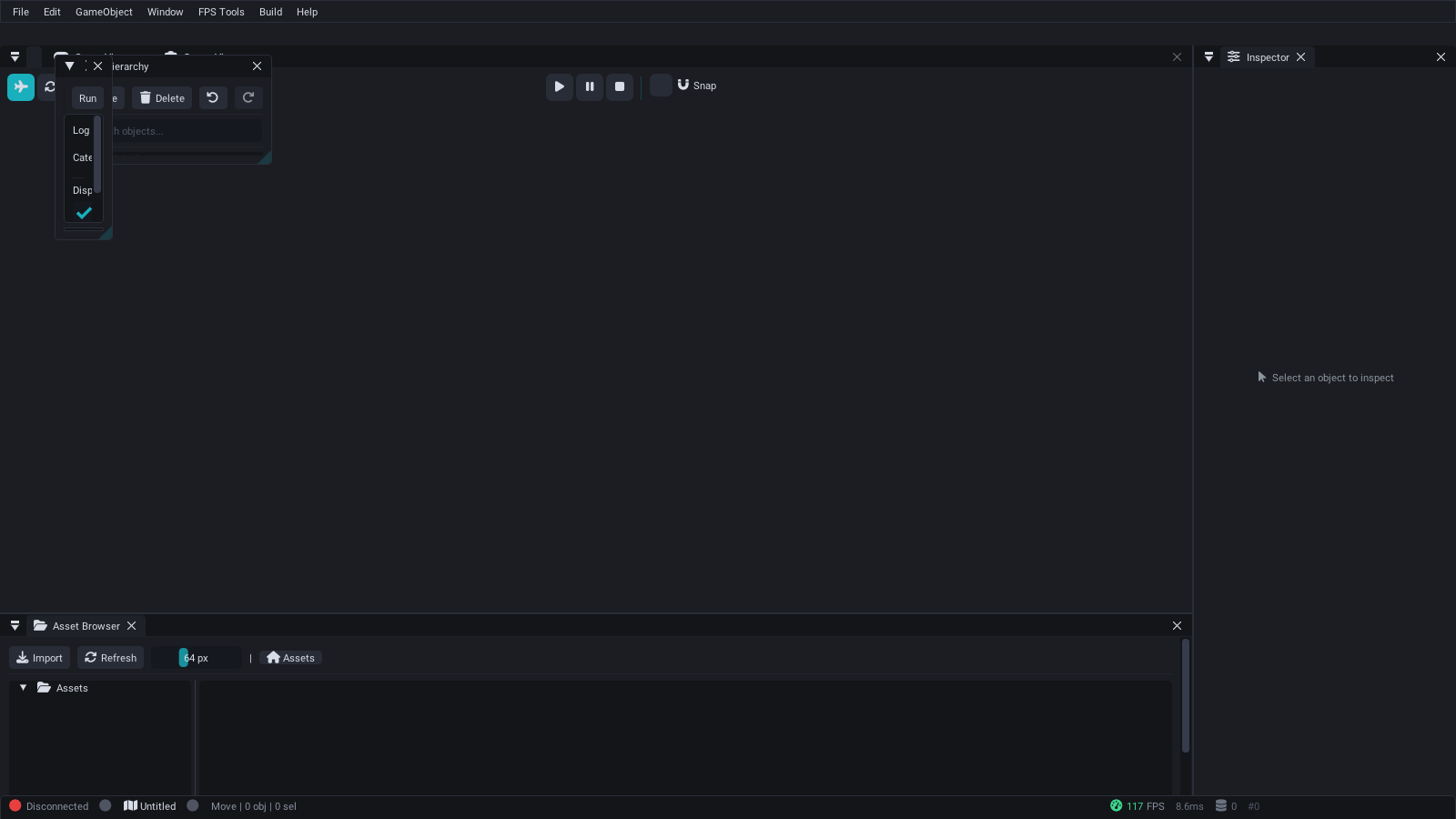
SparkEditor default layout — Hierarchy, Scene View, Inspector, Asset Browser, and Console panels with the Spark Professional dark theme.
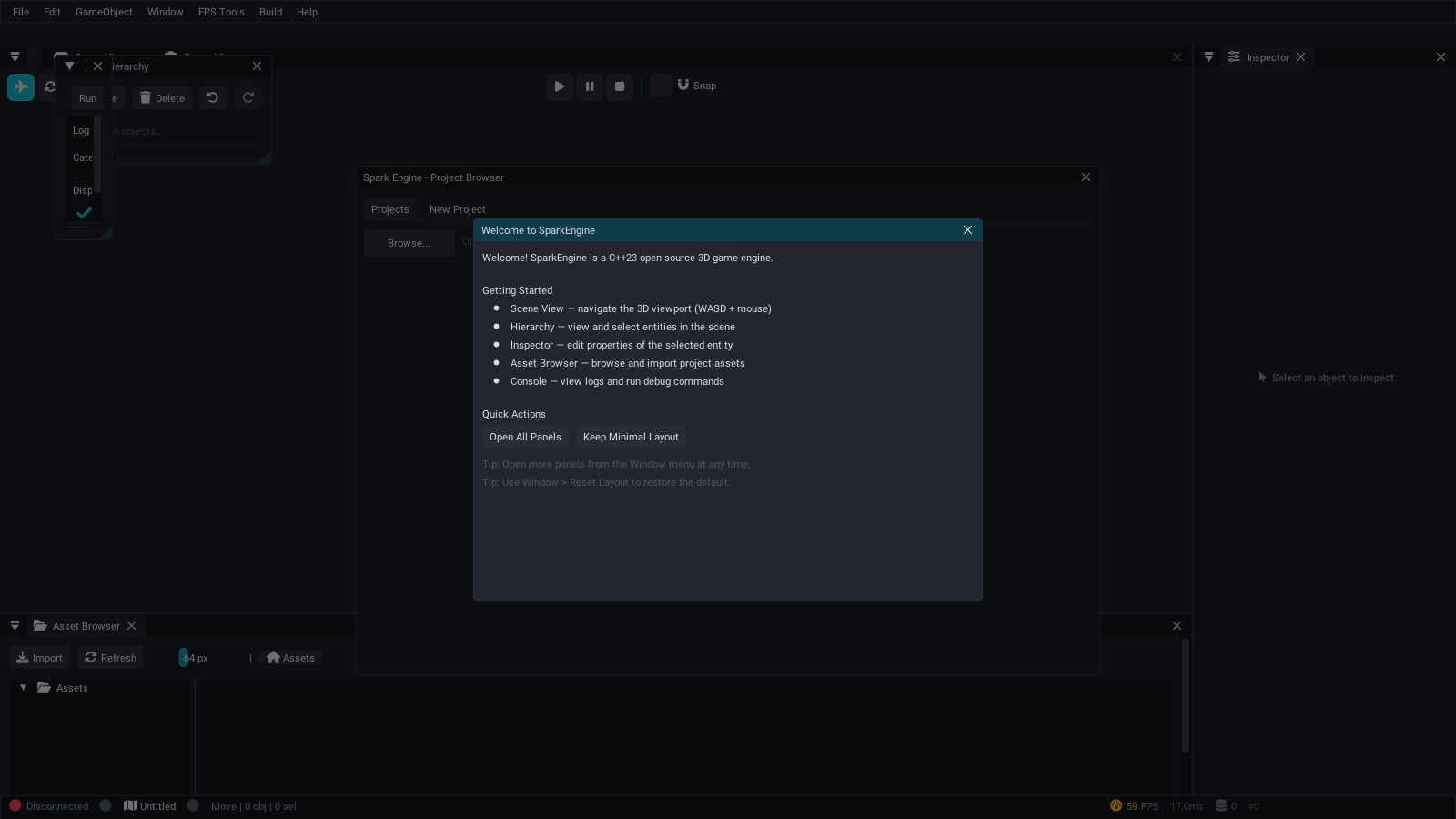
On first launch, a welcome screen introduces the core panels and offers quick actions:
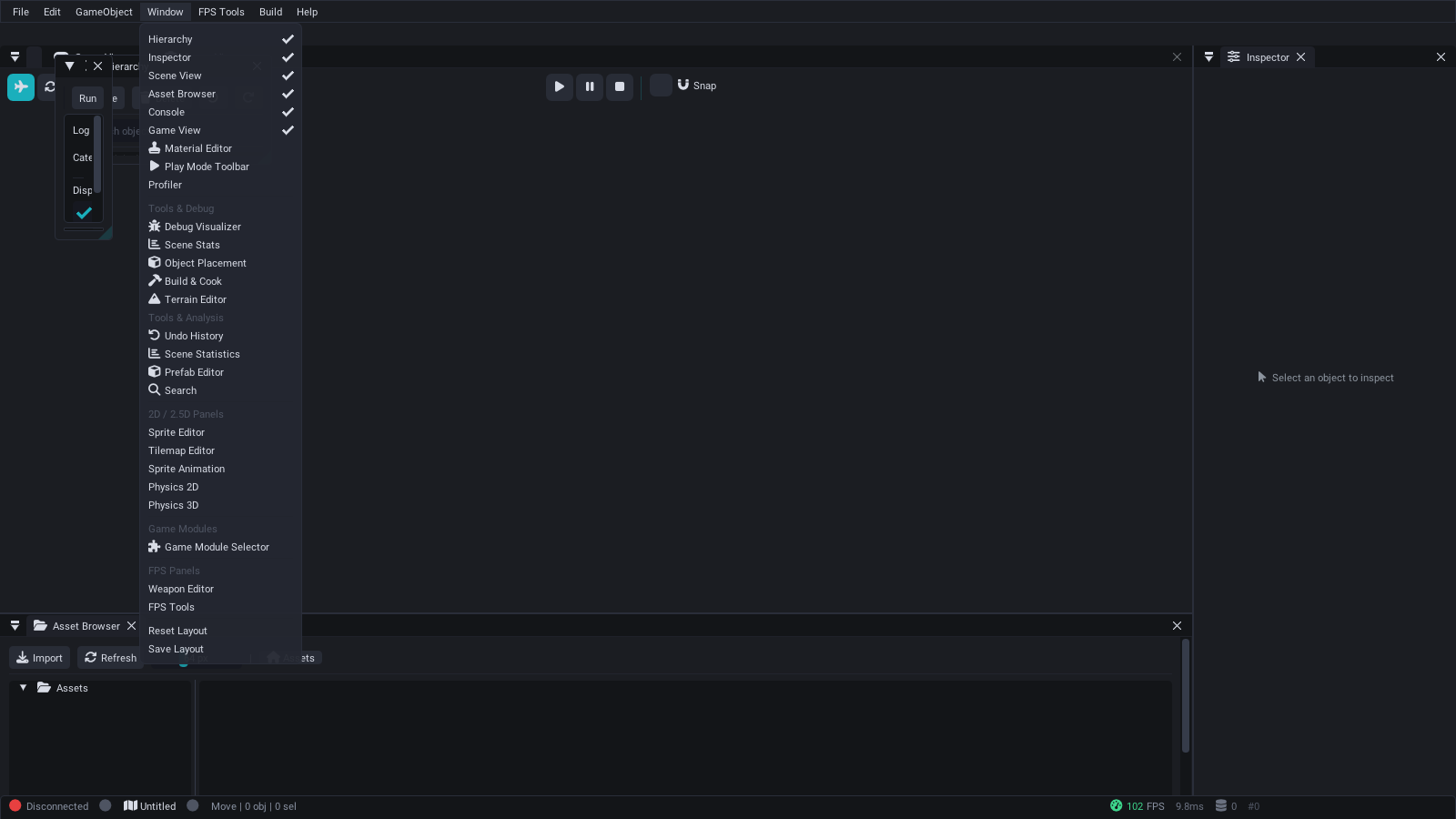
Additional panels can be enabled from the Window menu at any time:
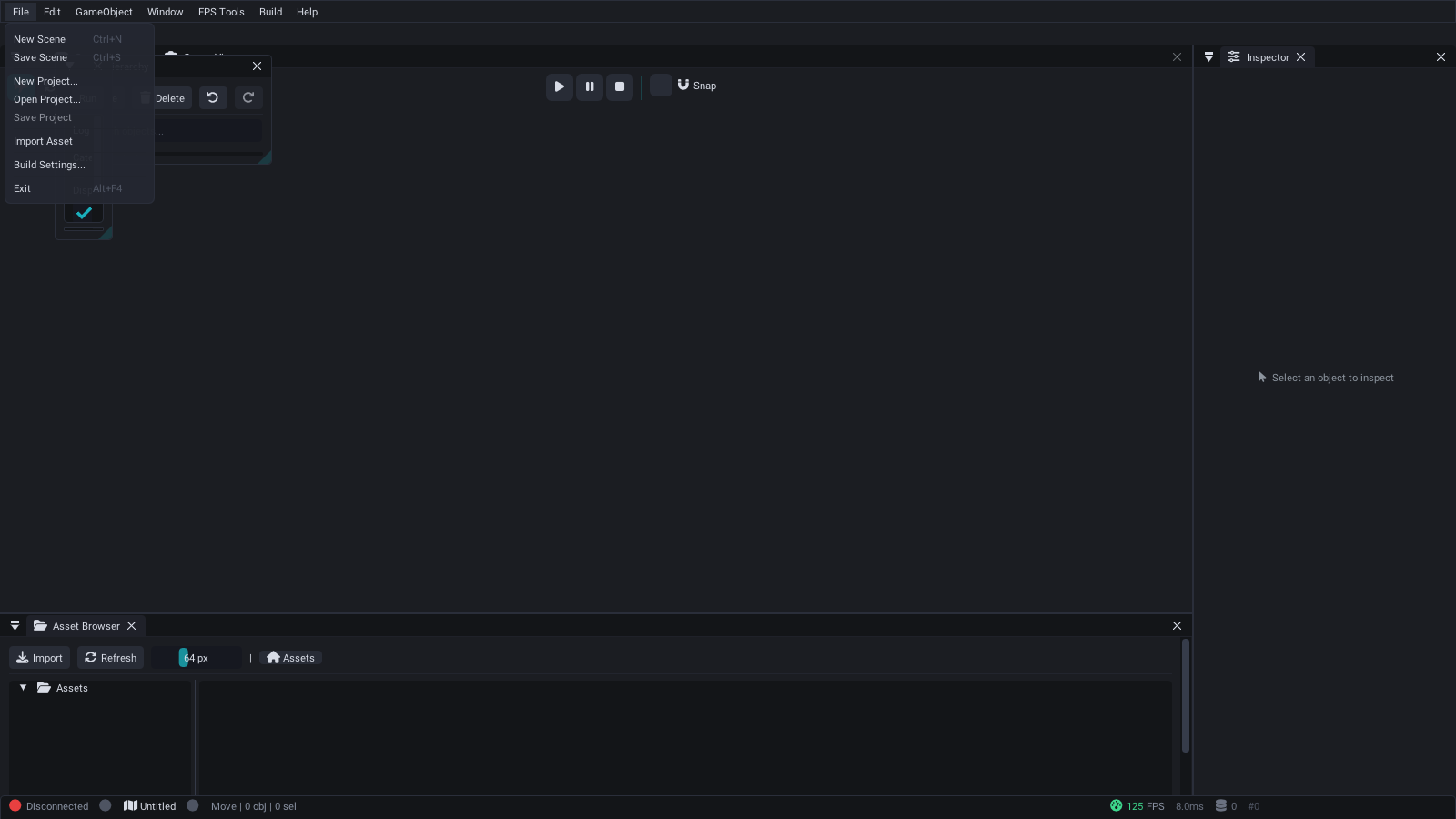
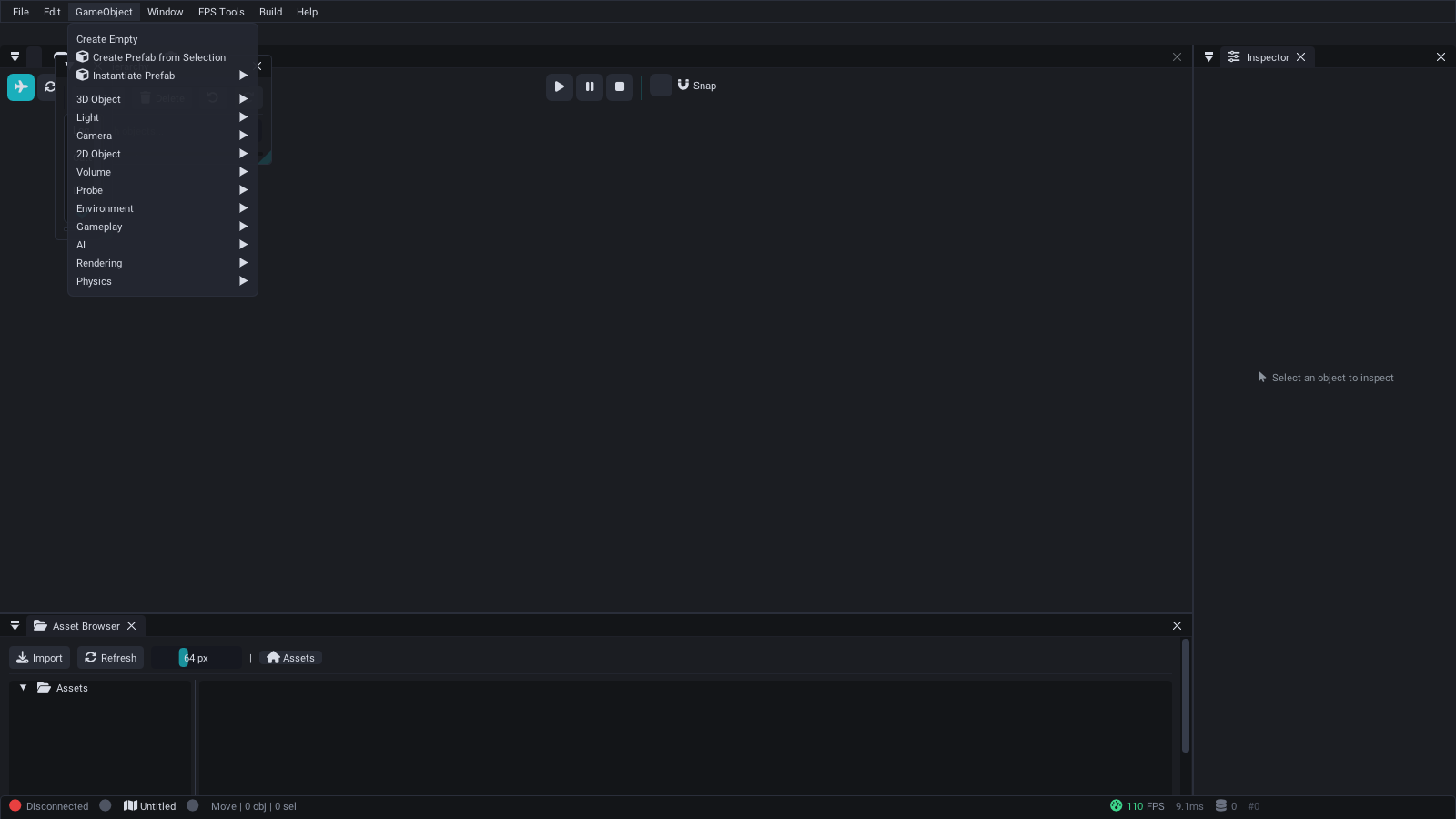
Create entities with pre-configured components:
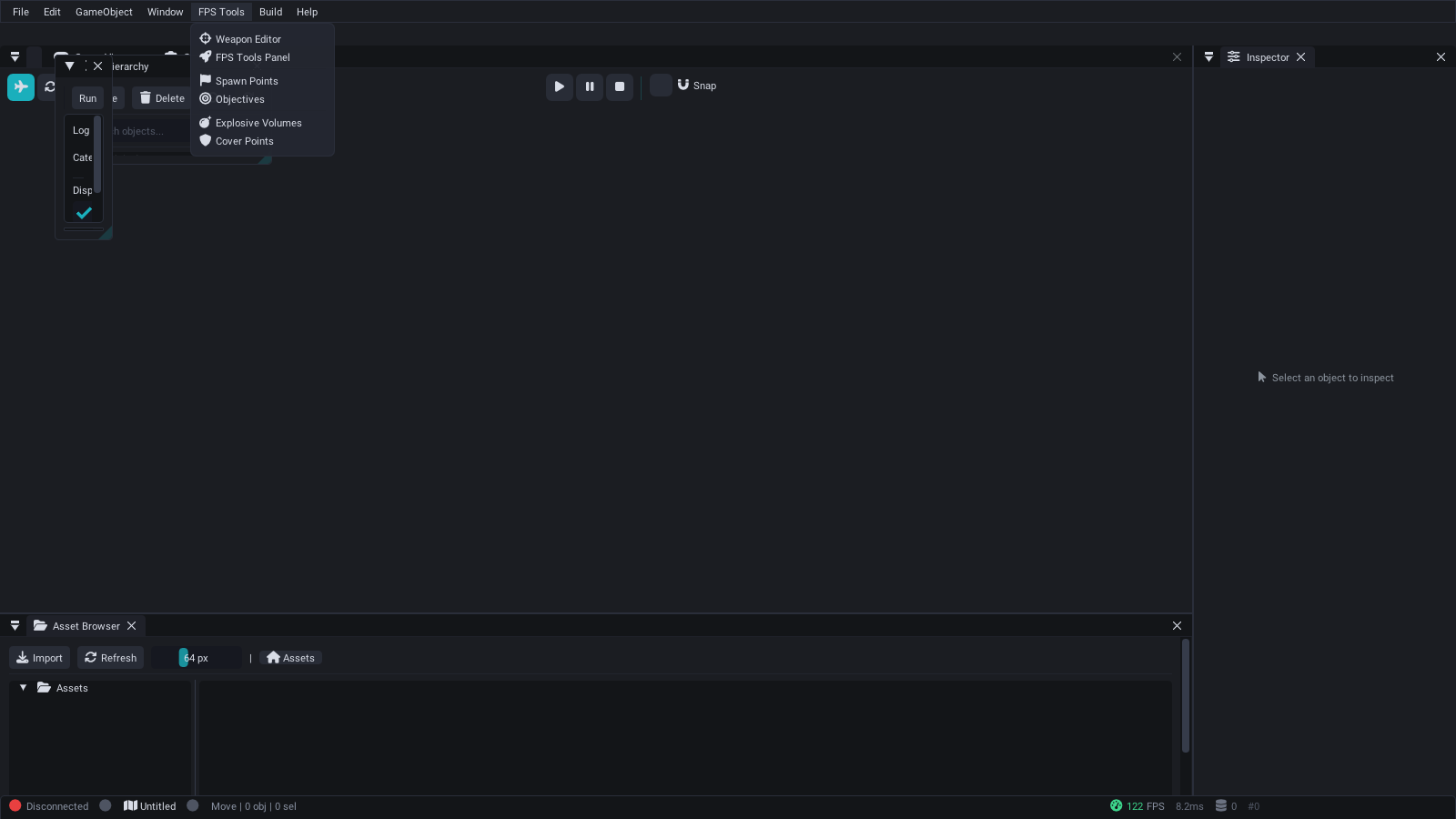
Weapon editor, spawn points, objectives, explosives, and cover points:
Source: SparkEditor/Source/
Platforms:
- Windows: Win32 + DirectX 11 ImGui backends (primary)
- Linux: SDL2 + OpenGL 3.3 ImGui backends (software rendering via Mesa llvmpipe supported)
ENABLE_EDITOR=ON
EditorApplication
  |
  +-- EditorUI
  |     |
  |     +-- EditorLayoutManager   (dock positions, panel visibility, layout save/load)
  |     +-- EditorTheme           (color palette, rounding, spacing, font config)
  |     +-- EditorPanel* panels[] (57 registered panels)
  |     +-- GizmoSystem           (translate/rotate/scale gizmos via DX11)
  |     +-- UndoRedoManager       (command history stack)
  |     +-- CommandPalette        (Ctrl+P quick-command search)
  |
  +-- EditorPluginManager         (built-in + DLL plugin lifecycle)
  +-- SceneManager                (scene load/save/serialize)
  +-- AssetDatabase               (file-system asset indexing)
  +-- PrefabManager               (prefab asset CRUD)
  +-- VersionControlSystem        (optional VCS integration)
  +-- BuildCookPanel               (cook, package, deploy)
  +-- PerformanceProfiler         (CPU/GPU timing, memory)
The entry point is EditorApplication (Core/EditorApplication.h). It owns the Win32 window, DirectX 11 device/context/swap chain, and the ImGui context.
struct EditorConfig
{
    std::string projectPath = ".";
    std::string layoutDirectory = "Layouts";
    std::string logDirectory = "Logs";
    bool enableLogging = true;
    bool startMaximized = true;
    float autoSaveInterval = 30.0f;
    int windowWidth = 1600;
    int windowHeight = 900;
};

class EditorApplication
{
public:
    bool Initialize(const EditorConfig& config);
    int  Run();
    void Shutdown();
    bool IsRunning() const;
    void RequestExit();
    PerformanceMetrics GetPerformanceMetrics() const;
    void OnWindowResize(int width, int height);
    void SetWindowTitle(const std::string& title);
};Each frame executes the following steps:
-
ProcessMessages()-- Win32 message pump (or SDL on Linux stubs) -
Update(deltaTime)-- tick all panels, gizmo system, profiler -
Render()-- ImGui new frame, render all visible panels, ImGui render, DX11 present
Every panel inherits from EditorPanel (Core/EditorPanel.h), which provides a consistent interface:
class EditorPanel
{
public:
    EditorPanel(const std::string& name, const std::string& id);
    virtual ~EditorPanel() = default;

    virtual bool Initialize() = 0;
    virtual void Update(float deltaTime) = 0;
    virtual void Render() = 0;
    virtual void Shutdown() {}
    virtual bool HandleEvent(const std::string& eventType, void* eventData);

    // Visibility and state
    bool IsVisible() const;
    void SetVisible(bool visible);
    bool IsFocused() const;
    void SetFocused(bool focused);
    bool IsClosable() const;
    bool IsModified() const;

    // Persistence
    virtual std::string SaveState() const;
    virtual bool LoadState(const std::string& state);

    // Geometry
    void GetSize(float& width, float& height) const;
    void SetSize(float width, float height);
    void GetPosition(float& x, float& y) const;
    void SetPosition(float x, float y);

protected:
    bool BeginPanel();   // Sets up ImGui window
    void EndPanel();     // Finishes ImGui window
    void NotifyStateChange();
};The editor includes 57 subsystem panels:
- Tree view of all scene nodes with parent-child relationships
- Drag-and-drop to reparent nodes
- Right-click context menu for add/delete/duplicate
- Search and filter nodes by name or type
- Property editor for the selected node/entity
- Transform editing (position, rotation, scale)
- Component editing with type-appropriate widgets
- Material assignment and configuration
- Component reflection via
ComponentReflection.h
- Real-time 3D preview of the scene
- Play/pause/stop game simulation via
PlayModeToolbarPanel - Camera controls (orbit, pan, fly-through)
- Grid and axis overlays
The GizmoSystem (Gizmos/GizmoSystem.h) provides industry-standard 3D object manipulation:
enum class GizmoMode
{
    TRANSLATE = 0,   // Move objects
    ROTATE    = 1,   // Rotate objects
    SCALE     = 2,   // Scale objects
    UNIVERSAL = 3    // All operations
};

enum class GizmoSpace
{
    WORLD = 0,       // World coordinate space
    LOCAL = 1        // Local coordinate space
};

enum class GizmoAxis
{
    NONE = 0,
    X = 1,    Y = 2,    Z = 4,
    XY = 3,   XZ = 5,   YZ = 6,   XYZ = 7,
    SCREEN = 8
};
Features:
- Axis-constrained and plane-constrained manipulation
- Grid snapping (
SetSnapToGrid(bool),SetSnapSize(float)) - Rotation snap (
SetRotationSnapAngle(float)-- default 15 degrees) - Adaptive gizmo size based on camera distance
- Multi-object editing support
- Undo/redo integration
Asset Browser (see Asset Pipeline)
- File-system view of project assets
- Drag-and-drop assets into the scene
- Thumbnail previews for textures and models
- Dependency tracking via
AssetDependencyPanel
Material Editor (see Shader Pipeline)
- PBR material authoring
- Texture slot assignment
- Real-time preview sphere
- Blend mode and shader selection
- Keyframe editing on a timeline
- State machine visualization
- Blend tree configuration
- Animation clip preview
Terrain Editor (see Terrain and Procedural Generation)
- Heightmap painting (raise/lower/smooth/flatten)
- Texture splatting brush
- Object placement brush via
ObjectPlacementPanel - Terrain configuration (size, resolution, LOD)
Weapon Editor (see Gameplay Systems)
- Weapon property configuration
- Projectile type selection
- Fire rate, damage, spread tuning
- Visual scripting nodes (see Scripting with AngelScript)
- Material graph editor
- Connection-based data flow
- CPU and GPU timing breakdown via
PerformanceProfiler - Per-system performance graphs
- Memory usage tracking
- Frame time history
Full-featured debug console with real-time log streaming, severity filtering, and command execution.
- Real-time log output with color-coded severity (Info, Warning, Error, Fatal)
- Command input with auto-completion and history
- Text search and regex filtering across log output
- Export logs to txt, csv, or json formats
- Configurable scroll behavior (auto-scroll, pause on hover)
Source: SparkEditor/Source/Panels/ConsolePanel.cpp (821 lines)
3D viewport for editing the scene with editor camera controls.
- Orbit, pan, and fly-through camera modes
- Grid overlay with configurable spacing
- Multiple render modes (lit, wireframe, unlit, normals)
- Gizmo rendering for selected entities
- Click-to-select entities via raycasting
Source: SparkEditor/Source/Panels/SceneViewPanel.cpp (404 lines)
Transport controls for play-in-editor (PIE) sessions.
- Play, Pause, Stop, and Step-Frame buttons
- Time-scale slider (0.1x to 10x)
- Per-subsystem toggle (physics, AI, audio, particles)
- Camera mode switching (editor camera vs. game camera)
- Frame statistics overlay during play
Source: SparkEditor/Source/Panels/PlayModeToolbarPanel.cpp (644 lines)
Build configuration and packaging pipeline.
- Profile selection: Debug, Development, Release, Shipping
- Asset cooking with progress tracking
- Platform targeting (Windows, Linux, macOS stubs)
- Output directory configuration
- Build log with error/warning highlights
Source: SparkEditor/Source/Panels/BuildCookPanel.cpp (591 lines)
Server management for multiplayer testing and deployment.
- Server cook settings and map rotation configuration
- PIE server launch for local testing
- LAN server browser with auto-discovery
- RCON console for remote administration
- Player list with kick/ban controls
Source: SparkEditor/Source/Panels/DedicatedServerPanel.cpp (999 lines)
Toggle debug overlays for various engine subsystems.
- Grid, wireframe, and collider visualization
- Physics contacts and constraint rendering
- Navigation mesh overlay
- Light radius and attenuation spheres
- Audio source range indicators
Source: SparkEditor/Source/Panels/DebugVisualizerPanel.cpp (245 lines)
Real-time EventBus inspector for debugging event-driven systems.
- Live event stream during play mode
- Filter by event type or source
- Event payload inspection
- Pause/resume event capture
Source: SparkEditor/Source/Panels/EventMonitorPanel.cpp (97 lines)
Visual dialogue tree authoring tool.
- Node types: Text, Choice, Branch, Event, End
- Speaker name and voice clip assignment per node
- Branching condition configuration
- Preview dialogue flow in-editor
Source: SparkEditor/Source/Panels/DialogueEditorPanel.cpp (175 lines)
Specialized tools for first-person shooter level design and balancing.
- Spawn point placement and team assignment
- Game mode configuration (Deathmatch, CTF, Domination)
- Player stats testing (health, armor, speed)
- Combat simulation for balance testing
- Level design helpers (cover analysis, sight lines)
Source: SparkEditor/Source/Panels/FPSToolsPanel.cpp (630 lines)
Real-time performance and scene metrics dashboard.
- Entity and component counts by type
- Render statistics: draw calls, triangles, batches
- Physics statistics: rigid bodies, contacts, constraints
- Memory usage breakdown
- Per-frame performance graphs with history
Source: SparkEditor/Source/Panels/SceneStatisticsPanel.cpp (391 lines)
Global fuzzy search across the entire project.
- Search entities by name, tag, or component type
- Search assets by filename or type
- Search components by property values
- Result filtering and sorting
- Search history with recent queries
Source: SparkEditor/Source/Panels/SearchPanel.cpp (435 lines)
Level editing tools for placing and arranging objects in the scene.
- Placement modes: Single, Brush, Line, Grid, Scatter
- Grid and surface snapping
- Prefab library with drag-and-drop
- Randomization controls (rotation, scale jitter)
Source: SparkEditor/Source/Panels/ObjectPlacementPanel.cpp (364 lines)
Create, edit, and manage prefab assets.
- Prefab browser with search
- Component editing within prefab context
- Property serialization and override tracking
- Create prefab from selected entities
- Apply prefab changes to all instances
Source: SparkEditor/Source/Panels/PrefabEditorPanel.cpp (393 lines)
Project-level hub for opening, creating, and managing projects.
- Recent projects list with last-opened timestamps
- New project wizard with templates (FPS, RPG, Blank)
- Existing project browser with folder navigation
- Project settings quick-access
Source: SparkEditor/Source/Panels/ProjectBrowserPanel.cpp (540 lines)
Visual particle system authoring.
- Emission rate, lifetime, and burst configuration
- Emitter shapes: Point, Sphere, Cone, Box
- Color gradient editor over particle lifetime
- Physics integration (gravity, wind, collision)
- Live preview in viewport
Source: SparkEditor/Source/Panels/ParticleEditorPanel.cpp (147 lines)
Post-processing effect configuration.
- Bloom intensity and threshold
- Tonemapping operator selection
- Fog density, color, and falloff
- Sky and atmospheric parameters
- Wind direction and strength
Source: SparkEditor/Source/Panels/PostProcessingPanel.cpp (166 lines)
String table editor for multi-language support.
- Supported languages: English, Spanish, French, German, Japanese, Chinese
- Key/value translation table with inline editing
- Missing translation highlighting
- Import/export CSV for translator workflows
Source: SparkEditor/Source/Panels/LocalizationPanel.cpp (149 lines)
Save/Load slot manager.
- View save slot metadata (timestamp, playtime, level)
- Create and delete save slots
- Autosave interval configuration
- Save file location management
Source: SparkEditor/Source/Panels/SaveSystemPanel.cpp (141 lines)
The Region Map Editor discovers every Terrafront continent lattice declared by
Assets/MMOFPS/Data/continents.json. Switching maps is disabled while the
current map has unsaved edits. Save validates the serialized document with the
strict JSON parser, refreshes that selected map's sibling .bak, and atomically
replaces only its declared region file, so an interrupted write cannot truncate
the live lattice.
Source: SparkEditor/Source/Panels/RegionMapEditorPanel.h
Spline path authoring for cameras, AI, and procedural content.
- Control point creation and editing
- Curve types: Catmull-Rom, Bezier
- Closed loop toggle
- Tension parameter adjustment
- Visual preview in scene view
Source: SparkEditor/Source/Panels/SplineEditorPanel.cpp (140 lines)
Weather preset editor.
- Preset types: Clear, Rain, Snow, Storm
- Precipitation intensity and particle density
- Wind speed and direction
- Fog distance and color
- Lighting adjustments per weather type
Source: SparkEditor/Source/Panels/WeatherFogPanel.cpp (184 lines)
Visual timeline of the undo/redo command stack.
- Chronological command list with descriptions
- Click to jump to any point in history
- Current position indicator
- Saved state marker
Source: SparkEditor/Source/Panels/UndoHistoryPanel.cpp (161 lines)
Behavior tree visual editor.
- Node creation for Selector, Sequence, Decorator, Action types
- Template management for reusable tree patterns
- Agent inspection with live blackboard values
- Tree validation and error highlighting
Source: SparkEditor/Source/Panels/AIEditorPanel.cpp (201 lines)
Real-time AI agent runtime inspector for play-mode debugging.
- Agent list with color-coded state (Idle, Patrol, Alert, Combat, Flee, Dead)
- Per-agent blackboard variable viewer with type-aware display
- Behavior tree execution trace with active node highlighting
- Perception overlay toggles (detection ranges, attack ranges, nav paths, target lines)
- AI system statistics (agent counts by state, targets)
- State filtering and configurable refresh rate
Source: SparkEditor/Source/Panels/AIDebugPanel.cpp (290 lines)
2D physics configuration and debugging.
- Gravity vector configuration
- Collision layer matrix editor
- Debug visualization: AABBs, contacts, grid
- Interactive raycast testing tool
Source: SparkEditor/Source/Panels/Physics2DPanel.cpp (308 lines)
Sprite configuration for 2D rendering.
- Texture selection and source rectangle editing
- Pivot point setup with visual indicator
- Sorting layer and order assignment
- Color tint and flip controls
Source: SparkEditor/Source/Panels/SpriteEditorPanel.cpp (329 lines)
2D animation clip authoring.
- Frame-by-frame timeline with keyframe editing
- Per-frame duration control
- Preview with play/pause/step controls
- Onion skinning for animation reference
Source: SparkEditor/Source/Panels/SpriteAnimationEditorPanel.cpp (534 lines)
Tile-based map editing.
- Tools: Paint, Erase, Fill, Rectangle
- Collision layer painting
- Auto-tiling rules configuration
- Zoom and pan viewport
- Full undo/redo support
Source: SparkEditor/Source/Panels/TilemapEditorPanel.cpp (540 lines)
Full game viewport with FPS HUD preview.
- Crosshair rendering with customizable styles
- Health and armor bar overlays
- Ammo counter and magazine display
- Minimap with configurable zoom
- Kill feed, damage indicators, and scoreboard
Source: SparkEditor/Source/Panels/GameViewPanel.cpp (1,163 lines)
SparkEditor supports multi-user collaborative editing sessions where multiple editor instances can work on the same scene simultaneously. See Collaborative Editing for full documentation.
Key features:
- Peer presence — see other editors' selections and viewport cameras
- Node locking — pessimistic locks prevent conflicting edits
- Edit broadcasting — changes are visible across all editors in real-time
- Auto-expiry — locks expire after 5 minutes to prevent blocking
Source: SparkEditor/Source/Communication/CollaborativeEditSession.h
The UndoRedoManager (UndoRedo/UndoRedoManager.h) maintains command stacks for full undo/redo support:
class UndoRedoManager
{
public:
    void ExecuteCommand(std::unique_ptr<EditorCommand> command);
    bool Undo();
    bool Redo();
    void UndoToIndex(size_t targetIndex);

    bool CanUndo() const;
    bool CanRedo() const;
    std::string GetUndoDescription() const;
    std::string GetRedoDescription() const;

    void Clear();
    void MarkSaved();
    bool HasUnsavedChanges() const;

    size_t GetMaxStackDepth() const;           // Default: 100
    void SetMaxStackDepth(size_t depth);
    void SetOnStackChanged(std::function<void()> callback);
};
All editor operations that modify scene state go through ExecuteCommand(). Each command implements EditorCommand::Execute() and EditorCommand::Undo(). Executing a new command clears the redo stack. The UndoHistoryPanel provides a visual timeline of the command history.
The EditorTheme class (Core/EditorTheme.h) provides professional theming with 8 built-in themes:
| Theme | Description |
|---|---|
| Unity Pro | Unity-inspired dark theme |
| Unreal Pro | Unreal Engine-inspired dark theme |
| VS Pro | Visual Studio-inspired dark theme |
| JetBrains | JetBrains IDE-inspired theme |
| Professional Light | Light theme for well-lit environments |
| High Contrast | Accessibility-focused high-contrast theme |
| Blue Accent | Custom blue accent dark theme |
| Orange Accent | Custom orange accent dark theme |
The EditorThemeData struct contains 60+ color properties organized into groups:
-
Background:
background,backgroundDark,backgroundLight,backgroundAccent,backgroundHeader,backgroundActive,backgroundHover,backgroundSelected -
Text:
text,textDisabled,textSecondary,textAccent,textWarning,textError,textSuccess -
Buttons:
button,buttonHovered,buttonActive,buttonDisabled -
Frames:
frame,frameHovered,frameActive -
Borders:
border,borderLight,borderAccent,borderSeparator - Tabs/Scrollbars/Menus: full color sets for each
- Style values: rounding, border sizes, padding, spacing, shadows, font size
// Apply a built-in theme
EditorTheme::ApplyTheme("UnityPro");

// Create a blended theme
EditorTheme::CreateBlendedTheme("UnityPro", "UnrealPro", 0.5f, "HybridTheme");

// Export/import custom themes
ThemeCustomizer::ExportTheme(theme, "MyTheme.json");
ThemeCustomizer::ImportTheme("MyTheme.json", theme);

// Live editing
ThemeCustomizer::ShowThemeEditor();The EditorLayoutManager (Core/EditorLayoutManager.h) handles docking, saving, and loading panel layouts:
enum class DockPosition { Left, Right, Top, Bottom, Center, Float };

struct PanelConfig
{
    std::string name;
    std::string displayName;
    DockPosition dockPosition;
    ImVec2 size;
    ImVec2 position;
    bool isVisible;
    bool isFloating;
    bool canClose;
    bool canDock;
    float dockRatio;    // Ratio of parent space to occupy
    int tabOrder;
    std::string parentDock;
};
The editor uses ImGui's docking branch for a fully customizable workspace:
- Drag panels to dock at any edge
- Create floating windows
- Save and load layout configurations
- Reset to default layout
The EditorPluginManager (Core/EditorPluginManager.h) supports both built-in and DLL-loaded editor plugins:
class EditorPluginManager
{
public:
    // Registration
    template<typename T> bool RegisterPlugin();
    bool LoadPlugin(const std::string& path);
    bool UnloadPlugin(const std::string& name);

    // Lookup
    IEditorPlugin* GetPlugin(const std::string& name) const;
    size_t GetPluginCount() const;
    std::vector<std::string> GetPluginNames() const;

    // Lifecycle
    bool InitializeAll(EditorApplication* app);
    void ShutdownAll();
    void UpdateAll(float deltaTime);
    void RenderAll();

    // Events
    void NotifySceneLoad(const std::string& scenePath);
    void NotifySceneSave(const std::string& scenePath);
    void NotifyEntitySelected(uint32_t entityID);
    void RenderMenuBarItems();

    // Panel registration from plugins
    void RegisterPanel(std::unique_ptr<EditorPanel> panel);
};
Plugins implement the IEditorPlugin interface and are loaded at startup or dynamically at runtime. Each plugin can register custom panels, menu items, and respond to editor events.
# Windows PowerShell
.\build.ps1 -config Release -editor

# Or via CMake
cmake -B build -DENABLE_EDITOR=ON
cmake --build build --config Release- All panel rendering uses immediate-mode ImGui; no retained scene graph overhead.
- The
PerformanceProfilertracks per-panel render time to identify bottlenecks. - Gizmo rendering uses dedicated DX11 vertex/pixel shaders with minimal draw calls.
- The
EditorApplicationframe loop targets 60 FPS; the editor can optionally cap to lower rates when idle.
- All editor UI code runs on the main thread.
- The
EditorApplicationholds the DX11 device and context; rendering is single-threaded. - Background asset imports (if any) communicate results back to the main thread via queues.
- The
SimpleConsolePanelwraps the engine's thread-safeSimpleConsole.
- Verify
ENABLE_EDITOR=ONis set in CMake. - Confirm you are building on Windows with MSVC.
- Check that DirectX 11 runtime is available (Windows 10+ includes it).
- Check that the panel's
SetVisibleInMenu(true)is called during registration. - If the panel was loaded from a plugin, verify the plugin initialized successfully.
- Ensure the
GizmoSystem::HandleMouseInput()is receiving mouse events before ImGui consumes them. - Check that
GizmoSystem::IsVisible()returns true. - Verify at least one object is selected in the hierarchy.
- Call
EditorTheme::ApplyProfessionalEnhancements()after applying the theme. - Verify custom fonts loaded successfully via
EditorTheme::ApplyCustomFonts().
- Time slider (0-24h) with formatted HH:MM display
- Time scale control (1x, 10x, 60x, 600x) with pause/resume
- Preset buttons: Dawn, Morning, Noon, Dusk, Midnight
- Sun direction, color, and intensity preview with color swatches
- Ambient lighting state display
- Day/night indicator and day period classification
- Day cycle progress bar
- Tabbed view: Abilities, Auras, Procs
- Ability authoring: targeting, range, cast time, cooldown, resource cost, channeling
- Aura authoring: type, school, duration, tick interval, modifiers, stacking
- Proc authoring: trigger mask checkboxes, chance, cooldown, charges
- Filterable lists with create/delete operations
- List of proximity trigger volumes with ID, shape, label, enabled state
- Create dialog for sphere/AABB triggers with center and size parameters
- Per-trigger detail editor (shape, center, radius/extents, enabled, occupant count)
- Viewport visualization toggle
- Visual condition set builder with AND/OR group logic
- 27 condition types matching ConditionSystem enum (IsAlive, HasItem, QuestComplete, etc.)
- Negation toggle per condition
- World variable editor (name/value pairs with add/edit/delete)
- World flag editor (boolean toggle list)
- Decal material list with create/delete
- Per-material texture paths (albedo, normal, roughness), opacity, fade time
- Surface-to-decal mapping table (Concrete, Metal, Wood, etc.)
- Active decal count display and "Clear All" button
- Max decal pool size configuration
- Scene Management -- Scene hierarchy and serialization
- Rendering and Graphics -- Material system and render pipelines
- Animation -- Animation state machines and timeline
- Cinematic Sequencer -- Timeline editor
- Entity Component System -- Component architecture
- Shader Pipeline -- Shader authoring and compilation
- Asset Pipeline -- Asset importing and management
- Physics -- Physics simulation
- Terrain and Procedural Generation -- Terrain editing and procedural tools
- Gameplay Systems -- Weapons, inventory, and game mechanics
- Scripting with AngelScript -- Visual scripting system
| Panel | Header |
|---|---|
AIDebugPanel |
SparkEditor/Source/Panels/AIDebugPanel.h |
AIEditorPanel |
SparkEditor/Source/Panels/AIEditorPanel.h |
AbilityEditorPanel |
SparkEditor/Source/Panels/AbilityEditorPanel.h |
AssetBrowserPanel |
SparkEditor/Source/Panels/AssetBrowserPanel.h |
AudioMixerPanel |
SparkEditor/Source/Panels/AudioMixerPanel.h |
BasicMaterialEditorPanel |
SparkEditor/Source/Panels/BasicMaterialEditorPanel.h |
BuildCookPanel |
SparkEditor/Source/Panels/BuildCookPanel.h |
CSGEditorPanel |
SparkEditor/Source/Panels/CSGEditorPanel.h |
CinematicSequencerPanel |
SparkEditor/Source/Panels/CinematicSequencerPanel.h |
CollaborationPanel |
SparkEditor/Source/Panels/CollaborationPanel.h |
ConditionEditorPanel |
SparkEditor/Source/Panels/ConditionEditorPanel.h |
ConsolePanel |
SparkEditor/Source/Panels/ConsolePanel.h |
CoroutineDebugPanel |
SparkEditor/Source/Panels/CoroutineDebugPanel.h |
DebugVisualizerPanel |
SparkEditor/Source/Panels/DebugVisualizerPanel.h |
DecalEditorPanel |
SparkEditor/Source/Panels/DecalEditorPanel.h |
DecorLayoutEditorPanel |
SparkEditor/Source/Panels/DecorLayoutEditorPanel.h |
DedicatedServerPanel |
SparkEditor/Source/Panels/DedicatedServerPanel.h |
DestructionEditorPanel |
SparkEditor/Source/Panels/DestructionEditorPanel.h |
DialogueEditorPanel |
SparkEditor/Source/Panels/DialogueEditorPanel.h |
EventMonitorPanel |
SparkEditor/Source/Panels/EventMonitorPanel.h |
EventResponsePanel |
SparkEditor/Source/Panels/EventResponsePanel.h |
FPSToolsPanel |
SparkEditor/Source/Panels/FPSToolsPanel.h |
GameModuleSelectorPanel |
SparkEditor/Source/Panels/GameModuleSelectorPanel.h |
GameModuleSelectorPanel |
SparkEditor/Source/Panels/PlayControlPanel.h |
GameViewPanel |
SparkEditor/Source/Panels/GameViewPanel.h |
HierarchyPanel |
SparkEditor/Source/Panels/HierarchyPanel.h |
InspectorPanel |
SparkEditor/Source/Panels/InspectorPanel.h |
LocalizationPanel |
SparkEditor/Source/Panels/LocalizationPanel.h |
MaterialEditorPanel |
SparkEditor/Source/Panels/MaterialEditorPanel.h |
ModdingPanel |
SparkEditor/Source/Panels/ModdingPanel.h |
NetworkDebugPanel |
SparkEditor/Source/Panels/NetworkDebugPanel.h |
ObjectPlacementPanel |
SparkEditor/Source/Panels/ObjectPlacementPanel.h |
ParticleEditorPanel |
SparkEditor/Source/Panels/ParticleEditorPanel.h |
Physics2DPanel |
SparkEditor/Source/Panels/Physics2DPanel.h |
Physics3DPanel |
SparkEditor/Source/Panels/Physics3DPanel.h |
PlayModeToolbarPanel |
SparkEditor/Source/Panels/PlayModeToolbarPanel.h |
PostProcessingPanel |
SparkEditor/Source/Panels/PostProcessingPanel.h |
PrefabEditorPanel |
SparkEditor/Source/Panels/PrefabEditorPanel.h |
ProjectBrowserPanel |
SparkEditor/Source/Panels/ProjectBrowserPanel.h |
ProjectSettingsPanel |
SparkEditor/Source/Panels/ProjectSettingsPanel.h |
PrototypingPanel |
SparkEditor/Source/Panels/PrototypingPanel.h |
RegionMapEditorPanel |
SparkEditor/Source/Panels/RegionMapEditorPanel.h |
ReplayPanel |
SparkEditor/Source/Panels/ReplayPanel.h |
SaveSystemPanel |
SparkEditor/Source/Panels/SaveSystemPanel.h |
SceneImportPanel |
SparkEditor/Source/Panels/SceneImportPanel.h |
SceneStatisticsPanel |
SparkEditor/Source/Panels/SceneStatisticsPanel.h |
SceneViewPanel |
SparkEditor/Source/Panels/SceneViewPanel.h |
ScriptDebugPanel |
SparkEditor/Source/Panels/ScriptDebugPanel.h |
ScriptEditorPanel |
SparkEditor/Source/Panels/ScriptEditorPanel.h |
SearchPanel |
SparkEditor/Source/Panels/SearchPanel.h |
ServiceTopologyPanel |
SparkEditor/Source/Panels/ServiceTopologyPanel.h |
SplineEditorPanel |
SparkEditor/Source/Panels/SplineEditorPanel.h |
SpriteAnimationEditorPanel |
SparkEditor/Source/Panels/SpriteAnimationEditorPanel.h |
SpriteEditorPanel |
SparkEditor/Source/Panels/SpriteEditorPanel.h |
StreamingPanel |
SparkEditor/Source/Panels/StreamingPanel.h |
TilemapEditorPanel |
SparkEditor/Source/Panels/TilemapEditorPanel.h |
TimeOfDayPanel |
SparkEditor/Source/Panels/TimeOfDayPanel.h |
TriggerEditorPanel |
SparkEditor/Source/Panels/TriggerEditorPanel.h |
UIDesignerPanel |
SparkEditor/Source/Panels/UIDesignerPanel.h |
UndoHistoryPanel |
SparkEditor/Source/Panels/UndoHistoryPanel.h |
VRConfigPanel |
SparkEditor/Source/Panels/VRConfigPanel.h |
VisualScriptPanel |
SparkEditor/Source/Panels/VisualScriptPanel.h |
WeaponEditorPanel |
SparkEditor/Source/Panels/WeaponEditorPanel.h |
WeatherFogPanel |
SparkEditor/Source/Panels/WeatherFogPanel.h |
WorkflowPanel |
SparkEditor/Source/Panels/WorkflowPanel.h |