Custom Eye Textures
Warning
This eye texture format is not released yet. This page documents the upcoming format so pack authors can prepare for it. Details may still change before release.
MCA can recolor selected pixels in a custom villager eye while leaving the rest of the PNG exactly as painted.
The basic rule is simple:
Paint normal, untinted pixels normally at alpha
255. Use alpha254only on iris pixels that MCA should recolor.
There is no separate fixed-color alpha marker.
- Copy an existing MCA eye or download the 64x64 example template.
- Put it at
assets/[yourNamespace]/skins/face/normal/my_eye.png. - Leave fixed pixels at normal alpha
255. - Set tintable iris pixels to alpha
254and use one RGB channel for their tone. - Add the eye definition to
data/[yourNamespace]/skins/eyes/normal.json. - Reload server data with
/reload(or restart the server). MCA automatically synchronizes the updated eye catalog to connected clients. Reload the resource pack withF3 + Tif the PNG itself changed.

That is enough for a normal custom eye. You do not need separate PNGs for blue, green, brown, or custom RGB eyes.
A custom eye has two parts: server-owned catalog data and the client texture it points to.
data/example/skins/eyes/normal.json
assets/example/skins/face/normal/my_eye.png
example is your namespace. The JSON belongs in a datapack/server-data source; the PNG belongs in a resource pack/client-assets source. A modpack can ship both together.
Add the eye to data/example/skins/eyes/normal.json:
{
  "replace": false,
  "textures": [
    "example:skins/face/normal/my_eye.png"
  ]
}
Keep replace set to false if you only want to add eyes. Setting it to true replaces eyes loaded before this file.
The server is the source of truth for this catalog. It uses these definitions for random eye assignment, editor validation, disabled-eye rules, inheritance validity, and the list synchronized to clients. Clients only need the matching PNGs to render the IDs selected by the server.
MCA sends the full effective appearance catalog to clients when they join and after a successful datapack reload. This is the same synchronization model used for MCA clothing, body skins, and hairstyles. A client does not merge locally invented eye IDs into the server list, so server additions, replacements, removals, and disabled entries remain authoritative.
If an already-loaded villager stores an eye ID that is no longer available after a datapack reload, the server deterministically replaces it with a valid eye from the effective catalog and stores that replacement. If a broken pack leaves the normal eye catalog empty, MCA keeps one built-in default eye available as a safety fallback.
The eye PNG is a normal 64x64 RGBA texture. Alpha 254 is the only special pixel value used by the tint system.
| Alpha | Meaning |
|---|---|
0 |
Transparent |
254 |
Tintable eye-color mask |
255 |
Normal fully opaque pixel; RGB stays as painted |
Other alpha values are ordinary transparency. They are not MCA markers.
Use normal alpha 255 for the sclera, pupil, eyelashes, outlines, and any other pixels that should keep their painted RGB color. Use alpha 254 only where the villager's eye color should appear.
Here is a real MCA eye mask enlarged so the pixels are easy to see:
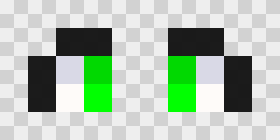
The white, gray, and black parts are normal fixed pixels. The colored mask pixels are tintable. The original working file is only 64x64 pixels: open or download the template.
Every alpha 254 pixel uses exactly one RGB channel:
| RGB channel | Tone |
|---|---|
| Red | Shadow |
| Green | Main eye color |
| Blue | Highlight |
The value of that channel controls the mask strength from 1 to 255. Do not mix two or three RGB channels on the same tintable pixel.
Examples:
| Pixel | RGBA value |
|---|---|
| Fixed off-white sclera | 254, 251, 249, 255 |
| Full shadow | 255, 0, 0, 254 |
| Full main color | 0, 255, 0, 254 |
| Full highlight | 0, 0, 255, 254 |
| Half-strength main color | 0, 128, 0, 254 |
| Transparent | 0, 0, 0, 0 |
The red, green, and blue mask colors are not the final colors shown in game. MCA replaces them with the selected eye-color tones at runtime.
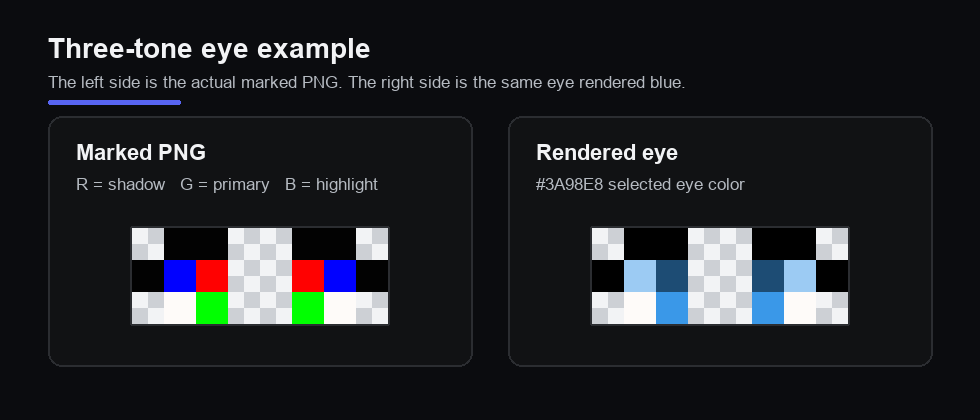
The same texture can therefore be rendered with very different eye colors:

The PNG controls the eye's shape, fixed artwork, and tint shading. The actual eye color comes from the villager.
For a normal villager, MCA uses the villager's genetic or selected eye color. If the villager has Heterochromia, MCA applies the same mask separately using the villager's left and right eye colors.
The texture itself does not define a hard-coded heterochromia pair. A resource pack therefore cannot make one PNG always mean, for example, “blue left eye and green right eye.” Those colors belong to the villager, not the texture.
For each selected eye color, MCA creates three tones automatically:
- Main uses the selected color as-is.
- Shadow is darker.
- Highlight is lighter, toward white.
This works with arbitrary RGB colors, including colors chosen in the villager editor.
If an entire eye should always keep its painted colors and has no tintable pixels at all, register it with "fixed_color": true:
{
  "replace": false,
  "textures": [
    {
      "id": "example:skins/face/normal/fixed_eye.png",
      "fixed_color": true
    }
  ]
}
Paint that PNG normally. It does not need any alpha 254 pixels.
You do not need fixed_color for an ordinary tintable eye. Normal alpha 255 pixels in a tintable eye already keep their painted colors.
Every villager stores one eye texture ID. Eye style is separate from genetic eye color: children inherit one parent's eye texture, while their natural eye color is inherited through MCA's eye-color genetics.
The server uses gender when randomly choosing eyes for newly created villagers and the editor uses it as a browsing category. It does not invalidate an already stored or inherited eye when the villager has another gender.
Use an object when you want an eye grouped under a specific editor filter:
{
  "replace": false,
  "textures": [
    {
      "id": "example:skins/face/normal/female/my_eye.png",
      "gender": "female"
    },
    {
      "id": "example:skins/face/normal/male/my_eye.png",
      "gender": "male"
    }
  ]
}
Valid values are female, male, and neutral. Leaving gender out makes the eye neutral.
You can also set an optional chance value on an eye definition. It defaults to 1.0 and controls its relative weight when the server assigns an eye to a newly created villager:
{
  "id": "example:skins/face/normal/my_eye.png",
  "gender": "neutral",
  "chance": 0.5
}
Because the catalog is server-owned, custom eyes declared by a server datapack can be assigned to fresh villagers and inherited normally. Children inherit one parent's exact eye texture ID; the eye's natural color and brightness remain separate inherited genetics.
A resource pack by itself can still repaint an existing registered eye ID. It cannot create a new genetically meaningful eye identity without the corresponding server-side catalog entry.
The finalized eye system migrates directly from the shipped 1.21.1 MCA data format to the new one. Production data version 1 is upgraded to version 2; intermediate development-only formats are not part of the migration path.
Old 1.21.1 villagers stored their eye appearance through the FACE gene. During migration MCA converts that legacy value into the new stored eye texture and initializes the new eye-color genetics, then removes the old GeneFace value. Existing eye style therefore remains represented after upgrading while future children use the new eye-texture inheritance model.
Most resource packs do not need tone_overrides.
It lets one exact selected eye color use custom shadow, main, and highlight colors instead of MCA's automatic three-tone calculation. MCA uses this for some built-in palettes whose original shading does not follow the normal formula.
{
  "replace": false,
  "textures": [
    {
      "id": "example:skins/face/normal/special_eye.png",
      "tone_overrides": {
        "#53351d": {
          "shadow": "#53351d",
          "primary": "#7a4d2b",
          "highlight": "#f2dfd1"
        }
      }
    }
  ]
}
The key, here #53351d, is the exact eye color selected by the villager. If that selected color has no override, MCA uses the normal automatic tones.
All colors use #RRGGBB format, and each override needs shadow, primary, and highlight.
Existing eye PNG artwork is still supported once its texture ID is declared in the server eye catalog.
If a PNG has no alpha 254 pixels and is not registered with "fixed_color": true, MCA treats it as an old-style eye texture. The legacy system guesses the sclera, iris, and details from the painted colors.
That compatibility path is useful for existing packs, but the guess can be ambiguous. New tintable eyes should use the explicit alpha 254 mask instead.
- Use alpha
254only for pixels MCA should recolor. - Use exactly one RGB channel on each alpha
254pixel. - Leave ordinary fixed pixels at normal alpha
255. - Do not create separate eye PNGs just for different eye colors; MCA supplies the color at runtime.
- Use
"fixed_color": trueonly when the entire eye should ignore villager eye colors. - Use
"replace": falseunless you intentionally want to replace the existing eye list. - Put eye definitions in
data/<namespace>/skins/eyes/; keep the PNGs inassets/<namespace>/skins/face/.