Repository navigation
Editor Tools
Editor-only helpers for placing UI and editing Selectable navigation. Namespace Mane.Unity.UI.Editor.
Use these when you add a GameObject → UI menu item of your own (same pattern as Three States Toggle).
using Mane.Unity.UI.Editor;
using UnityEditor;
using UnityEngine;

[MenuItem("GameObject/UI (Canvas)/My Widget", false, 2200)]
private static void Create(MenuCommand menuCommand)
{
    GameObject go = ObjectFactory.CreateGameObject("My Widget");
    UICanvasTools.PlaceUIElement(go, menuCommand);
    UICanvasTools.BeginHierarchyRename();
}| Method | Role |
|---|---|
PlaceUIElement(element, menuCommand) |
Parent under a Canvas (create if needed), unique sibling name, select. Prefab Stage aware. |
GetOrCreateCanvas() |
Valid canvas in the current stage, or CreateCanvas(). |
CreateCanvas() |
Screen Space Overlay + scaler + raycaster on the UI layer. Ensures EventSystem in scenes. |
EnsureEventSystem() |
Adds EventSystem + input module if the stage has none. |
SetParentAndAlign |
Parent, reset local transform, copy layer. |
IsValidCanvas |
Active, not hidden, current stage. |
BeginHierarchyRename() |
Focus Hierarchy and start rename next tick. |
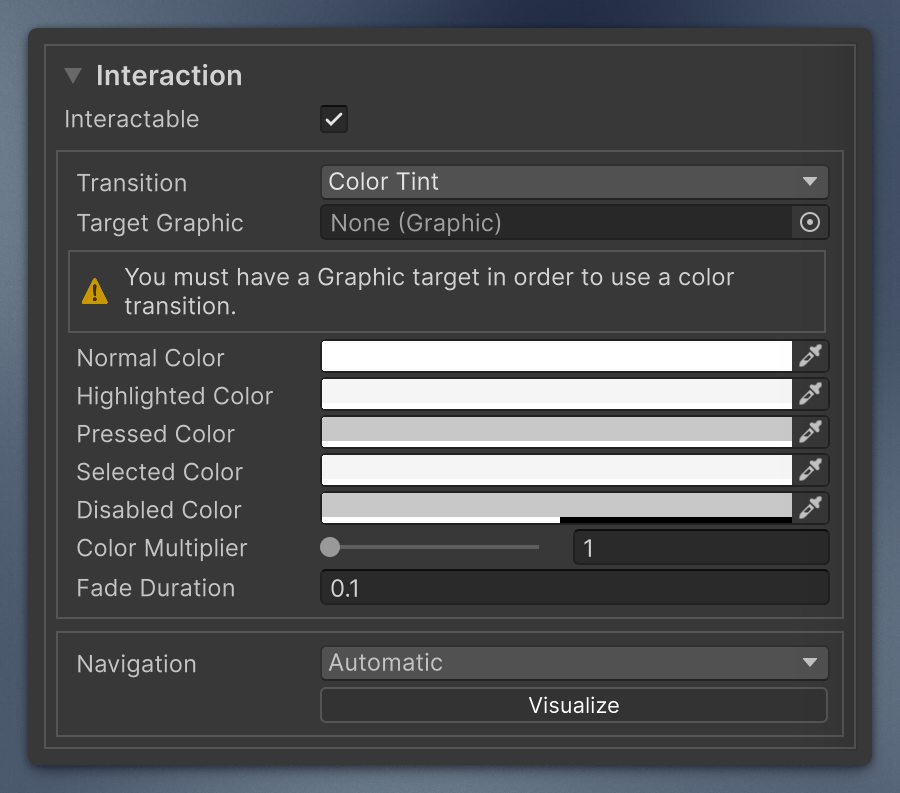
Reusable UI Toolkit Interaction block for a custom Selectable. It is a foldable block (collapsed by default, state remembered per component type) with:
- Interactable
- Transition, Target Graphic, Colors, Sprite State, Animation Triggers. Only the fields that match the chosen transition are shown, plus warnings when a color transition has no Graphic or a sprite swap has no Image.
- A
UINavigationControl.
Add it to your inspector UXML and call Bind once. ThreeStatesToggle uses it this way.
<ui:UXML xmlns:ui="UnityEngine.UIElements" xmlns:mui="Mane.Unity.UI.Editor" editor-extension-mode="True">
    <mui:UIInteractionControl name="interaction" />
    <!-- your own fields -->
</ui:UXML>
protected override void BuildInspector(VisualElement root)
{
root.Q<UIInteractionControl>("interaction").Bind(serializedObject);
}It binds the standard Selectable fields (m_Interactable, m_Transition, m_TargetGraphic, m_Colors, m_SpriteState, m_AnimationTriggers, m_Navigation), so your component must derive from Selectable. Set collapsed-by-default="false" to start expanded. The inner navigation block is available as .Navigation.
The navigation part of the Interaction block, also usable on its own: mode, wrap-around (horizontal/vertical), explicit targets, and Visualize.
Default binding path is m_Navigation. Call Bind(serializedObject) from a custom inspector (UIInteractionControl does it for you).
Navigation.Mode is [Flags], so the mode is Unity's flags popup, as in the built-in Selectable inspector: you can combine bits, including Automatic + Explicit (“Everything”).
Visualize draws Scene View arrows between Selectable.FindSelectableOn* results (same PrefKey as Unity's own selectable editor: SelectableEditor.ShowNavigation). Selected control is brighter. The overlay is subscribed only while a navigation control is in the inspector.
Create → Scripting → UIBehaviour and Create → Scripting → ManeUIBehaviour follow Unity's script menu: the Project window asks for a name, and the class name and root namespace come from that name and the assembly definition.
The class body is empty.