A Melogne Studio project.




TrackMLN is a Windows desktop app for lightweight screen-time tracking.
It runs as a Tauri app with a React frontend, watches the currently focused window, logs usage locally, and shows the data in a full-screen glass-style dashboard you can toggle with a global shortcut. Now with screen time limits that will personally bother you until you close YouTube.
- Does not open directly by clicking it through windows start menu. Use Hotkey or system tray Control + Shift + Space
- It is NOT a virus. It costs money and alot of time to buy a certificate to stop that from happening, as a hobby dev, I cannot buy that.
ℹ️ Windows only. (Because I don't have MacOS or Linux 🥀. I won't download Linux for 1 single repo)
- Tracks the active foreground app once per second
- Stores session history locally in SQLite (your data stays on your machine, not my problem)
- Shows a
Todaydashboard with:- total tracked time
- most-used apps
- hourly usage bars
- Shows a
Weekdashboard with:- weekly totals
- most-used apps across the last 7 days
- daily usage trend vs current and previous week averages
- per-day app breakdown
Goalstab for setting per-app screen time limits with two escalating alert modes (more below)Settingsscreen for changing the global shortcut, adjusting glass blur/opacity strength, and customizing app names- Two visual modes: Mica (default — minimalist, zero GPU) and Liquid Glass (more depth and animation, negligibly low GPU)
- Runs from the system tray, show/hide with a hotkey (
Ctrl + Shift + Spaceby default) - Comes with a separate installer app so you don't have to deal with any of that yourself
Just want it now? Click the download button
Or grab it from the Releases page — look for trackmln-installer-v1.x.x.exe in the Assets section.


⚠️ Do not installtrackmln-main-v1.x.x.exe— it's not intended for normal use and won't show up as an app without manual setup.
After downloading:
- Run the installer
- If Windows SmartScreen appears, click
More info→Run anyway(The app isn't code-signed yet — this is expected) - Finish setup
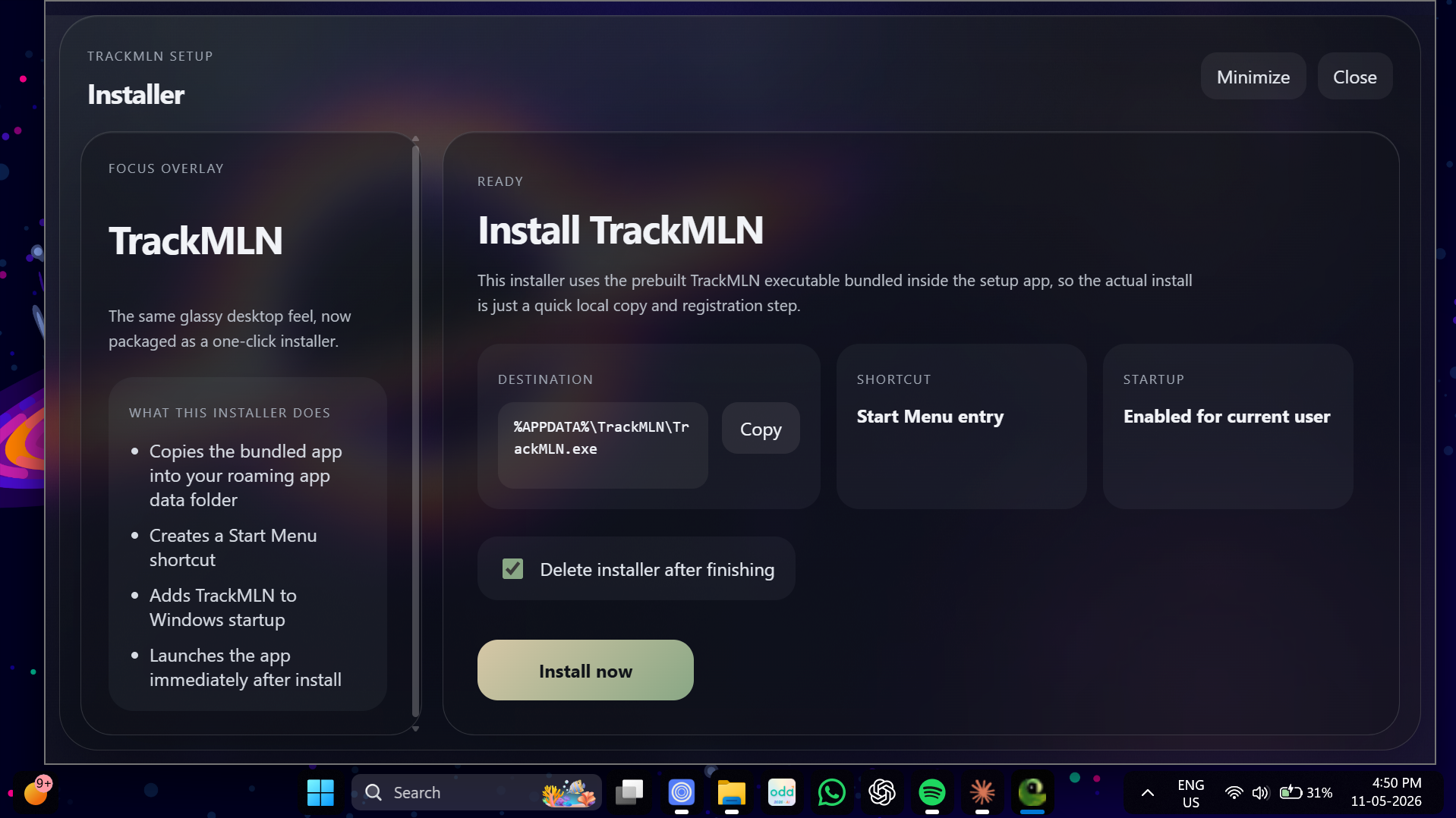
The installer will:
- install TrackMLN into your local app data folder
- create a Start Menu shortcut
- add TrackMLN to Windows startup
- launch the app automatically after install
To disable auto-startup: Settings → Apps → Startup Apps → TrackMLN → Off
⚠️ Not recommended — you'll have to launch it manually every time, which kind of defeats the purpose.
- Alt+F4 is now blocked until the snooze button is available — no bailing out early
- Alt+F4 now behaves like snooze instead of closing the window
- Removed the dismiss button — snooze or nothing
- Annoy window is now full-screen
- Annoy window is no longer draggable
- Snooze times adjusted to 5 min → 3 min → 1 min → forever
- Annoy window messages are now randomised
- Fixed default-looking text boxes in the Exe Labels modal [Glass version] to match Mica styling
- Added
Goalstab with per-app screen time limits - Added Warn alert — a small popup at the bottom of the screen when you hit your warn time
- Added Annoy alert — a full-screen popup with a 5-second cooldown on dismiss that appears when you hit your annoy time. Dismiss makes it go away for 10 minutes. Snooze time shrinks every time you snooze it. You did this to yourself.
- Updated installer layout
- Fixed installer not deleting itself after install (it said it would. it didn't. now it does.)
- Added editable app name labels in
Settings, so exe-based names can now be customized without changing tracked history - Refactored app tracking to use normalized executable paths as the internal app identity
- Prevented renamed app labels from splitting usage history into separate apps
- Added app-name resolution cache for per-path app names and metadata reuse across launches
- Added Windows executable metadata lookup for friendlier app names when available
- Added AppxManifest parsing for MSIX / Windows Store apps to resolve names like
ChatGPTandTradingViewcorrectly - Kept existing exe-name prettification as the final fallback when metadata is unavailable
- Preserved full paths as internal-only data so normal UI continues showing friendly app names instead of raw paths
- Blur slider now works — adjusts opacity and blur of cards and sidebar
- Added Mica and Liquid Glass visual modes (switchable in Settings)
- Fixed hourly chart hover jumping to the wrong time
- Fixed scrollbar mismatch
- Fixed data display inconsistency
- Fixed sleep time being logged as screen time
- Fixed record sleep time tracking
- Initial release


Left: Mica Right: Liquid Glass
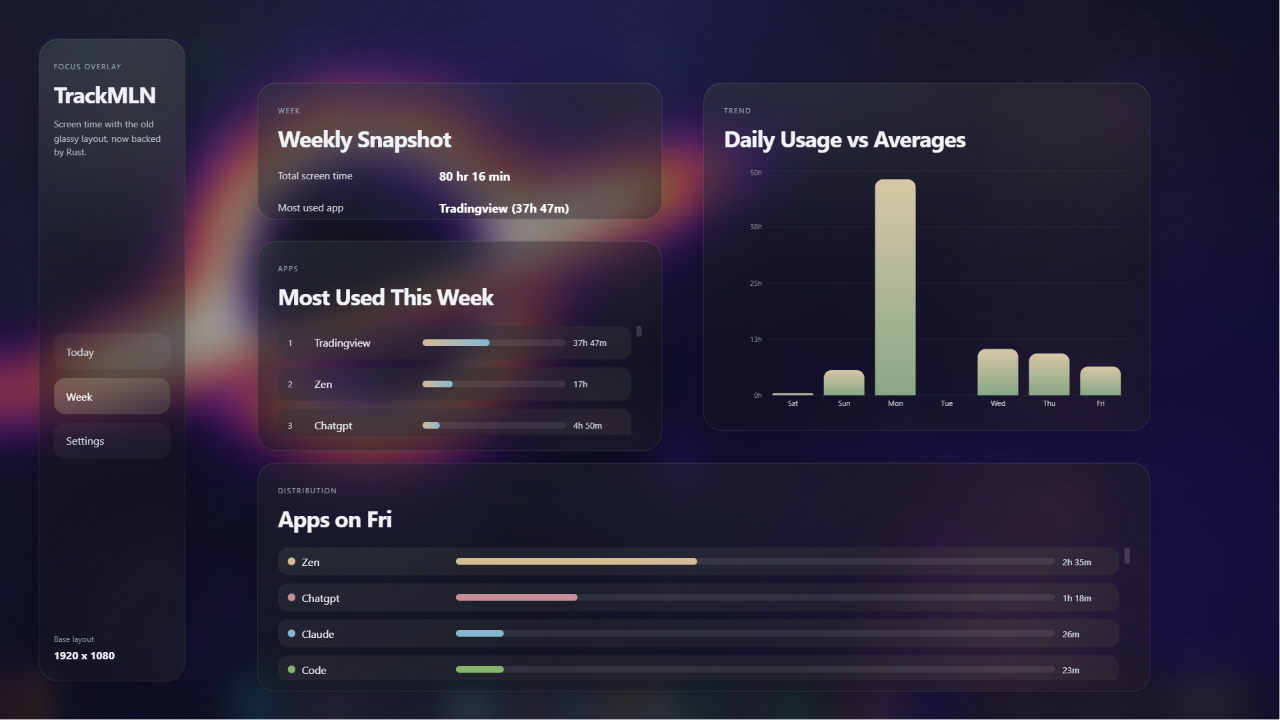

Left: Mica Right: Liquid Glass
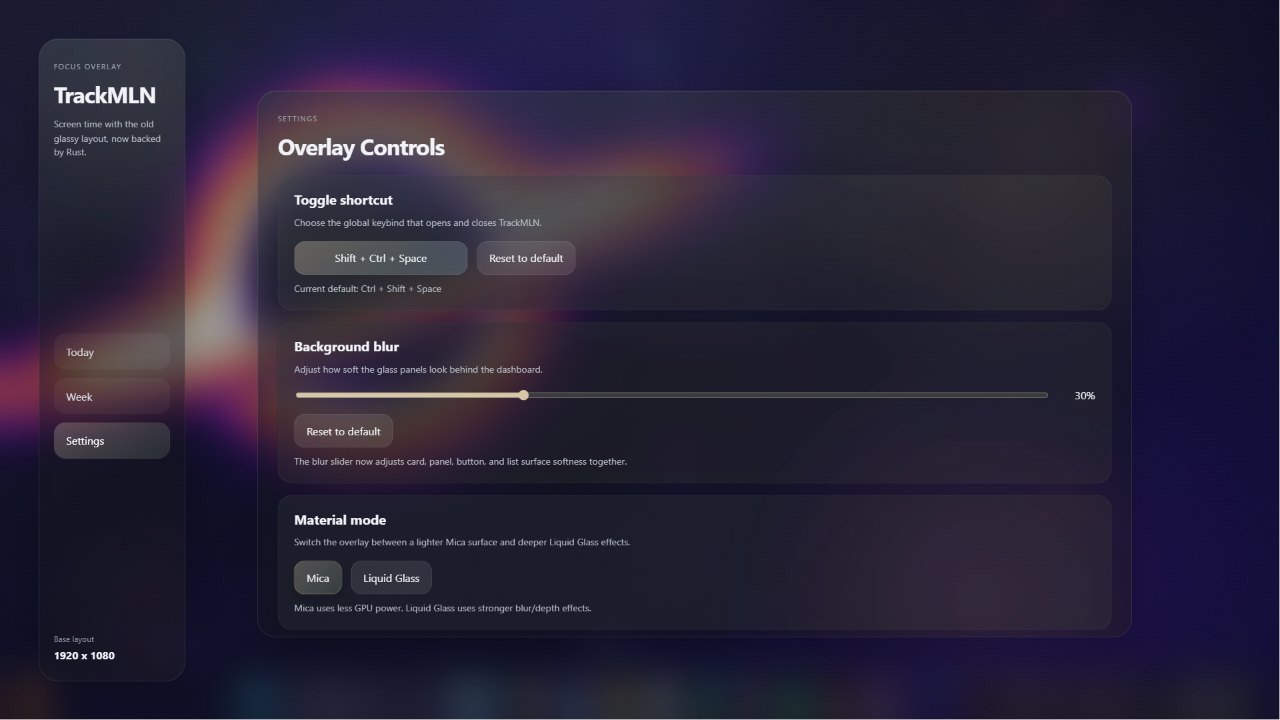
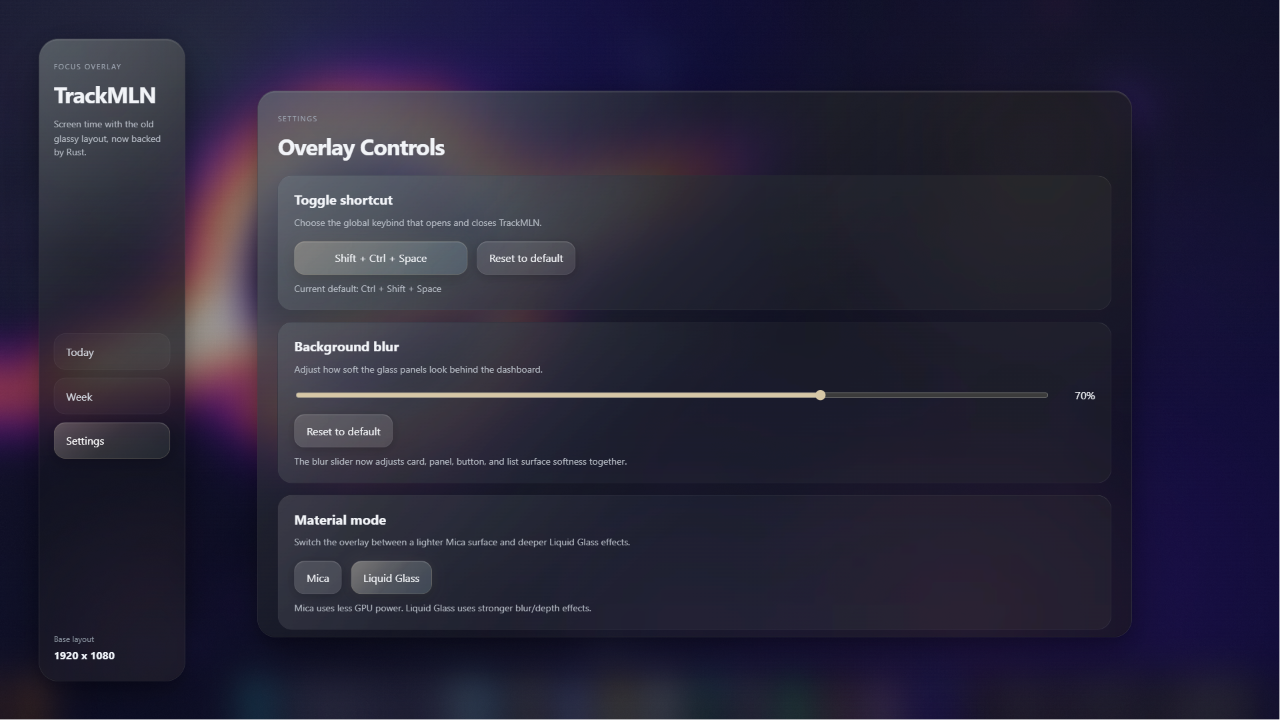
Left: Mica Right: Liquid Glass

TrackMLN is intentionally local and simple for now.
- All data stays on your machine — no accounts, no cloud sync
- Windows-only because the tracker uses Windows APIs to read the active foreground process
- Goals and limit enforcement are now live
Set per-app limits in the Goals tab. Each app can have two thresholds:
- Warn time — a small popup appears at the bottom of the screen. Gentle. Informative. Easy to ignore.
- Annoy time — a full-screen popup takes over. You can't move it, you can't Alt+F4 it, and there's a cooldown before you can do anything. Snooze is your only option, and the snooze window shrinks every time you use it: 5 min → 3 min → 1 min → forever. You set this limit. You did this.
- Tauri 2
- React 18
- TypeScript
- Vite
- Rust
- SQLite via
rusqlite - Recharts
.
├─ src/                     React UI for the main TrackMLN app
├─ src-tauri/               Rust backend for the main app
├─ installer/               Separate Tauri app that installs TrackMLN
│  ├─ src/                  Installer frontend
│  └─ src-tauri/            Installer backend
The Rust backend polls the active foreground window every second. When the focused executable changes, it writes the previous session to the local database with the app name, start time, and end time.
App names are resolved in this order:
- Exe Labels — your custom names from Settings, checked first
- AppxManifest — for MSIX / Windows Store apps like
ChatGPTorTradingView - Version info — Windows executable metadata for friendlier names
- Prettify fallback — capitalizes, strips
.exe, turns-,_,.into spaces
Apps are tracked by their full executable path internally, so renaming an app in Settings won't split its history.
Idle and unknown windows are filtered out of the dashboard views.
There are some small bugs in screen time limits, visual and slightly functional. I am trying to fix them by next update. If anything explodes, report a bug :,)

TrackMLN stores everything in the Tauri app data directory:
trackmln.db— session history and goalssettings.json— global shortcut, blur percentage, and exe labels
- Default toggle shortcut:
Ctrl + Shift + Space - The main window starts hidden
- Closing the window hides it instead of quitting — use the tray icon to exit fully
- Notifications and limit enforcement sounds/escalation
- macOS support (buy me a Mac)
- Windows-only (will make macOS if you buy me a MacBook to test it on ;))
- No cloud sync
- Windows
- Node.js + npm
- Rust toolchain
- Tauri prerequisites for Windows
From the project root:
npm installThe installer reuses the root node_modules, so you usually don't need a second install inside installer/.
npm run tauri:devThis starts the Vite dev server on http://localhost:1420 and the Tauri desktop app.
Note: If you run a debug binary directly without the dev server running, it'll probably break. Use a release build or the installer for normal behavior.
npm run tauri:buildThe installer/ folder is a separate Tauri app that:
- Copies the bundled app to
%APPDATA%\TrackMLN\TrackMLN.exe - Creates a Start Menu shortcut
- Adds TrackMLN to Windows startup for the current user
- Launches the app after setup
Build the main app first, then the installer.
# Step 1 — build the main app
npm run tauri:build

# Step 2 — build the installer
cd installer
npm run tauri:build
The installer build automatically copies the main app executable into installer/src-tauri/assets/trackmln.exe — no manual copying needed.
- The repo ignores generated binaries, build folders, and the bundled installer payload
- The installer source is tracked, but the embedded
trackmln.exeis not
Source-available — free for non-commercial use. See LICENSE for full terms. (idk what its called ive only heard of MIT :/)
Made with 💚, Debugged with 😭 by WTRMLN @ Melogne Studio © 2026 Melogne Studio