Releases: MemorySafe-Labs/memorysafe-plugin
Release list
MemorySafe 0.4.10

MemorySafe 0.4.10
Install or update
Claude Code and Codex update themselves from the marketplace. New installs:
claude plugin marketplace add MemorySafe-Labs/memorysafe-plugin
claude plugin install memorysafe@memorysafe

codex plugin marketplace add MemorySafe-Labs/memorysafe-plugin
codex plugin add memorysafe@memorysafe
Claude Desktop has no claude command: download the .mcpb below, then in Claude
Desktop choose it from Settings -> Extensions -> Advanced settings -> Install Extension....
Don't double-click it: on some computers Windows opens it in Notepad. Restart the
assistant either way, then open http://127.0.0.1:8765/dashboard to confirm.
What changed
After an update, the dashboard could keep showing the old version. On Windows the page
at http://127.0.0.1:8765/dashboard could go on being served by a previous install for good --
three versions behind, on the machine where this was found -- so what you saw there was not
what you had, and nothing said so except one line in the doctor. MemorySafe now recognises
its own dashboard properly and replaces an old one when it starts.
The doctor says what to do about it. If an old dashboard is still holding the address, it
names the process and tells you to restart the assistant that started it, rather than only
reporting that the version is old.
If your dashboard has been showing an older version than the one you installed, this is why.
After updating, restart your assistant once and the address should show this version.
Everything in 0.4.7 through 0.4.9 is included: the uninstaller, the launcher for other MCP
clients, the dashboard opening itself once, the corrected Beta Terms of Use and Privacy
Policy, the fix for doctor and uninstall stopping with an error instead of printing their
report, and the Codex registration that could stop Codex loading any tools at all.
MemorySafe 0.4.9
MemorySafe 0.4.9
Install or update
Claude Code and Codex update themselves from the marketplace. New installs:
claude plugin marketplace add MemorySafe-Labs/memorysafe-plugin
claude plugin install memorysafe@memorysafe

codex plugin marketplace add MemorySafe-Labs/memorysafe-plugin
codex plugin add memorysafe@memorysafe
Claude Desktop has no claude command: download the .mcpb below, then in Claude
Desktop choose it from Settings -> Extensions -> Advanced settings -> Install Extension....
Don't double-click it: on some computers Windows opens it in Notepad. Restart the
assistant either way, then open http://127.0.0.1:8765/dashboard to confirm.
What changed
MemorySafe's old registration in Codex could stop Codex loading any tools at all.
Installs going back to 0.3.x wrote a [mcp_servers.memorysafe] block into
~/.codex/config.toml using Windows paths that TOML cannot read. The whole file then
failed to parse, so Codex started with none of its MCP servers -- not only without
MemorySafe. Nothing writes that block any more, and memorysafe migrate removes an old
one. If Codex has been quietly missing its tools, this is worth checking.
If that entry keeps coming back, close Codex before you remove it. Codex writes
config.toml from what it holds in memory, so an entry deleted while it is running
reappears the next time it saves. That is not MemorySafe rewriting itself, and
memorysafe migrate now says so before you run it.
Everything in 0.4.7 and 0.4.8 is included: the uninstaller, the launcher for other MCP
clients, the dashboard opening itself once, the corrected Beta Terms of Use and Privacy
Policy, and the fix for doctor and uninstall stopping with an error instead of
printing their report.
For anyone working on MemorySafe
A first-start window thread could outlive the test that started it and open a browser
during an unrelated test, which showed up as a rare CI failure on Linux. The launcher
now exposes that thread as its own seam and the tests stop it for a whole module.
MemorySafe 0.4.8
MemorySafe 0.4.8
Install or update
Claude Code and Codex update themselves from the marketplace. New installs:
claude plugin marketplace add MemorySafe-Labs/memorysafe-plugin
claude plugin install memorysafe@memorysafe

codex plugin marketplace add MemorySafe-Labs/memorysafe-plugin
codex plugin add memorysafe@memorysafe
Claude Desktop has no claude command: download the .mcpb below, then in Claude
Desktop choose it from Settings -> Extensions -> Advanced settings -> Install Extension....
Don't double-click it: on some computers Windows opens it in Notepad. Restart the
assistant either way, then open http://127.0.0.1:8765/dashboard to confirm.
What changed
A same-day fix for 0.4.7, which could not finish its own headline feature on Windows.
If you are on 0.4.7, take this one.
memorysafe doctor could stop with an error instead of printing its report. On
Windows, saving the output to a file, or letting your assistant run the command and read
what came back, made it fail on the first tick it tried to print. memorysafe uninstall
had the same fault on its first arrow, and a memory with an accent in it could stop
memorysafe find the same way. All of it prints properly now.
Uninstalling could stop partway with "Access is denied". Windows holds on to a file
for a moment after it has been touched, so a removal that was about to succeed was
reported as a failure instead. The uninstaller now waits and tries again.
And it now says what to do when something really is in use. MemorySafe is running
inside your assistants while you uninstall it, which is why a first run can leave the
large files behind. Instead of a list of Windows error codes, it tells you to close
Claude Desktop, Claude Code and Codex, and that running it again picks up where it left
off.
Everything in 0.4.7 is included: the uninstaller, the launcher for other MCP clients,
the dashboard opening itself once, and the corrected Beta Terms of Use and Privacy
Policy. The dashboard will ask you to read and accept those again -- nothing stops
working while you do, and your memories are untouched.
MemorySafe 0.4.7
MemorySafe 0.4.7
Install or update
Claude Code and Codex update themselves from the marketplace. New installs:
claude plugin marketplace add MemorySafe-Labs/memorysafe-plugin
claude plugin install memorysafe@memorysafe

codex plugin marketplace add MemorySafe-Labs/memorysafe-plugin
codex plugin add memorysafe@memorysafe
Claude Desktop has no claude command: download the .mcpb below, then in Claude
Desktop choose it from Settings -> Extensions -> Advanced settings -> Install Extension....
Don't double-click it: on some computers Windows opens it in Notepad. Restart the
assistant either way, then open http://127.0.0.1:8765/dashboard to confirm.
What changed
You can take MemorySafe off this computer with one command. memorysafe uninstall lists
everything it put here, with sizes, and changes nothing until you add --apply. Plugins leave
through each assistant's own installer, and the private runtime, the local state and any
hand-written registration go with them. Your memories stay unless you add --purge, which
copies the database to your home folder first and tells you where. Claude Desktop asks you to
confirm what its extensions do, so removing that one stays with you, and the command says so.
Other MCP clients can share the same memory. Cursor, VS Code, Windsurf and anything else
that speaks MCP can use bin/memorysafe-mcp in your MemorySafe folder as the command to run.
It is rewritten on every start, so it keeps working across updates.
The dashboard opens itself, once. On the first start after an install it shows itself
rather than leaving you to type an address. Once only, never again, and
MEMORYSAFE_OPEN_DASHBOARD=0 turns it off.
The Claude Code row says what connecting it is for. If you have the Claude Desktop
extension, sessions inside the desktop app already reach MemorySafe through it. The dashboard
now says so, and that connecting Claude Code is for using it in a terminal, where the
extension cannot reach.
The Beta Terms of Use and Privacy Policy now describe this product. They were written for
a ChatGPT-only beta and said that every request passed through OpenAI's systems. That was
never true of Claude Code, Claude Desktop or Codex, which reach MemorySafe on your own
computer, and Anthropic was named nowhere. The documents now say where your memories actually
go. They are version 0.2, so the dashboard will ask you to read and accept them again --
nothing stops working while you do, and your memories are untouched.
Fixed
On Windows, editing the launcher could silently stop the memorysafe command from being
created. cmd.exe finds a label in a batch file by byte offset, and on a file with Unix
line endings it can miss. One added line was enough, and nothing reported it: the server
still started, so only the first-run test noticed the command was never written.
migrate missed MemorySafe registrations inside individual projects, so a project could
still load it twice. It now finds them in ~/.claude.json and in project .mcp.json files,
and removes them only when that assistant's plugin is installed.
MemorySafe 0.4.6
MemorySafe 0.4.6
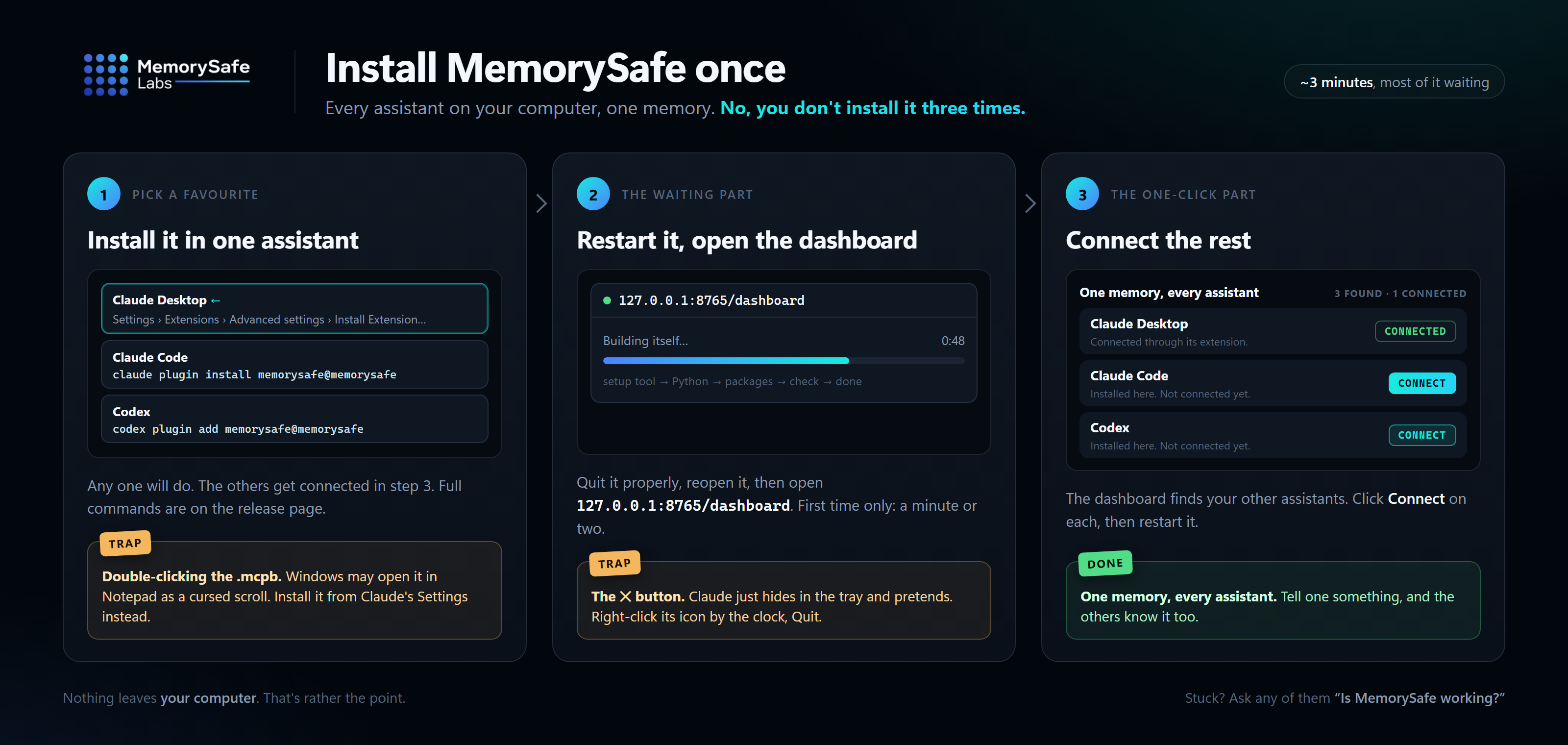
Install or update
Claude Code and Codex update themselves from the marketplace. New installs:
claude plugin marketplace add MemorySafe-Labs/memorysafe-plugin
claude plugin install memorysafe@memorysafe

codex plugin marketplace add MemorySafe-Labs/memorysafe-plugin
codex plugin add memorysafe@memorysafe
Claude Desktop has no claude command: download the .mcpb below, then in Claude choose
Settings → Extensions → Advanced settings → Install Extension… and pick the file. Don't
double-click it; Windows may open it in Notepad, and saving it from there breaks the file.
Restart the assistant either way, then open http://127.0.0.1:8765/dashboard to confirm.
Already using MemorySafe in one assistant? You don't need another install: the
dashboard connects the rest.
What changed
The doctor says which of your assistants reach MemorySafe. Ask your assistant to run
the MemorySafe doctor, or run memorysafe doctor, and it now names any assistant on this
computer that isn't connected, and how to connect it.
It also spots MemorySafe being loaded twice. In the Claude desktop app, a Claude Code
session gets MemorySafe from the desktop extension and from the Claude Code plugin, so
every MemorySafe tool is listed twice and each conversation carries about 1,800 tokens it
doesn't need. The doctor now says so, and which copy to remove: the Claude Code one if you
only use Claude Code inside the desktop app, or neither if you also use it in a terminal,
where the extension can't reach.
Installing says how to get the claude command. The Claude Code instructions said the
command was needed and stopped there, which left anyone without it stuck. They now give
the installer for each platform, and the step Windows leaves to you.
MemorySafe 0.4.5
MemorySafe 0.4.5
Install or update
Claude Code and Codex update themselves from the marketplace. New installs:
claude plugin marketplace add MemorySafe-Labs/memorysafe-plugin
claude plugin install memorysafe@memorysafe

codex plugin marketplace add MemorySafe-Labs/memorysafe-plugin
codex plugin add memorysafe@memorysafe
Claude Desktop has no claude command: download the .mcpb below, then in Claude choose
Settings → Extensions → Advanced settings → Install Extension… and pick the file. Don't
double-click it; Windows may open it in Notepad. Restart the assistant either way, then
open http://127.0.0.1:8765/dashboard to confirm.
Already using MemorySafe in one assistant? You don't need another install: the
dashboard connects the rest.
What changed
Report a problem now actually reports. It used to create a file and stop there. Its
confirmation appeared at the bottom of the page, the file sat in a hidden folder, and there
was no way to say what had gone wrong or where to send it. Now it asks what went wrong,
saves a report to your Downloads folder, and opens an email to contact@memorysafe.ca:
attach the file and press Send. The report holds status, counts, sanitized error
signatures and your description: no memories, no conversations, no keys. Nothing is sent
until you send the email.
Its messages tell you what actually happened. If your browser asks before saving, or
you cancel, the message still tells you where the copy on your computer is. If the
dashboard restarted while its page was open, it says to reload the page rather than to
restart your assistant.
MemorySafe 0.4.4
MemorySafe 0.4.4
Install or update
Claude Code and Codex update themselves from the marketplace. New installs:
claude plugin marketplace add MemorySafe-Labs/memorysafe-plugin
claude plugin install memorysafe@memorysafe

codex plugin marketplace add MemorySafe-Labs/memorysafe-plugin
codex plugin add memorysafe@memorysafe
Claude Desktop has no claude command: download the .mcpb below, then in Claude choose
Settings → Extensions → Advanced settings → Install Extension… and pick the file. Don't
double-click it; Windows may open it in Notepad. Restart the assistant either way, then
open http://127.0.0.1:8765/dashboard to confirm.
Already using MemorySafe in one assistant? You don't need another install: the
dashboard connects the rest.
What changed
One install connects every assistant on this computer. The memory was always shared by
Claude Desktop, Claude Code and Codex, but each one had to be installed separately, and
nothing said which were connected. Install MemorySafe in any one of them, and the dashboard
finds the others and asks once whether to connect them. Say yes and it connects them through
each one's own installer, now and whenever you install another later. Remove MemorySafe from
one of them afterwards and it stays removed. Say no and it won't ask again; the One memory,
every assistant panel keeps a Connect button for each. memorysafe connect does the same
from a terminal, and your assistant can run it for you.
Setup now sets up this computer. It no longer talks about a Mac or asks for a ChatGPT
tunnel unless this computer has one; it shows which assistants are connected and connects
the rest.
Claude Desktop still asks you first. It has you confirm every extension, and MemorySafe
does not get around that. The panel shows the one step instead.
Assistants installed in unusual places are found, including the Microsoft Store build
of Claude Desktop, the Codex desktop app, and a claude command left off your PATH by its
installer.
MemorySafe 0.4.3
MemorySafe 0.4.3
Install or update
Claude Code and Codex update themselves from the marketplace. New installs:
claude plugin marketplace add MemorySafe-Labs/memorysafe-plugin
claude plugin install memorysafe@memorysafe

codex plugin marketplace add MemorySafe-Labs/memorysafe-plugin
codex plugin add memorysafe@memorysafe
Claude Desktop has no claude command: download the .mcpb below and open it with
Claude Desktop. Restart the assistant either way, then open
http://127.0.0.1:8765/dashboard to confirm. From the first seconds it shows setup's
progress, and it turns into your dashboard when setup finishes.
What changed
The dashboard address shows setup progress from the first seconds. The first start
builds a private runtime, a minute or two, once. The dashboard needs that runtime, so
the address named as the proof an install worked refused connections until setup had
finished, and a tester downloaded the extension three times in three minutes. It now
shows each step as it happens and turns into the dashboard when setup finishes. If
setup fails, it says why and what to do.
Asking during setup gets an answer, not "try again in a minute". A request made
before setup finishes says which step it is on. memorysafe_doctor answers at once
with setup's progress instead of waiting behind every other call, and the memorysafe
command points at the progress page.
Setup interrupted part-way resumes at the next start. A build stopped by a restart,
sleep or Task Manager left a lock behind that the next start waited on for 20 minutes,
answering "try again in a minute" throughout, before giving up into limited mode. The
next start now sees the build has stopped and takes it over at once.
MemorySafe 0.4.2
MemorySafe 0.4.2
Claude Code and Codex update themselves from the marketplace. New installs:
claude plugin marketplace add MemorySafe-Labs/memorysafe-plugin
claude plugin install memorysafe@memorysafe

codex plugin marketplace add MemorySafe-Labs/memorysafe-plugin
codex plugin add memorysafe@memorysafe
Claude Desktop has no claude command: download the .mcpb below and open it with
Claude Desktop. Restart the assistant either way, then open
http://127.0.0.1:8765/dashboard to confirm.
One install route per host, and a way to tell it worked. Each assistant has one
route and one confirmation. Claude Desktop has no claude command, so its section
says so rather than leaving you to find out. The restart, and the one-off wait
while the runtime builds, come before the commands instead of after.
memorysafe migrate has a Windows path. It listed only macOS and Linux, in the
release that announced Windows parity.
The dashboard stopped calling your computer a Mac. It is served on every platform.
memorysafe doctor reports more, and no longer crashes. It says when the
prompt-time capture hint cannot run on Windows, shows %LOCALAPPDATA%\MemorySafe
instead of the long redirected path Claude Desktop's packaged build produces, and
names a dashboard left behind by an older install that is still holding the
address. A status it did not recognise used to make the command fail with an
error instead of printing the report.
The published documents come from one source, so the two public READMEs cannot
drift apart again, and a test fails if they ever describe different install
routes or migrate paths.
The privacy policy ships beside the licence that incorporates it. The Beta Terms
name it as forming part of the Terms in four places, and it was published nowhere.
ChatGPT on the web is no longer documented as an install route. Reaching it needs
a separate tunnel and developer mode, and it cannot be listed the way the plugin
is. Existing tunnel installs are untouched and keep working.
Upgrading from 0.4.1 does not rebuild your runtime: requirements.lock and the
Python pin are unchanged.
MemorySafe 0.4.1
MemorySafe 0.4.1
Windows installs the same way as macOS and Linux: one marketplace plugin, one
uv-provided Python, one runtime directory, and the dashboard starts there too.
The separate Windows installer and the pip runtime builder behind it are gone,
and uv's download is checksum-verified before it runs.
Also in this release:
- The Windows launcher no longer rejects every uv download as a checksum
mismatch, and no longer writes CRLF onto the JSON-RPC channel. - A first start that fails prints its install log instead of discarding it.
- MemorySafe closes the SQLite connections it was leaving open, which on
Windows kept a handle on the database file. - Windows now runs in CI beside Linux and macOS.
Known limitation: the prompt-time capture hint hook does not run on Windows
(hooks.json cannot name a per-platform command). Automatic capture still works
there when the assistant calls memorysafe_auto_capture, and the hook never
blocks a prompt.
Upgrading from 0.4.0 does not rebuild your runtime: requirements.lock and the
Python pin are unchanged.